
mozlz4-edit EN
Siarhei Kuzeyeu · Firefox
The addon lets you add custom search engines to the Mozilla Firefox without the Internet connection using! Add your own search engine to the Firefox! Actually mozlz4-edit is a simple mozlz4 file editor. You can open, edit and save mozlz4 files.
<all_urls>),意味着它可以读取你在任意站点的页面内容,包括已登录的页面。这是许多扩展正常工作的必要条件,但也值得你确认来源可信。
截图


简介
Warning! You should not delete default search engines from a search.json.mozlz4 file if you edit the file. If you delete a default search engine then the Firefox will reset search engine list to a default state. But you can add new search engines.
Maybe there is another way to delete default search engines except Firefox Preferences menu but I don't know how.
How to
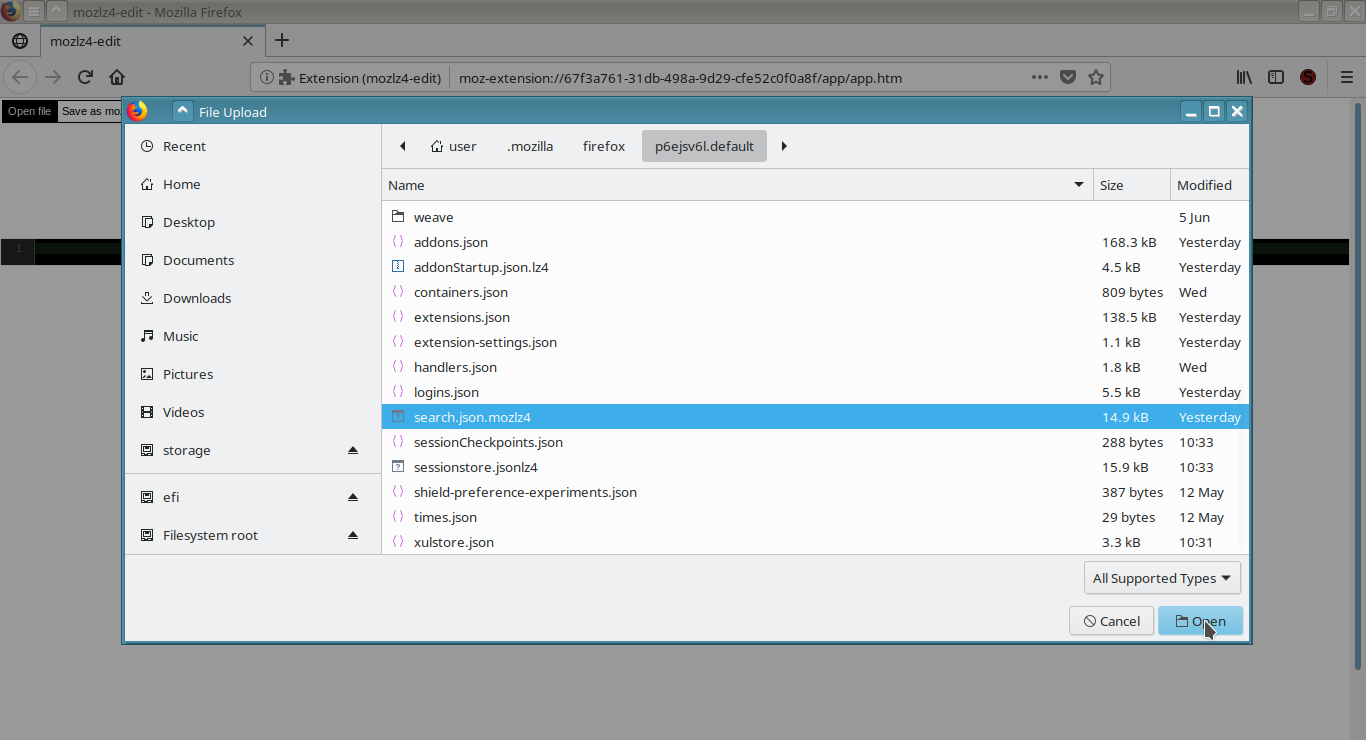
1. Find a search.json.mozlz4 file inside of your Mozilla Firefox profile folder.
2. Open the search.json.mozlz4 file with the mozlz4-edit extension.
3. Edit a search engine list.
4. Save the search.json.mozlz4 file in your Mozilla Firefox profile folder, replace the existed search.json.mozlz4 file by your new version.
5. Restart the Mozilla Firefox.
Note
There're .lz4 ( .jsonlz4, .jsonlz4-xxxx, .baklz4 etc) files inside of a Firefox's profile folder but actually they're mozlz4 files. You can try to open and edit these files.
About permissions (The block for paranoids only!)
All these permissions are needed to let the extension to work properly. Or at least it used to be like that at the time when I made the extension. In future Mozilla may change permission system and add more options that let differentiate permissions more accurately.
Some thoughts about Web Extension Search API and the extension.
The extension was made at the time when Web Extension API just came up. One of the main reason to make the extension was a joke about poor Search API that does not allow even to add your own search engine without the Internet connection. All Firefox extension that allow you to add a search engine by one click actually use the Internet connection and send your search engine to external service to let API that allow developer add search engine work (it is not about the extension or other extensions that export/import mozlz4 file). It is a restriction the Mozilla did. And funny moment here that even Google Chrome allow you to add your own search engine by few clicks through standard configuration menu. When I made the extension I thought that after few months Mozilla will make reach Search API because Mozilla already made extended variant of Google Chrome Web Extension API. I thought that after those few months I can freely delete the extension and forget about it. And here we are. (: After years of Web Extension API existence Mozilla did not add even a function to add custom search engine though standard configuration menu and the extension still is relevant and still in use by some users.
So the joke is still relevant.
To check Search API of Firefox see https://developer.mozilla.org/en-US/docs/Mozilla/Add-ons/WebExtensions/API/search
To check new version of the extension that is not finished yet see https://github.com/serj-kzv/mozlz4-edit/tree/develop (I done not know when I will have a time to finish it)
mozlz4-edit 是做什么的
mozlz4-edit 是一款面向 Firefox 的隐私与安全类扩展,主要用来拦截追踪器、屏蔽广告、管理 Cookie、加固浏览器指纹。官方对它的介绍是:The addon lets you add custom search engines to the Mozilla Firefox without the Internet connection using! Add your own search engine to the Firefox! Actually mozlz4-edit is a simple mozlz4 file editor. You can open, edit and save mozlz4 files.在Firefox 附加组件商店(AMO)上,它当前版本 4.1.2,评分 4.78(41 人评价),约 495 名用户。
适合什么人用
从功能定位看,mozlz4-edit 更适合在意上网被跟踪、希望减少广告干扰的用户。如果你平时只是偶尔遇到相关需求,用浏览器自带功能也能凑合;但如果这件事每天都发生,装一个专门处理它的扩展通常比手动操作省事得多。需要注意的是它作用于所有网站,装上后建议先观察一两天,确认不影响常用站点的正常使用。
怎么安装 mozlz4-edit
- 打开Firefox 附加组件商店(AMO)上的官方页面;
- 点「添加到浏览器」并确认权限提示;
- 装好后在扩展列表里固定图标,方便随时开关。
本站只做索引与介绍,安装包来自官方商店。如果商店页面提示当前地区不可用,说明该扩展未在你所在区域上架。
常见问题
mozlz4-edit 是免费的吗?
mozlz4-edit 在Firefox 附加组件商店(AMO)免费提供下载。它是浏览器扩展,装上就能直接用,不需要注册账号。
mozlz4-edit 安全吗?
它只申请了 0 项权限,范围比较克制,没有申请「读取所有网站数据」这种大权限。
mozlz4-edit 支持哪些浏览器?
当前收录的版本来自Firefox 附加组件商店(AMO),适用于 Firefox。同一个扩展在其他商店可能有对应版本,但功能与版本号不一定相同。
怎么卸载 mozlz4-edit?
在扩展管理页找到 mozlz4-edit,点移除即可。它在本地保存的设置会一起清掉,不会残留数据。
权限清单 来自 manifest.json 原文
站点访问 1
<all_urls>
接口权限 4
downloadsstoragetabsunlimitedStorage