
MetaClean for Gmail EN
Adarsus Developer Team · Firefox
Removes metadata and hidden data in email attachments preventing the leakage of confidential information that occurs in this type of communication and avoiding possible economic and reputational damages derived from the malicious use of metadata.
截图



简介
Why should you use MetaClean for Gmail?
- Data Breach Prevention: Every document contains metadata. For example, metadata is embedded in the file and is different to the information that is typed on the page – such as Author, track changes or comments. It can tell the reader who created the document, how long was spent editing it, and where the document is saved. Cleaning a document of metadata means that the recipient will only be sent what would be printed. Removing potentially harmful forms of metadata from the attached files is a risk area that should be considered when investigating ways to prevent email-related data leaks.
- Phishing Attack Prevention: MetaClean prevents the exfiltration of information through metadata which is commonly used to generate phishing attacks.
- Ease of use and there is no user registration required: Just install and enjoy it!
How to use MetaClean for Gmail?
- This extension automatically processes the document's metadata when it is attached, you don't need to take any additional action, ensuring that the attachments you send are free of metadata and personal information.
- It allows you to quickly and intuitively select the types of files to process (see screenshot).
- It shows information of interest to the user, for example when a PDF file is digitally signed.
Standard Functionalities:
- FREE for personal use.
- Removes metadata from all versions of Microsoft Office, Open/Libre Office, PDF, RTF and Image, Audio and Video files. (See the list of supported file formats at: https://www.adarsus.com/en/file-formats-compatible-with-metaclean/)
- Supports ZIP and 7Z files: compressed documents will be processed by MetaClean.
- Detection of signed PDF files: To avoid invalidation of the signature, a warning will be displayed indicating whether you want to process the metadata of the signed PDF file (see screenshot).
- Displays a warning when attaching Microsoft Office files with change control and/or comments enabled.
- Delete hidden data such as: Printer routes, history of document changes, etc.
- For free version, the tag "Metadata removed by MetaClean (www.adarsus.com)" will be added to the keyword metadata in processed documents.
Enterprise Functionalities:
- Creation of metadata templates to remove, add or modify standard and customized metadata tags.
- The text: "Metadata removed by MetaClean (www.adarsus.com)" will be removed from the metadata tag: keyword.
For business use contact us at: sales@adarsus.com
How to view PDF document metadata?
Open the concerned PDF document in Adobe Acrobat and go to File > Properties > Description and Custom tabs. It will show you a window that consists of different components of the metadata of the concerned PDF document.
How to view Microsoft Word/Excel/PowerPoint document metadata?
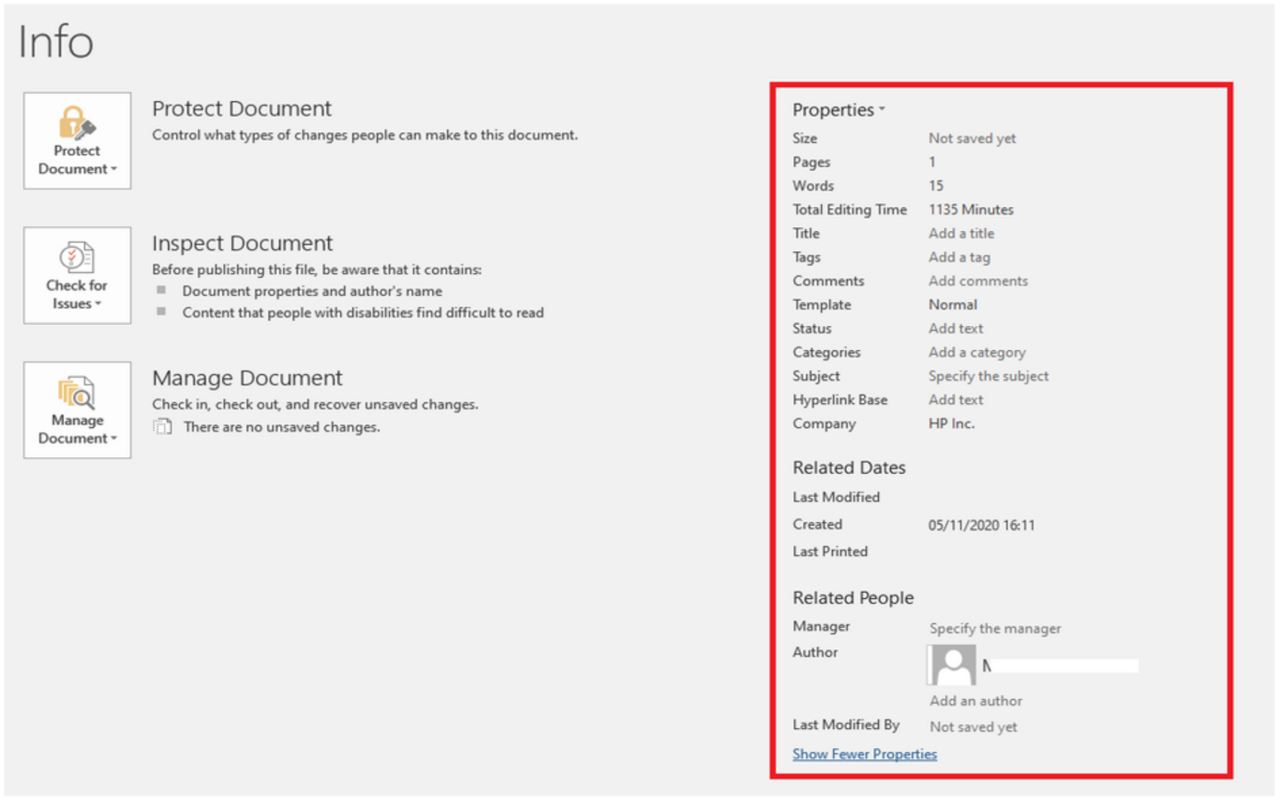
Open the Word/Excel/PowerPoint document and go to "File" menu. Click "Info" and then click "Show all Properties" to view the metadata entries for the document.
MetaClean for Gmail 是做什么的
MetaClean for Gmail 是一款面向 Firefox 的隐私与安全类扩展,主要用来拦截追踪器、屏蔽广告、管理 Cookie、加固浏览器指纹。官方对它的介绍是:Removes metadata and hidden data in email attachments preventing the leakage of confidential information that occurs in this type of communication and avoiding possible economic and reputational damages derived from the malicious use of metadata.在Firefox 附加组件商店(AMO)上,它当前版本 4.0.2,评分 5(2 人评价),约 64 名用户。
适合什么人用
从功能定位看,MetaClean for Gmail 更适合在意上网被跟踪、希望减少广告干扰的用户。如果你平时只是偶尔遇到相关需求,用浏览器自带功能也能凑合;但如果这件事每天都发生,装一个专门处理它的扩展通常比手动操作省事得多。
怎么安装 MetaClean for Gmail
- 打开Firefox 附加组件商店(AMO)上的官方页面;
- 点「添加到浏览器」并确认权限提示;
- 装好后在扩展列表里固定图标,方便随时开关。
本站只做索引与介绍,安装包来自官方商店。如果商店页面提示当前地区不可用,说明该扩展未在你所在区域上架。
常见问题
MetaClean for Gmail 是免费的吗?
MetaClean for Gmail 在Firefox 附加组件商店(AMO)免费提供下载。它是浏览器扩展,装上就能直接用,不需要注册账号。
MetaClean for Gmail 安全吗?
它只申请了 0 项权限,范围比较克制,没有申请「读取所有网站数据」这种大权限。
MetaClean for Gmail 支持哪些浏览器?
当前收录的版本来自Firefox 附加组件商店(AMO),适用于 Firefox。同一个扩展在其他商店可能有对应版本,但功能与版本号不一定相同。
怎么卸载 MetaClean for Gmail?
在扩展管理页找到 MetaClean for Gmail,点移除即可。它在本地保存的设置会一起清掉,不会残留数据。
权限清单 来自 manifest.json 原文
接口权限 2
storageunlimitedStorage