
Memento Time Travel EN
Harihar Shankar · Firefox
Travel to the past of the web by right-clicking pages and links.
<all_urls>),意味着它可以读取你在任意站点的页面内容,包括已登录的页面。这是许多扩展正常工作的必要条件,但也值得你确认来源可信。
截图
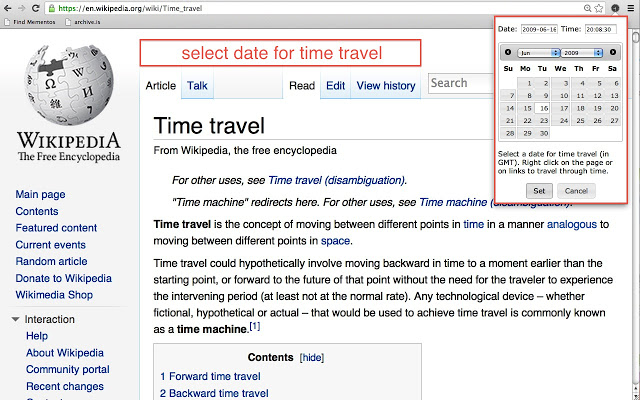


简介
Travel to the past of the web by right-clicking pages and links.
Memento for Firefox allows you to seamlessly navigate between the present web and the web of the past. It turns your browser into a web time travel machine that is activated by means of a Memento sub-menu that is available on right-click.
First, select a date for time travel by clicking the black Memento extension icon. Now right-click on a web page, and click the "Get near …" option from the Memento sub-menu to see what the page looked like around the selected date. Do the same for any link in a page to see what the linked page looked like. If you hit one of those nasty "Page not Found" errors, right-click and select the "Get near current time" option to see what the page looked like before it vanished from the web. When on a past version of a page - the Memento extension icon is now red - right-click the page and select the "Get current time" option to see what it looks like now.
Memento for Firefox obtains prior versions of pages from web archives around the world, including the massive web-wide Internet Archive, national archives such as the British Library and UK National Archives web archives, and on-demand web archives such as archive.is. It also allows time travel in all language versions of Wikipedia. There's two things Memento for Firefox can not do for you: obtain a prior version of a page when none have been archived and time travel into the future. Our sincere apologies for that.
Technically, the Memento for Firefox extension is a client-side implementation of the Memento protocol that extends HTTP with content negotiation in the date time dimension. Many web archives have implemented server-side support for the Memento protocol, and, in essence, every content management system that supports time-based versioning can implement it. Technical details are in the Memento Internet Draft at http://www.mementoweb.org/guide/rfc/ID/. General information about the protocol, including a quick introduction, is available at http://mementoweb.org.
For queries about the Memento for Firefox extensions and the Memento protocol, get in touch at memento-dev@googlegroups.com.
Memento Time Travel 是做什么的
Memento Time Travel 是一款面向 Firefox 的搜索增强类扩展,主要用来补充搜索结果、切换搜索引擎、过滤无效结果。官方对它的介绍是:Travel to the past of the web by right-clicking pages and links.在Firefox 附加组件商店(AMO)上,它当前版本 0.0.2resigned1,评分 2.5(2 人评价),约 248 名用户。
适合什么人用
从功能定位看,Memento Time Travel 更适合每天大量搜索、希望结果更干净准确的用户。如果你平时只是偶尔遇到相关需求,用浏览器自带功能也能凑合;但如果这件事每天都发生,装一个专门处理它的扩展通常比手动操作省事得多。需要注意的是它作用于所有网站,装上后建议先观察一两天,确认不影响常用站点的正常使用。
怎么安装 Memento Time Travel
- 打开Firefox 附加组件商店(AMO)上的官方页面;
- 点「添加到浏览器」并确认权限提示;
- 装好后在扩展列表里固定图标,方便随时开关。
本站只做索引与介绍,安装包来自官方商店。如果商店页面提示当前地区不可用,说明该扩展未在你所在区域上架。
常见问题
Memento Time Travel 是免费的吗?
Memento Time Travel 在Firefox 附加组件商店(AMO)免费提供下载。它是浏览器扩展,装上就能直接用,不需要注册账号。
Memento Time Travel 安全吗?
它只申请了 0 项权限,范围比较克制,没有申请「读取所有网站数据」这种大权限。
Memento Time Travel 支持哪些浏览器?
当前收录的版本来自Firefox 附加组件商店(AMO),适用于 Firefox。同一个扩展在其他商店可能有对应版本,但功能与版本号不一定相同。
怎么卸载 Memento Time Travel?
在扩展管理页找到 Memento Time Travel,点移除即可。它在本地保存的设置会一起清掉,不会残留数据。
权限清单 来自 manifest.json 原文
站点访问 2
*://*/*<all_urls>
接口权限 5
contextMenusstoragewebNavigationwebRequestwebRequestBlocking