
Look up dictionary by using dict:/// EN
Harpseal · Firefox
Call any dictionary app by using Uri scheme.
<all_urls>),意味着它可以读取你在任意站点的页面内容,包括已登录的页面。这是许多扩展正常工作的必要条件,但也值得你确认来源可信。
截图

简介
Kindly reminded if your OS is not macOS, this addon can't work without a wrapper script to call the external dictionary software for safety reasons. The following guide require a little programming skills. Please check How-to-use for detail.
This addon is forked from another Firefox addon https://addons.mozilla.org/en-US/firefox/addon/mactionary
For more detailed description with pictures, please check the github repo of this addon. https://github.com/Harpseal/LookUp-Dictionary-By-dict-URI-Scheme
Update for firefox 84+ users
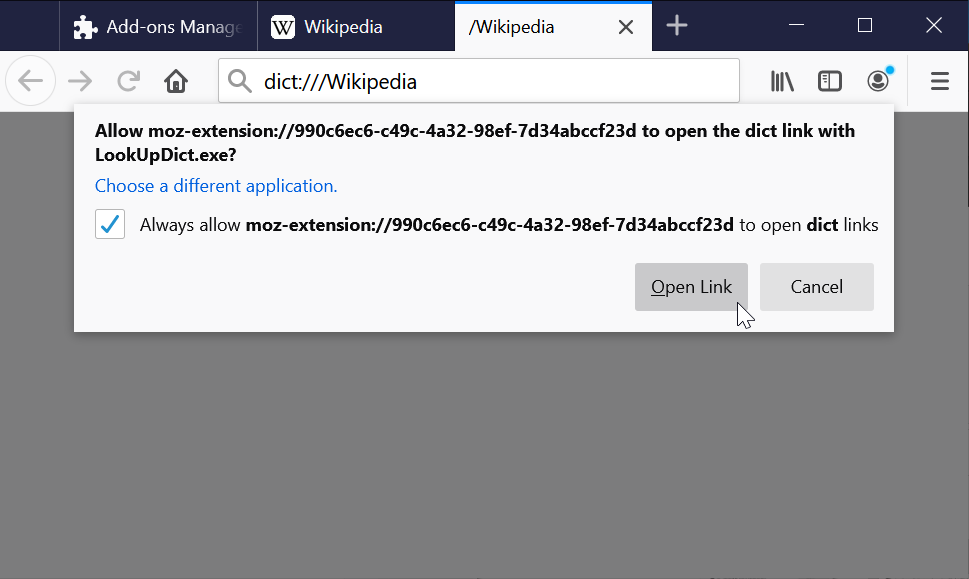
There is a new permission dialog to approve after firefox 84+.
Please open the Options page of this addon, check the checkbox, press the save button and try to look up some word. The temporary tab for dict scheme will not be closed and leave the permission dialog for user to approve.
After the permission is approved, please uncheck this checkbox in the Option page for normal use.
For more detail pleace check the How-to-use step4.
* How-to-use
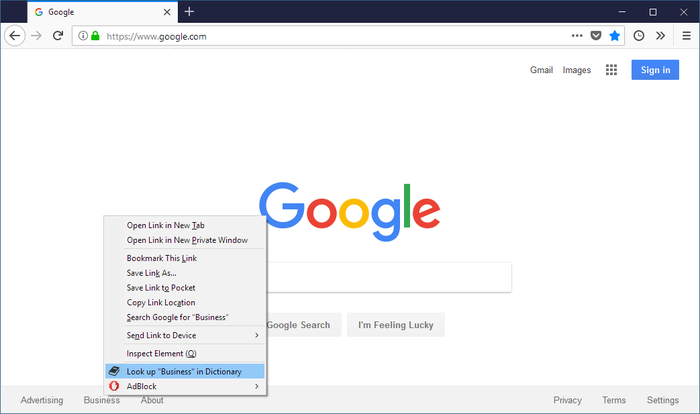
When user right-click on any word on any website, the "Look up in dictionary" will appear in the context menu right away. Please select it, and this addon will send the clicked text or selected texts to the dictionary software which supports dict Uri scheme. (ex. dict:///keyword)
The dict:/// Uri scheme is supported by the build-in dictionary software in macOS. If your OS is Windows or Linux, please take the following steps:
- Prepare the "wrapper script" before installing this addon. (require programming skills)
- Add dict:/// Uri scheme handler
- Install this addon.
- Approve permission to run the wrapper script.
Prepare the "wrapper script" before installing this addon, because this script is the connection to the outside of the Firefox. There are some example scripts written in Python (for Linux users) and Autohotkey (for Windows users) in the end of this guide, and one more Copy/Paste Autohotkey example in the this addon's github page. The example scripts still need some customization. Please trace the scripts and customize for your system.
Python installed by default on Linux. If your OS is Windows, Autohotkey is recommended. Because Firefox only support to call EXE application on windows, you need to compiler the ahk script to EXE by using the Autohotkey compiler. Please download Autohotkey .zip from its website (https://autohotkey.com/download/) and unzip it, the compiler named Ahk2Exe.exe is in the "Complier" folder.
Before taking the next step, you should check the script is work properly. To test the script, you can execute in the terminal with with uri scheme as the only one parameter. Make sure the dictionary is showed with the word after the dict:/// correctly ("test" for example). ex:
C:\Tools> look_up_dict.exe dict:///test
After some version of Firefox 57+, Firefox ignores all unknown URI scheme (ex.dict:/// on Win/Linux) and doesn't show the "Launch Application" window as before, so we have to add it by ourselves. In order to know how to deal with different types of files and URI schemes, Firefox have a internal list to save the action for each content type. The list is showed in Options->Applications. Unfortunately, even if user can change the actions in Options, Firefox doesn't support add or remove file types. We have to edit the list manually. Please take the following steps:
2.1. Open your Firefox profile folder
Click the firefox menu button, click Help and select Troubleshooting Information. The Troubleshooting Information tab will open.
Under the Application Basics section, click on Open Folder. Your profile folder will open.
2.2. Close firefox
2.3. Edit "handlers.json"
Please copy a backup before editing.
Add "dict":{"action":4,"ask":true} in the end of json. Please check there are only three } in the end of file. ex.
...,"itmss":{"action":4,"ask":true},"gameon":{"action":4,"ask":true},"dict":{"action":4,"ask":true}}}[End-of-file]
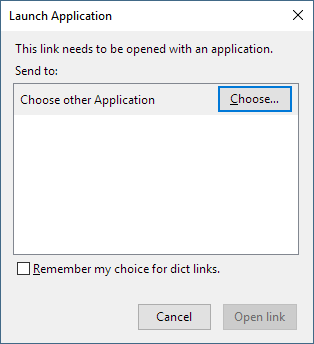
After installation, your can try to right click on any text, the "Look up in dictionary" will appear in the context menu. If this is the first time you try to use this addon, a window named "Launch Application" (showed as the second screenshot) should open, please choose the script/exe which you make in the first step.
If the "Launch Application" is not showed (firefox's rule is changed again...), please open the firefox's Options and scroll down to "Applications" section (or search). The dict is should in the list with question mark. Open the dropdown menu and click Use other... to select your wrapper script.
(only for firefox 84+)
Look up a keyword at the first time, the temporary tab for dict scheme will not be closed and leave the permission dialog for user to approve which is a new feature after firefox 84+.
If no temporary tab are shown and the wrapper script is not triggered, please open the Options page of this addon and check the checkbox to keep the temporary tab open.
After approving the permission, please uncheck the checkbox and click the save buttom in the Option page of this addon for normal use.
Kindly reminded that all add-ons will be disable in mozilla's add-ons website (https://addons.mozilla.org) and please try this addon on the other website after the installation is completed.
For more wrapper script examples, please check the github repo of…
Look up dictionary by using dict:/// 是做什么的
Look up dictionary by using dict:/// 是一款面向 Firefox 的搜索增强类扩展,主要用来补充搜索结果、切换搜索引擎、过滤无效结果。官方对它的介绍是:Call any dictionary app by using Uri scheme.在Firefox 附加组件商店(AMO)上,它当前版本 0.6.3,评分 3.78(9 人评价),约 136 名用户。
适合什么人用
从功能定位看,Look up dictionary by using dict:/// 更适合每天大量搜索、希望结果更干净准确的用户。如果你平时只是偶尔遇到相关需求,用浏览器自带功能也能凑合;但如果这件事每天都发生,装一个专门处理它的扩展通常比手动操作省事得多。需要注意的是它作用于所有网站,装上后建议先观察一两天,确认不影响常用站点的正常使用。
怎么安装 Look up dictionary by using dict:///
- 打开Firefox 附加组件商店(AMO)上的官方页面;
- 点「添加到浏览器」并确认权限提示;
- 装好后在扩展列表里固定图标,方便随时开关。
本站只做索引与介绍,安装包来自官方商店。如果商店页面提示当前地区不可用,说明该扩展未在你所在区域上架。
常见问题
Look up dictionary by using dict:/// 是免费的吗?
Look up dictionary by using dict:/// 在Firefox 附加组件商店(AMO)免费提供下载。它是浏览器扩展,装上就能直接用,不需要注册账号。
Look up dictionary by using dict:/// 安全吗?
它只申请了 0 项权限,范围比较克制,没有申请「读取所有网站数据」这种大权限。
Look up dictionary by using dict:/// 支持哪些浏览器?
当前收录的版本来自Firefox 附加组件商店(AMO),适用于 Firefox。同一个扩展在其他商店可能有对应版本,但功能与版本号不一定相同。
怎么卸载 Look up dictionary by using dict:///?
在扩展管理页找到 Look up dictionary by using dict:///,点移除即可。它在本地保存的设置会一起清掉,不会残留数据。
权限清单 来自 manifest.json 原文
站点访问 1
<all_urls>
接口权限 3
contextMenusmenusstorage