
Link Research SEO Toolbar EN
LinkResearchTools GmbH · Firefox
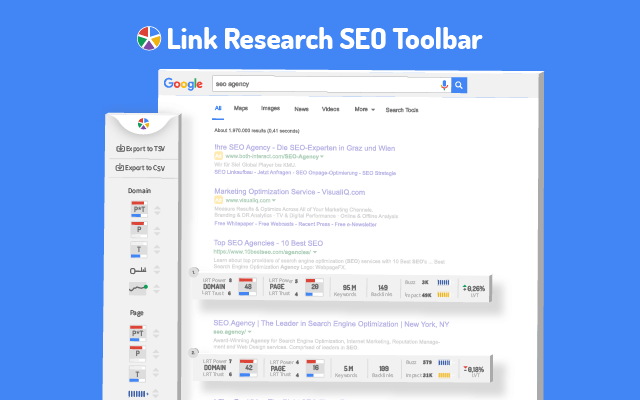
Enjoy looking at the most advanced SEO metrics while browsing. The Add-on works both as a SERP overlay and a SEO toolbar and it brings some of the strongest SEO metrics right in your browser.
<all_urls>),意味着它可以读取你在任意站点的页面内容,包括已登录的页面。这是许多扩展正常工作的必要条件,但也值得你确认来源可信。
截图


简介
Enjoy looking at the most advanced SEO metrics while you search the Web.
You can use the Link Research SEO Toolbar to customize your searches in Google, Bing and Yandex. You can also enable it as a page toolbar, so you look at advanced SEO metrics for every page.
Here’s what you can do with the Link Research SEO Toolbar:
• See the Power and Trust of a domain or page
• Discover great places to get links from
• See how successful a page is on social media
• Understand user engagement
• See the strongest pages by Keyword Ranking
• Spot drastic changes in the number of links
• See how many backlinks a page has.
All this is possible by looking at a set of powerful SEO metrics:
• LRT Power*Trust for domains
• LRT Power*Trust for pages
• Buzz - social media signals
• Impact - long-term user engagement metrics
• Keyword Ranking
• Link Velocity Trends
• Number of Backlinks
Why LRT Power*Trust?
Because LRT Power*Trust is a precise, reliable and stable metric built by LinkResearchTools shortly after the first Google Penguin update in 2012, as a result of many years of research and calculations.
Forget about Google’s Toolbar PageRank. Google stopped updating it many years ago and completely removed it from their toolbar in April 2016.
You can think of LRT Power*Trust as a replacement for Google’s toolbar PageRank, but it’s so much more. LRT Power*Trust is the metric to look at when you want to assess the quality and trustworthiness of a page, domain or top domain.
Why Keyword Ranking?
The Link Research SEO Toolbar’s “Keyword Ranking” metric allows you to take a quick look at your competitors’ keyword rankings. By evaluating the keywords your competitors rank for, you will easily come up with new ideas for your content optimization.
Why Buzz?
Buzz is Impactana’s aggregate of social media signals, divided into shares and likes. By using the Link Research SEO toolbar to sort the search results by Buzz, you can quickly find out what sort of content is “HOT” on social media. You can use Google’s time filter to see only the pages indexed in the past year, month or week.
Why Impact?
The Impact metric helps you discover strong content that people linked to a lot and engaged with by commenting or downloading it. This metric measures user engagement for any content, not only for the one that goes viral on social media. A good article about construction will not get shared on social media, but it may get many links or comments if it’s great.
Why link velocity trends?
A website needs to have a steady link growth. Search engines can interpret unnatural link growth as a negative signal, which can lead to a loss in the rankings. Google uses link growth trends to detect any algorithm manipulation attempts. If your backlink profile grows too fast, you’re out. If you’re too slow, you won’t ever get on the first page.
Why backlinks?
Google confirmed links to be a top ranking factor. That's a very strong reason to look at links whenever you analyse the strength of a page or domain.
Link Research SEO Toolbar 是做什么的
Link Research SEO Toolbar 是一款面向 Firefox 的搜索增强类扩展,主要用来补充搜索结果、切换搜索引擎、过滤无效结果。官方对它的介绍是:Enjoy looking at the most advanced SEO metrics while browsing. The Add-on works both as a SERP overlay and a SEO toolbar and it brings some of the strongest SEO metrics right in your browser.在Firefox 附加组件商店(AMO)上,它当前版本 0.1.4resigned1,评分 5(4 人评价),约 156 名用户。
适合什么人用
从功能定位看,Link Research SEO Toolbar 更适合每天大量搜索、希望结果更干净准确的用户。如果你平时只是偶尔遇到相关需求,用浏览器自带功能也能凑合;但如果这件事每天都发生,装一个专门处理它的扩展通常比手动操作省事得多。需要注意的是它作用于所有网站,装上后建议先观察一两天,确认不影响常用站点的正常使用。
怎么安装 Link Research SEO Toolbar
- 打开Firefox 附加组件商店(AMO)上的官方页面;
- 点「添加到浏览器」并确认权限提示;
- 装好后在扩展列表里固定图标,方便随时开关。
本站只做索引与介绍,安装包来自官方商店。如果商店页面提示当前地区不可用,说明该扩展未在你所在区域上架。
常见问题
Link Research SEO Toolbar 是免费的吗?
Link Research SEO Toolbar 在Firefox 附加组件商店(AMO)免费提供下载。它是浏览器扩展,装上就能直接用,不需要注册账号。
Link Research SEO Toolbar 安全吗?
它只申请了 0 项权限,范围比较克制,没有申请「读取所有网站数据」这种大权限。
Link Research SEO Toolbar 支持哪些浏览器?
当前收录的版本来自Firefox 附加组件商店(AMO),适用于 Firefox。同一个扩展在其他商店可能有对应版本,但功能与版本号不一定相同。
怎么卸载 Link Research SEO Toolbar?
在扩展管理页找到 Link Research SEO Toolbar,点移除即可。它在本地保存的设置会一起清掉,不会残留数据。
权限清单 来自 manifest.json 原文
站点访问 2
http://*/*https://*/*
接口权限 4
activeTabstoragetabswebRequest