
Image Max URL EN
qsniyg · Firefox
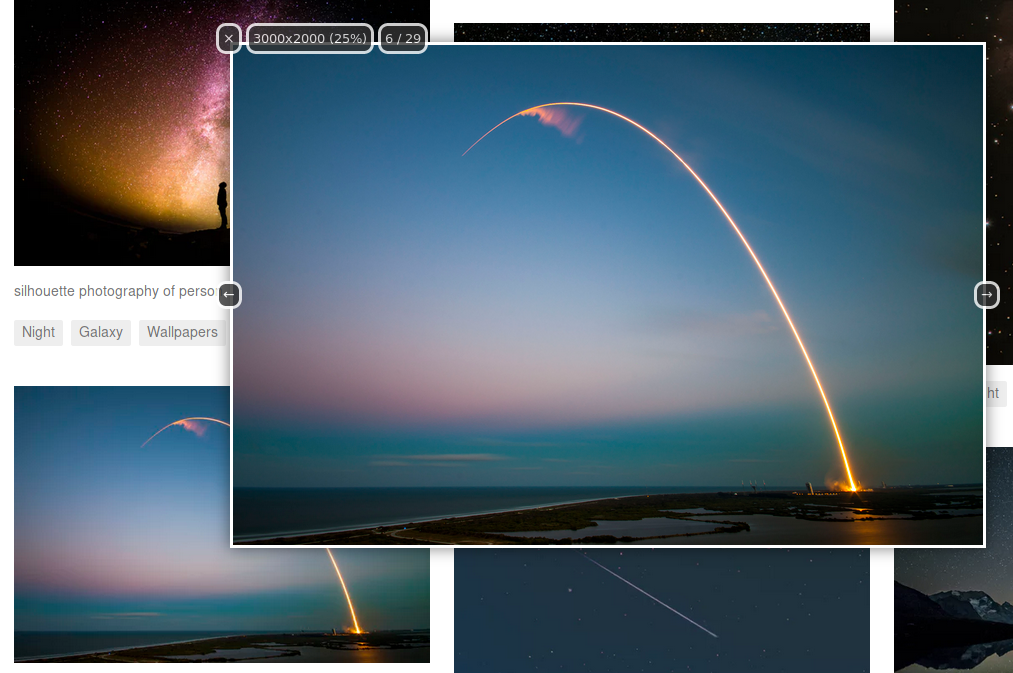
Finds larger/original versions of images (supporting 10,000+ websites), including a powerful media popup feature
<all_urls>),意味着它可以读取你在任意站点的页面内容,包括已登录的页面。这是许多扩展正常工作的必要条件,但也值得你确认来源可信。
截图
简介
Image Max URL helps you find and download larger or original versions of images and videos for currently ~10900 websites (using ~6000 individual rules).
Many generic engines (such as Wordpress) are also supported, which means it can work for almost any website, even if not explicitly supported by the extension.
It contains the following features, each of which can be toggled and customized to a significant extent. There are over 300 options.
- Redirect images opened in a new tab to their larger version (if one is found)
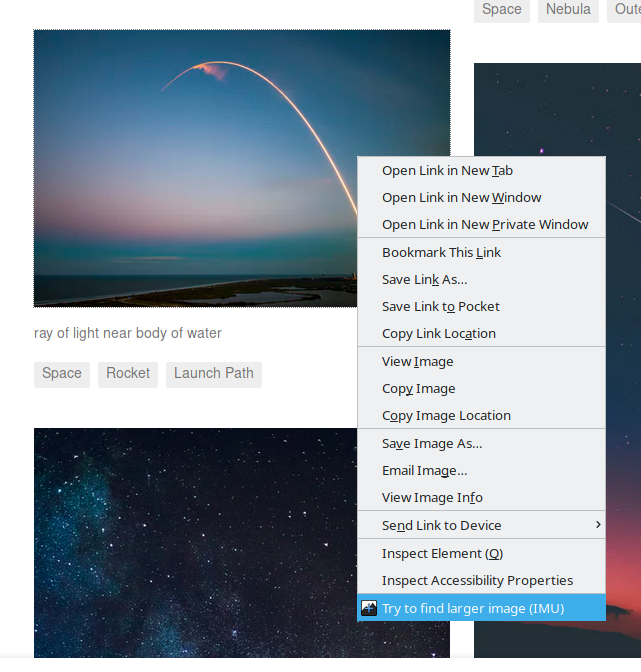
- A highly configurable image popup can be opened by a keybinding (
Shift+Alt+iby default), hovering your mouse over an image, or through a right-click menu item - It automatically detects image galleries, and will let you browse through them with the pop-up
- Images on a page can optionally be replaced to their larger versions (e.g. to use with extensions that download all images on a page)
- You can select galleries and/or individual media on a page to batch download in full resolution
Some of the websites it supports includes (full list):
- Social media websites (incl. Instagram, Patreon, Pinterest, Reddit, Snapchat, TikTok, Twitter, Tumblr, VK, VSCO, Weibo)
- News websites (incl. BBC, Daily Mirror, Huffington Post, The Guardian, The Independent, Vogue)
- Generic image hosting engines (incl. Cloudinary, Drupal, Imgix, MediaWiki, Wordpress)
- Image hosting services (incl. 500px, Imgur, Flickr, DeviantArt, Pixiv, SmugMug)
Image Max URL works by replacing URLs, and in some cases, querying website-specific APIs. For example, if you have this image:
https://pbs.twimg.com/media/DlOC3mOWsAEi1ld.jpg (1200x800)

By adding ?name=orig to the end, you will get a much larger image:
https://pbs.twimg.com/media/DlOC3mOWsAEi1ld.jpg?name=orig (4096x2730)

This does not replace using a reverse image search to find a larger image, but rather complements using one, as reverse image search engines often don't link to the largest (or original) image.
Permissions:
- Access your data on all websites: This permission is required in order for the extension to function in any way (redirect images, find images on a page, create the popup, etc.)
- (Optional) Input data to the clipboard: This permission is required if the "Enable writing to clipboard" option is enabled (disabled by default), which allows copying the link to the larger image/video to the clipboard.
- (Optional) Download files and read+modify the download history: This permission is required if the "Force save dialog when downloading" option is enabled. However, the option is not required to be enabled in order to save media from the popup (and is disabled by default).
- (Optional) Access browsing history: This permission is required if the "Add popup link to history" option is enabled (disabled by default). It only needs this permission in order to write to the browser history (to add the link), it doesn't read anything.
- (Optional) Display notifications to you: This permission is required if the "Notify when update is available" option is enabled (disabled by default).
This extension does not, and will never contain any kind of tracking code. Feel free to look at the source code or contact me if you have any concerns.
If you have any problems, or requests for new features/websites to support, you can use one of the resources below (whichever is easiest for you):
- Github: https://github.com/qsniyg/maxurl
- Reddit: https://www.reddit.com/r/MaxImage/
- Discord: https://discord.gg/fH9Pf54
- Matrix: https://matrix.to/#/#image-max-url:tedomum.net
- Contact me directly: https://qsniyg.github.io/
This is the Firefox addon port for the <a href="https://prod.outgoing.prod.webservices.mozgcp.net/v1/01856cfb9a7a8920192747859d6b0f8c35dd3be18a88d94040ed2b9b994b71a1/https%3A//gith…
Image Max URL 是做什么的
Image Max URL 是一款面向 Firefox 的影音图像类扩展,主要用来处理图片、调节音量、增强播放器功能。官方对它的介绍是:Finds larger/original versions of images (supporting 10,000+ websites), including a powerful media popup feature在Firefox 附加组件商店(AMO)上,它当前版本 2026.6.0,评分 4.73(142 人评价),约 34,900 名用户。
适合什么人用
从功能定位看,Image Max URL 更适合经常在网页上看视频、听音乐或处理图片的用户。如果你平时只是偶尔遇到相关需求,用浏览器自带功能也能凑合;但如果这件事每天都发生,装一个专门处理它的扩展通常比手动操作省事得多。需要注意的是它作用于所有网站,装上后建议先观察一两天,确认不影响常用站点的正常使用。
怎么安装 Image Max URL
- 打开Firefox 附加组件商店(AMO)上的官方页面;
- 点「添加到浏览器」并确认权限提示;
- 装好后在扩展列表里固定图标,方便随时开关。
本站只做索引与介绍,安装包来自官方商店。如果商店页面提示当前地区不可用,说明该扩展未在你所在区域上架。
常见问题
Image Max URL 是免费的吗?
Image Max URL 在Firefox 附加组件商店(AMO)免费提供下载。它是浏览器扩展,装上就能直接用,不需要注册账号。
Image Max URL 安全吗?
它只申请了 0 项权限,范围比较克制,没有申请「读取所有网站数据」这种大权限。
Image Max URL 支持哪些浏览器?
当前收录的版本来自Firefox 附加组件商店(AMO),适用于 Firefox。同一个扩展在其他商店可能有对应版本,但功能与版本号不一定相同。
怎么卸载 Image Max URL?
在扩展管理页找到 Image Max URL,点移除即可。它在本地保存的设置会一起清掉,不会残留数据。
权限清单 来自 manifest.json 原文
站点访问 1
<all_urls>
接口权限 5
contextMenuscookiesstoragewebRequestwebRequestBlocking
接口权限(可选) 4
clipboardWritedownloadshistorynotifications