
Gitmoji Browser Extension EN
Lyokolux · Firefox
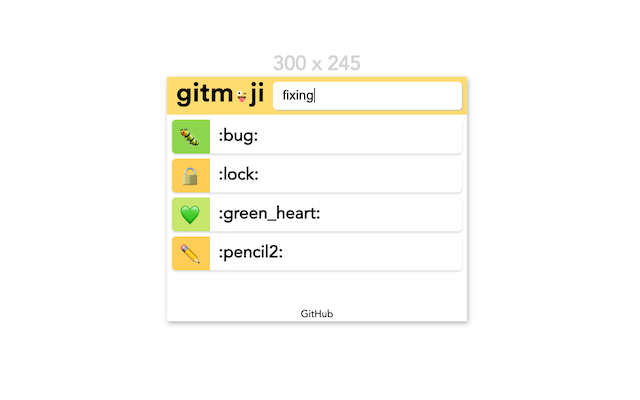
The Gitmoji extension to easily search and copy gitmojis 😜
截图

简介
Gitmoji (https://gitmoji.carloscuesta.me/) is a project to standardize emojis in git messages 🎉
This extension should provide an easy way to search and copy codes or emojis. It is meant for people who knows which emoji should be used 😈
🧩 Features
- 🔍 Search for a specific gitmoji's code/emoji by name or description
- 🐕 Detect the gitmojis present on the current tab
- ➕ Inject 🔀 gitmoji in front of the commit title of GitHub/GitLab pull-request
- 🌔 Dark/light mode (⚙️)
- ❌ Close extension's popup after a gitmoji is saved in the clipboard (⚙️)
- ❓ Show gitmoji's description on mouse over or focus (⚙️)
Features with the (⚙️) can be modified in the settings page.
✨ Usage (with keyboard shortcuts)
- toggle the extension button or use the shortcut
Alt+G(⌥+Gfor mac) - search emoji names or descriptions (from the website
- use
tabandShift+tabto navigate between the shortcodes and emojis - press
Enterto copy
⚖️ Permissions
activeTab
Detect the gitmojis present on the current tab.
Used to access some hardcoded URLs detailed below:
Access your data for github.com
Access your data for gitlab.com
Both are used for the feature "Inject 🔀 gitmoji in front of the commit title of GitHub/GitLab pull-request"
We restricted these permissions to the minimum by using specific URLs:
It can be checked on the injectMergeGitmoji.js file.
Storage
The storage is used to keep the settings preferences (see 🧩 Features > Through the settings panel).
Gitmoji Browser Extension 是做什么的
Gitmoji Browser Extension 是一款面向 Firefox 的搜索增强类扩展,主要用来补充搜索结果、切换搜索引擎、过滤无效结果。官方对它的介绍是:The Gitmoji extension to easily search and copy gitmojis 😜在Firefox 附加组件商店(AMO)上,它当前版本 1.7.1,评分 3(2 人评价),约 56 名用户。
适合什么人用
从功能定位看,Gitmoji Browser Extension 更适合每天大量搜索、希望结果更干净准确的用户。如果你平时只是偶尔遇到相关需求,用浏览器自带功能也能凑合;但如果这件事每天都发生,装一个专门处理它的扩展通常比手动操作省事得多。
怎么安装 Gitmoji Browser Extension
- 打开Firefox 附加组件商店(AMO)上的官方页面;
- 点「添加到浏览器」并确认权限提示;
- 装好后在扩展列表里固定图标,方便随时开关。
本站只做索引与介绍,安装包来自官方商店。如果商店页面提示当前地区不可用,说明该扩展未在你所在区域上架。
常见问题
Gitmoji Browser Extension 是免费的吗?
Gitmoji Browser Extension 在Firefox 附加组件商店(AMO)免费提供下载。它是浏览器扩展,装上就能直接用,不需要注册账号。
Gitmoji Browser Extension 安全吗?
它只申请了 0 项权限,范围比较克制,没有申请「读取所有网站数据」这种大权限。
Gitmoji Browser Extension 支持哪些浏览器?
当前收录的版本来自Firefox 附加组件商店(AMO),适用于 Firefox。同一个扩展在其他商店可能有对应版本,但功能与版本号不一定相同。
怎么卸载 Gitmoji Browser Extension?
在扩展管理页找到 Gitmoji Browser Extension,点移除即可。它在本地保存的设置会一起清掉,不会残留数据。
权限清单 来自 manifest.json 原文
接口权限 2
activeTabstorage