
SmartCopy EN
Jeff G · Firefox
Streamline your genealogy research by copying profiles, family data, and records directly into Geni with built-in consistency checks and tools.
截图
简介
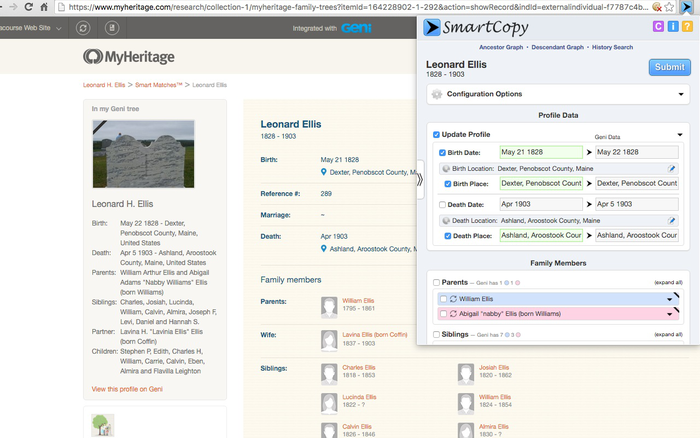
SmartCopy is a powerful browser extension that helps Geni users seamlessly transfer and update genealogical profiles, records, and entire family branches from across the web into the Geni World Family Tree.
By analyzing the structure of the source webpage, SmartCopy automatically maps vital statistics, flags potential duplicates, and performs automated consistency checks to ensure your tree remains clean and accurate. It also provides quick access to external research links and additional HistoryLink tools.
- Semi-Automated Data Extraction: Quickly copy individual profiles or full family groups without manual retyping.
- Consistency & Duplicate Warnings: Automatically detects discrepancies (e.g., impossible birth/death dates, overlapping parents) before data is committed to Geni.
- Direct Integration with HistoryLink: Easily trigger external research searches and HistoryLink utilities.
- Historical Location Matching: Uses FamilySearch's historical place database to recognize historical place names, changing borders, and locations that modern maps may misidentify.
- Deep Research: Automatically follows linked family profiles across supported websites, reducing repetitive research steps and manual navigation.
- 33 Languages: Fully localized interface supporting genealogists around the world.
SmartCopy reads profile and record data directly from:
* Geni (Native Smart Match suggestions)
* MyHeritage (Data Matches, SuperSearch & Genealogies)
* FamilySearch (Trees, Records & Memories view)
* Ancestry (Public tree profiles & person records)
* Find A Grave
* BillionGraves
* WikiTree
* Geneanet
* Filae
* Genealogy Net / Online-OFB
* RootsWeb (WorldConnect)
* WeRelate
* FamilyTreeMaker (Web-published trees)
* The Next Generation (TNG) (Works on any site built with TNG software)
* Gravez
* Yad Vashem
* Toldot
* BeZikaron
- Geni Account: Using SmartCopy requires an active Geni account and joining the official SmartCopy Project on Geni for authorization.
- Subscriptions: Some third-party match data (such as MyHeritage Smart Matches) may require a paid subscription with that service.
- Copyright Notice: Users are responsible for obtaining any necessary permissions prior to copying protected biographies, personal notes, or copyrighted images.
SmartCopy 是做什么的
SmartCopy 是一款面向 Firefox 的搜索增强类扩展,主要用来补充搜索结果、切换搜索引擎、过滤无效结果。官方对它的介绍是:Streamline your genealogy research by copying profiles, family data, and records directly into Geni with built-in consistency checks and tools.在Firefox 附加组件商店(AMO)上,它当前版本 4.18.0,评分 4.71(7 人评价),约 161 名用户。
适合什么人用
从功能定位看,SmartCopy 更适合每天大量搜索、希望结果更干净准确的用户。如果你平时只是偶尔遇到相关需求,用浏览器自带功能也能凑合;但如果这件事每天都发生,装一个专门处理它的扩展通常比手动操作省事得多。
怎么安装 SmartCopy
- 打开Firefox 附加组件商店(AMO)上的官方页面;
- 点「添加到浏览器」并确认权限提示;
- 装好后在扩展列表里固定图标,方便随时开关。
本站只做索引与介绍,安装包来自官方商店。如果商店页面提示当前地区不可用,说明该扩展未在你所在区域上架。
常见问题
SmartCopy 是免费的吗?
SmartCopy 在Firefox 附加组件商店(AMO)免费提供下载。它是浏览器扩展,装上就能直接用,不需要注册账号。
SmartCopy 安全吗?
它只申请了 0 项权限,范围比较克制,没有申请「读取所有网站数据」这种大权限。
SmartCopy 支持哪些浏览器?
当前收录的版本来自Firefox 附加组件商店(AMO),适用于 Firefox。同一个扩展在其他商店可能有对应版本,但功能与版本号不一定相同。
怎么卸载 SmartCopy?
在扩展管理页找到 SmartCopy,点移除即可。它在本地保存的设置会一起清掉,不会残留数据。
权限清单 来自 manifest.json 原文
接口权限 6
activeTabdeclarativeNetRequestWithHostAccessoffscreenscriptingstoragetabs