
Furiganaize
ono ono · Firefox
Auto insert furigana (振り仮名) on Japanese kanji.
<all_urls>),意味着它可以读取你在任意站点的页面内容,包括已登录的页面。这是许多扩展正常工作的必要条件,但也值得你确认来源可信。
截图
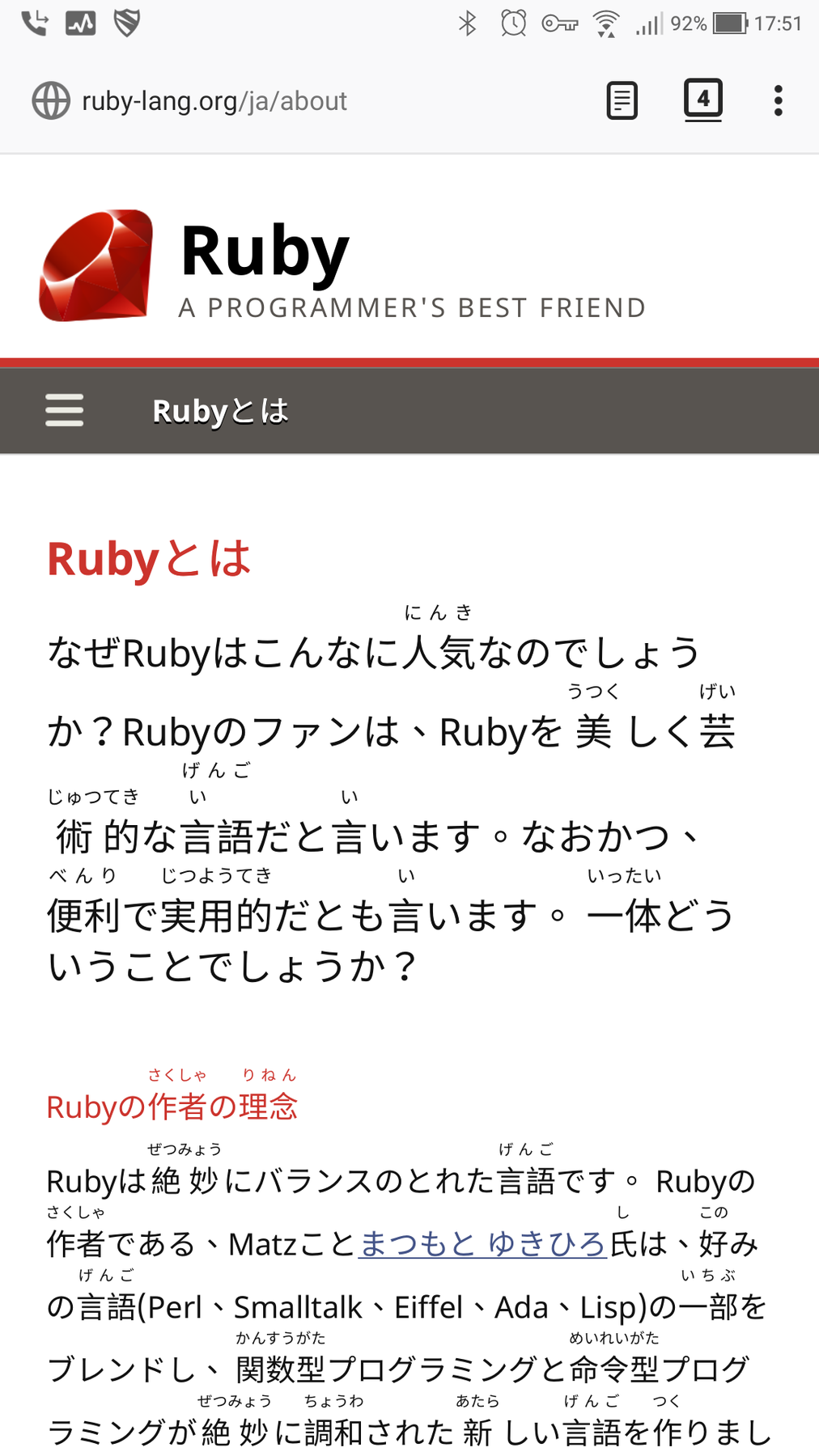


简介
Add Furigana (振り仮名) on Japanese kanji.
Forked from ilyalissoboi's FuriganaInjectorPlusPlus. See GitHub for more detailed information, source code and issues.
- 🔖 The pronounce (furigana) provided by the addon are for reference and convenience only, please do not rely on this tool too heavily. When in doubt of the pronunciation, please look it up in a dictionary.
- 🔖 このアドオンが提供する発音・振り仮名はあくまで参考用と便利性のみを目的としており、過度に依存しないようにお願いします。発音に疑問がある場合は、辞書で調べてください。
-----
⚠️ ATTENTION: DO NOT test this add-on on this addon page. Due to the security reason, Firefox doesn't allow any addon to run any script on some protected domains such as
addons.mozilla.org, so this addon works not correctly in here. THIS IS NOT A BUG OF THIS ADDON. Please don't report any issue about this.
⚠️ 注意:このページの中でこのアドオンを試しないでください!安全性によって、addons.mozilla.org のようなドメインは Firefox ブラウザー自身に保護されています。これらのドメインには、いかなる content script も実行されなくなります。これはアドオンのバグではありません。
-----
ℹ️ Some kanji/dango may be annotated with wrong furigana. This is a known issue and a technical limitation on natural language processing (NLP), even the products of big tech companies like Google Assistant or Apple Siri also sometimes mistakenly speaks Japanese sentence, not to mention I'm merely a (volunteer) individual developer; 100% correct guarantee of Japanese sentence pronunciation is impossible. Therefore, please don't complain any about such issue, unless you intend to contribute to the development (coding) of this project.
ℹ️ 申し訳ございませんが、このアドオンのようなツールが提供する読み方は100%正確が不可能です。これは自然言語処理技術の制限です。Google Assistant や Apple Siri との大企業が開発された産品にさえ読み方も時々違ったのです(私毎日GoogleのTTSで小説などを聞いていますのでわかります)、それに対して私はただの個人開発者です。ですので、読み方の誤りのような苦情は、このプロジェクトの開発に貢献する(コーディング)つもりでない限り、報告しないようにお願いします。
-----
📱Notice: to install this addon on Firefox for Android (Nightly Build only currently), please follow Mozilla's official instructions: Expanded extension support in Firefox for Android Nightly
-----
Shortcut Ctrl+Shift+F (Mac is Command+Shift+F) can also be used to toggle furigana.
The Differences against to FuriganaInjectorPlusPlus
Compatibility
- Ported to WebExtension
- Compatible with Firefox for Android / Fenix.
Features
- [beta] Add floating button for mobile, which let you able to trigger it quickly.
- [beta] Add dynamic page support (e.g. Twitter).
- Show enable / disable status via badge. (Because WebExtension API doesn't provide any way to detect dark/light status of browser theme)
- Add support for light / dark theme.
- [alpha] Optional setting to always prefer to choose the longer segments in the analyzed sentence to prevent some wrongly added furigana. (Thanks for Akimitsu Inoue)
- Better UX of options_ui, with more descriptions for each option.
- Improved font-size settings.
Performance
- Use WebWorker (separated CPU thread) to analyze sentence to prevent blocking and improve performance & UX.
- Huge improvement on the performance of removing ruby tags.
- Some other small performance improvements.
Bug Fixes
- Improved compatibility for website with <noscript>, like Google, Twitter.
- Fix bugs that some Furiganas may unable to be removed correctly.
- Fix potential freezing in some page.
- Some other little bugfixes.
Furiganaize 是做什么的
Furiganaize 是一款面向 Firefox 的语言辅助类扩展,主要用来划词翻译、语法校对、词典查询。官方对它的介绍是:Auto insert furigana (振り仮名) on Japanese kanji.在Firefox 附加组件商店(AMO)上,它当前版本 0.7.2,评分 4.82(44 人评价),约 3,400 名用户。
适合什么人用
从功能定位看,Furiganaize 更适合需要阅读外文资料或写英文内容的用户。如果你平时只是偶尔遇到相关需求,用浏览器自带功能也能凑合;但如果这件事每天都发生,装一个专门处理它的扩展通常比手动操作省事得多。需要注意的是它作用于所有网站,装上后建议先观察一两天,确认不影响常用站点的正常使用。
怎么安装 Furiganaize
- 打开Firefox 附加组件商店(AMO)上的官方页面;
- 点「添加到浏览器」并确认权限提示;
- 装好后在扩展列表里固定图标,方便随时开关。
本站只做索引与介绍,安装包来自官方商店。如果商店页面提示当前地区不可用,说明该扩展未在你所在区域上架。
常见问题
Furiganaize 是免费的吗?
Furiganaize 在Firefox 附加组件商店(AMO)免费提供下载。它是浏览器扩展,装上就能直接用,不需要注册账号。
Furiganaize 安全吗?
它只申请了 0 项权限,范围比较克制,没有申请「读取所有网站数据」这种大权限。
Furiganaize 支持哪些浏览器?
当前收录的版本来自Firefox 附加组件商店(AMO),适用于 Firefox。同一个扩展在其他商店可能有对应版本,但功能与版本号不一定相同。
怎么卸载 Furiganaize?
在扩展管理页找到 Furiganaize,点移除即可。它在本地保存的设置会一起清掉,不会残留数据。
权限清单 来自 manifest.json 原文
站点访问 3
<all_urls>http://*/*https://*/*
接口权限 3
activeTabstoragetabs