 DuckDuckGo Privacy Essentials
⚡保护您的数据。支持可选 AI 的私密搜索、私密浏览和广告拦…
Firefox

Full Text Tabs Forever EN
iansinnott · Firefox
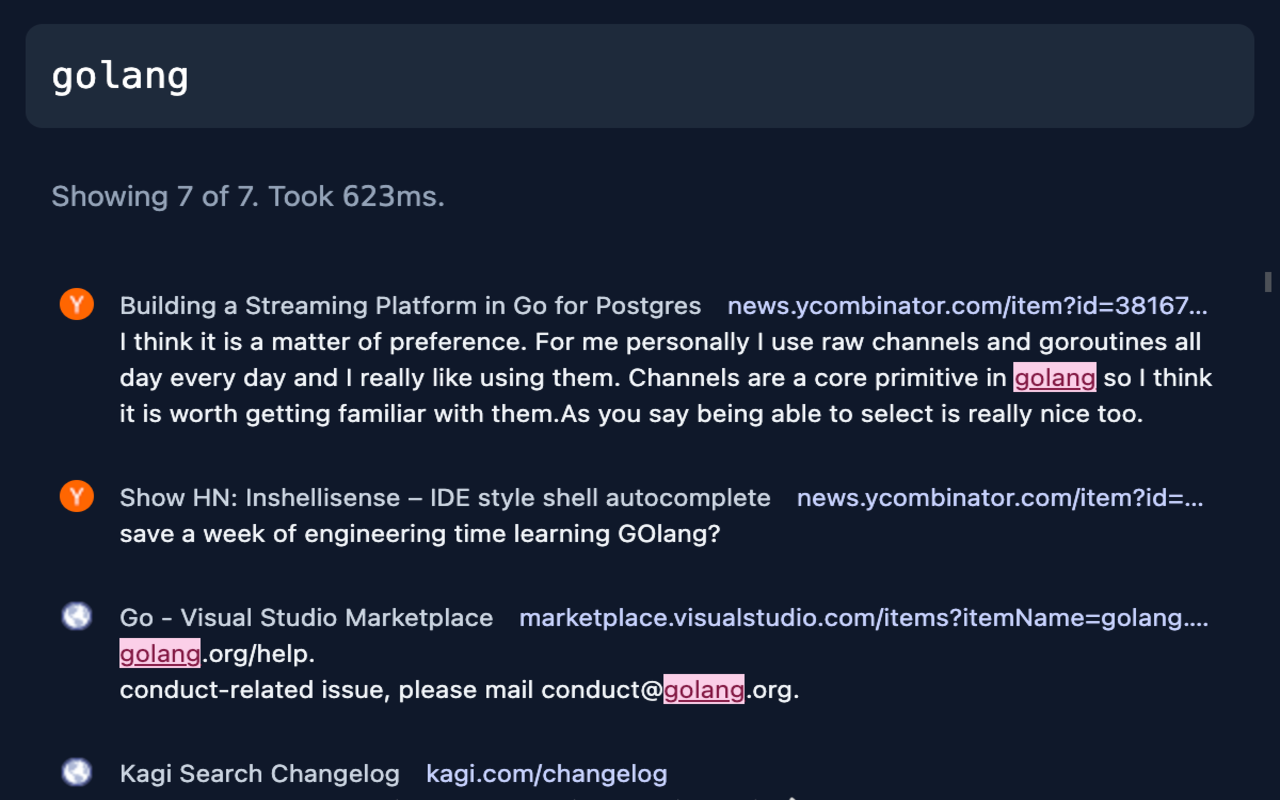
Full text search all your browsing history
4.4/5
5 人评分
26用户
v1.2.2当前版本
权限提示
该扩展申请访问所有网站(
<all_urls>),意味着它可以读取你在任意站点的页面内容,包括已登录的页面。这是许多扩展正常工作的必要条件,但也值得你确认来源可信。
截图
简介
Search your full browsing history
Search everything you've seen in your browser. Full Text Tabs Forever (FTTF) is a powerhouse tool for navigating your browsing history.
Doesn't the browser already do that? How is this different?
Browsers do not let you search the text on pages you've visited, only the URLs/titles, and some delete your history after a number of months.
FTTF is different:
- Full-Text Search Capabilities: The full content of every page you've visited becomes searchable, ensuring that no piece of information ever slips through the cracks.
- Permanent History: Your digital footprints are yours to keep. Your data is yours, so it should not be removed without your approval. Nothing is deleted automatically.
- Instant indexing: FTTF creates a search index as you browse, so pages are immediately available for searching right after you land on a page.
- For your eyes only: Your browsing history is stored locally on your device, and not on any external servers. Beware that if you switch computers your FTTF history will not automatically come with you. It can be exported though.
Who is it for?
Data hoarders like myself that never want to delete anything, and want everything to be searchable. More generally, if you've ever felt limited by the standard history search you should try this out.
How it works:
Browser extensions have access to the pages you visit, which lets FTTF make an index of the content on any page. When a page loads its content is extracted and indexed.
Extracted? Yes, or "distilled" if you prefer. Full web pages are huge and have a lot of information that's not related to the content itself. FTTF will ignore all of that. It acts like "reader mode" to find relevant content on a page and only index that.
Open Source: This extension is fully open source. You can find the MIT-licensed source code here: https://github.com/iansinnott/full-text-tabs-forever
Full Text Tabs Forever 是做什么的
Full Text Tabs Forever 是一款面向 Firefox 的搜索增强类扩展,主要用来补充搜索结果、切换搜索引擎、过滤无效结果。官方对它的介绍是:Full text search all your browsing history在Firefox 附加组件商店(AMO)上,它当前版本 1.2.2,评分 4.4(5 人评价),约 26 名用户。
适合什么人用
从功能定位看,Full Text Tabs Forever 更适合每天大量搜索、希望结果更干净准确的用户。如果你平时只是偶尔遇到相关需求,用浏览器自带功能也能凑合;但如果这件事每天都发生,装一个专门处理它的扩展通常比手动操作省事得多。需要注意的是它作用于所有网站,装上后建议先观察一两天,确认不影响常用站点的正常使用。
怎么安装 Full Text Tabs Forever
- 打开Firefox 附加组件商店(AMO)上的官方页面;
- 点「添加到浏览器」并确认权限提示;
- 装好后在扩展列表里固定图标,方便随时开关。
本站只做索引与介绍,安装包来自官方商店。如果商店页面提示当前地区不可用,说明该扩展未在你所在区域上架。
常见问题
Full Text Tabs Forever 是免费的吗?
Full Text Tabs Forever 在Firefox 附加组件商店(AMO)免费提供下载。它是浏览器扩展,装上就能直接用,不需要注册账号。
Full Text Tabs Forever 安全吗?
它只申请了 0 项权限,范围比较克制,没有申请「读取所有网站数据」这种大权限。
Full Text Tabs Forever 支持哪些浏览器?
当前收录的版本来自Firefox 附加组件商店(AMO),适用于 Firefox。同一个扩展在其他商店可能有对应版本,但功能与版本号不一定相同。
怎么卸载 Full Text Tabs Forever?
在扩展管理页找到 Full Text Tabs Forever,点移除即可。它在本地保存的设置会一起清掉,不会残留数据。
权限清单 来自 manifest.json 原文
站点访问 1
<all_urls>
接口权限 4
activeTabdownloadstabsunlimitedStorage
标签 点标签看同类扩展
DuckDuckGo Privacy Essentials
⚡保护您的数据。支持可选 AI 的私密搜索、私密浏览和广告拦…
Firefox
 Search by Image
A powerful reverse image searc…
Firefox
 SteamDB
在 Steam 商店和社区页面中添加 SteamDB 链接和…
Firefox
 Qwant - Search engine
With this extension, Qwant bec…
Firefox
 Popup Blocker (strict)
Strictly block all popup reque…
Firefox
 Indie Wiki Buddy
Helping you discover quality, …
Firefox
 Tabliss - New Tab
A beautiful New Tab page with …
Firefox
 Block Site
A customizable, password-prote…
Firefox