
FPL Tools EN
Amit Chauhan · Firefox
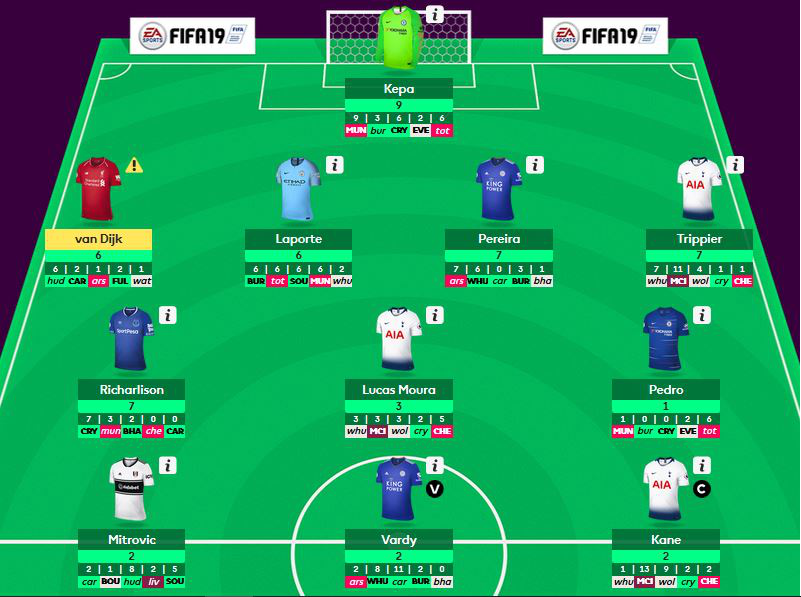
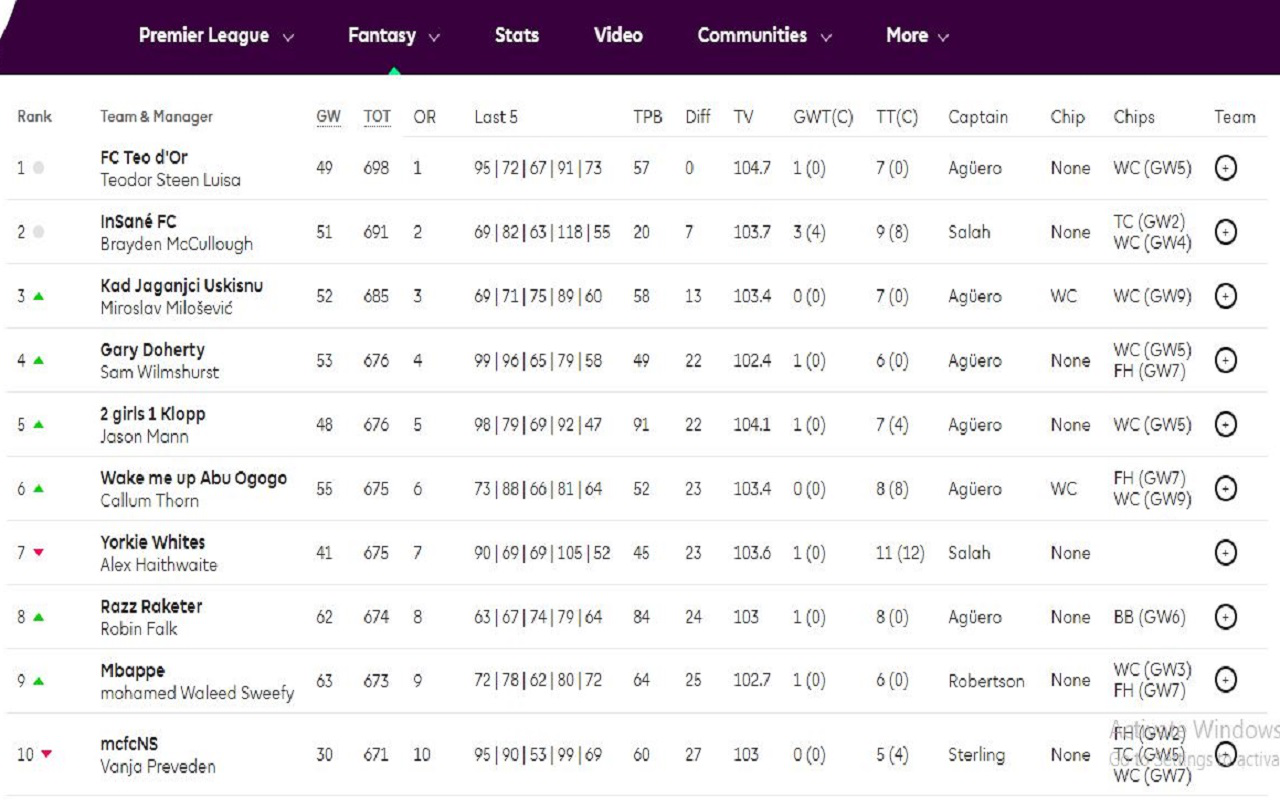
1. Fixture difficulty 2. Last 5 GW Points 3. Net Transfers 4. Extended League Table 5. Expected Points 6. Quick Transfer 7. Enhanced Stats 8. Compare Players
截图

简介
FPL Tools 2.0 Update
1.Fixture difficulty ✓
2.Quick Transfer ✓
3.Enhanced Stats ✓
4.Compare Players ✓
...more to follow
FPL Tools:
1. Fixture difficulty
-In page fixture difficulty in team and transfer list.
-Home and away indicator with uppercase indicate home and lowercase indicate away.
-Default green -> red color indicate lower to higher fixture difficulty.
-Color scheme options to change color to blue -> red for fixture difficulty.
2. Last 5 GW Points
-Last 5 Game week points in page
-Hover to see opponent details
3.Net Transfers
-Net transfers in transfer page in pitch view and transfer list.
4.Extended League Tables
-Added more information about teams in league tables like last 5 gw points, total transfer, hits, team value, captain, cheap used, total cheap used and playing xi.
5. Expected Points
-Shows expected points for next GW for playing 11 and bench in my team page
6. Live Bonus (Experimental) -- temporarily removed
-Update live bonus for live matches.This feature is not fully tested, disable it if you face issue.
7. Quick Transfer
-Add player without popup from transfer list
8. Enhanced Stats
-Sort players by goals per match, assists per match, bonus per match etc. stats
9. Compare Players
-Compare players within fpl dialog
-How to compare players?
* open any player information dialog
* select player to compare with
* max 3 players can be compared
FPL Tools 是做什么的
FPL Tools 是一款面向 Firefox 的游戏娱乐类扩展,主要用来增强游戏社区功能、显示额外数据。官方对它的介绍是:1. Fixture difficulty 2. Last 5 GW Points 3. Net Transfers 4. Extended League Table 5. Expected Points 6. Quick Transfer 7. Enhanced Stats 8. Compare Players在Firefox 附加组件商店(AMO)上,它当前版本 5.1.0,评分 4.65(17 人评价),约 488 名用户。
适合什么人用
从功能定位看,FPL Tools 更适合游戏玩家与游戏社区常客。如果你平时只是偶尔遇到相关需求,用浏览器自带功能也能凑合;但如果这件事每天都发生,装一个专门处理它的扩展通常比手动操作省事得多。
怎么安装 FPL Tools
- 打开Firefox 附加组件商店(AMO)上的官方页面;
- 点「添加到浏览器」并确认权限提示;
- 装好后在扩展列表里固定图标,方便随时开关。
本站只做索引与介绍,安装包来自官方商店。如果商店页面提示当前地区不可用,说明该扩展未在你所在区域上架。
常见问题
FPL Tools 是免费的吗?
FPL Tools 在Firefox 附加组件商店(AMO)免费提供下载。它是浏览器扩展,装上就能直接用,不需要注册账号。
FPL Tools 安全吗?
它只申请了 0 项权限,范围比较克制,没有申请「读取所有网站数据」这种大权限。
FPL Tools 支持哪些浏览器?
当前收录的版本来自Firefox 附加组件商店(AMO),适用于 Firefox。同一个扩展在其他商店可能有对应版本,但功能与版本号不一定相同。
怎么卸载 FPL Tools?
在扩展管理页找到 FPL Tools,点移除即可。它在本地保存的设置会一起清掉,不会残留数据。
权限清单 来自 manifest.json 原文
接口权限 1
storage