
Cookie AutoDelete EN
CAD Team · Firefox
Control your cookies! This WebExtension is inspired by Self Destructing Cookies. When a tab closes, any cookies not being used are automatically deleted. Keep the ones you trust (forever/until restart) while deleting the rest. Containers Supported
<all_urls>),意味着它可以读取你在任意站点的页面内容,包括已登录的页面。这是许多扩展正常工作的必要条件,但也值得你确认来源可信。
截图
简介
Please don't use reviews for bugs, support request, or feature requests. Use GitHub instead.
As of Firefox 86, strict mode is not supported at this time due to missing APIs to handle the Total Cookie Protection. Also as of Firefox 103, standard mode has also enabled Total Cookie Protection. Use 'strict' mode if using pre-86, use standard mode for versions 86-102, or from version 103+ use the custom configuration and set cookie to 'cross site tracking cookies' option (not the cross-site cookies).
Before opening a GitHub Issue, please check the troubleshooting FAQ first. Note that support may not be available for variants of Mozilla Firefox and Google Chrome.
Permission Request Explanations
- Access your data for all websites: CAD requests this to delete cookies and other site data for all sites
- Clear recent browsing history, cookies and related data: Ability to delete site data by domains.
- Display notifications to you: Self explanatory.
- Read and modify privacy settings: This setting has been removed since 3.4.0 and is kept here for historical reasons. Automatic detection of First Party Isolation support. Although the Privacy permission gives CAD "read and modify" permissions, NO MODIFICATIONS are done to your privacy settings, CAD only reads the setting of First Party Isolation. The privacy permission unfortunately cannot be given granular control, so this will stay for now.
- Access browser tabs: CAD uses this permission to display the site hostname in the popup for easy whitelisting/greylisting, displaying the amount of cookies for that site, and which rules apply to that site.
Take the permission wording with a grain of salt.
Main Features
- Auto Deletes Cookies from Closed (and/or discarded) Tabs
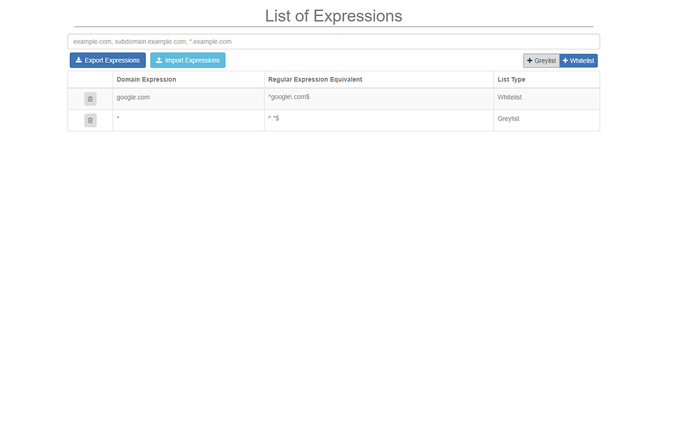
- WhiteList/GreyList Support for domains
- Easily Export/Import your Whitelist/Greylist and core settings
- Clear All Cookies and site data for a Domain
- Supports Manual Mode Cleaning from the popup
- Easily See the Number of Cookies for a site
- Support for Container Tabs (Firefox 53+ Only)
Usage
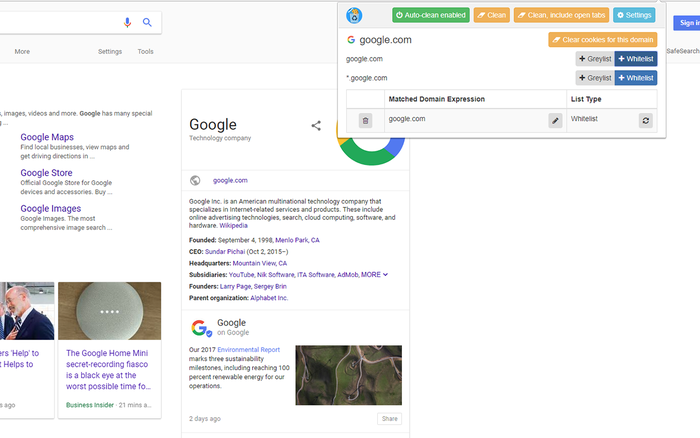
This extension does not clean cookies automatically until you enable "Auto-clean". This gives you the chance to add sites to the WhiteList.
1. Add the sites you want to keep cookies in the WhiteList (permanently) or GreyList (until Browser restart)
2. Toggle "Auto-clean" in the popup or "Automatic cleaning" in the settings
3. Watch those unused cookies disappear :)
You must enable cookies in the browser as this extension will replace the internal cookie manager.
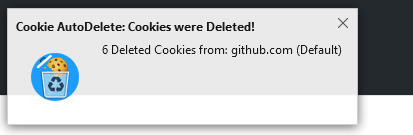
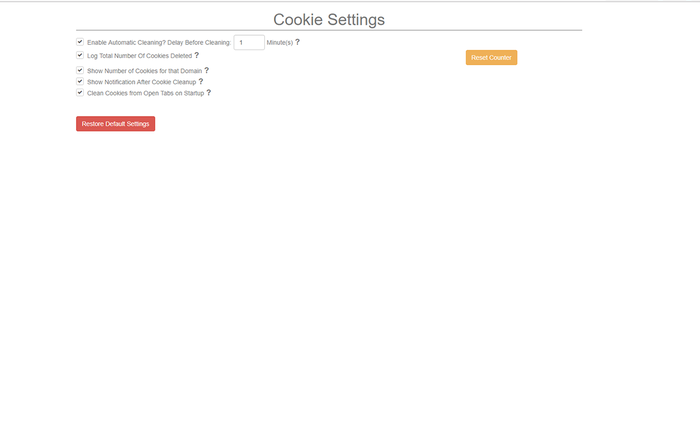
You can disable Cleanup Notifications via the Settings.
Popup Menu Features
Clean: This is basically a quick way of activating the Cookie Cleanup on demand. This looks at all your cookies and deletes them if they are not in any Open Tabs or the WhiteList.
Clean, include open tabs: Same thing as Cookie Cleanup except that it only deletes cookies only if they are not in the WhiteList. Open tabs are not taken into consideration.
Clear All Cookies for This Domain: Easy way to delete all cookies for one particular domain that you are on.
Some things to Note:
- This extension can clear localstorage as of version 2.1.0 and Firefox 58+. Enable it in the settings.
- Even though third party cookies are cleared with this extension, it is better to disable third party cookies from the settings
- Cleaning site data other than cookies within containers will have unintended side effects due to the current Web Extension API where attempting to clear a site data for one domain on a container will also clear that site data of the same domain on all containers.
If you have any other problem, file an issue on GitHub. Maybe we can work it out. Note that support may not be available for variants of Mozilla Firefox and Google Chrome.
BTC: 16km6pFV33S6kaeb8rCaDLZXUyo3uyVnsk
Cookie AutoDelete 是做什么的
Cookie AutoDelete 是一款面向 Firefox 的隐私与安全类扩展,主要用来拦截追踪器、屏蔽广告、管理 Cookie、加固浏览器指纹。官方对它的介绍是:Control your cookies! This WebExtension is inspired by Self Destructing Cookies. When a tab closes, any cookies not being used are automatically deleted. Keep the ones you trust (forever/until restart) while deleting the rest. Containers Supported在Firefox 附加组件商店(AMO)上,它当前版本 3.8.2,评分 4.54(1521 人评价),约 157,467 名用户。
适合什么人用
从功能定位看,Cookie AutoDelete 更适合在意上网被跟踪、希望减少广告干扰的用户。如果你平时只是偶尔遇到相关需求,用浏览器自带功能也能凑合;但如果这件事每天都发生,装一个专门处理它的扩展通常比手动操作省事得多。需要注意的是它作用于所有网站,装上后建议先观察一两天,确认不影响常用站点的正常使用。
怎么安装 Cookie AutoDelete
- 打开Firefox 附加组件商店(AMO)上的官方页面;
- 点「添加到浏览器」并确认权限提示;
- 装好后在扩展列表里固定图标,方便随时开关。
本站只做索引与介绍,安装包来自官方商店。如果商店页面提示当前地区不可用,说明该扩展未在你所在区域上架。
常见问题
Cookie AutoDelete 是免费的吗?
Cookie AutoDelete 在Firefox 附加组件商店(AMO)免费提供下载。它是浏览器扩展,装上就能直接用,不需要注册账号。
Cookie AutoDelete 安全吗?
它只申请了 0 项权限,范围比较克制,没有申请「读取所有网站数据」这种大权限。
Cookie AutoDelete 支持哪些浏览器?
当前收录的版本来自Firefox 附加组件商店(AMO),适用于 Firefox。同一个扩展在其他商店可能有对应版本,但功能与版本号不一定相同。
怎么卸载 Cookie AutoDelete?
在扩展管理页找到 Cookie AutoDelete,点移除即可。它在本地保存的设置会一起清掉,不会残留数据。
权限清单 来自 manifest.json 原文
站点访问 1
<all_urls>
接口权限 9
activeTabalarmsbrowsingDatacontextMenuscontextualIdentitiescookiesnotificationsstoragetabs