
Containers Helper EN
Containers Helper · Firefox
Helps improve container management by providing container searching, deleting, modifying, duplicating, and default URLs on a per-container or bulk basis. Complements the multi-account containers addon.
截图

简介
Firefox multi-account containers are for power users. So is this extension. This extension adds bulk container interactivity features missing from the Mozilla Multi-Account Containers extension.
This extension is intended to augment the Multi-Account Containers extension in Firefox.
This readme contains extensive information about the extension and it aims to bootstrap new users into using the extension effectively.
If you're like me and you care deeply about your web browsing privacy, you may be creating a large amount of containers for your browsing, even multiple containers for the same sites.
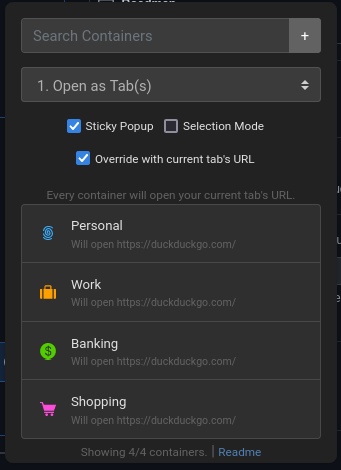
If this is you, and if you've also struggled to scroll through your long list of containers without reprieve or do other bulk interactions with the multi-account containers extension, then this extension is for you. It will enable you to quickly filter all of your containers and open a new one quickly, or do other things (continue reading).
Features
- Container search capability - filters your containers as you type.
- Press
enterto open the first result in the list (or the only result, if just one result remains). - Simultaneously press
ctrland eitherclickorenterto open the result(s) in a pinned state. (cmd key on mac) - Combine above shortcuts with
shiftto open all filtered containers at once. - Sort the list of containers shown in the extension popup by their name, default URL, or the default sort order.
- Press
- Set a Default URL for containers - Any time you use this extension to open a tab, you can configure the tab to open a specific URL by default.
- The URL settings are stored as part of the extension itself, and are independent of the Multi-Account Containers addon. It will not affect any existing settings, and will not change the behavior of which URLs are opened in which containers by default.
- Similar to above, press
shiftto bulk-set-default URLs for the current query.
- Sticky Popup - If you want, you can check this box to keep the extension open while you click on different results (to open many containers) for your search. This mode feels very powerful to use.
- Set Name/Icon/Color mode - Allows you to quickly set one or more containers' icon, color, or name quickly.
- Find and Replace mode - Allows you to perform a find and replace on container names or default URLs.
- Duplication mode - Allows you to duplicate one or more containers returned by a search query.
- Note: Duplication mode currently does not copy the default open-in-URL capability for multi-account containers, but it does duplicate default URLs defined for containers within this extension. (This extension currently does not have the capability to access information about default open-in-URLs for containers, which is stored in the extension settings for the multi-account containers extension storage in your browser's settings)
- Deletion mode - When checked, you can click on a container to delete it. This method of deletion is a bit quicker than the multi-account containers extension. You will be prompted for deletion more than once.
- Caution: This can delete all of your containers if you're not careful.
- Similar to above, press
shiftto bulk-delete containers returned by a query.
- Refresh mode - Quickly allows you to delete & re-create any or all of your containers at once, which allows you to quickly purge cookies and other site data for your favorite containers.
- Keyboard shortcut to open the popup window is
alt+shift+D(configurable). It will immediately focus the search box, so you can quickly filter for a container, press enter, and go. - Dark and Light mode respects your system's dark/light mode setting.
- Select Mode - Like you'd intuitively expect, you can enable Select Mode, press
Ctrl+Click(cmd key on mac) to specifically select a couple results from the list, as well asCtrl+Shift+Click(cmd+shift key on mac) to traverse a range of containers. - Container Quick-Add - Allows you to quickly add a new container based on what you have typed into the filter text box. Defaults to a circle icon and the toolbar color.
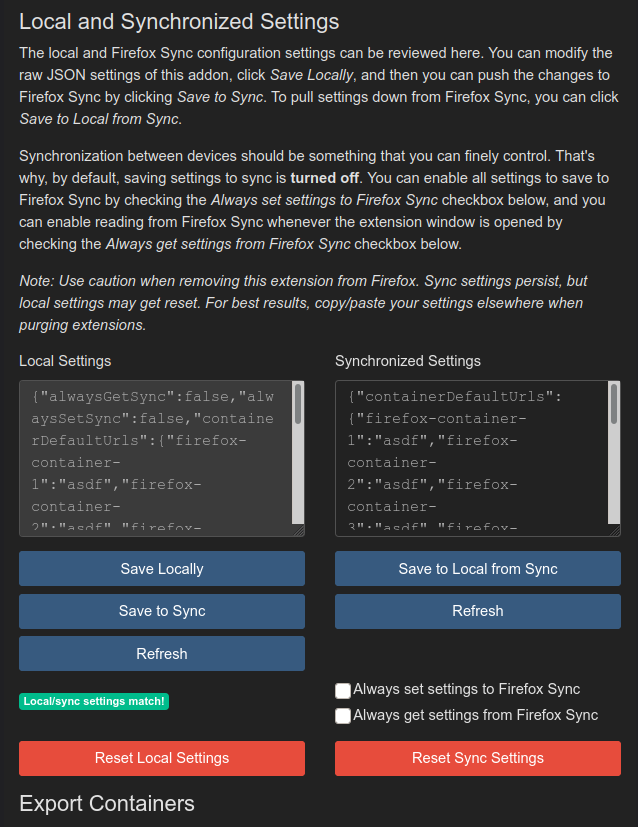
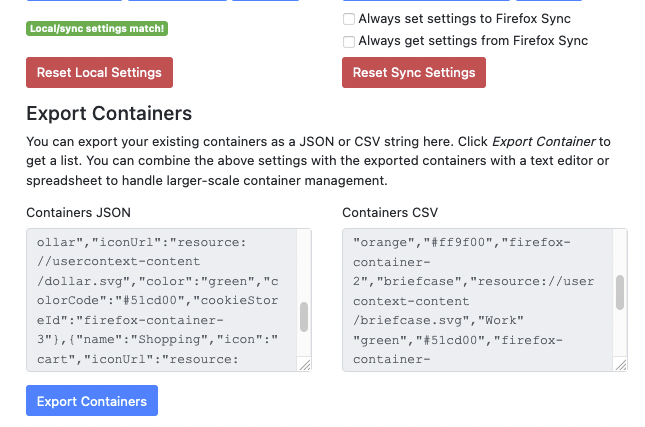
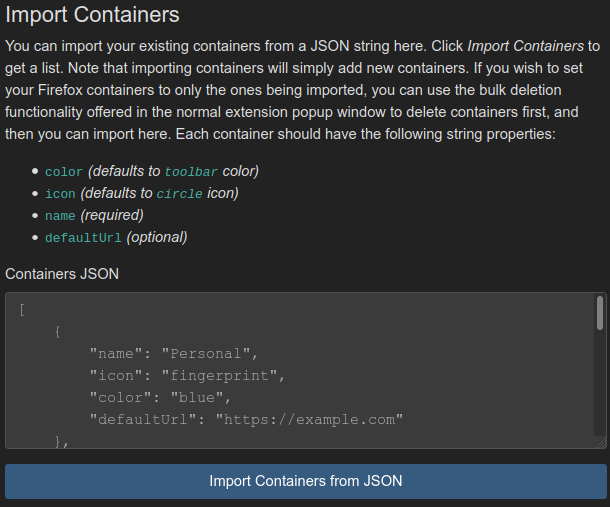
- Container Import/Export - Using the Preferences section, you can use JSON to import and export containers, and set default URLs for them. This can make your life easier if you're migrating between devices and want to carry over all of your containers, for example.
- Quickly Open Current Page in Other Containers - Disabled by default - enable this in the addon settings page. You can automatically open the current page in other containers whose domains/hosts/origins match your current tab's URL's domain/host/origin. Read more in the addon settings page.
- Open the current tab's page in all containers - Allows you to check a box and open the current URL in every filtered container, if you'd like.
For a list of all features, screengrabs/examples, and other information, visit the GitHub home page for this extension: https://codeberg.org/firefox-containers-helper/firefox-containers-helper
Containers Helper 是做什么的
Containers Helper 是一款面向 Firefox 的隐私与安全类扩展,主要用来拦截追踪器、屏蔽广告、管理 Cookie、加固浏览器指纹。官方对它的介绍是:Helps improve container management by providing container searching, deleting, modifying, duplicating, and default URLs on a per-container or bulk basis. Complements the multi-account containers addon.在Firefox 附加组件商店(AMO)上,它当前版本 0.1.4,评分 4.72(29 人评价),约 606 名用户。
适合什么人用
从功能定位看,Containers Helper 更适合在意上网被跟踪、希望减少广告干扰的用户。如果你平时只是偶尔遇到相关需求,用浏览器自带功能也能凑合;但如果这件事每天都发生,装一个专门处理它的扩展通常比手动操作省事得多。
怎么安装 Containers Helper
- 打开Firefox 附加组件商店(AMO)上的官方页面;
- 点「添加到浏览器」并确认权限提示;
- 装好后在扩展列表里固定图标,方便随时开关。
本站只做索引与介绍,安装包来自官方商店。如果商店页面提示当前地区不可用,说明该扩展未在你所在区域上架。
常见问题
Containers Helper 是免费的吗?
Containers Helper 在Firefox 附加组件商店(AMO)免费提供下载。它是浏览器扩展,装上就能直接用,不需要注册账号。
Containers Helper 安全吗?
它只申请了 0 项权限,范围比较克制,没有申请「读取所有网站数据」这种大权限。
Containers Helper 支持哪些浏览器?
当前收录的版本来自Firefox 附加组件商店(AMO),适用于 Firefox。同一个扩展在其他商店可能有对应版本,但功能与版本号不一定相同。
怎么卸载 Containers Helper?
在扩展管理页找到 Containers Helper,点移除即可。它在本地保存的设置会一起清掉,不会残留数据。
权限清单 来自 manifest.json 原文
接口权限 6
activeTabcontextualIdentitiescookiesstoragetabsunlimitedStorage