
Conex EN
kesselborn · Firefox
TabGroups married with Tab Containers and bookmark & history search
<all_urls>),意味着它可以读取你在任意站点的页面内容,包括已登录的页面。这是许多扩展正常工作的必要条件,但也值得你确认来源可信。
截图
简介
conex
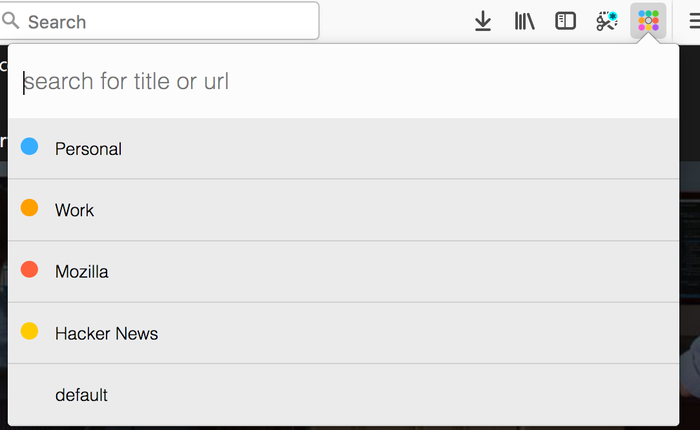
This addon tries to replace some functionality from the discontinued *TabGroups* with some differences:
Differences to tabgroups
- it lacks the big "Manage my TabGroups" overview window
- tab groups are implemented via containers
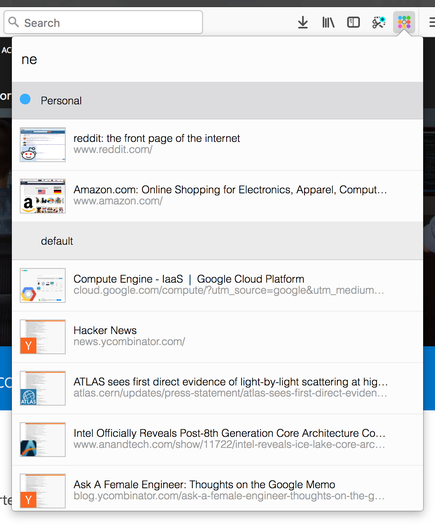
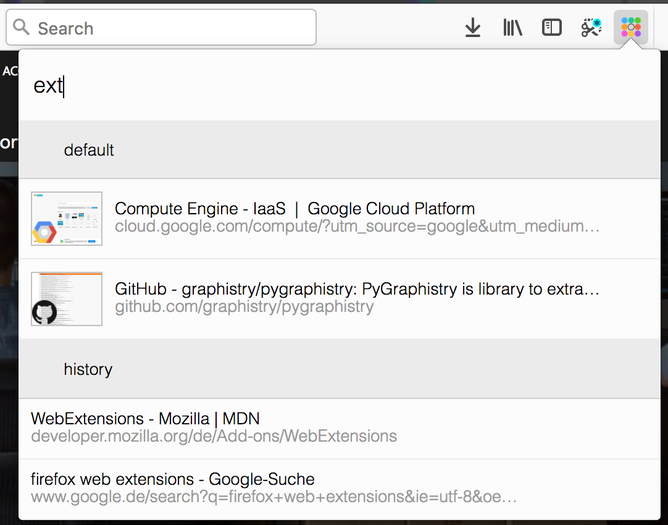
- the quick search contains thumbnail of the results
- the quick search includes bookmarks and history
Global keyboard shortcuts
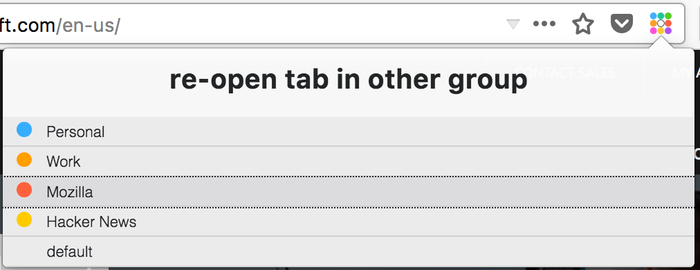
Ctrl+Space (adjustable): open conex popupCtrl+Shift+E / Cmd+Shift+E (adjustable): move tab to another containerCtrl+T / Cmd+T: open tab in current container
Conex popup keyboard shortcuts
↓/Tabjump to next container or tab in the popup list↑/Shift+Tabjump to previous container or tab in the popup listEnteron a tab: switch to tab / on a container: activate the last accessed tab of the selected containerBackspaceon a tab: close the selected tab / on a container: delete selected container→/←/Ctrl+Enteron a container: expand / unexpand tab list of the selected containerCtrl+Shift+Enter/Ctrl+ +on a container: open a new tab in the selected container and activate this tab / in the search box: open new container dialog
Enable tab hiding
Necessary addon permissions
- <all_url> : for taking screenshots for the thumbnails during search
- activeTab (optional) : necessary in order to show a dialog, where the user can select the container to open external links
- bookmarks (optional) : for searching in bookmarks
- contextMenus : for context menu for moving tab to a different container
- contextualIdentities : for working with tab containers
- cookies : for working with tab containers
- history (optional) : for showing history results in quick search
- menus : for creating context menus when moving tabs
- notifications (optional) : to show a warning if the tabhiding is not activated
- storage : for storing thumbnails
- tabs : for tab handling
- tabHide : for hiding and showing tabs
- webNavigation : for intercepting and reacting on new tabs
- webRequest : necessary in order to show a dialog, where the user can select the container to open external links
- webRequestBlocking : necessary in order to show a dialog, where the user can select the container to open external links
Conex 是做什么的
Conex 是一款面向 Firefox 的实用工具类扩展,主要用来解决浏览器里某类具体的小问题。官方对它的介绍是:TabGroups married with Tab Containers and bookmark & history search在Firefox 附加组件商店(AMO)上,它当前版本 0.9.8resigned1,评分 4.39(82 人评价),约 584 名用户。
适合什么人用
从功能定位看,Conex 更适合想补上浏览器原生缺失功能的用户。如果你平时只是偶尔遇到相关需求,用浏览器自带功能也能凑合;但如果这件事每天都发生,装一个专门处理它的扩展通常比手动操作省事得多。需要注意的是它作用于所有网站,装上后建议先观察一两天,确认不影响常用站点的正常使用。
怎么安装 Conex
- 打开Firefox 附加组件商店(AMO)上的官方页面;
- 点「添加到浏览器」并确认权限提示;
- 装好后在扩展列表里固定图标,方便随时开关。
本站只做索引与介绍,安装包来自官方商店。如果商店页面提示当前地区不可用,说明该扩展未在你所在区域上架。
常见问题
Conex 是免费的吗?
Conex 在Firefox 附加组件商店(AMO)免费提供下载。它是浏览器扩展,装上就能直接用,不需要注册账号。
Conex 安全吗?
它只申请了 0 项权限,范围比较克制,没有申请「读取所有网站数据」这种大权限。
Conex 支持哪些浏览器?
当前收录的版本来自Firefox 附加组件商店(AMO),适用于 Firefox。同一个扩展在其他商店可能有对应版本,但功能与版本号不一定相同。
怎么卸载 Conex?
在扩展管理页找到 Conex,点移除即可。它在本地保存的设置会一起清掉,不会残留数据。
权限清单 来自 manifest.json 原文
站点访问 1
<all_urls>
接口权限 8
contextualIdentitiescookiesmenusstoragetabswebNavigationwebRequestwebRequestBlocking
接口权限(可选) 5
activeTabbookmarkshistorynotificationstabHide