 DuckDuckGo Privacy Essentials
⚡保护您的数据。支持可选 AI 的私密搜索、私密浏览和广告拦…
Firefox

[cmd.ms] EN
Merill Fernando · Firefox
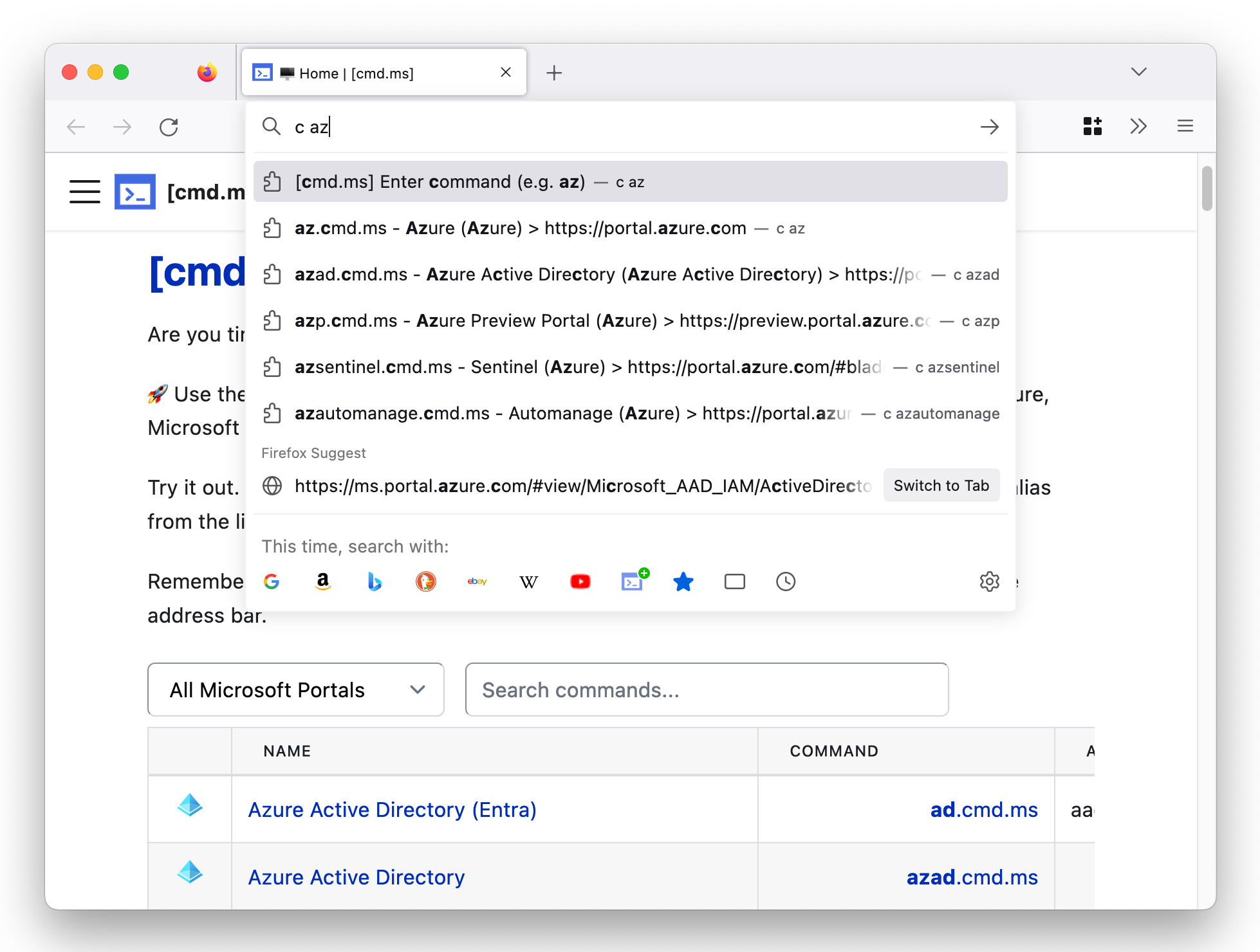
Type 'c' and then type in the [cmd.ms] command.
5.0/5
1 人评分
267用户
v0.4当前版本
截图
简介
[cmd.ms] is your Microsoft Cloud command line!
🚀 Use the power of your browser's address bar to quickly get to your favorite blade in Azure, Microsoft 365, Azure AD, Intune or any other Microsoft portal.
Installing this add-on will add the 'c' keyword to your address bar and provide autocomplete suggestions for all the available [cmd.ms] commands as you type.
To navigate to a Microsoft portal or blade type 'c' <SPACE> <cmd.ms command>
Here are a few examples
c <SPACE> ad -> This will take you directly to the Azure Active Directory portal.
c <SPACE> ex -> This will take you directly to the Exchange Admin center.
If you press Enter without choosing a suggestion, the full list of available commands will be displayed. Alternatively you can also browse to https://cmd.ms for a full list of all the commands.
[cmd.ms] 是做什么的
[cmd.ms] 是一款面向 Firefox 的搜索增强类扩展,主要用来补充搜索结果、切换搜索引擎、过滤无效结果。官方对它的介绍是:Type 'c' and then type in the [cmd.ms] command.在Firefox 附加组件商店(AMO)上,它当前版本 0.4,评分 5(1 人评价),约 267 名用户。
适合什么人用
从功能定位看,[cmd.ms] 更适合每天大量搜索、希望结果更干净准确的用户。如果你平时只是偶尔遇到相关需求,用浏览器自带功能也能凑合;但如果这件事每天都发生,装一个专门处理它的扩展通常比手动操作省事得多。
怎么安装 [cmd.ms]
- 打开Firefox 附加组件商店(AMO)上的官方页面;
- 点「添加到浏览器」并确认权限提示;
- 装好后在扩展列表里固定图标,方便随时开关。
本站只做索引与介绍,安装包来自官方商店。如果商店页面提示当前地区不可用,说明该扩展未在你所在区域上架。
常见问题
[cmd.ms] 是免费的吗?
[cmd.ms] 在Firefox 附加组件商店(AMO)免费提供下载。它是浏览器扩展,装上就能直接用,不需要注册账号。
[cmd.ms] 安全吗?
它只申请了 0 项权限,范围比较克制,没有申请「读取所有网站数据」这种大权限。
[cmd.ms] 支持哪些浏览器?
当前收录的版本来自Firefox 附加组件商店(AMO),适用于 Firefox。同一个扩展在其他商店可能有对应版本,但功能与版本号不一定相同。
怎么卸载 [cmd.ms]?
在扩展管理页找到 [cmd.ms],点移除即可。它在本地保存的设置会一起清掉,不会残留数据。
权限清单 来自 manifest.json 原文
未解析到权限条目。
标签 点标签看同类扩展
DuckDuckGo Privacy Essentials
⚡保护您的数据。支持可选 AI 的私密搜索、私密浏览和广告拦…
Firefox
 Search by Image
A powerful reverse image searc…
Firefox
 SteamDB
在 Steam 商店和社区页面中添加 SteamDB 链接和…
Firefox
 Qwant - Search engine
With this extension, Qwant bec…
Firefox
 Popup Blocker (strict)
Strictly block all popup reque…
Firefox
 Indie Wiki Buddy
Helping you discover quality, …
Firefox
 Tabliss - New Tab
A beautiful New Tab page with …
Firefox
 Block Site
A customizable, password-prote…
Firefox