
 uBlock Origin
一款高效的网络请求过滤工具,占用极低的内存和 CPU。
Firefox

Clear Browsing Data EN
Armin Sebastian · Firefox
Delete browsing data directly from the browser toolbar. Clear cookies, history and cache with a single click.
4.4/5
214 人评分
4.1万用户
v5.1.2当前版本
截图
简介
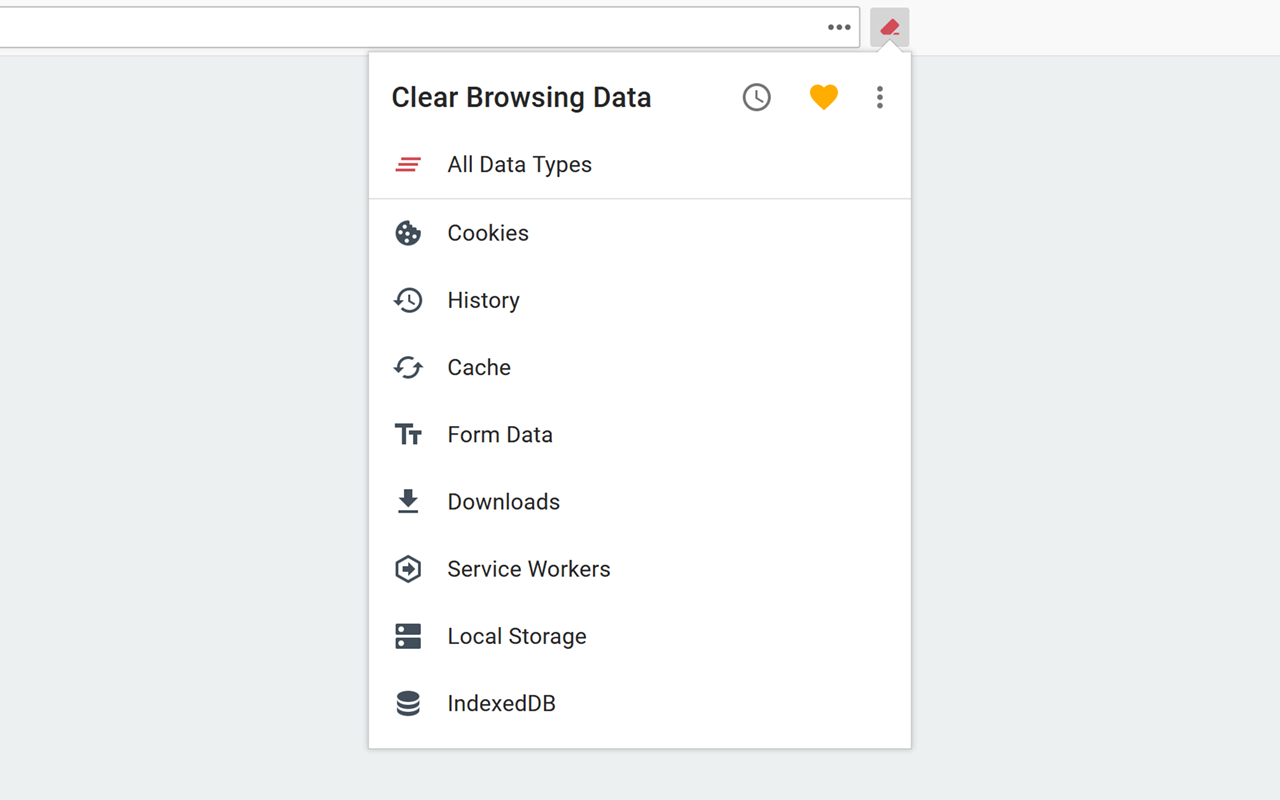
Clear Browsing Data is a Firefox extension which enables you to delete browsing data, such as cookies, history and cache, directly from the browser toolbar. The toolbar button can be configured to clear all browsing data with a single click, or to show a list of data types available for clearing.
Clear Browsing Data is an open source project made possible thanks to a community of awesome supporters. If you'd like to support the continued development of the extension, please consider contributing with Patreon, PayPal or Bitcoin.
The extension also supports closing and reloading tabs, these features can be configured from the extension's options.
Supported data types:
- Cookies
- Browsing history
- Cached images and files
- Autofill form data
- Download history
- Service Workers
- Local storage data
- IndexedDB data
- Plugin data
The data types and their order can be customized from the extension's options.
Relevant Firefox bugs:
- Data saved with the Cache API is not cleared (1526246)
- The HTTP authentication cache is not cleared (1535606)
- Clearing downloads only removes them from the current session, downloads from previous sessions can be removed by clearing the history (1380445)
- The cache and local storage are cleared entirely regardless of the requested time interval
- Clearing the history also removes downloads and service workers
The extension is also available for Chrome and Edge.
The developer does not collect any personal data from this extension, visit the extension's privacy policy for more information.
Reviews are not monitored for bug reports, please use GitHub for issues and feature requests.
Clear Browsing Data 是做什么的
Clear Browsing Data 是一款面向 Firefox 的开发者工具类扩展,主要用来调试页面、查看样式与请求、测试接口、辅助前端开发。官方对它的介绍是:Delete browsing data directly from the browser toolbar. Clear cookies, history and cache with a single click.在Firefox 附加组件商店(AMO)上,它当前版本 5.1.2,评分 4.35(214 人评价),约 40,740 名用户。
适合什么人用
从功能定位看,Clear Browsing Data 更适合前端工程师、测试与需要经常查看页面结构的用户。如果你平时只是偶尔遇到相关需求,用浏览器自带功能也能凑合;但如果这件事每天都发生,装一个专门处理它的扩展通常比手动操作省事得多。
怎么安装 Clear Browsing Data
- 打开Firefox 附加组件商店(AMO)上的官方页面;
- 点「添加到浏览器」并确认权限提示;
- 装好后在扩展列表里固定图标,方便随时开关。
本站只做索引与介绍,安装包来自官方商店。如果商店页面提示当前地区不可用,说明该扩展未在你所在区域上架。
常见问题
Clear Browsing Data 是免费的吗?
Clear Browsing Data 在Firefox 附加组件商店(AMO)免费提供下载。它是浏览器扩展,装上就能直接用,不需要注册账号。
Clear Browsing Data 安全吗?
它只申请了 0 项权限,范围比较克制,没有申请「读取所有网站数据」这种大权限。
Clear Browsing Data 支持哪些浏览器?
当前收录的版本来自Firefox 附加组件商店(AMO),适用于 Firefox。同一个扩展在其他商店可能有对应版本,但功能与版本号不一定相同。
怎么卸载 Clear Browsing Data?
在扩展管理页找到 Clear Browsing Data,点移除即可。它在本地保存的设置会一起清掉,不会残留数据。
权限清单 来自 manifest.json 原文
接口权限 3
browsingDatanotificationsstorage
标签 点标签看同类扩展
uBlock Origin
一款高效的网络请求过滤工具,占用极低的内存和 CPU。
Firefox
 Privacy Badger
自动学习屏蔽隐藏的追踪器。由领先的数字权利非营利组织电子前哨…
Firefox
 AdGuard AdBlocker
AdGuard 广告拦截器可有效的拦截所有网页上的所有类型的…
Firefox
 DuckDuckGo Privacy Essentials
⚡保护您的数据。支持可选 AI 的私密搜索、私密浏览和广告拦…
Firefox
 AdBlocker Ultimate
Completely remove ALL ads. No …
Firefox
 Ghostery – 隐私广告拦截工具
Ghostery 是强大的隐私保护扩展程序。拦截广告,停止跟…
Firefox
 Facebook Container
Prevent Facebook from tracking…
Firefox
 Malwarebytes Browser Guard
Fast and safe browsing that pr…
Firefox