
Canvas Blocker - Fingerprint Protect EN
Joue · Firefox
Prevent HTML canvas element from generating a unique identification key to protect user's privacy
<all_urls>),意味着它可以读取你在任意站点的页面内容,包括已登录的页面。这是许多扩展正常工作的必要条件,但也值得你确认来源可信。
截图
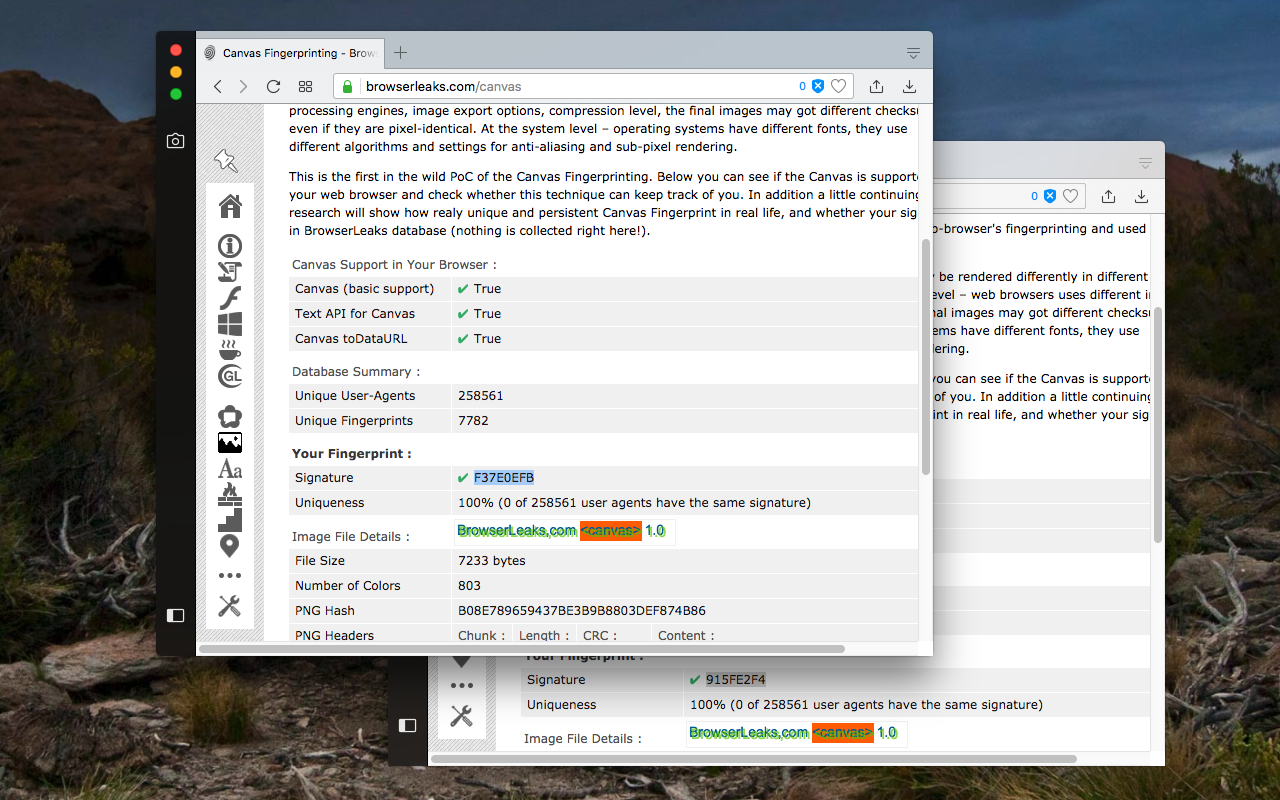
简介
This extension protects user privacy by prevents the HTML canvas element from being used by malicious scripts for fingerprinting the user. This extension adds a slight noise to the data generated by the canvas element when certain methods are being called. This way the canvas element cannot be used for fingerprinting purposes. Compared to other similar extensions, this one is lighter and uses a more effective method to block fingerprinting from all frame elements (top and subframes). The extension supports three modes of operation:
1. Random noise
2. Random noise (per session) (to have a fixed identity for current page session)
3. Fixed noise (to have a fixed but unique identity all the time)
Features:
1. Fingerprint defender with as minimum footprint as possible
2. Block or disable fingerprint on certain hostnames
3. Notify when the canvas fingerprint is detected
4. Disable notification for a few hostnames or for all hostnames.
5. Works on cross-origin (CORS) and sandboxed iframes (like Disqus and Hangouts)
Notes:
1. There is no on and off button as the extension is not meant to be disabled. If there is a use case of the on and off button please report on the FAQs page (review section)
2. This extension does not block the canvas element entirely. It only modifies two methods to prevent the JavaScript engine from generating a unique identification key from this element.
What is Canvas Fingerprinting:
Canvas fingerprinting is one of a number of browser fingerprinting techniques for tracking online users that allow websites to identify and track visitors using the HTML5 canvas element instead of browser cookies or other similar means. Canvas fingerprinting works by exploiting the HTML5 canvas element. When a user visits a page, the fingerprinting script first draws text with the font and size of its choice and adds background colors. Next, the script calls Canvas API's ToDataURL method to get the canvas pixel data in dataURL format, which is basically a Base64 encoded representation of the binary pixel data. Finally, the script takes the hash of the text-encoded pixel data, which serves as the fingerprint.
It is recommended to install an adblocker extension along with this defender (e.g. uBlock Origin or Adblock Plus).
Canvas Blocker - Fingerprint Protect 是做什么的
Canvas Blocker - Fingerprint Protect 是一款面向 Firefox 的开发者工具类扩展,主要用来调试页面、查看样式与请求、测试接口、辅助前端开发。官方对它的介绍是:Prevent HTML canvas element from generating a unique identification key to protect user's privacy在Firefox 附加组件商店(AMO)上,它当前版本 0.2.4,评分 3.81(16 人评价),约 423 名用户。
适合什么人用
从功能定位看,Canvas Blocker - Fingerprint Protect 更适合前端工程师、测试与需要经常查看页面结构的用户。如果你平时只是偶尔遇到相关需求,用浏览器自带功能也能凑合;但如果这件事每天都发生,装一个专门处理它的扩展通常比手动操作省事得多。需要注意的是它作用于所有网站,装上后建议先观察一两天,确认不影响常用站点的正常使用。
怎么安装 Canvas Blocker - Fingerprint Protect
- 打开Firefox 附加组件商店(AMO)上的官方页面;
- 点「添加到浏览器」并确认权限提示;
- 装好后在扩展列表里固定图标,方便随时开关。
本站只做索引与介绍,安装包来自官方商店。如果商店页面提示当前地区不可用,说明该扩展未在你所在区域上架。
常见问题
Canvas Blocker - Fingerprint Protect 是免费的吗?
Canvas Blocker - Fingerprint Protect 在Firefox 附加组件商店(AMO)免费提供下载。它是浏览器扩展,装上就能直接用,不需要注册账号。
Canvas Blocker - Fingerprint Protect 安全吗?
它只申请了 0 项权限,范围比较克制,没有申请「读取所有网站数据」这种大权限。
Canvas Blocker - Fingerprint Protect 支持哪些浏览器?
当前收录的版本来自Firefox 附加组件商店(AMO),适用于 Firefox。同一个扩展在其他商店可能有对应版本,但功能与版本号不一定相同。
怎么卸载 Canvas Blocker - Fingerprint Protect?
在扩展管理页找到 Canvas Blocker - Fingerprint Protect,点移除即可。它在本地保存的设置会一起清掉,不会残留数据。
权限清单 来自 manifest.json 原文
站点访问 1
*://*/*
接口权限 5
contextMenusdeclarativeNetRequestWithHostAccessnotificationsscriptingstorage