
calc-extension EN
Martin Väth · Firefox
Calculate values of mathematical expressions
截图
简介
The extension strives to be useful for everybody quickly needing
brief or mid-long calculations: in daily “browser” life, as a
mathematician, or as a programmer - there is support for all needs.
Formulas can be entered in the typical mathematician's or programmer's syntax - both is understood. There is also support for lengthy sessions (saving/restoring, exporting to clipboard, etc).
The original motivation was to experiment with a Pratt parser.
There is already a much richer expression syntax than in most languages
(implicit multiplication signs, no braces necessary for function calls),
and it would be simple to extend the syntax to a more full-blown “language”.
(In fact, earlier versions of calc-extension had a simpler syntax.
Readers interested in the parser implementation can check data/js/parser.js).
After installing calc-extension, it can be used as follows.
Click the calc-extension symbol 1+2.
Then a page opens where you can enter a formula (see below) which will be
calculated when you press the solver button (~>).
(There is an option to use the enter key instead if you prefer.)
The result is then shown and you can enter the next formula.
You can also go back to an earlier entered formula and “recalculate” it
(e.g. after you modified some variables).
To remove a formula from your list, simply remove the main formula text
and press the solver button.
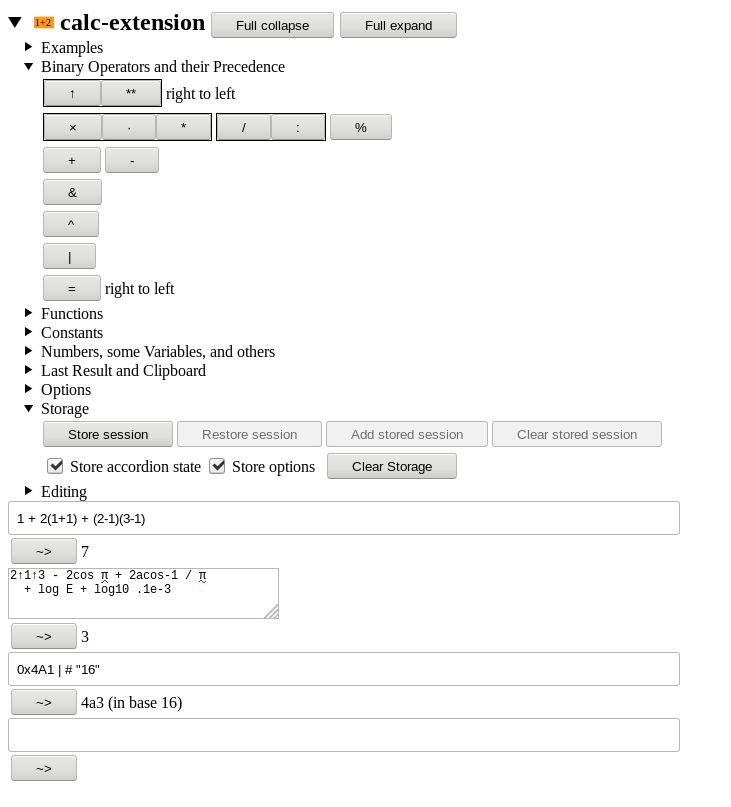
A simple formula is a usual mathematical expression which consists of numbers, the usual operators + - * / and braces ( ).
As usual in mathematics (though not in most computer languages),
it is possible to omit the multiplication sign.
However:
Be aware that x means the variable x and not a multiplication sign…!
For multiplication use instead one of the symbols * · × or simply omit it (a space can be used to separate adjacent tokens).
The division symbol is / or :.
Numbers have the usual floating-point format, e.g. 17 0.1 1.2e-3 or they can be octal or hexadecimal: For an octal number start with 0, for a hexadecimal number start with 0x.
There are further operators which can be used in expressions:
%remainder (“modulo”)**or↑exponentiation (binds from right to left)&bitwise AND|bitwise OR^bitwise XOR
There are also some mathematical functions available.
Note that functions bind stronger than all binary operators, i.e. sin π/2 is the same as sin(π)/2 but differs from sin(π/2).
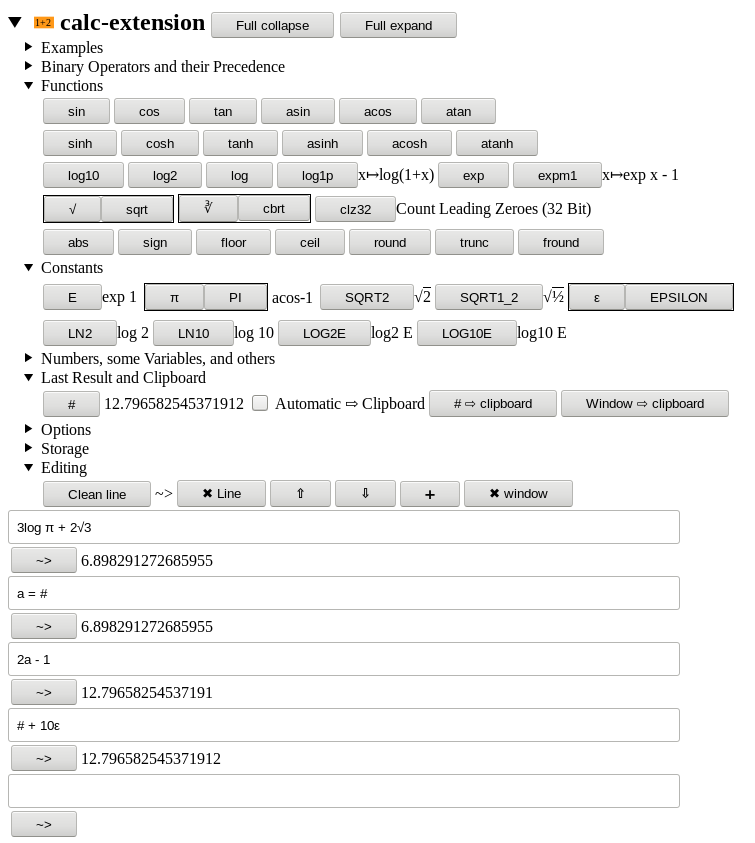
sinthe sine, argument is in radianscosthe cosine, argument is in radianstanthe tangent, argument is in radiansasinthe arcsine, in radiansacosthe arccosine, in radiansatanthe arctangent, in radianssinhthe hyperbolic sinecoshthe hyperbolic cosinetanhthe hyperbolic tangentasinhthe hyperbolic areasineacoshthe hyperbolic areacosineatanhthe hyperbolic areatangentlog10the base 10 logarithmlog2the base 2 logarithmlogthe natural logarithm (base E)log1plog(1+x)wherexis the argumentexpthe exponential function (base E)expm1exp x - 1wherexis the argumentsqrtthe square root, that issqrt x = x ** (1/2)cbrtthe cube root, that iscbrt x = x ** (1/3)absthe absolute valuesignthe signum (1, 0, or -1)floorthe value rounded down to its nearest integerceilthe value rounded up to its nearest integertruncthe value rounded to the integer of smaller absolute valueroundthe value rounded to its nearest integerfroundthe value rounded to the nearest 32 bit floatclz32the number of leading zero bits in a 32 bit representation
Furthermore, there are constants available:
EEuler's number exp 1PIorπthe circle number acos -1SQRT2sqrt 2SQRT1_2sqrt 1/2LN2log 2LN10log 10LOG2Elog2 ELOG10Elog10 EEPSILONorεthe distance of 1 to the smallest larger floating point number
Finally, it is possible to define variables with e.g. a=... and to use them.
Variable names must only consist of English characters, numbers, or _.
The whole syntax and operator precedence is inspired by javascript.
However, the following things are new.
There is a special variable name # which always refers to the result of
the last (succesful) calculation.
There are also special sequences which can occur anywhere in an expression
and which cause options to switch (you can also switch them by the mouse).
To modify options more permanently (also for future sessions even across
browser restarts), you have to set them in the preferences window.
'width:height'default is 60:1"base"switch output to base (2-36)!new input fields are textareas (multiple lines)?new input fields…
calc-extension 是做什么的
calc-extension 是一款面向 Firefox 的实用工具类扩展,主要用来解决浏览器里某类具体的小问题。官方对它的介绍是:Calculate values of mathematical expressions在Firefox 附加组件商店(AMO)上,它当前版本 5.4resigned1,评分 5(3 人评价),约 32 名用户。
适合什么人用
从功能定位看,calc-extension 更适合想补上浏览器原生缺失功能的用户。如果你平时只是偶尔遇到相关需求,用浏览器自带功能也能凑合;但如果这件事每天都发生,装一个专门处理它的扩展通常比手动操作省事得多。
怎么安装 calc-extension
- 打开Firefox 附加组件商店(AMO)上的官方页面;
- 点「添加到浏览器」并确认权限提示;
- 装好后在扩展列表里固定图标,方便随时开关。
本站只做索引与介绍,安装包来自官方商店。如果商店页面提示当前地区不可用,说明该扩展未在你所在区域上架。
常见问题
calc-extension 是免费的吗?
calc-extension 在Firefox 附加组件商店(AMO)免费提供下载。它是浏览器扩展,装上就能直接用,不需要注册账号。
calc-extension 安全吗?
它只申请了 0 项权限,范围比较克制,没有申请「读取所有网站数据」这种大权限。
calc-extension 支持哪些浏览器?
当前收录的版本来自Firefox 附加组件商店(AMO),适用于 Firefox。同一个扩展在其他商店可能有对应版本,但功能与版本号不一定相同。
怎么卸载 calc-extension?
在扩展管理页找到 calc-extension,点移除即可。它在本地保存的设置会一起清掉,不会残留数据。
权限清单 来自 manifest.json 原文
接口权限 1
storage