
All Tabs Helper EN
Kevin Jones · Firefox
Provides list-style menu to do closing, loading, unloading, moving of single/multiple tabs. Search tab titles/urls, search content in all loaded tabs, visited tabs history, find duplicate tabs. (Window-centric except moves tabs across windows)
<all_urls>),意味着它可以读取你在任意站点的页面内容,包括已登录的页面。这是许多扩展正常工作的必要条件,但也值得你确认来源可信。
截图
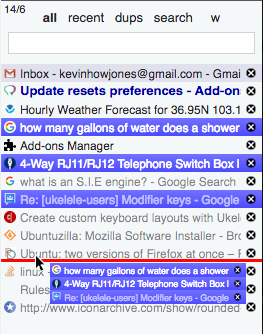
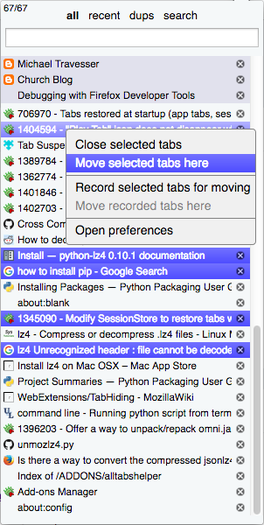
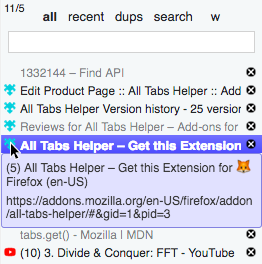
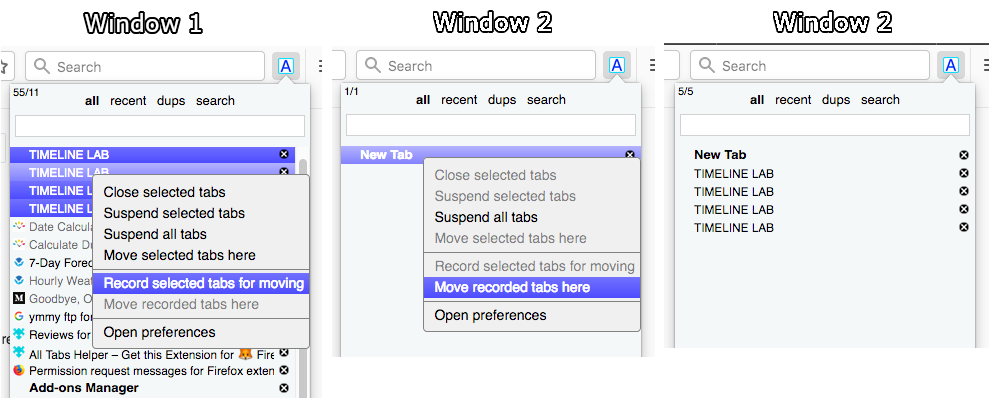
简介
(Note: ATH versions >= 1.1.1 will not work on Firefox versions < 58.)
Summary
This addon provides a list-style UI for tab management. Designed mainly for high-volume tab users.
The ATH UI can be accessed 3 ways: From the toolbar button popup, in the sidebar, or in the management window (aka "full view" window). Each UI provides 4 different views, also referred to as "menus":
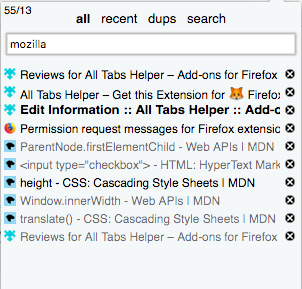
all - All tabs are displayed in tabs bar order, or can be filtered by title and url by typing in the search box.
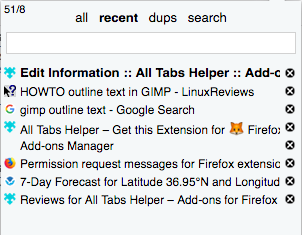
recent - Lists tabs in order from most recently accessed first.
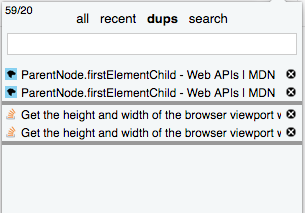
dups - Duplicate tabs are displayed. (See caveat*)
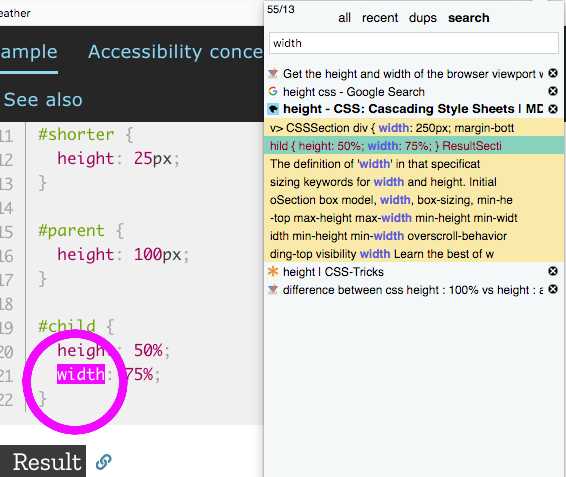
search - Tabs can be searched by tabs content of loaded tabs.
The screenshots and captioned instructions give a good introduction to using ATH.
Note that ATH is window-centric, ie, menu only applies to the window it is in. The only cross-window support is the ability to move multiple tabs across windows. Demonstration for this is also shown in the screenshots.
(EDIT: ATH now has multi-window functionality, however it is experimental and currrently considered "unsupported". Must be enabled in Options.)
*caveats:
Dup tabs - Note that dup tabs list is generated by searching for tabs with identical URLs. It is possible for two tabs to have the same URL but different content, eg the case where the page is generated based on form or cookie data. Use with awareness when removing tabs.
Reasons for permissions:
Access your data for all websites - Listing and searching tabs - used for the highlighting within the page that is used in the "Search all tabs" feature when the user clicks on a search result in the ATH UI.
Read and modify browser settings - ATH option "Open new tab next to current" changes FF pref
Read the text of all open tabs - Searching tabs content ("search" menu)
Access recently closed tabs - Used to store data that is window oriented, such as window title names
Access browser tabs - Listing and searching tabs
(Note: To be clear, ATH does not modify any part of any page for spoofing, nor scavenge any user input, in order learn any user information, including but not limited to passwords etc.)
Note for Legacy Firefox users: I am making a few concessions to allow ATH to run on Firefox 56 (the last legacy version.) I'd like to make it clear that I am officially not supporting Firefox 56. Some features will not work, or be inapplicable, due to the lack of APIs in Firefox 56. I have only made attempts to allow what will work to work, without breakage, however I am not taking the time to make a customized UI. Thus you may find options, features or context menu items listed that won't apply to you. You may also find bugs which won't be fixed.
In this same paradigm, I cannot guarantee that all future updates of ATH will continue to work on Firefox 56 (or variants.) To be safe you may want to turn off automatic updates and only do updates where you can monitor which is the last version that will work for you.
All Tabs Helper 是做什么的
All Tabs Helper 是一款面向 Firefox 的搜索增强类扩展,主要用来补充搜索结果、切换搜索引擎、过滤无效结果。官方对它的介绍是:Provides list-style menu to do closing, loading, unloading, moving of single/multiple tabs. Search tab titles/urls, search content in all loaded tabs, visited tabs history, find duplicate tabs. (Window-centric except moves tabs across windows)在Firefox 附加组件商店(AMO)上,它当前版本 1.2.45,评分 4.43(164 人评价),约 1,797 名用户。
适合什么人用
从功能定位看,All Tabs Helper 更适合每天大量搜索、希望结果更干净准确的用户。如果你平时只是偶尔遇到相关需求,用浏览器自带功能也能凑合;但如果这件事每天都发生,装一个专门处理它的扩展通常比手动操作省事得多。需要注意的是它作用于所有网站,装上后建议先观察一两天,确认不影响常用站点的正常使用。
怎么安装 All Tabs Helper
- 打开Firefox 附加组件商店(AMO)上的官方页面;
- 点「添加到浏览器」并确认权限提示;
- 装好后在扩展列表里固定图标,方便随时开关。
本站只做索引与介绍,安装包来自官方商店。如果商店页面提示当前地区不可用,说明该扩展未在你所在区域上架。
常见问题
All Tabs Helper 是免费的吗?
All Tabs Helper 在Firefox 附加组件商店(AMO)免费提供下载。它是浏览器扩展,装上就能直接用,不需要注册账号。
All Tabs Helper 安全吗?
它只申请了 0 项权限,范围比较克制,没有申请「读取所有网站数据」这种大权限。
All Tabs Helper 支持哪些浏览器?
当前收录的版本来自Firefox 附加组件商店(AMO),适用于 Firefox。同一个扩展在其他商店可能有对应版本,但功能与版本号不一定相同。
怎么卸载 All Tabs Helper?
在扩展管理页找到 All Tabs Helper,点移除即可。它在本地保存的设置会一起清掉,不会残留数据。
权限清单 来自 manifest.json 原文
站点访问 1
<all_urls>
接口权限 7
browserSettingscookiesfindmenussessionsstoragetabs