
Advanced GitHub Notifier EN
freaktechnik · Firefox
Shows notifications when you get a new notification on GitHub (or similar source control services) and provides quick access to all notifications in a popup. Supports GitHub.com, GitHub Enterprise, GitLab and Gitea.
<all_urls>),意味着它可以读取你在任意站点的页面内容,包括已登录的页面。这是许多扩展正常工作的必要条件,但也值得你确认来源可信。
截图
简介
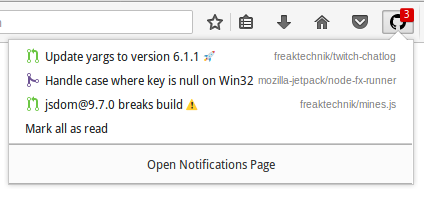
Conveniently get notified when you get a new notification on GitHub.com or a GitHub Enterprise instance with this extension. If you missed a notification, you can easily access the subject of the notification directly from a popup listing all unread notifications.
The button to open the panel shows a count of unread notifications. You can mark all notifications as read from within the panel or open GitHub's notification page.
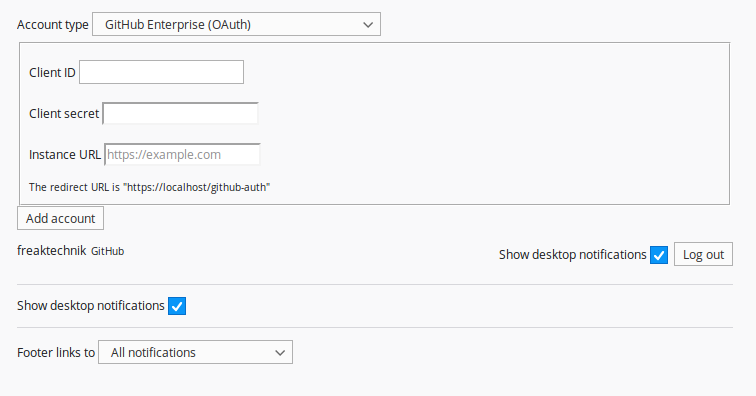
You can authenticate as multiple GitHub.com and GitHub Enterprise users at once.
GitHub Authentification
In order to get your notifications you have to authenticate the extension to access your GitHub notifications. The authentication is handled completely client-side and there is no third party server involved in it. The repo read and write permission is needed to display notifications for private repositories. This permission only has to be granted on organizations with private repositories that you need notifications for. In theory the extension only needs read access to determine issue title and similar. However GitHub only has a scope for read and write access.
You can also authenticate with a personal access token for GitHub.com. For enterprise installations you can always try to use OAuth, but no guarantees, while personal access tokens should work as well. The personal access tokens need at least the notifications permission, and if the notifications should be accurate for things in private repos, it also needs the repo permission.
GitLab and Gitea
GitLab and Gitea support is fairly simple. For GitLab todos are shown as notifications, for Gitea it's notifications. Both of them require you to provide an access token as well as the base URL of the instance. The appearance will be identical to notifications from GitHub.
Languages
This extension is translated to Dutch, German, Italian, Russian, Spanish, Thai, French, Chinese (China and Taiwan), Japanese.
You can help translate this extension on Transifex: https://www.transifex.com/freaktechnik/advanced-github-notifier/
Permissions
- identity: OAuth flow API
- Display notifications to you: To show notifications when a new notification is added on GitHub
- alarms: Periodically check for new notifications.
- storage: Save settings and notifications
- Access your data for "https://github.com/login/oauth/access_token": To complete OAuth with GitHub even when CORS headers are missing
Additionally the extension may prompt to access specific hosts for authenticating and interacting with them if you configure a GitHub Enterprise or Gitea account.
See https://support.mozilla.org/kb/permission-request-messages-firefox-extensions for explanations what permissions allow an extension to do in general.
GitHub Enterprise pre-configuration
You can pre-configure an OAuth app to authenticate against your enterprise installation using Firefox Enterprise Policies. See the README of this extension on GitHub for details: https://github.com/freaktechnik/advanced-github-notifier/blob/master/README.md#pre-configuring-a-github-enterprise-oauth-app
Alert sounds
If you want sounds for you notifications and Firefox doesn't make a sound by default, you can use the Notification Sound extension to get a sound whenever a notification is displayed.
Source Code, Bugs and Feature requests
The source of this extension is hosted on GitHub: https://github.com/freaktechnik/advanced-github-notifier/
Disclaimer
This product is not developed or run by GitHub. It is a hobbyist project that uses the official GitHub API to display information about the notifications of a user on the GitHub platform. GitHub and the associated imagery are subject to copyright and trademarks of GitHub, Inc.
Advanced GitHub Notifier 是做什么的
Advanced GitHub Notifier 是一款面向 Firefox 的资讯订阅类扩展,主要用来订阅 RSS、聚合新闻、跟踪博客更新。官方对它的介绍是:Shows notifications when you get a new notification on GitHub (or similar source control services) and provides quick access to all notifications in a popup. Supports GitHub.com, GitHub Enterprise, GitLab and Gitea.在Firefox 附加组件商店(AMO)上,它当前版本 1.10.2,评分 4.5(16 人评价),约 76 名用户。
适合什么人用
从功能定位看,Advanced GitHub Notifier 更适合想摆脱算法推荐、自己掌控信息源的用户。如果你平时只是偶尔遇到相关需求,用浏览器自带功能也能凑合;但如果这件事每天都发生,装一个专门处理它的扩展通常比手动操作省事得多。需要注意的是它作用于所有网站,装上后建议先观察一两天,确认不影响常用站点的正常使用。
怎么安装 Advanced GitHub Notifier
- 打开Firefox 附加组件商店(AMO)上的官方页面;
- 点「添加到浏览器」并确认权限提示;
- 装好后在扩展列表里固定图标,方便随时开关。
本站只做索引与介绍,安装包来自官方商店。如果商店页面提示当前地区不可用,说明该扩展未在你所在区域上架。
常见问题
Advanced GitHub Notifier 是免费的吗?
Advanced GitHub Notifier 在Firefox 附加组件商店(AMO)免费提供下载。它是浏览器扩展,装上就能直接用,不需要注册账号。
Advanced GitHub Notifier 安全吗?
它只申请了 0 项权限,范围比较克制,没有申请「读取所有网站数据」这种大权限。
Advanced GitHub Notifier 支持哪些浏览器?
当前收录的版本来自Firefox 附加组件商店(AMO),适用于 Firefox。同一个扩展在其他商店可能有对应版本,但功能与版本号不一定相同。
怎么卸载 Advanced GitHub Notifier?
在扩展管理页找到 Advanced GitHub Notifier,点移除即可。它在本地保存的设置会一起清掉,不会残留数据。
权限清单 来自 manifest.json 原文
站点访问(可选) 1
https://*/*
接口权限 6
alarmsidentitymenusmenus.overrideContextnotificationsstorage