
7 Times Faster EN
RadventSolutions · Firefox
It's a fastest ad blocker. Its speed up your internet, sometimes in two times and more. By blocking ads, malware and tracking
<all_urls>),意味着它可以读取你在任意站点的页面内容,包括已登录的页面。这是许多扩展正常工作的必要条件,但也值得你确认来源可信。
截图



简介
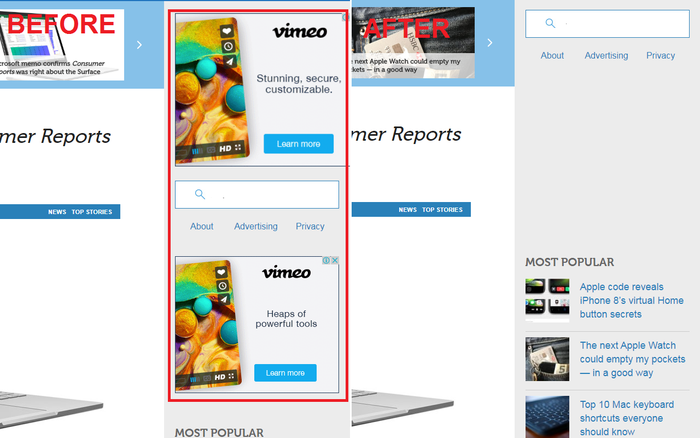
The main purpose is fast web pages loading time. So, it blocks ads and tracking. And that why you get faster internet. It allows some ads, when it takes a longer time to block them. Also, it blocks malware for your security and some inappropriate content, for a example, porn. Also, you can block social media. This option can significantly increase speed on some web pages.
If this extension blocks some site that you want to visit, just add blocked page to whitelist by clicking special button in popup after clicking on icon of 7 Times Faster.
7 Times Faster is extension for users with slow internet speed. It's a free ad blocker. But, please, support us and we will improve it.
I called it "7 Times Faster", because one of my favourite sites is loading 7.2 times faster, from 6.5 seconds to 0.9 seconds now. So I am very happy now :-)
Comparison of ad blockers on ten very popular web pages. If you are using no extension you get average page loading time 3.3 seconds. If you are using AdBlock – 4.295 seconds - 30.15% slower than using no extension. Adblock plus – 4.527 seconds - 37.18% slower. Fair AdBlocker – 3.549 seconds - 7.5% slower. 7 Times Faster 2.839 seconds - 13.96% faster. Only "7 Times Faster" faster than no extension. So, it not only block ads as others, but also speed up your page loading time.
Comparison of ad blockers on typical web pages with few ads. If you are using no extension you get average page loading time 3.292 seconds. If you are using AdBlock – 3.785 seconds - 14.97% slower than using no extension. Adblock plus – 3.829 seconds - 16.31% slower. Fair AdBlocker – 2.538 seconds - 22.9% faster. 7 Times Faster 1.797 seconds - 45.41% faster. 7 Times Faster is fastest again. And it speed up your page loading time almost in two times.
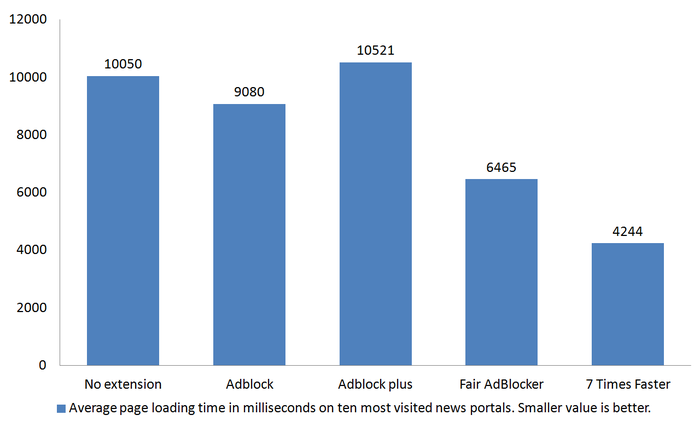
Comparison of ad blockers on top ten most visited news portals. It's a heavy sites with a lot of resources loaded. So, we get bigger page loading time values. As expected. If you are using no extension you get average page loading time 10.05 seconds. If you are using AdBlock – 9.08 seconds - 9.65% faster than using no extension. Adblock plus – 10.521 seconds - 4.68% slower. Fair AdBlocker – 6.465 seconds - 35.67% faster, nice result! 7 Times Faster 4.244 seconds - 57.77% faster. 7 Times Faster is fastest ad blocker again. It's 2.36 times faster than no extension, 2.14 times faster than AdBlock which have 40+ millions of users. And it's 2.48 times faster than AdBlock Plus.
This extension don't track you and we prevent others from tracking you!
Please, use it on your own risk. Because, sometimes it can harm web pages. We shall not be responsible or liable for any loss or damage of any kind incurred as a result of the use of the services
Updates:
Version "1.0.0.5"
1. Fixed some bugs.
2. Code optimization. Now it 5% faster than previous version.
3. Added "block social media" option. Using it you can increase speed on 30% on web pages with social media buttons and etc.
Version "1.0.0.8"
1. Fixed some code bugs.
Version "1.0.0.9"
1. Fixed some code bugs.
2. Changed logic of blocking social media.
3. Many domains were deleted from blocked list
7 Times Faster 是做什么的
7 Times Faster 是一款面向 Firefox 的隐私与安全类扩展,主要用来拦截追踪器、屏蔽广告、管理 Cookie、加固浏览器指纹。官方对它的介绍是:It's a fastest ad blocker. Its speed up your internet, sometimes in two times and more. By blocking ads, malware and tracking在Firefox 附加组件商店(AMO)上,它当前版本 1.0.2.2resigned1,评分 3.4(20 人评价),约 91 名用户。
适合什么人用
从功能定位看,7 Times Faster 更适合在意上网被跟踪、希望减少广告干扰的用户。如果你平时只是偶尔遇到相关需求,用浏览器自带功能也能凑合;但如果这件事每天都发生,装一个专门处理它的扩展通常比手动操作省事得多。需要注意的是它作用于所有网站,装上后建议先观察一两天,确认不影响常用站点的正常使用。
怎么安装 7 Times Faster
- 打开Firefox 附加组件商店(AMO)上的官方页面;
- 点「添加到浏览器」并确认权限提示;
- 装好后在扩展列表里固定图标,方便随时开关。
本站只做索引与介绍,安装包来自官方商店。如果商店页面提示当前地区不可用,说明该扩展未在你所在区域上架。
常见问题
7 Times Faster 是免费的吗?
7 Times Faster 在Firefox 附加组件商店(AMO)免费提供下载。它是浏览器扩展,装上就能直接用,不需要注册账号。
7 Times Faster 安全吗?
它只申请了 0 项权限,范围比较克制,没有申请「读取所有网站数据」这种大权限。
7 Times Faster 支持哪些浏览器?
当前收录的版本来自Firefox 附加组件商店(AMO),适用于 Firefox。同一个扩展在其他商店可能有对应版本,但功能与版本号不一定相同。
怎么卸载 7 Times Faster?
在扩展管理页找到 7 Times Faster,点移除即可。它在本地保存的设置会一起清掉,不会残留数据。
权限清单 来自 manifest.json 原文
站点访问 1
<all_urls>
接口权限 5
storagetabswebNavigationwebRequestwebRequestBlocking