
YTM Block EN
Kakeroth · EEdge MV3
Block artists on YouTube Music to automatically skip their tracks.
截图


简介
YouTube Music is great, but managing playback quality while coding or studying often means being forced to listen to artists, tracks, or albums you dislike. YTM Block solves this by integrating directly with YouTube Music's interface and underlying player.
With a single right-click or dashboard update, you can permanently block any artist, track, or album. YTM Block will ensure they are automatically skipped, hidden, and filtered with zero distraction, allowing you to stay focused on your work.
✨ Features
🖱️ Multi-Entity Right-Click Context Blocking: Block any Artist, Song, or Album by right-clicking elements directly on the YouTube Music page and selecting context options. Includes automatic Shadow DOM crawling.
🔔 Premium Capsule Toasts: Floating glass notifications with blur-filters and custom icons showing three distinct states: Successfully Blocked (with a one-click "Unblock" button inside the toast!), Already Blocked, and Detection Failure.
⚡ Prioritized Auto-Skipping: Programmatic skip engine respects blocklists in strict order of precedence (Blocked Songs -> Blocked Albums -> Blocked Artists) with sub-second response times and fuzzy-normalized song matching.
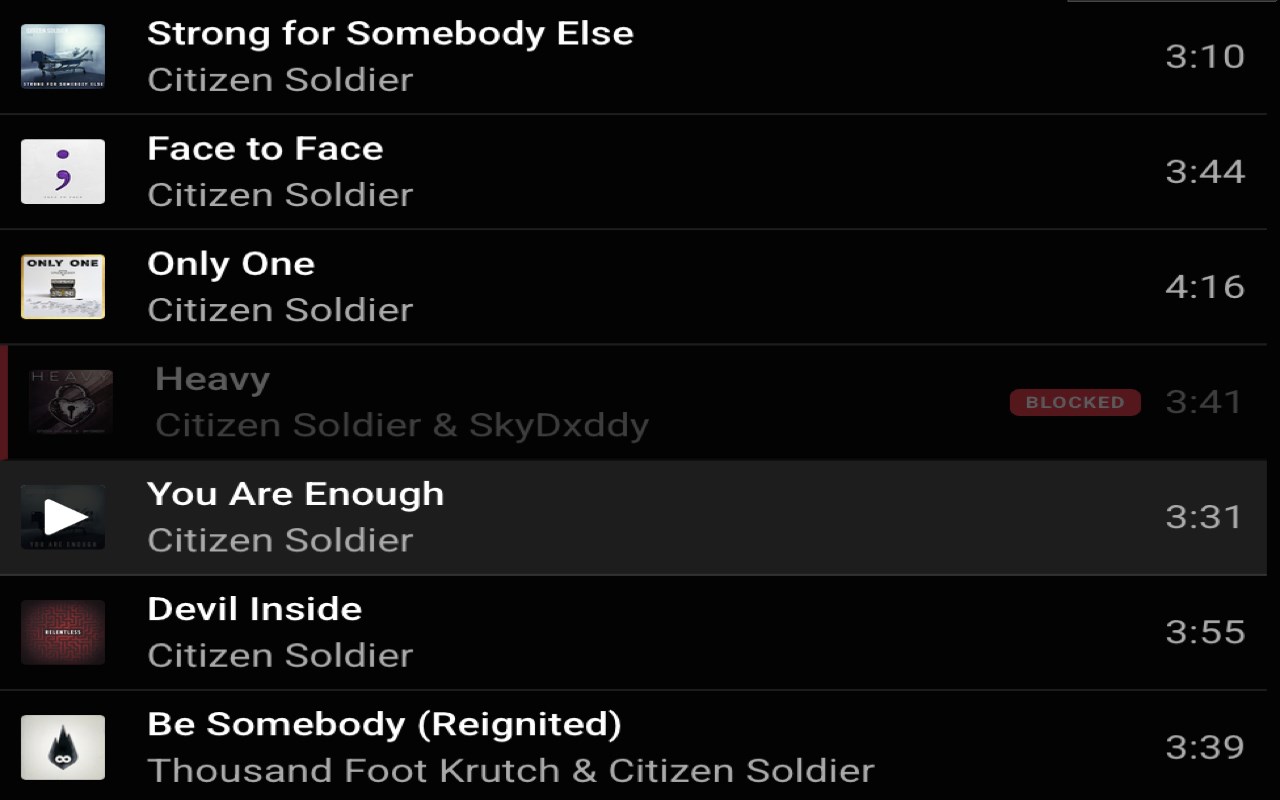
👁️ Queue Intelligence: Visually dims and crosses out blocked songs inside your "Up Next" panel, injects an absolute-positioned "BLOCKED" capsule badge, and displays a counter badge in the header.
🚫 Click Protection: Restricts clicks on blocked queue elements, preventing accidental selections.
🔍 Recommendation Filtering: Visual layout-safe suppression blurs blocked items on home grids, mixes, and shelves with a custom translucent overlay badge, preserving grid alignment.
🎨 Premium Glass Dashboard UI: Multi-list dashboard popup showing Blocked Songs, Blocked Albums, and Blocked Artists concurrently, with real-time search filtering, tag removal fade animations, and a Live Now Playing Card.
🔒 100% Local & Secure: No tracker scripts, no third-party libraries, and zero external network calls. Your blocklist syncs securely using Chrome's native storage profile bridge.
YTM Block 是做什么的
YTM Block 是一款面向 Edge 的实用工具类扩展,主要用来解决浏览器里某类具体的小问题。官方对它的介绍是:Block artists on YouTube Music to automatically skip their tracks.在微软 Edge 加载项商店上,它当前版本 1.0.0,约 6 名用户。
适合什么人用
从功能定位看,YTM Block 更适合想补上浏览器原生缺失功能的用户。如果你平时只是偶尔遇到相关需求,用浏览器自带功能也能凑合;但如果这件事每天都发生,装一个专门处理它的扩展通常比手动操作省事得多。
怎么安装 YTM Block
- 打开微软 Edge 加载项商店上的官方页面;
- 点「添加到浏览器」并确认权限提示;
- 装好后在扩展列表里固定图标,方便随时开关。
本站只做索引与介绍,安装包来自官方商店。如果商店页面提示当前地区不可用,说明该扩展未在你所在区域上架。
常见问题
YTM Block 是免费的吗?
YTM Block 在微软 Edge 加载项商店免费提供下载。它是浏览器扩展,装上就能直接用,不需要注册账号。
YTM Block 安全吗?
它只申请了 0 项权限,范围比较克制,没有申请「读取所有网站数据」这种大权限。
YTM Block 支持哪些浏览器?
当前收录的版本来自微软 Edge 加载项商店,适用于 Edge。同一个扩展在其他商店可能有对应版本,但功能与版本号不一定相同。
怎么卸载 YTM Block?
在扩展管理页找到 YTM Block,点移除即可。它在本地保存的设置会一起清掉,不会残留数据。
权限清单 来自 manifest.json 原文
接口权限 3
activeTabcontextMenusstorage
其他商店也有这款
同一款扩展在不同浏览器下的版本,权限与更新节奏可能不同
