xRM MDA EN
Xrm World · EEdge MV3
Productivity tools for Power Apps Makers
截图
简介
xRM MDA is an extension for Power Apps model-driven apps and maker pages. It combines naming rules, record helpers, metadata navigation, JSON payload tooling, and generated documentation in one extension.
Some utilities are familiar to teams that already use Level Up style tooling. The difference here is the shortcut-first workflow, the reusable template flow, and the additional maker-focused documentation and naming features.
(Special thanks to Natraj Yegnaraman and Level Up for Dynamics 365 for their contribution to the Dynamics 365 maker community.)
What makes xRM MDA different
- Keyboard shortcuts for high-frequency record and metadata actions.
- Metadata launch from both record context and list context.
- Reusable template workflow for saving and reapplying form values.
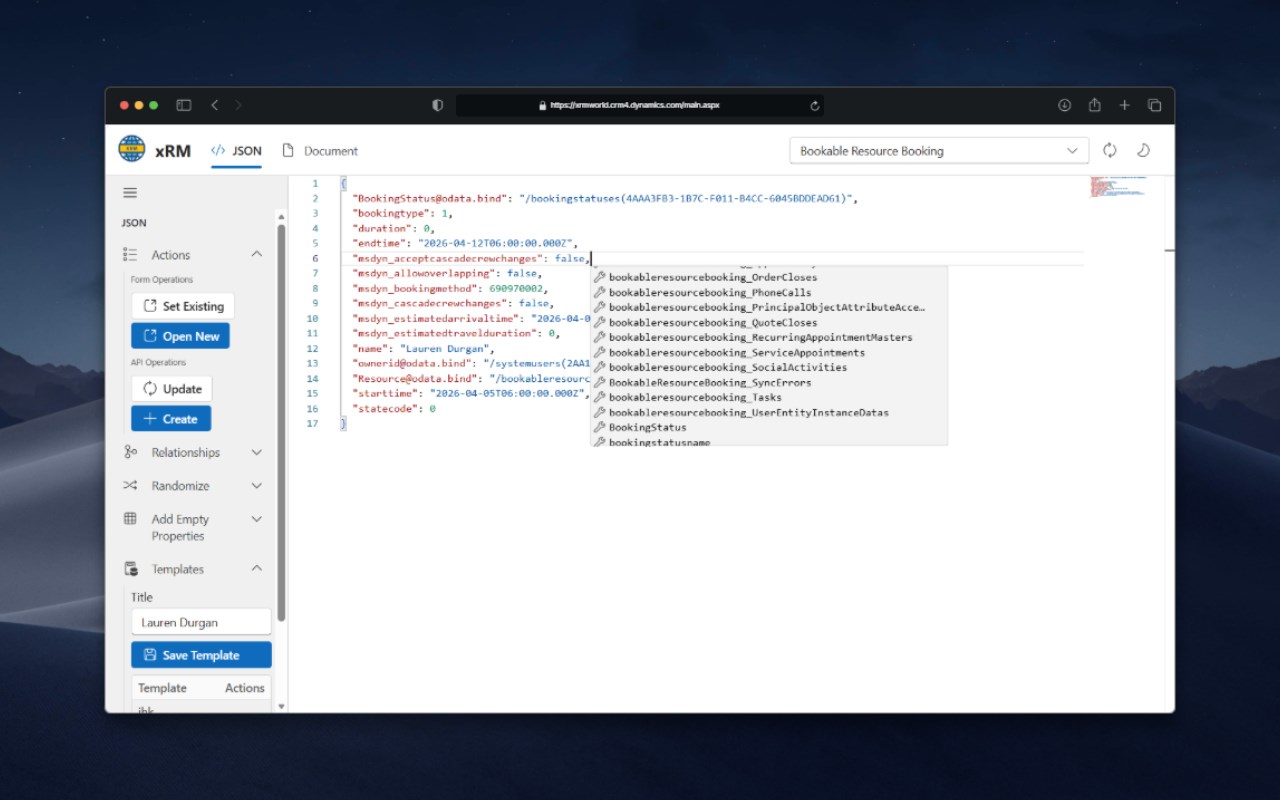
- JSON object manipulator for record payload inspection, editing, create, update, and template work.
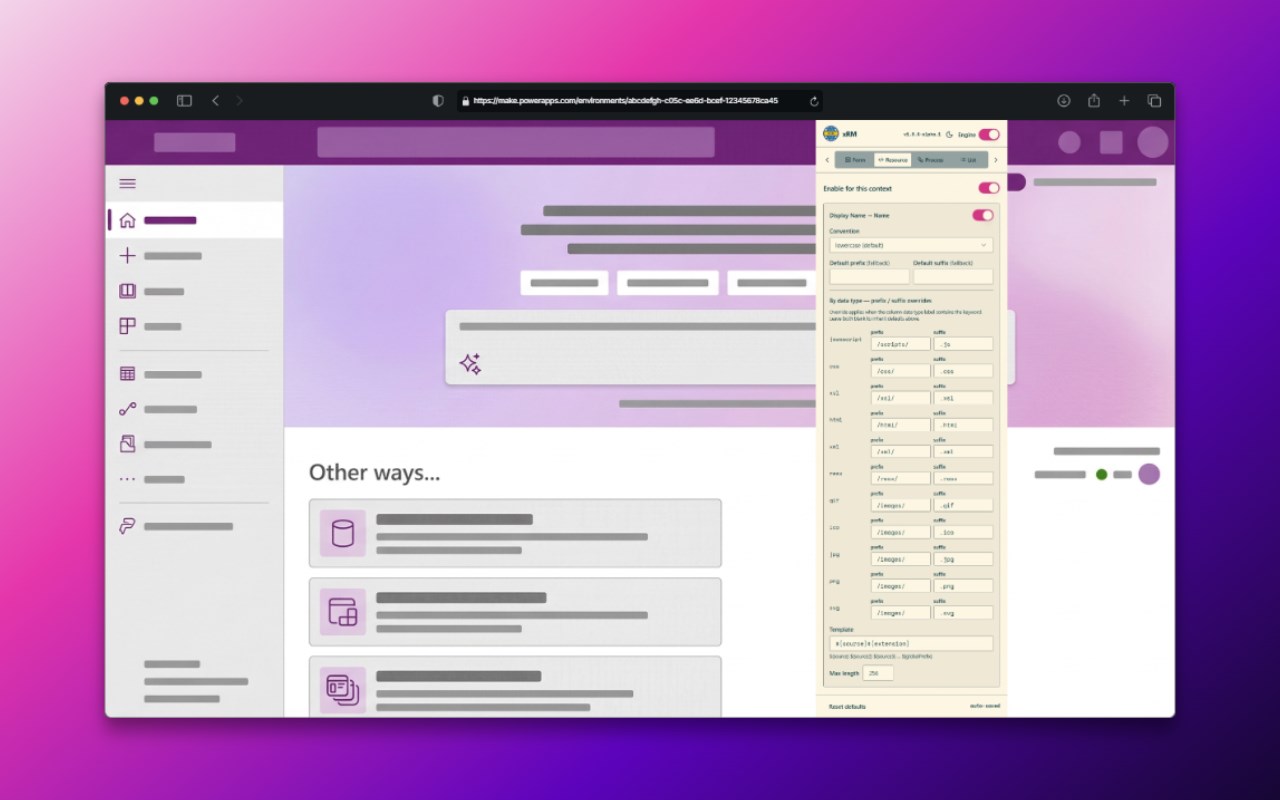
- Context-aware naming rules across maker surfaces.
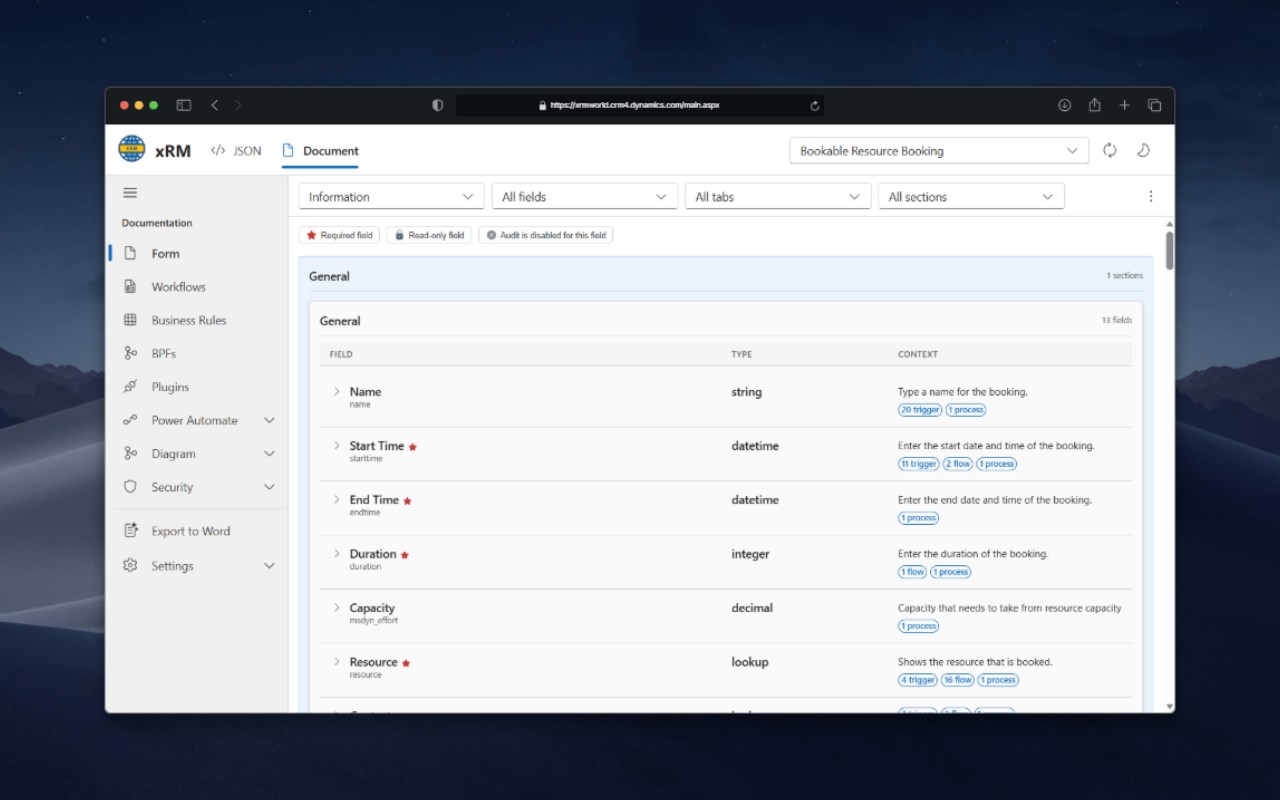
- Built-in documentation views for forms, workflows, diagrams, and security.
- Navigation explorer for moving between table metadata surfaces from inside the app.
Keyboard-first workflow
xRM MDA is designed for users who want frequent actions on the keyboard instead of repeated popup interaction.
- Alt+F to set a fake value on the current record or fill the full form.
- Alt+F+N to set fake values in a new record.
- Alt+G to toggle Godmode.
- Alt+N to show or hide logical names.
- Alt+C to clone the current record.
- Alt+I to copy the current record ID.
- Alt+M to open metadata tools for the current entity.
Record and testing utilities
- Clone the current record.
- Copy the current record ID.
- Show or hide logical names.
- Toggle Godmode while customizing or testing.
- Keep Godmode and logical name visibility available across navigation.
- Fill the current form with fake data.
- Fill a new record with fake data.
- Reuse saved values through templates.
Template workflow
The extension includes a persistent template workflow for repeated test and setup scenarios.
- Save current form values for reuse.
- Store templates from the popup and JSON tooling surface.
- Reapply templates on later records.
- Use templates together with fake-fill and payload editing flows.
JSON object manipulator
The JSON object manipulator is one of the main advanced features in xRM MDA.
- Inspect record payloads directly.
- Edit values in a JSON-oriented view.
- Open existing records or create new ones.
- Run update and create style operations.
- Work with relationships.
- Add empty properties.
- Randomize values.
- Save payloads as templates.
Metadata access
xRM MDA exposes metadata entry points from multiple contexts.
- Open metadata tools from the current record.
- Open metadata tools from the current list view.
- Use the navigation explorer to search tables and jump between metadata surfaces.
Naming and maker automation
The naming engine applies rule-driven naming behavior across maker experiences.
- Global publisher prefix configuration.
- Table naming rules.
- Column naming rules.
- Column data-type overrides such as lookup, yes/no, choice, and text.
- Form naming rules for tabs and sections.
- Template token support in form naming rules.
- Web resource path and extension rules.
- Process naming support.
- Warning when the detected publisher prefix does not match the configured global prefix.
Documentation and analysis features
xRM MDA also includes documentation tooling that goes beyond quick record utilities.
- Form documentation with field metadata.
- Filters for fields, tabs, and sections.
- Visual state indicators such as required, read-only, and audit state.
- Workflow cross-reference with triggering attributes.
- Visibility into workflows, business rules, BPFs, plugins, and Power Automate.
- Relationship diagrams with SVG and Draw.io export.
- Security role matrix by privilege depth.
- Word export of collected documentation.
Who should use this
- Power Platform makers.
- Dynamics 365 consultants.
- Admins.
- Solution engineers.
- Teams that repeat the same record setup and testing flows.
- Teams that want more keyboard-driven execution.
- Teams that want naming automation and documentation in the same extension.
Positioning
If your team already uses Level Up style utilities, xRM MDA is strongest where you need:
- More direct shortcut-driven execution.
- A stronger template and fake-fill workflow.
- JSON payload editing from inside the extension.
- Naming automation for maker surfaces.
- Built-in documentation, relationship, and security views.
Summary
xRM MDA is focused on faster maker workflows inside Dynamics 365 and Power Apps through shortcuts, templates, fake-fill tools, naming rules, metadata entry points, JSON payload tooling, and technical documentation views.
xRM MDA 是做什么的
xRM MDA 是一款面向 Edge 的实用工具类扩展,主要用来解决浏览器里某类具体的小问题。官方对它的介绍是:Productivity tools for Power Apps Makers在微软 Edge 加载项商店上,它当前版本 5.0.48-alpha.1,约 23 名用户。
适合什么人用
从功能定位看,xRM MDA 更适合想补上浏览器原生缺失功能的用户。如果你平时只是偶尔遇到相关需求,用浏览器自带功能也能凑合;但如果这件事每天都发生,装一个专门处理它的扩展通常比手动操作省事得多。
怎么安装 xRM MDA
- 打开微软 Edge 加载项商店上的官方页面;
- 点「添加到浏览器」并确认权限提示;
- 装好后在扩展列表里固定图标,方便随时开关。
本站只做索引与介绍,安装包来自官方商店。如果商店页面提示当前地区不可用,说明该扩展未在你所在区域上架。
常见问题
xRM MDA 是免费的吗?
xRM MDA 在微软 Edge 加载项商店免费提供下载。它是浏览器扩展,装上就能直接用,不需要注册账号。
xRM MDA 安全吗?
它只申请了 0 项权限,范围比较克制,没有申请「读取所有网站数据」这种大权限。
xRM MDA 支持哪些浏览器?
当前收录的版本来自微软 Edge 加载项商店,适用于 Edge。同一个扩展在其他商店可能有对应版本,但功能与版本号不一定相同。
怎么卸载 xRM MDA?
在扩展管理页找到 xRM MDA,点移除即可。它在本地保存的设置会一起清掉,不会残留数据。
权限清单 来自 manifest.json 原文
接口权限 6
activeTabidentityscriptingstoragetabswebNavigation