
Wordmemo Translate EN
Stanislav Khatko · EEdge MV3
Translate selected text using Google or Bing. Save words to Wordmemo and learn them. Supports 100+ languages.
<all_urls>),意味着它可以读取你在任意站点的页面内容,包括已登录的页面。这是许多扩展正常工作的必要条件,但也值得你确认来源可信。
截图
简介
Wordmemo Translate - Instant Translation and Vocabulary Building
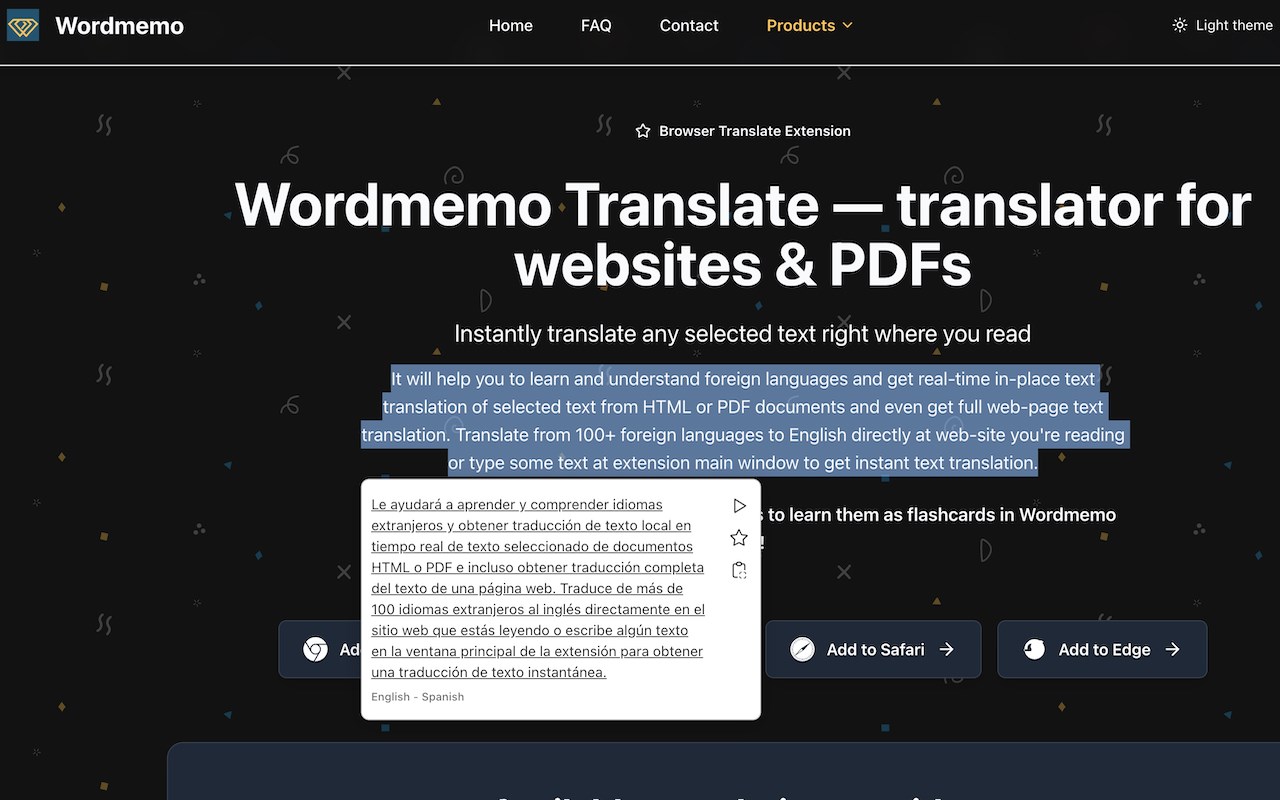
Wordmemo Translate is a powerful and intuitive browser extension that makes translating text on any webpage effortless. Whether you are reading articles, browsing social media, or studying in a foreign language, Wordmemo Translate puts translation right at your fingertips. Save translated words to Wordmemo and learn them with spaced repetition to build your vocabulary.
Compatible with Safari, Chrome, Edge, and Firefox browsers.
KEY FEATURES:
Instant Translation
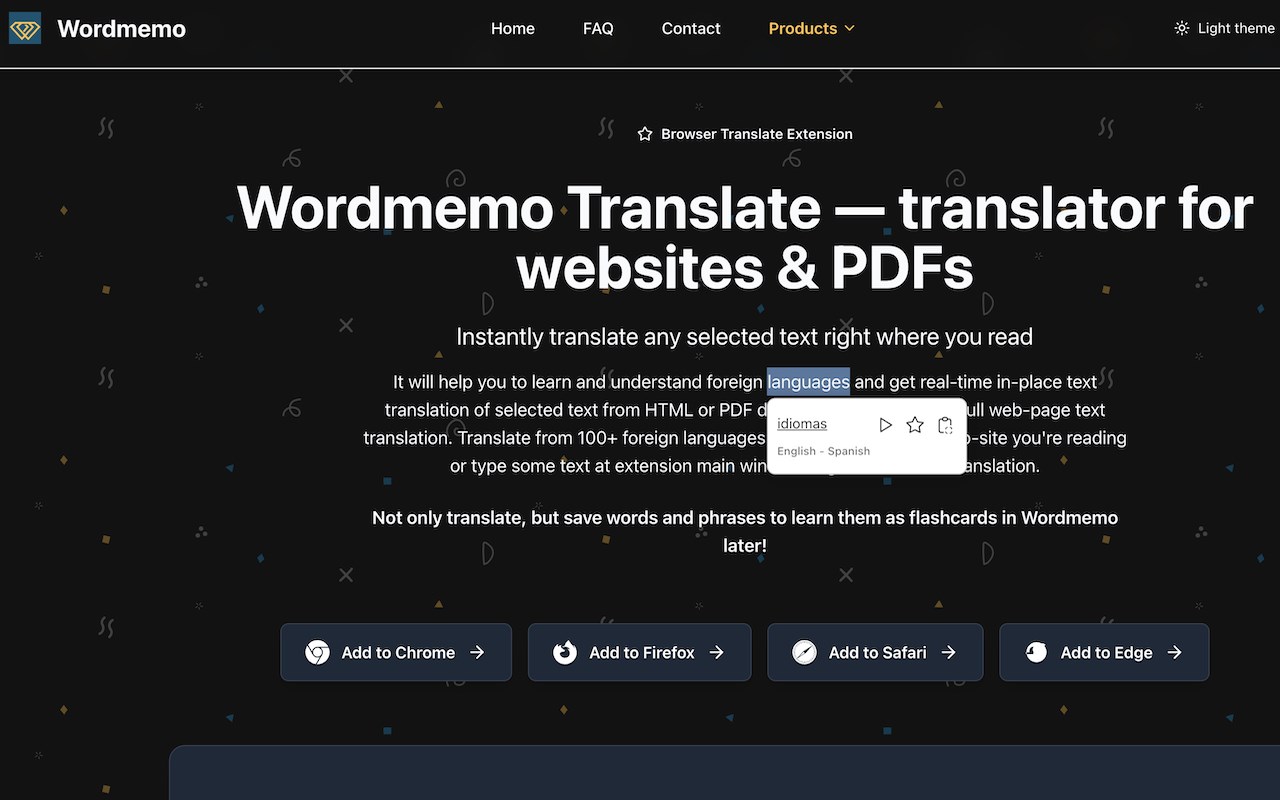
- Double-click any word or phrase to translate instantly
- Select text and click the translation icon that appears
- Right-click context menu option for quick translation
- Translations appear in a popup right next to your selection
- Click the star icon to save words to Wordmemo for vocabulary building
- Click translation text to open in main extension popup for editing
100+ Languages Supported
- Translate between 100+ languages including:
English, Spanish, French, German, Italian, Portuguese, Russian, Japanese, Chinese, Korean, Arabic, Hindi, and many more
- Automatic source language detection
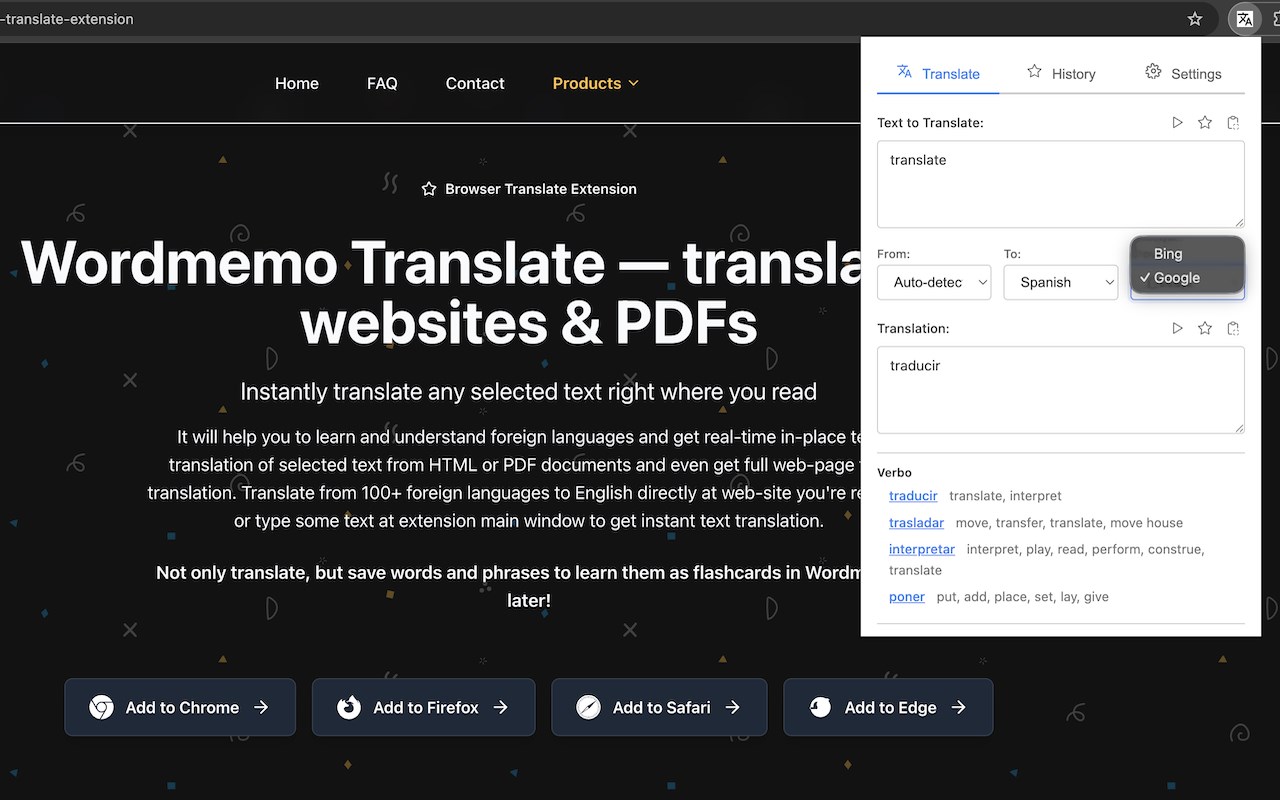
- High-quality translations powered by Google or Bing
- Choose your preferred translation provider
Vocabulary Building with Wordmemo
- Save translated words directly to Wordmemo with one click
- Mark translations as favorites for easy access
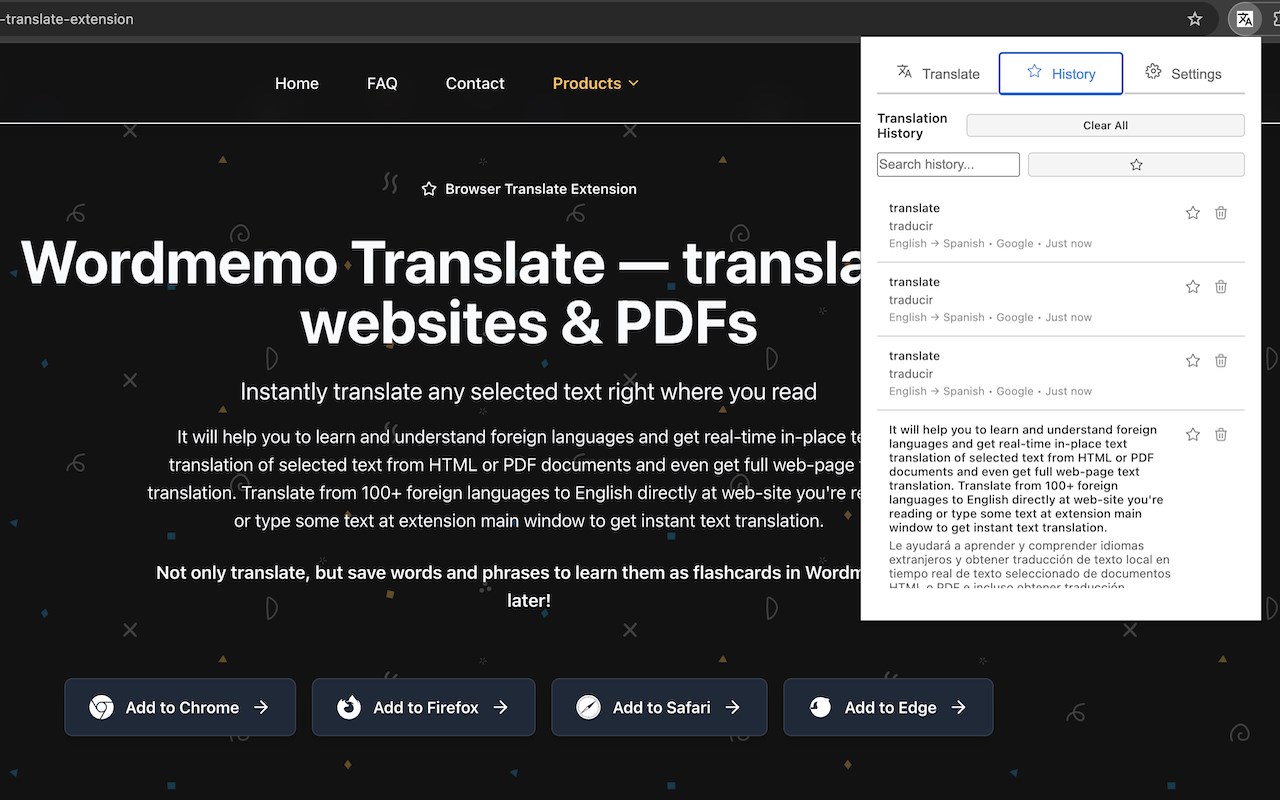
- Filter history by favorites
- Learn your saved words with spaced repetition on Wordmemo.net
- Build your vocabulary while browsing the web
- Track your learning progress and review words efficiently
Smart Translation Features
- Dictionary definitions with word types, meanings, and examples
- Spell correction suggestions
- Transcription for pronunciation
- Source language detection with alternatives
- Reverse translation support
- Letter case preservation
- Translation history with search functionality
Customizable Experience
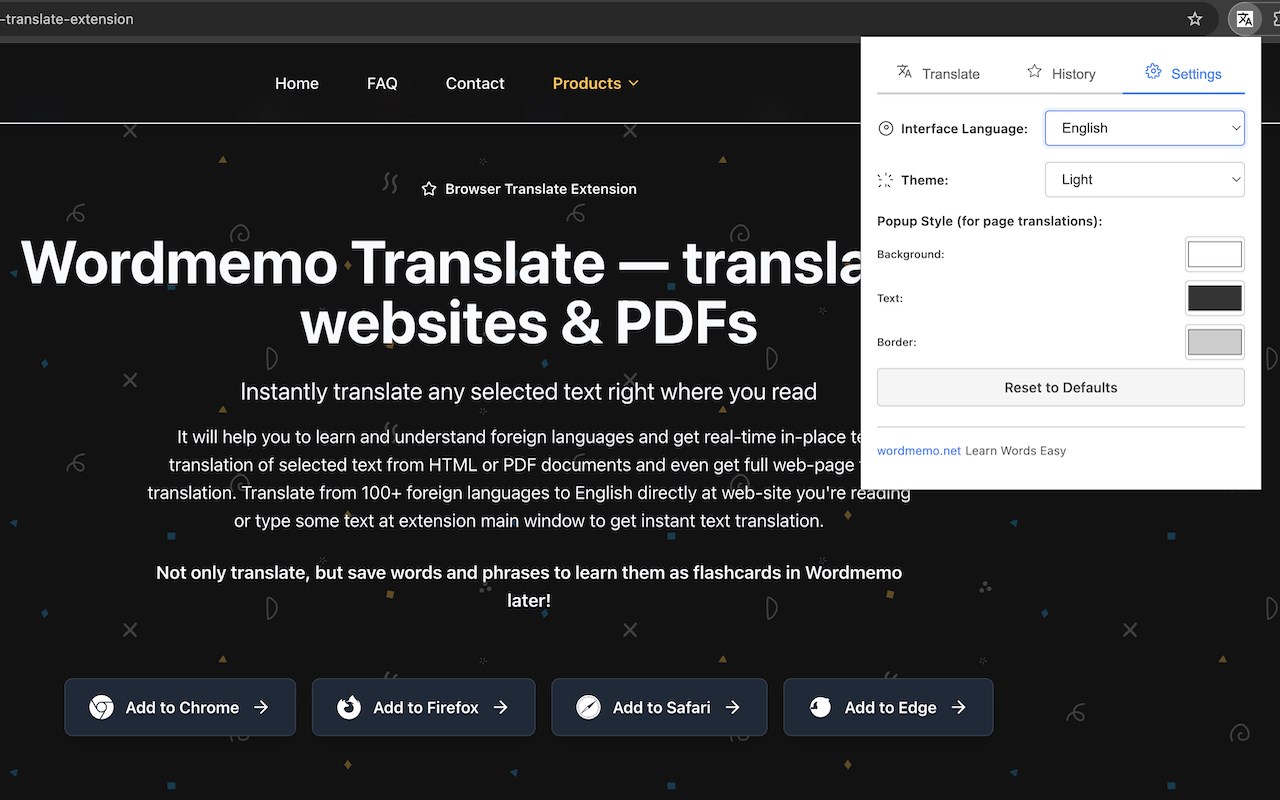
- Customize popup colors (background, text, border)
- Choose your preferred target language
- Select translation provider (Google or Bing)
- Light and dark theme support
- Interface language selection (10 languages supported)
- Clean, modern interface that does not distract from your browsing
Text-to-Speech
- Play source text in original language
- Play translated text in target language
- Browser-native speech synthesis
- Pause and stop playback controls
Smart Interface
- Tabbed interface: Translate, History, and Settings
- Auto-translation with debouncing
- Editable translation output
- Copy translations with one click
- Save to favorites from both input and output
- Translation history with search and filter
- Delete individual history entries
Efficient and Fast
- Fast translation with minimal delay
- Direct integration with Google and Bing translation services
- No API keys required for basic usage
- Smart positioning of translation popup
- Popup follows text selection on scroll
- Responsive design for all screen sizes
Privacy-Focused
- All translations are processed securely
- No personal information collected
- Translation history stored locally
- All communication is encrypted (HTTPS)
- No tracking or analytics
PERFECT FOR:
- Students learning new languages
- Professionals working with international content
- Travelers browsing foreign websites
- Researchers reading academic papers in other languages
- Anyone who needs quick translations while browsing
HOW IT WORKS:
1. Browse any webpage in your browser (Safari, Chrome, Edge, or Firefox)
2. Double-click a word or select text
3. Click the translation icon that appears
4. View the translation instantly in a popup
5. Click the star icon to save words to Wordmemo (requires authentication)
6. Visit Wordmemo.net to learn your saved words with spaced repetition
7. Copy the translation with one click
8. Access full translation interface via extension icon
TECHNICAL FEATURES:
Content Script Features (content.js):
- Text selection detection with debouncing
- Translation icon positioning (bottom-right of selection, or top-left for RTL)
- Translation popup with smart positioning
- Popup follows selection on scroll and resize
- Text-to-speech for source and translated text
- Copy to clipboard functionality
- Save to favorites integration
- Click translation to open in main popup
- Error handling with localized messages
- Support for RTL (Right-to-Left) languages
- Editable element detection
- Multi-line selection support
Popup Interface Features (popup.js):
- Tabbed interface: Translate, History, Settings
- Auto-translation with 500ms debounce
- Language selection with localized names
- Provider selection (Google or Bing)
- Dictionary display with word types and examples
- Spell correction suggestions
- Transcription display
- Translation history with search
- Favorites filtering
- Theme customization (Light/Dark)
- Color customization (background, text, border)
- Interface language selection
- Text-to-speech controls
- Copy functionality
- Save to favorites
- Reverse translation
- Letter case preservation
SETUP:
- No complex configuration needed
- Works out of the box
- Configure your preferred target language in the extension settings
- Customize popup colors to match your style
- Select your preferred translation provider
- Choose interface language
SUPPORT:
Questions or need help? Contact us at stanislav@wordmemo.net
Visit wordmemo.net for more language learning tools and resources.
---
Wordmemo Translate makes the web accessible in any language. Download now and break down language barriers while building your vocabulary!
Wordmemo Translate 是做什么的
Wordmemo Translate 是一款面向 Edge 的实用工具类扩展,主要用来解决浏览器里某类具体的小问题。官方对它的介绍是:Translate selected text using Google or Bing. Save words to Wordmemo and learn them. Supports 100+ languages.在微软 Edge 加载项商店上,它当前版本 1.0.2,约 26 名用户。
适合什么人用
从功能定位看,Wordmemo Translate 更适合想补上浏览器原生缺失功能的用户。如果你平时只是偶尔遇到相关需求,用浏览器自带功能也能凑合;但如果这件事每天都发生,装一个专门处理它的扩展通常比手动操作省事得多。需要注意的是它作用于所有网站,装上后建议先观察一两天,确认不影响常用站点的正常使用。
怎么安装 Wordmemo Translate
- 打开微软 Edge 加载项商店上的官方页面;
- 点「添加到浏览器」并确认权限提示;
- 装好后在扩展列表里固定图标,方便随时开关。
本站只做索引与介绍,安装包来自官方商店。如果商店页面提示当前地区不可用,说明该扩展未在你所在区域上架。
常见问题
Wordmemo Translate 是免费的吗?
Wordmemo Translate 在微软 Edge 加载项商店免费提供下载。它是浏览器扩展,装上就能直接用,不需要注册账号。
Wordmemo Translate 安全吗?
它只申请了 0 项权限,范围比较克制,没有申请「读取所有网站数据」这种大权限。
Wordmemo Translate 支持哪些浏览器?
当前收录的版本来自微软 Edge 加载项商店,适用于 Edge。同一个扩展在其他商店可能有对应版本,但功能与版本号不一定相同。
怎么卸载 Wordmemo Translate?
在扩展管理页找到 Wordmemo Translate,点移除即可。它在本地保存的设置会一起清掉,不会残留数据。
权限清单 来自 manifest.json 原文
站点访问(可选) 1
https://*/*
接口权限 5
activeTabcontextMenusscriptingstoragetabs