
VoiceWave:ChatGPT、DeepSeek 及其他 AI 聊天机器人的语音模式
VoiceWave · EEdge MV3
与 DeepSeek、ChatGPT 和其他 AI 聊天机器人进行语音聊天。启用语音模式、语音识别、文本转语音等功能。
<all_urls>),意味着它可以读取你在任意站点的页面内容,包括已登录的页面。这是许多扩展正常工作的必要条件,但也值得你确认来源可信。
截图
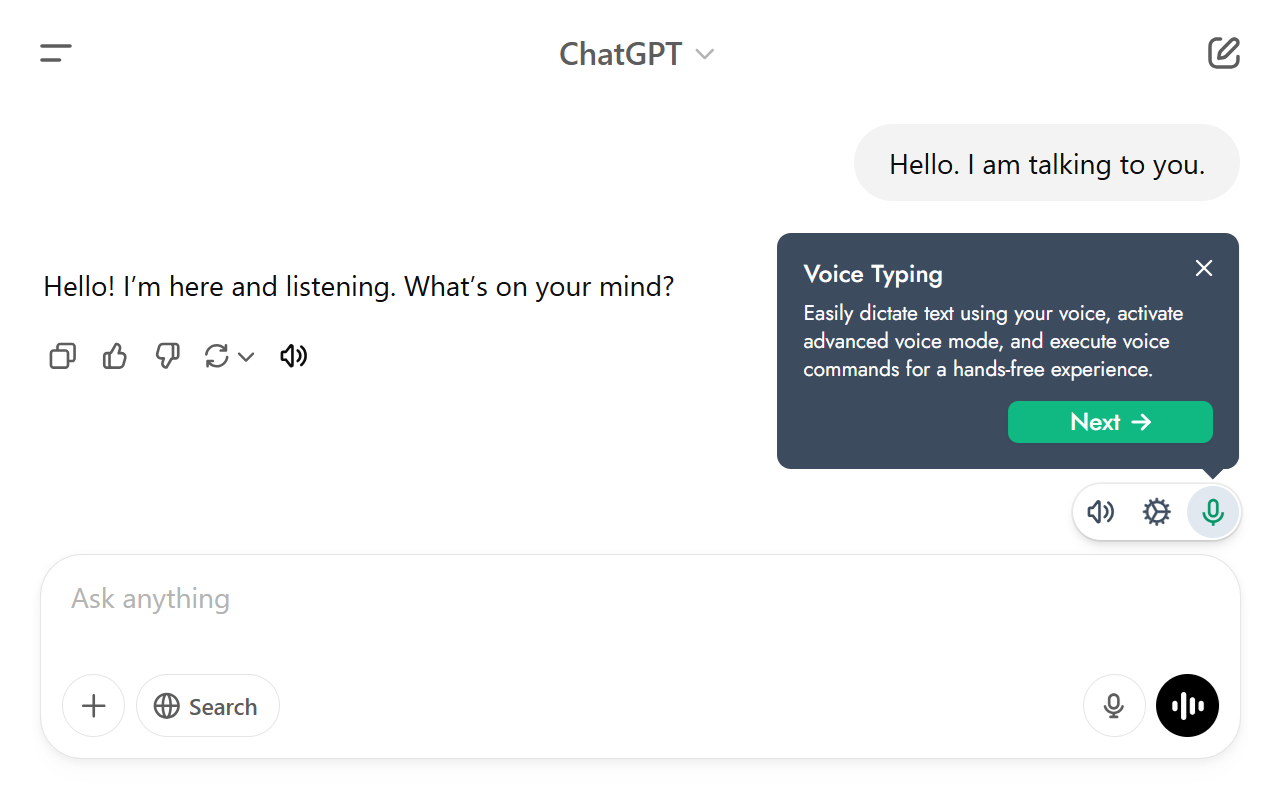
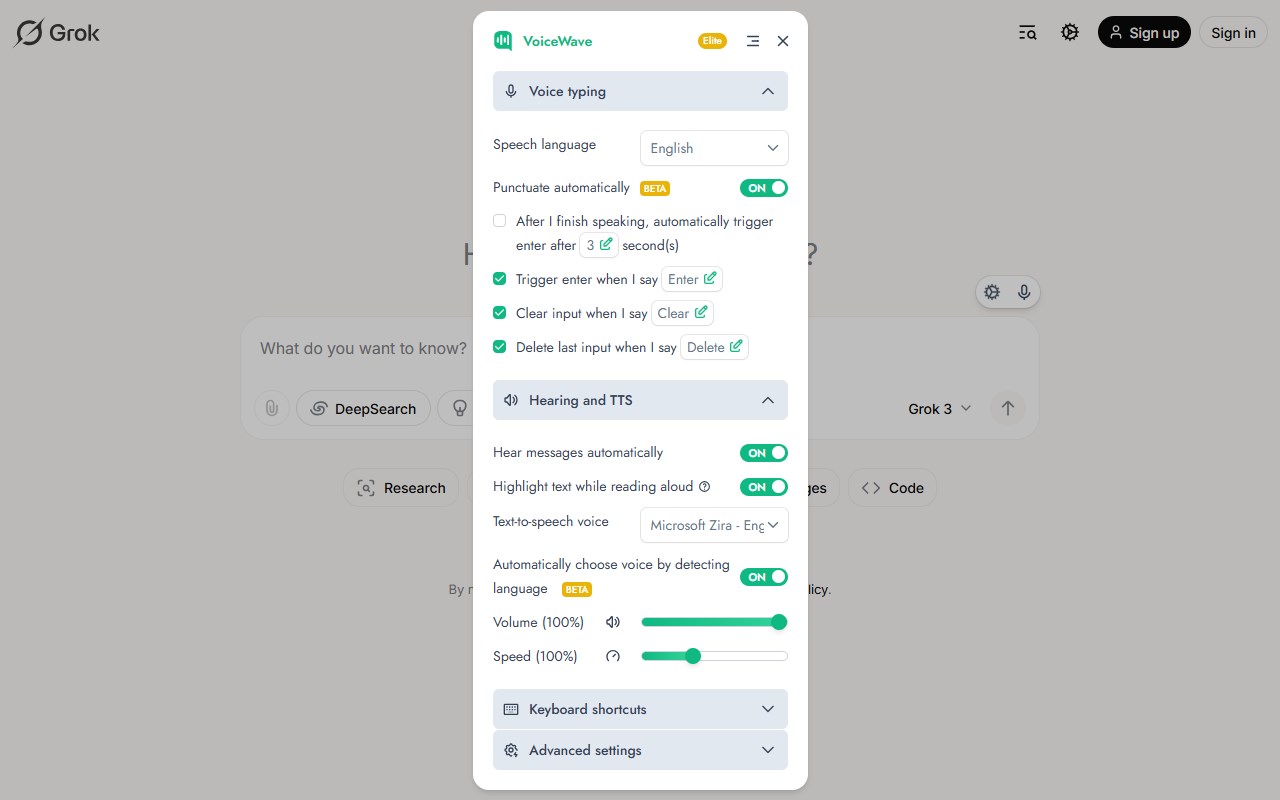


简介
The VoiceWave extension enhances ChatGPT, DeepSeek, and other AI chatbots with voice control and read-aloud features using advanced voice recognition and text-to-speech (TTS) technologies. It enables seamless voice conversations with AI chatbots in multiple languages, eliminating the need for typing. You can send voice queries and listen to AI responses effortlessly. Additionally, VoiceWave includes read-aloud (TTS) and advanced voice typing features with customizable commands, available across all websites.
Voice control for ChatGPT, DeepSeek, Mistral AI, and Poe which allows you to talk to the AI chatbots using your voice.
Extension features:
🗣 Real-Time Voice Chat: Speak to ChatGPT, DeepSeek, and other AI chatbots and hear responses instantly in a natural-sounding voice.
🌍 145+ Languages Supported: Interact with your favorite AI chatbot in your preferred language.
🔈 Voice Replay: Adds a listen button to each message on the AI chatbots for listening to messages again.
✨ Automatic Text Highlight: Highlights the phrase or sentence you're currently listening to, making it easier to follow along with the spoken words by visually marking the text.
🎙 Customizable Voice Commands: Assign voice commands to send messages, modify voice input, or perform additional actions.
✍ Auto-Punctuation: Voice inputs are automatically formatted and punctuated for better readability.
⌨ Voice Typing for All Websites: Transcribes your speech to text in real-time, allowing you to use your voice to type in text fields on any website.
📖 Advanced Read-Aloud for All Websites: Listen to articles, emails, documents, and any text on any website, with the spoken sentences or phrases dynamically highlighted on the page for enhanced comprehension and ease of reading.
⚙ Personalized Settings: Personalize your experience with extensive language options, various text-to-speech voices, customizable keyboard shortcuts, automatic language detection, and more.
This extension lets you voice chat with ChatGPT, DeepSeek, and other AI chatbots using your microphone. Simply ask questions and hear AI responses in a natural voice. Perfect for users tired of typing out queries and responses to the AI. Plus, you can also use this read-aloud feature to hear the AI's responses read back to you in a clear and natural voice. This feature is perfect for users who prefer to listen instead of read, or who want to learn new languages by listening to AI's responses in different tongues. Maintain continuous voice dialogue with AI chatbots while multitasking, or working - your AI companion stays responsive through voice mode.
This extension is easy to install and use, and it works seamlessly with the AI's existing features. Simply install the extension, turn on the microphone, and start chatting with the AI like never before! Voice control (voice recognition) is available in more than 145 languages including English, Japanese, German, Spanish, Chinese, Russian, Korean, and more.
Usage guide:
🗣 Advanced AI Voice Mode:
• After installing this extension, access the settings by clicking the ⚙️ icon located near the input field of the AI. Set your input voice language, and text-to-speech voice, and customize everything you want.
• To activate ChatGPT voice control, simply click the 🎙️ icon or press the "X" key outside the input field and start speaking.
• To start a voice chat with DeepSeek AI, click the 🎙️ icon or press the “X” key outside the input field. Release the key when you finish speaking. DeepSeek AI will respond using your selected text-to-speech voice.
• For longer voice inputs, press and hold the “X” key while speaking, then release it when you're done.
• To replay or listen to a specific message, click the 🔈 icon located below the message.
• To turn read-aloud on or off, simply click on the 🔈 icon located near the AI's input field.
⌨ Voice Typing for All Websites:
• For voice typing, on any website just right-click on the input field, choose “Voice typing” from the menu, click the 🎙️ icon, and start speaking to type without using the keyboard.
📖 Advanced Read-Aloud for All Websites:
• To listen to specific text on any webpage, select the desired text, right-click, and choose the “Listen” option from the context menu. This feature allows you to hear only the text you've highlighted.
Don't hesitate to explore the settings and customize your experience to best suit your needs!
Plans:
Free: All features are available. Limited access to premium features.
Premium: Unlimited access to all features.
VoiceWave:ChatGPT、DeepSeek 及其他 AI 聊天机器人的语音模式 是做什么的
VoiceWave:ChatGPT、DeepSeek 及其他 AI 聊天机器人的语音模式 是一款面向 Edge 的效率工具类扩展,主要用来管住注意力、屏蔽干扰站点、记录时间。官方对它的介绍是:与 DeepSeek、ChatGPT 和其他 AI 聊天机器人进行语音聊天。启用语音模式、语音识别、文本转语音等功能。在微软 Edge 加载项商店上,它当前版本 5.0.0,评分 4.5(67 人评价),约 22,300 名用户。
适合什么人用
从功能定位看,VoiceWave:ChatGPT、DeepSeek 及其他 AI 聊天机器人的语音模式 更适合想专注工作学习、减少无效刷网页的用户。如果你平时只是偶尔遇到相关需求,用浏览器自带功能也能凑合;但如果这件事每天都发生,装一个专门处理它的扩展通常比手动操作省事得多。需要注意的是它作用于所有网站,装上后建议先观察一两天,确认不影响常用站点的正常使用。
怎么安装 VoiceWave:ChatGPT、DeepSeek 及其他 AI 聊天机器人的语音模式
- 打开微软 Edge 加载项商店上的官方页面;
- 点「添加到浏览器」并确认权限提示;
- 装好后在扩展列表里固定图标,方便随时开关。
本站只做索引与介绍,安装包来自官方商店。如果商店页面提示当前地区不可用,说明该扩展未在你所在区域上架。
常见问题
VoiceWave:ChatGPT、DeepSeek 及其他 AI 聊天机器人的语音模式 是免费的吗?
VoiceWave:ChatGPT、DeepSeek 及其他 AI 聊天机器人的语音模式 在微软 Edge 加载项商店免费提供下载。它是浏览器扩展,装上就能直接用,不需要注册账号。
VoiceWave:ChatGPT、DeepSeek 及其他 AI 聊天机器人的语音模式 安全吗?
它只申请了 0 项权限,范围比较克制,没有申请「读取所有网站数据」这种大权限。
VoiceWave:ChatGPT、DeepSeek 及其他 AI 聊天机器人的语音模式 支持哪些浏览器?
当前收录的版本来自微软 Edge 加载项商店,适用于 Edge。同一个扩展在其他商店可能有对应版本,但功能与版本号不一定相同。
怎么卸载 VoiceWave:ChatGPT、DeepSeek 及其他 AI 聊天机器人的语音模式?
在扩展管理页找到 VoiceWave:ChatGPT、DeepSeek 及其他 AI 聊天机器人的语音模式,点移除即可。它在本地保存的设置会一起清掉,不会残留数据。
权限清单 来自 manifest.json 原文
站点访问(可选) 1
<all_urls>
接口权限 4
contextMenusscriptingstoragetabs