
Video Resumer EN
mohamedsubarashi · EEdge MV3
Resume videos from where you left off. Works on all sites except adult content.
截图
简介
Video Resumer: Effortlessly Continue Watching Videos Across Websites
Video Resumer is a sophisticated browser extension crafted to enhance your online video experience by automatically tracking your viewing progress across a vast range of websites and video players. Whether you are switching sites, devices, or returning after several days, this extension ensures you can seamlessly resume watching from exactly where you left off. Designed to be universally compatible, Video Resumer works with all major video platforms, embedded players, custom players, and single-page applications, running discreetly in the background to capture playback positions and optionally take screenshot previews of each video you watch.
Unlike conventional resume features limited to specific platforms—such as YouTube’s native "Continue Watching" option—Video Resumer transcends site and account restrictions. It supports a broad spectrum of video players including HTML5, JavaScript-based players, iframe embeds, and shadow DOM implementations. The extension provides an elegant and intuitive interface with popup overlays that instantly display your recent viewing history, thumbnail previews, estimated timestamps, and quick access controls to resume or reset your progress. For supported sites, you benefit from the ability to jump back to your last-watched moment or explore additional video details with ease.
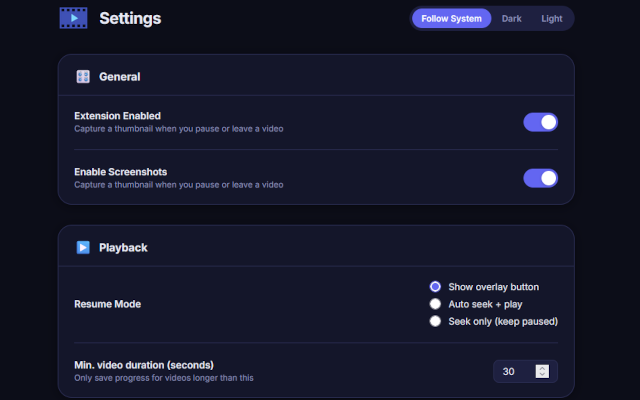
Advanced customization options allow you to tailor the tracking duration, storage capacity, screenshot privacy settings, and which domains or players you want the extension to monitor. This flexibility makes Video Resumer ideal for a variety of users, whether you are focused on studying lengthy lectures, binge-watching series, or following tutorials scattered across multiple platforms.
Behind the scenes, Video Resumer uses your browser’s local storage and modular scripts to deliver efficient performance without compromising privacy. All progress data and screenshots remain securely stored on your device and are never transmitted to external servers. You have complete control to manage your viewing history within the polished options menu, where you can wipe your data or export it as needed. Additional privacy features include the ability to disable screenshot capture, block certain domains—including adult content—and control automatic cleanup policies to prevent data bloat.
The extension also integrates seamlessly into your browsing workflow by offering context menu enhancements, intuitive keyboard shortcuts, and a clean, modern user interface that adapts fluidly to different sites and players. Accessibility and localization are central to its design, supporting multiple languages and visual themes to suit diverse user preferences. Video Resumer stands out as the premier cross-site and cross-player solution for retaining your video progress, saving time and eliminating the frustration of losing track in longer videos.
Key Features:
- Universal Video Position Tracking: Remembers your last watched timestamp across all supported websites and video players, enabling playback continuation regardless of platform.
- Screenshot Previews: Optionally captures thumbnail images of your paused video scenes to provide quick visual confirmation of your viewing position.
- Clean & Modern UI: Features an accessible popup interface and in-video overlays, offering easy access to history, resume buttons, reset options, and configurable settings.
- Smart Domain Filters: Includes built-in adult content blocklists and customizable domain exclusions to ensure tracking occurs only on desired websites.
- Robust Storage Management: Automatically cleans up old data and enforces storage limits to prevent overflow; users can manually wipe or export viewing history anytime.
- Privacy-First Controls: All data and screenshots are stored locally with no external transmission; fine-grained privacy settings allow customization of tracking behavior and data capture.
- Advanced Options & Localization: Users can configure personalized tracking rules, interface language, keyboard shortcuts, and visual themes for a fully tailored experience.
How It Works:
1. Install the Video Resumer extension from the browser’s extension store; it activates automatically across your tabs and websites.
2. When you start playing any online video, a background script monitors playback progress and captures an optional pause-screen snapshot for that video.
3. Upon leaving, refreshing, or returning to a video—whether on the same or a different device with browser sync enabled—Video Resumer automatically restores your playback to the saved timestamp, displaying preview images and duration info.
4. Access your video history and controls via the browser toolbar popup, which shows a sortable list of recent videos alongside thumbnail previews, watched time, and quick resume or reset buttons.
5. Customize your preferences in the Options menu, adjusting which sites to track, screenshot privacy settings, storage limits, and additional advanced configurations.
6. Manage your data with ease, deleting old or unwanted entries directly from the popup or options page, blocking specific domains, or disabling screenshot capture as desired.
7. Enjoy uninterrupted, frustration-free viewing sessions knowing you always pick up exactly where you left off—perfect for binge-watching, studying, or multitasking across multiple video sources.
Privacy: - No personal data collected. All video positions and screenshots are stored locally in your browser. Optional privacy controls let you disable screenshot storage, limit retention, and block tracking on unwanted domains. See our privacy policy for more details.
Video Resumer 是做什么的
Video Resumer 是一款面向 Edge 的实用工具类扩展,主要用来解决浏览器里某类具体的小问题。官方对它的介绍是:Resume videos from where you left off. Works on all sites except adult content.在微软 Edge 加载项商店上,它当前版本 1.4.0,约 18 名用户。
适合什么人用
从功能定位看,Video Resumer 更适合想补上浏览器原生缺失功能的用户。如果你平时只是偶尔遇到相关需求,用浏览器自带功能也能凑合;但如果这件事每天都发生,装一个专门处理它的扩展通常比手动操作省事得多。
怎么安装 Video Resumer
- 打开微软 Edge 加载项商店上的官方页面;
- 点「添加到浏览器」并确认权限提示;
- 装好后在扩展列表里固定图标,方便随时开关。
本站只做索引与介绍,安装包来自官方商店。如果商店页面提示当前地区不可用,说明该扩展未在你所在区域上架。
常见问题
Video Resumer 是免费的吗?
Video Resumer 在微软 Edge 加载项商店免费提供下载。它是浏览器扩展,装上就能直接用,不需要注册账号。
Video Resumer 安全吗?
它只申请了 0 项权限,范围比较克制,没有申请「读取所有网站数据」这种大权限。
Video Resumer 支持哪些浏览器?
当前收录的版本来自微软 Edge 加载项商店,适用于 Edge。同一个扩展在其他商店可能有对应版本,但功能与版本号不一定相同。
怎么卸载 Video Resumer?
在扩展管理页找到 Video Resumer,点移除即可。它在本地保存的设置会一起清掉,不会残留数据。
权限清单 来自 manifest.json 原文
接口权限 1
storage
其他商店也有这款
同一款扩展在不同浏览器下的版本,权限与更新节奏可能不同
