
VEO Automation Google Flow
LumenAutomations · EEdge MV3
Batch generate and auto-download videos and images on Google Flow.
截图
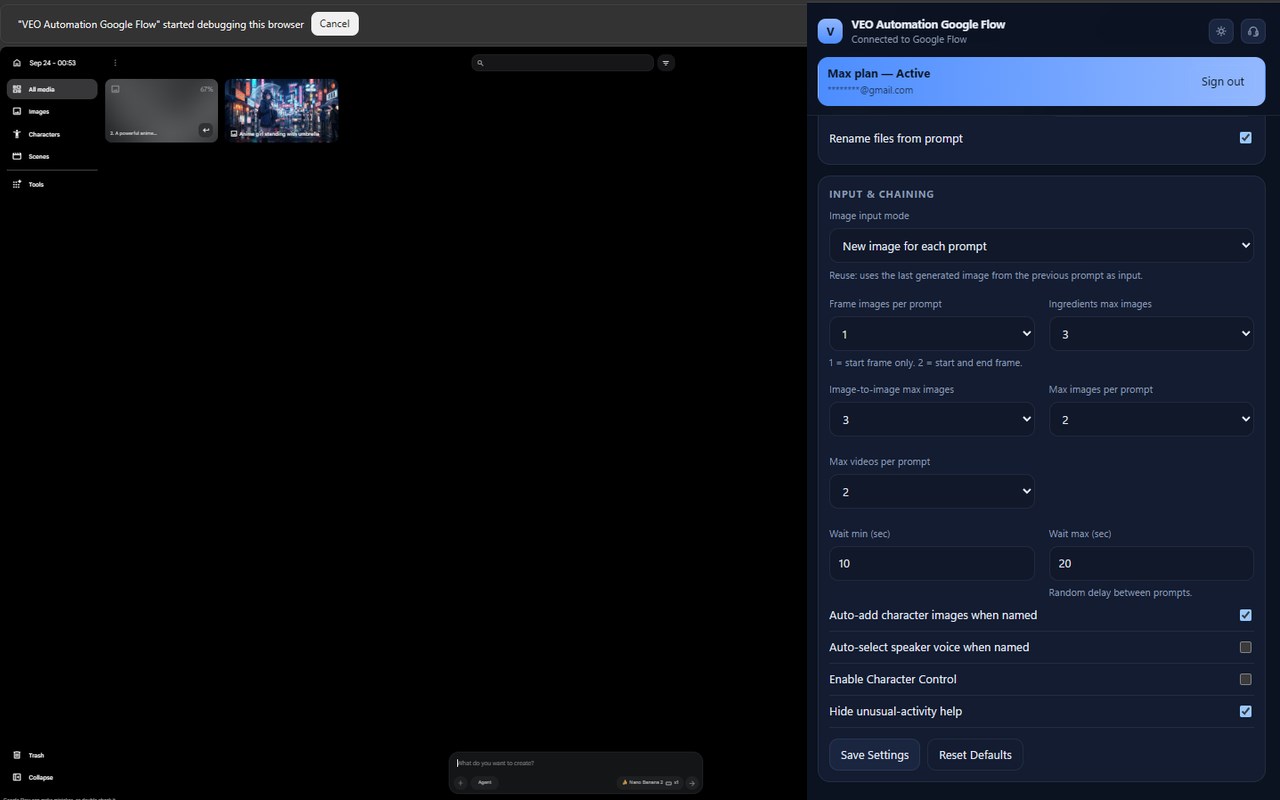
简介
Auto VEO and Nano Banana your prompts at scale. Batch generate and auto-download videos and images on Google Flow.
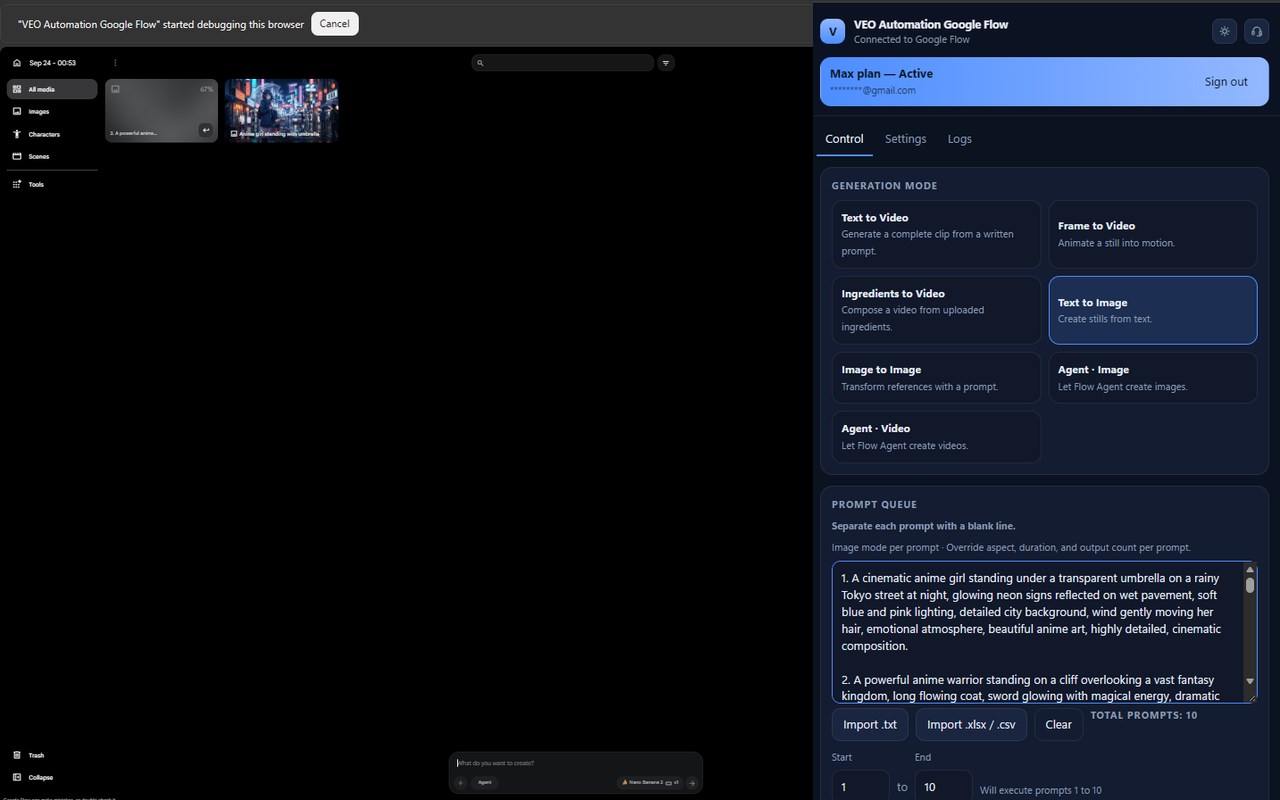
VEO Automation Google Flow is an Auto VEO tool for Google Flow (flow.google.com). Open a Flow project, load your prompt list in the side panel, and start the queue. The extension fills each prompt, applies your settings, submits the job, and downloads the result.
It turns Google Flow into a batch engine: auto-submit prompts, auto-generate videos and images, and auto-download files at scale.
What VEO Automation does
- Runs a prompt queue so you do not fill each prompt by hand
- Batch generates AI videos and images, including concurrent prompts (up to 6)
- Auto-downloads videos and images in the quality you pick
- Handles long queues with retries, delays, and folder verify
Key features
Auto video batch
Queue many prompts and let VEO Automation:
- Use the current Flow project, or create one if you are not already in a project
- Fill the prompt and settings
- Submit generation
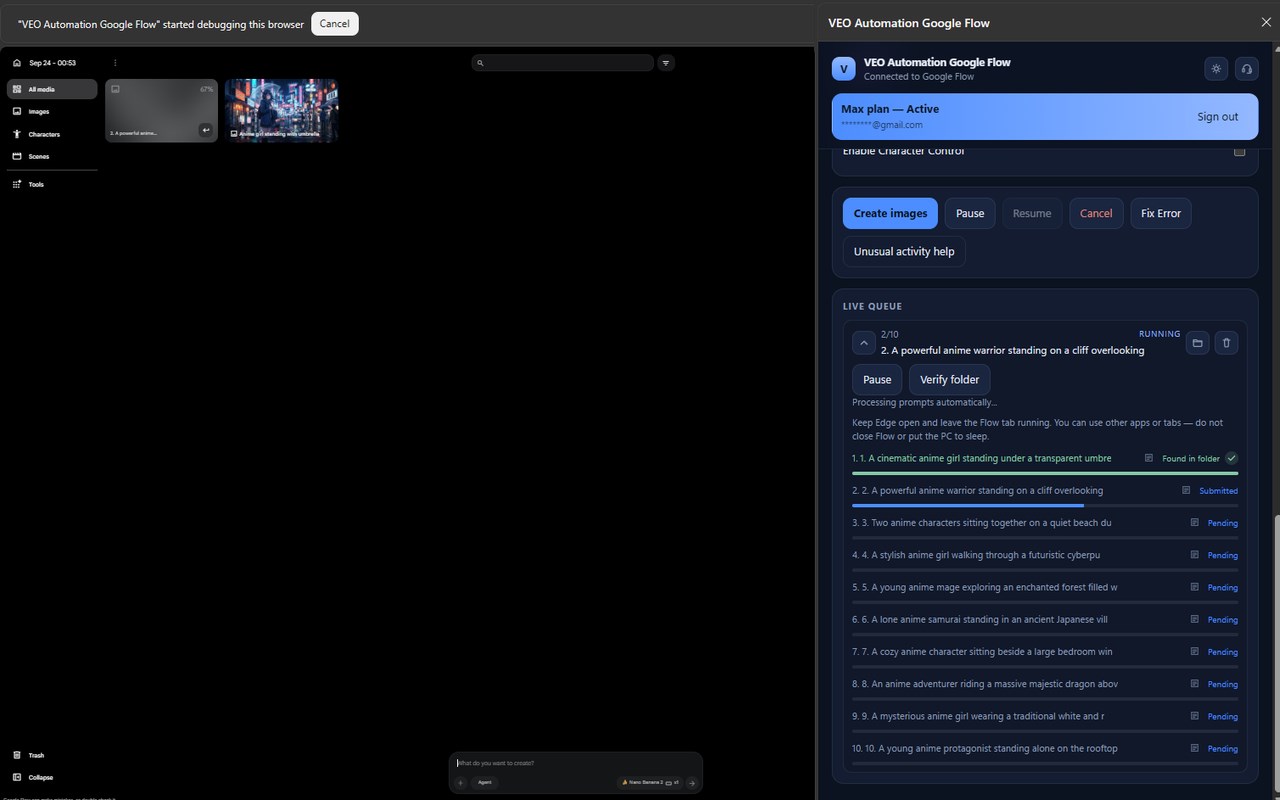
- Track progress in the side panel
- Move to the next prompt
- Save files as 001_prompt_name in your Downloads folder
Start the queue and let it run. You can pause, resume, or cancel at any time.
Auto video generation
- Text to Video
- Frame to Video (image to video, including start and end frames)
- Ingredients to Video
- Agent · Video
- Multiple outputs per prompt
- Concurrent prompts
- Video lengths: 4s, 6s, 8s, 10s, plus concat / chain lengths
- The last prompt in a chain uses a normal length, not concat
- Video download: 720p, 1080p, 2K, 4K, or skip download
Auto image generation (Nano Banana)
- Text to Image
- Image to Image
- Agent · Image
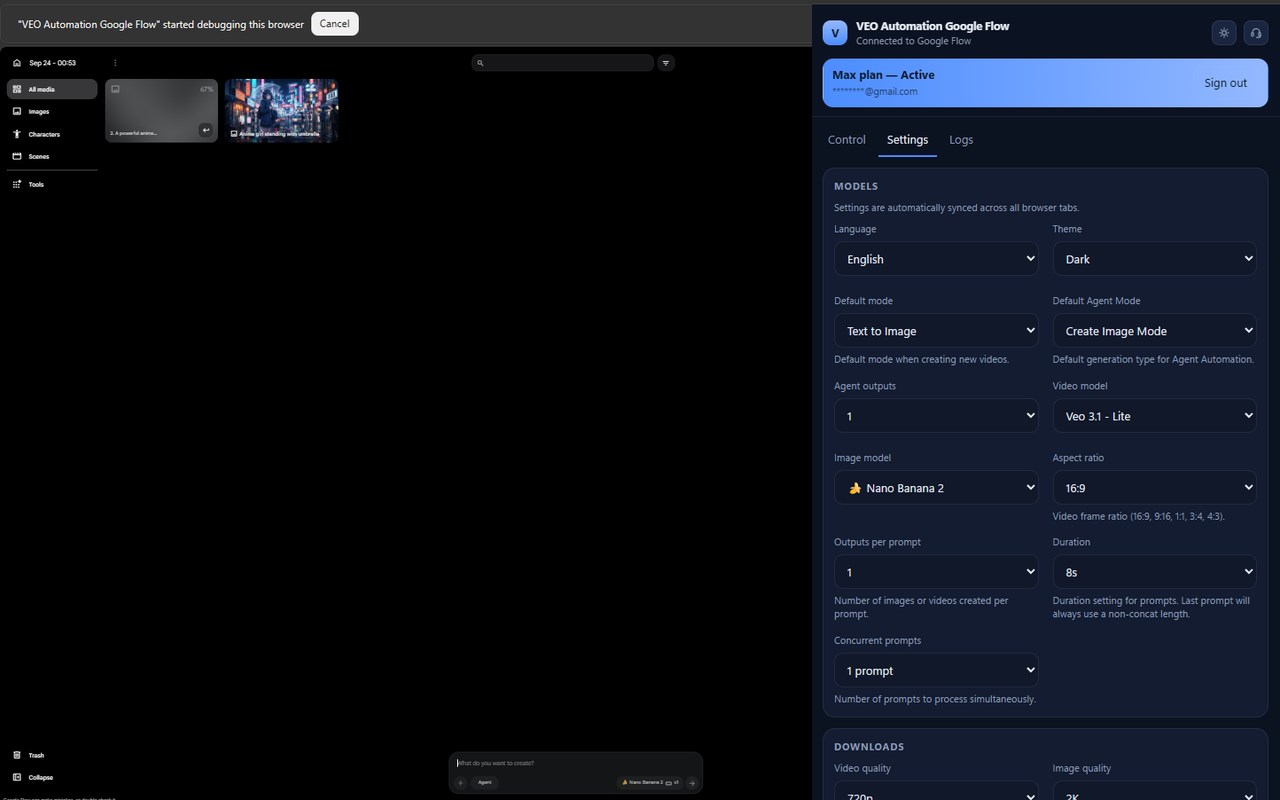
- Models: Nano Banana Pro, Nano Banana 2, Nano Banana 2 Lite
- New image for each prompt, or reuse the last generated image
- Chain the previous output into the next prompt
- Image download: 1K, 2K, 4K, or skip download
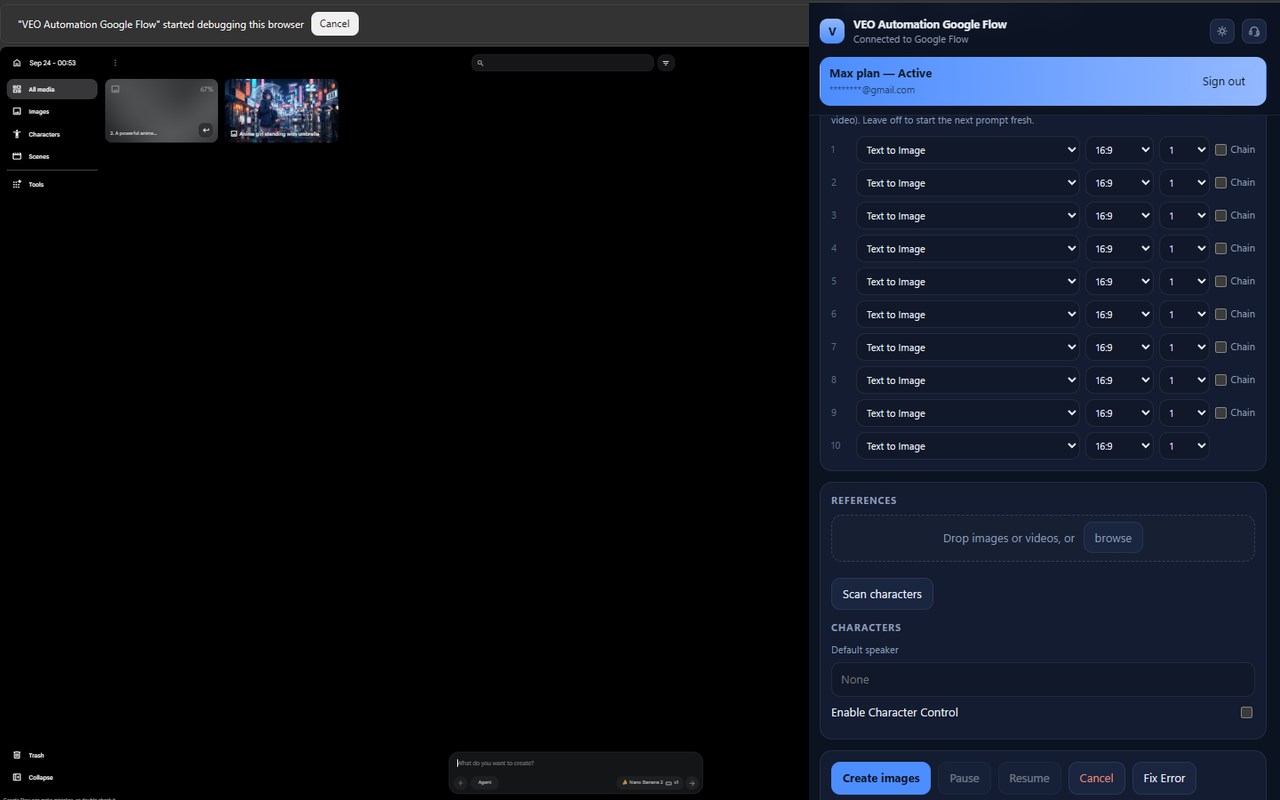
- Upload reference images and videos
- Scan project characters. A character chip is added only on prompts that mention that name
Automation controls
- Concurrent prompt processing (1–6)
- A separate prompt list for each mode
- Per-prompt mode, aspect ratio, duration, output count, and chain
- Run only prompts N through M
- Import prompts from .txt, .xlsx, or .csv
- Prompt delay range and retries
- Verify folder, open the batch folder, redownload missing files, regenerate missing prompts
- Rename downloaded files from the prompt text
- Dark and light theme
- Copy debug logs
Real-time queue
- Live status in the side panel: Pending, Running, Retrying, Submitted, Completed
- Open the batch folder from a queue row
- Waits for each download to finish before marking a file missing
- After you restart the browser, the prompt list is still there and an interrupted batch resumes when Flow is connected
Customization
- Aspect ratios: 16:9, 9:16, 1:1, 3:4, 4:3
- Video models: Omni 1.1 Flash, Omni Flash, Veo 3.1 Fast, Veo 3.1 Fast (Lower Priority), Veo 3.1 Quality, Veo 3.1 Lite, Veo 3.1 Lite (Lower Priority)
- Videos or images per prompt, and parallel prompt count
- Frame images per prompt, ingredients max images, and image-to-image max images
Languages
English, Tiếng Việt, 中文, 한국어, 日本語, Español
Plans
- Free: 10 prompts per day after email sign-in
- Max: unlimited prompts
- Sign in with a magic link. Settings, prompts, and the queue stay on this device
Perfect for
Content creators, AI video producers, and anyone who wants Auto VEO and Nano Banana on Google Flow at scale.
The extension only automates flow.google.com. It does not run on other websites.
VEO Automation Google Flow 是做什么的
VEO Automation Google Flow 是一款面向 Edge 的效率工具类扩展,主要用来管住注意力、屏蔽干扰站点、记录时间。官方对它的介绍是:Batch generate and auto-download videos and images on Google Flow.在微软 Edge 加载项商店上,它当前版本 1.0.4,约 21 名用户。
适合什么人用
从功能定位看,VEO Automation Google Flow 更适合想专注工作学习、减少无效刷网页的用户。如果你平时只是偶尔遇到相关需求,用浏览器自带功能也能凑合;但如果这件事每天都发生,装一个专门处理它的扩展通常比手动操作省事得多。
怎么安装 VEO Automation Google Flow
- 打开微软 Edge 加载项商店上的官方页面;
- 点「添加到浏览器」并确认权限提示;
- 装好后在扩展列表里固定图标,方便随时开关。
本站只做索引与介绍,安装包来自官方商店。如果商店页面提示当前地区不可用,说明该扩展未在你所在区域上架。
常见问题
VEO Automation Google Flow 是免费的吗?
VEO Automation Google Flow 在微软 Edge 加载项商店免费提供下载。它是浏览器扩展,装上就能直接用,不需要注册账号。
VEO Automation Google Flow 安全吗?
它只申请了 0 项权限,范围比较克制,没有申请「读取所有网站数据」这种大权限。
VEO Automation Google Flow 支持哪些浏览器?
当前收录的版本来自微软 Edge 加载项商店,适用于 Edge。同一个扩展在其他商店可能有对应版本,但功能与版本号不一定相同。
怎么卸载 VEO Automation Google Flow?
在扩展管理页找到 VEO Automation Google Flow,点移除即可。它在本地保存的设置会一起清掉,不会残留数据。
权限清单 来自 manifest.json 原文
接口权限 10
activeTabalarmsdebuggerdownloadsscriptingsidePanelstoragetabsunlimitedStoragewindows