
Velocity - Universal Video Speed Controller EN
MV Software · EEdge MV3
Take control of HTML5 video speeds on any website with simple hotkeys and a premium glassmorphism dashboard.
<all_urls>),意味着它可以读取你在任意站点的页面内容,包括已登录的页面。这是许多扩展正常工作的必要条件,但也值得你确认来源可信。
截图
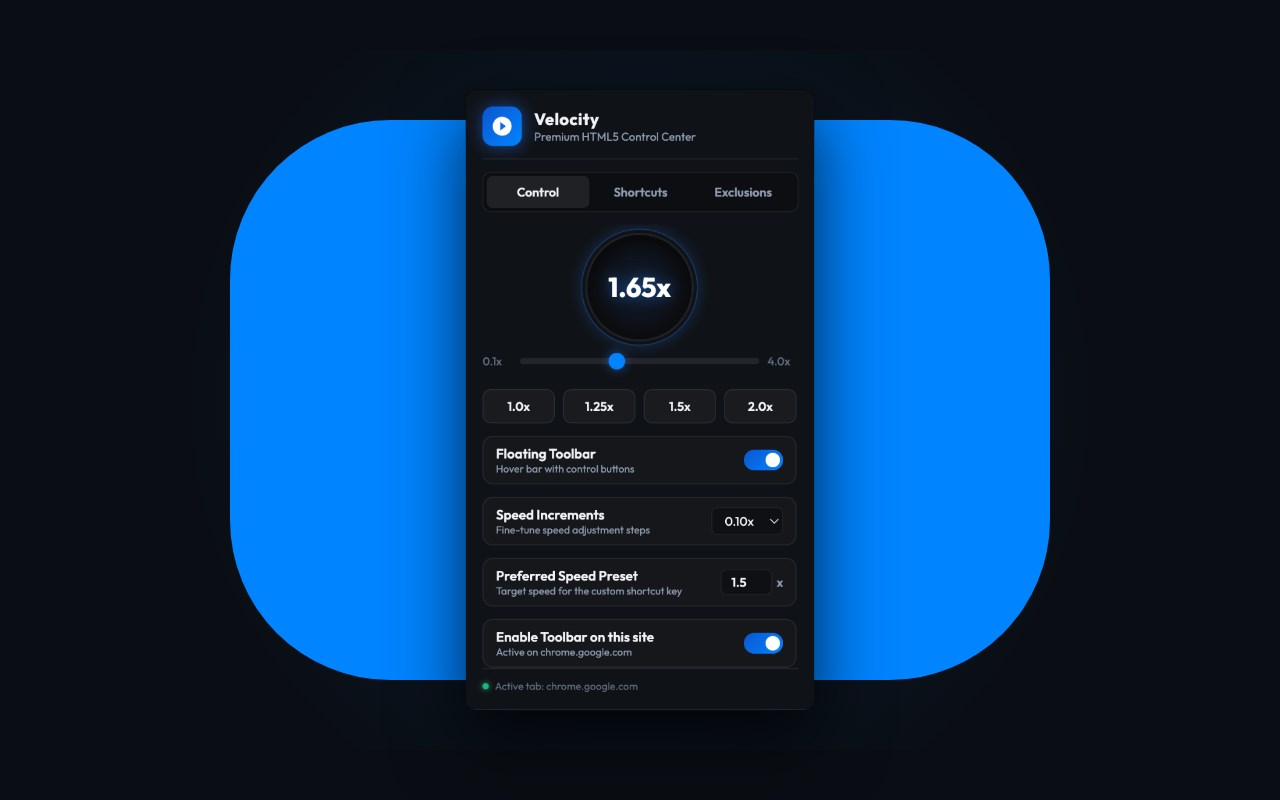
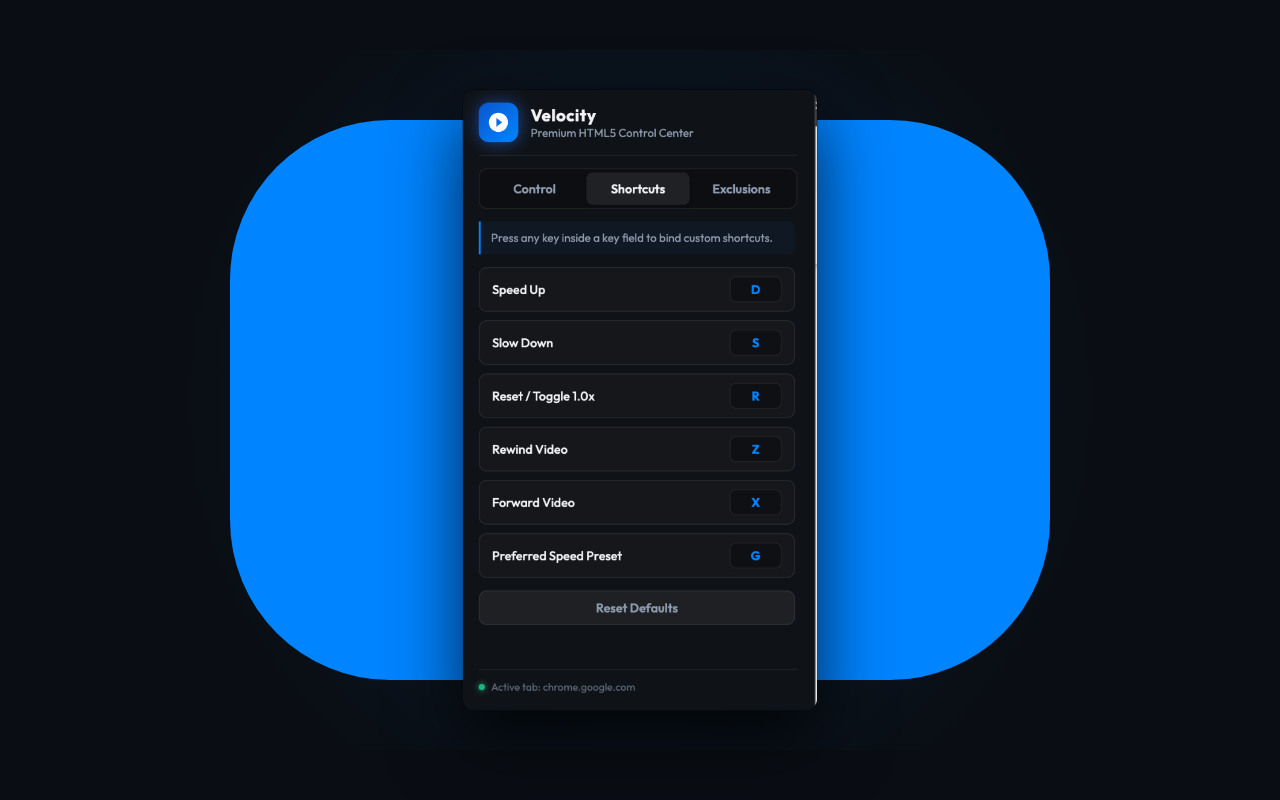

简介
Velocity - Universal Video Speed Controller is the ultimate high-performance playback controller designed for power users who want absolute mastery over their media consumption. Speed up, slow down, rewind, or advance HTML5 audio and video across virtually any platform on the web with zero latency.
Unlike outdated controllers that break on modern websites, Velocity features a resilient Injection Engine with Shadow DOM traversal — allowing it to hook video elements nested deep inside encapsulated custom players and single-page applications without requiring manual reloads. Enjoy seamless speed adjustments on YouTube, Netflix, Disney+, Amazon Prime Video, Hulu, Vimeo, Twitch, and educational lecture portals like Coursera, Udemy, and edX.
Velocity provides full compatibility for complex social feeds where transparent overlays intercept pointer events and break traditional controllers. Easily control videos on Instagram, TikTok, Reddit, Twitter/X, Facebook, and LinkedIn.
🚀 PREMIUM FEATURES & CAPABILITIES:
• Input-Safe Hotkeys & Shortcuts: Custom-map keyboard keys to slow down, speed up, rewind, advance, or toggle controls. Our smart typing detection ensures hotkeys never fire when you are typing comments or search queries.
• Floating Speed HUD: A frosted-glass heads-up display appears over any video on hover, showing your live playback speed alongside instant controls for speed adjustment, rewind, and skip — updates in real time whether you use mouse or keyboard.
• Micro-Precision Increments: Exceed native player limits by adjusting speed in ultra-fine increments — 0.05x, 0.1x, 0.25x, or 0.5x — to match your exact listening or learning pace.
• Intelligent Auto-Start & Enforced Speed: Set a preferred default speed applied automatically to every new video element. Standard content scripts lose control when platforms dynamically reload or reset video speeds. Velocity locks your playback rate, preventing custom site scripts from overriding your preferences.
• Sleek Glassmorphism Dashboard: A gorgeous dark-mode popup center to adjust speed, toggle parameters, and configure custom defaults.
• Picture-in-Picture Compatible: Continue controlling playback speed with keyboard shortcuts while a video plays in Chrome's Picture-in-Picture window — no need to switch back to the tab.
• Domain Exclusions: Create specific website rules. Specify exact domains where the controller should be disabled, and easily add websites to the exclusion list with a single click.
• Absolute Privacy & Zero Bloat: 100% private, sandbox-persisted, and zero tracker overhead. No user tracking, no third-party analytics, and minimal background memory footprint.
⌨️ DEFAULT KEYBOARD SHORTCUTS:
Open any website containing a video player and use these default global hotkeys to take instant control:
• S — Slow down playback speed (by -0.1x)
• D — Speed up playback speed (by +0.1x)
• R — Reset speed (toggles between 1.0x and your last active rate)
• Z — Rewind video (by 10 seconds)
• X — Fast forward video (by 10 seconds)
• G — Apply preset speed (instantly jumps to your customizable preset)
Don't like the defaults? Click the Velocity icon in your browser toolbar to re-map hotkeys, adjust step sizes, and manage domain rules.
Velocity - Universal Video Speed Controller 是做什么的
Velocity - Universal Video Speed Controller 是一款面向 Edge 的效率工具类扩展,主要用来管住注意力、屏蔽干扰站点、记录时间。官方对它的介绍是:Take control of HTML5 video speeds on any website with simple hotkeys and a premium glassmorphism dashboard.在微软 Edge 加载项商店上,它当前版本 1.1.7,约 24 名用户。
适合什么人用
从功能定位看,Velocity - Universal Video Speed Controller 更适合想专注工作学习、减少无效刷网页的用户。如果你平时只是偶尔遇到相关需求,用浏览器自带功能也能凑合;但如果这件事每天都发生,装一个专门处理它的扩展通常比手动操作省事得多。需要注意的是它作用于所有网站,装上后建议先观察一两天,确认不影响常用站点的正常使用。
怎么安装 Velocity - Universal Video Speed Controller
- 打开微软 Edge 加载项商店上的官方页面;
- 点「添加到浏览器」并确认权限提示;
- 装好后在扩展列表里固定图标,方便随时开关。
本站只做索引与介绍,安装包来自官方商店。如果商店页面提示当前地区不可用,说明该扩展未在你所在区域上架。
常见问题
Velocity - Universal Video Speed Controller 是免费的吗?
Velocity - Universal Video Speed Controller 在微软 Edge 加载项商店免费提供下载。它是浏览器扩展,装上就能直接用,不需要注册账号。
Velocity - Universal Video Speed Controller 安全吗?
它只申请了 0 项权限,范围比较克制,没有申请「读取所有网站数据」这种大权限。
Velocity - Universal Video Speed Controller 支持哪些浏览器?
当前收录的版本来自微软 Edge 加载项商店,适用于 Edge。同一个扩展在其他商店可能有对应版本,但功能与版本号不一定相同。
怎么卸载 Velocity - Universal Video Speed Controller?
在扩展管理页找到 Velocity - Universal Video Speed Controller,点移除即可。它在本地保存的设置会一起清掉,不会残留数据。
权限清单 来自 manifest.json 原文
站点访问(可选) 1
<all_urls>
接口权限 2
storagetabs