
Universal Image Downloader EN
ozler777 · EEdge MV3
Download all images from any webpage with filtering, sorting, ZIP export, and canvas unscrambling support.
<all_urls>),意味着它可以读取你在任意站点的页面内容,包括已登录的页面。这是许多扩展正常工作的必要条件,但也值得你确认来源可信。
截图
简介
Universal Image Downloader is a highly advanced, feature-rich browser extension designed to extract, filter, and download images from almost any webpage. Originally built for Firefox and now adapted for Microsoft Edge (Manifest V3), it acts as an aggressive media scraper capable of bypassing modern anti-theft protections.
The extension operates using three distinct fetching modes. The Default mode parses the DOM, capturing standard image tags, CSS background images, and dynamically lazy-loaded elements while intelligently preserving their visual top-to-bottom order. The Network mode actively monitors backend web traffic, bypassing CORS restrictions and dynamically spoofing "Referer" headers to catch hidden CDN files. Finally, the Scrapper mode hooks directly into standard browser APIs to extract heavily protected, blob-based images.
Its most impressive technical achievement is its descrambling capability. By safely injecting a script into the webpage's main execution environment, it intercepts the CanvasRenderingContext2D.drawImage API. This allows the extension to reverse-engineer and automatically reconstruct images that websites intentionally scramble or slice into puzzles (a technique commonly used by webtoon and manga platforms). Additionally, it computes SHA-256 cryptography hashes for every file to automatically detect and hide exact visual duplicates, ensuring a clean gallery.
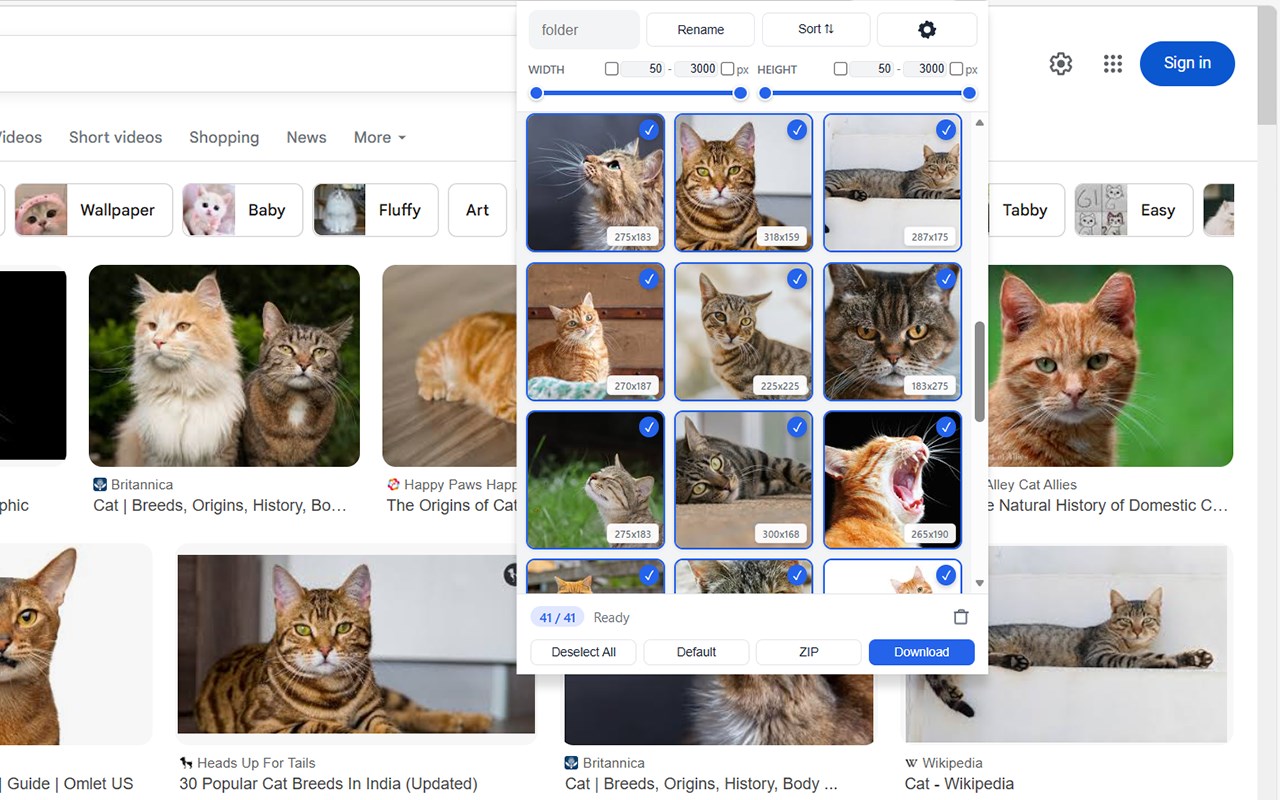
On the front end, users interact with a sleek popup grid. It offers granular control through width and height sliders, preventing tiny UI icons from cluttering the results. Users can sort images by resolution or page layout, specify a custom sub-folder, and toggle between keeping original filenames or using sequential auto-numbering (e.g., image001.jpg).
Finally, for exporting, the extension gives users the choice to download selected files individually or automatically compress the entire batch into a single, neatly organized ZIP archive named after the current page's title.
Universal Image Downloader 是做什么的
Universal Image Downloader 是一款面向 Edge 的实用工具类扩展,主要用来解决浏览器里某类具体的小问题。官方对它的介绍是:Download all images from any webpage with filtering, sorting, ZIP export, and canvas unscrambling support.在微软 Edge 加载项商店上,它当前版本 1.0,约 77 名用户。
适合什么人用
从功能定位看,Universal Image Downloader 更适合想补上浏览器原生缺失功能的用户。如果你平时只是偶尔遇到相关需求,用浏览器自带功能也能凑合;但如果这件事每天都发生,装一个专门处理它的扩展通常比手动操作省事得多。需要注意的是它作用于所有网站,装上后建议先观察一两天,确认不影响常用站点的正常使用。
怎么安装 Universal Image Downloader
- 打开微软 Edge 加载项商店上的官方页面;
- 点「添加到浏览器」并确认权限提示;
- 装好后在扩展列表里固定图标,方便随时开关。
本站只做索引与介绍,安装包来自官方商店。如果商店页面提示当前地区不可用,说明该扩展未在你所在区域上架。
常见问题
Universal Image Downloader 是免费的吗?
Universal Image Downloader 在微软 Edge 加载项商店免费提供下载。它是浏览器扩展,装上就能直接用,不需要注册账号。
Universal Image Downloader 安全吗?
它只申请了 0 项权限,范围比较克制,没有申请「读取所有网站数据」这种大权限。
Universal Image Downloader 支持哪些浏览器?
当前收录的版本来自微软 Edge 加载项商店,适用于 Edge。同一个扩展在其他商店可能有对应版本,但功能与版本号不一定相同。
怎么卸载 Universal Image Downloader?
在扩展管理页找到 Universal Image Downloader,点移除即可。它在本地保存的设置会一起清掉,不会残留数据。
权限清单 来自 manifest.json 原文
站点访问(可选) 1
<all_urls>
接口权限 6
activeTabdeclarativeNetRequestdownloadsstoragetabswebRequest
其他商店也有这款
同一款扩展在不同浏览器下的版本,权限与更新节奏可能不同
