
Umm al-Qura Calendar EN
Ummal qura · EEdge MV3
Full monthly Umm al-Qura Hijri calendar
截图
简介
Umm al-Qura Calendar Extension: Your Hijri Date and Calendar Companion
The Umm al-Qura Calendar extension brings the precision and cultural significance of the official Saudi Arabian Hijri calendar directly to your browser with ease and elegance. Built to provide a clear, concise monthly view of the Islamic lunar calendar, this extension connects seamlessly to the authoritative Umm al-Qura calculations via a dedicated API. It ensures you can always quickly and accurately check the current Hijri date, important religious holidays, and other key Islamic dates—all independently of your device’s region settings—right from a convenient side panel within your browser.
The Umm al-Qura calendar is widely recognized and used across the Muslim world, especially in Saudi Arabia, for marking religious events such as Ramadan, Eid, and other significant occasions. Despite its significance, access to a reliable, user-friendly monthly Hijri calendar inside browsers can be limited. This extension addresses that scarcity by offering a visually appealing and interactive month overview that fully adheres to Umm al-Qura’s official date calculations.
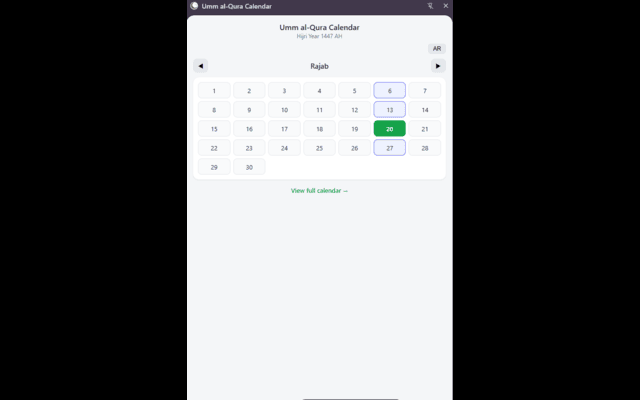
Upon activating the extension through its icon or side panel, users are greeted with a beautifully arranged monthly calendar displaying the entire current Hijri month. Each day is distinctly represented, with today’s date and Fridays elegantly highlighted to make distinguishing important dates effortless. Utilizing navigation arrows, you can effortlessly move between previous and upcoming Hijri months, with the year updating automatically as you scroll. The extension supports bilingual display with a simple toggle button, enabling quick switching between Arabic and English month names to suit different user preferences.
One of the extension’s convenient features is the Gregorian tooltip: when hovering over or tapping any Hijri day, a tooltip appears showing the corresponding Gregorian date, making it easy to cross-reference the two calendars side by side. For users seeking further details or official references, a direct link routes to the full Umm al-Qura calendar website, providing comprehensive access to the official data.
Designed with accessibility and speed in mind, the extension makes fetching and displaying updated calendar data instantaneous, allowing you to stay connected with the Islamic calendar effortlessly while browsing. Whether you’re observing religious duties, planning events around Islamic dates, or conducting research, this tool helps you remain in sync with Hijri time without ever leaving your browser environment.
Key Features:
- Comprehensive monthly view of the Umm al-Qura Hijri calendar in a responsive side panel.
- Simple navigation to browse previous and future months with smooth year transitions.
- Instant toggle between Arabic and English month names for cultural and linguistic flexibility.
- Visual highlighting of today’s date and Fridays for easy identification of important days.
- Gregorian date tooltips on hover or tap for direct calendar cross-referencing.
- Direct access link to the official Umm al-Qura calendar website for detailed reference.
- Clean, modern, and lightweight sidebar design optimized for browser usage.
How It Works:
1. Install the Umm al-Qura Calendar extension from your browser’s extension store.
2. Click the extension icon or open the side panel to reveal the current Hijri month view.
3. The extension automatically retrieves the official Umm al-Qura Hijri month and year using today’s Gregorian date.
4. Use the left and right navigation arrows to move between months; the year adjusts automatically when crossing over year boundaries.
5. Toggle the language display to switch between Arabic and English month names instantly.
6. Hover over (desktop) or tap (mobile) any Hijri date to view the corresponding Gregorian date in a tooltip.
7. Benefit from highlighted Fridays and the current date to easily track religious and special days.
8. For deeper reference or study, use the embedded link to visit the full Umm al-Qura calendar website at ummalquracalendar.org.
Privacy: - No personal data collected. All date conversion queries are sent anonymously to the Umm al-Qura calendar API without any usage tracking, login requirements, or exchange of sensitive information.
Umm al-Qura Calendar 是做什么的
Umm al-Qura Calendar 是一款面向 Edge 的效率工具类扩展,主要用来管住注意力、屏蔽干扰站点、记录时间。官方对它的介绍是:Full monthly Umm al-Qura Hijri calendar在微软 Edge 加载项商店上,它当前版本 1.0,约 7 名用户。
适合什么人用
从功能定位看,Umm al-Qura Calendar 更适合想专注工作学习、减少无效刷网页的用户。如果你平时只是偶尔遇到相关需求,用浏览器自带功能也能凑合;但如果这件事每天都发生,装一个专门处理它的扩展通常比手动操作省事得多。
怎么安装 Umm al-Qura Calendar
- 打开微软 Edge 加载项商店上的官方页面;
- 点「添加到浏览器」并确认权限提示;
- 装好后在扩展列表里固定图标,方便随时开关。
本站只做索引与介绍,安装包来自官方商店。如果商店页面提示当前地区不可用,说明该扩展未在你所在区域上架。
常见问题
Umm al-Qura Calendar 是免费的吗?
Umm al-Qura Calendar 在微软 Edge 加载项商店免费提供下载。它是浏览器扩展,装上就能直接用,不需要注册账号。
Umm al-Qura Calendar 安全吗?
它只申请了 0 项权限,范围比较克制,没有申请「读取所有网站数据」这种大权限。
Umm al-Qura Calendar 支持哪些浏览器?
当前收录的版本来自微软 Edge 加载项商店,适用于 Edge。同一个扩展在其他商店可能有对应版本,但功能与版本号不一定相同。
怎么卸载 Umm al-Qura Calendar?
在扩展管理页找到 Umm al-Qura Calendar,点移除即可。它在本地保存的设置会一起清掉,不会残留数据。
权限清单 来自 manifest.json 原文
接口权限 1
sidePanel