
Tuvito Photo Printer EN
Nareshkumar D · EEdge MV3
Convert photos to passport size and arrange them for printing on 4x6 or A4 pages
截图
简介
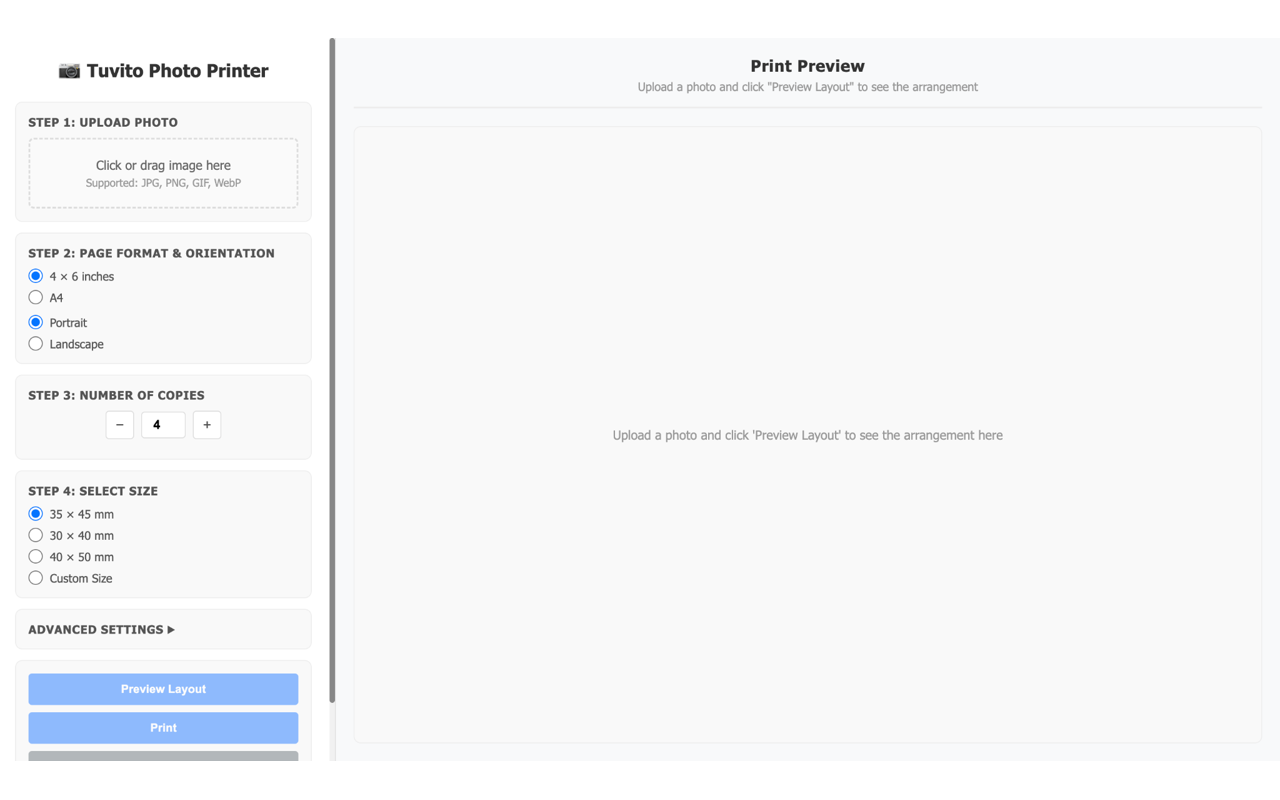
Transform any photo into professional passport-size prints with Tuvito Photo Printer!
🎯 WHAT IT DOES
Quickly convert your photos to passport dimensions and automatically arrange multiple copies on standard paper sizes for printing. Perfect for passport applications, visas, ID documents, and more.
✨ KEY FEATURES
📸 SMART PHOTO PROCESSING
• Upload any image (JPG, PNG, GIF, WebP)
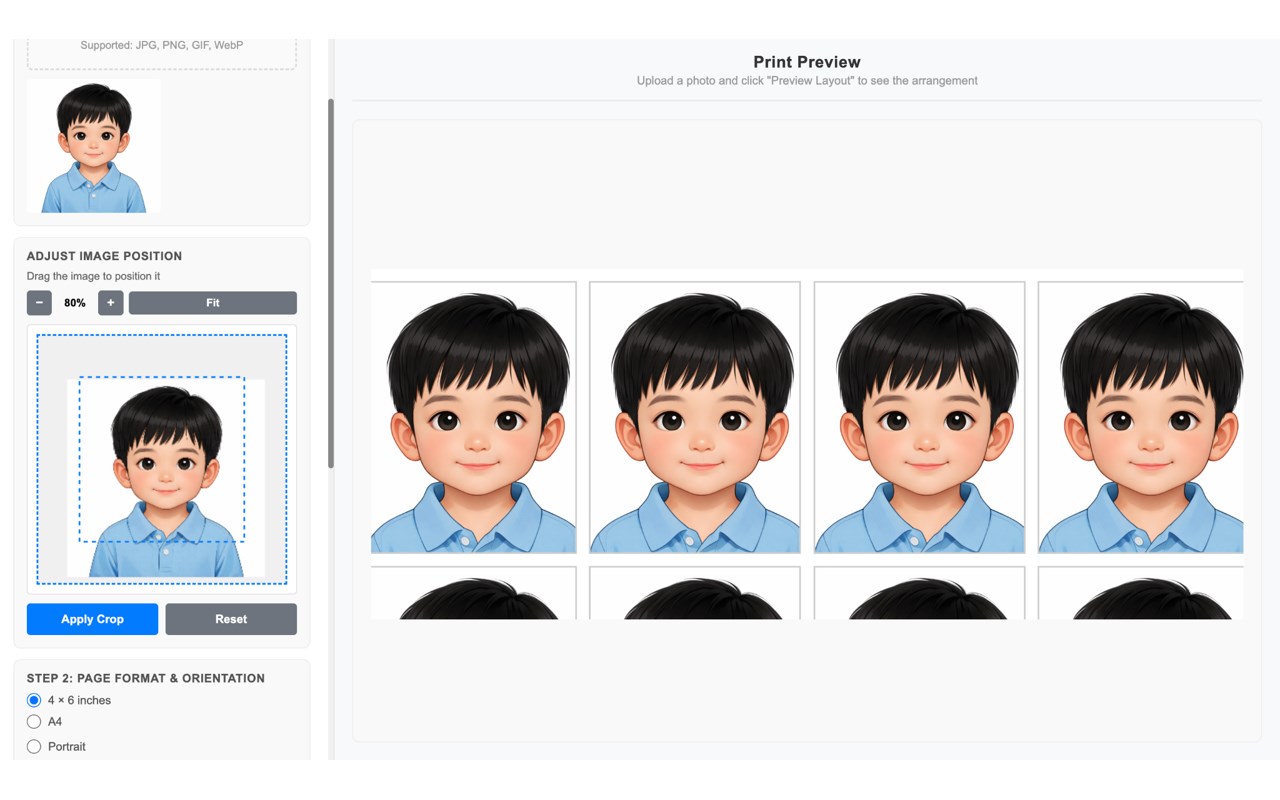
• Automatic cropping and resizing
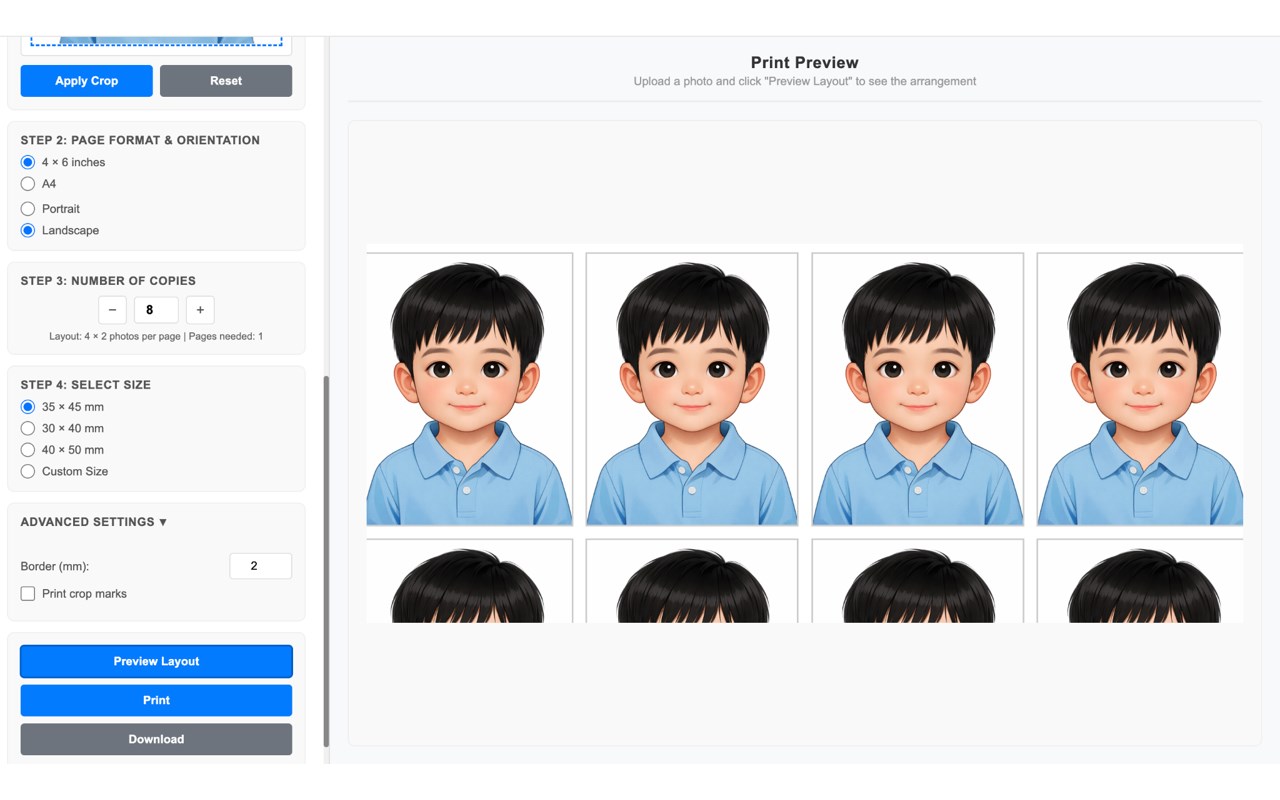
• Real-time preview of your layout
• High-quality output suitable for official documents
📄 MULTIPLE PAGE FORMATS
• 4 × 6 inches (10 × 15 cm)
• A4 (210 × 297 mm)
• Choose the format that works best for you
📐 FLEXIBLE PASSPORT SIZES
• 35 × 45 mm (Standard - most countries)
• 30 × 40 mm (Some regional requirements)
• 40 × 50 mm (Larger format option)
🖨️ INTELLIGENT LAYOUT
• Auto-calculates optimal photos per page
• Adjustable borders between photos (0-20mm)
• Shows pages needed before printing
• Perfect aspect ratio maintenance
🎨 ADVANCED OPTIONS
• Custom size input (mm, cm, or inches)
• 50%-300% zoom for precise positioning
• Optional crop marks for precision cutting
• Print crop marks feature for easier photo separation
🔒 PRIVACY FIRST
• All processing happens locally on your device
• No images uploaded to any server
• No tracking, no analytics
• Fully offline operation
• Your photos stay completely private
💾 FLEXIBLE OUTPUT
• Direct printing to your printer
• Download as HTML for later use
• Perfect for backup and digital storage
HOW TO USE
1. Click the extension icon
2. Upload your photo
3. Select page format (4×6 or A4)
4. Choose passport size (35×45mm, 30×40mm, or 40×50mm)
5. Set number of copies needed
6. Adjust border size if needed
7. Enable crop marks for precise cutting
8. Click Preview to see your layout
9. Click Print and choose your printer
10. Done! Professional passport photos ready
PERFECT FOR
✓ Passport applications
✓ Visa applications
✓ ID card photos
✓ Driver's license photos
✓ School photos
✓ Travel documentation
✓ Bulk photo printing
SUPPORTED FORMATS
• JPG/JPEG
• PNG
• GIF
• WebP
PAPER SIZES
• 4 × 6 inches (standard postcard size)
• A4 (standard office paper size)
TECHNICAL SPECIFICATIONS
Standard Layouts:
• 4×6" page: 4-6 photos per page depending on size
• A4 page: 9-25 photos per page depending on size
Quality Features:
• 300+ DPI suitable for official documents
• Maintains perfect aspect ratios
• Professional-grade output
• Optimized for all major printers
WHAT'S INCLUDED
✅ Photo upload and preview
✅ Multiple page format support
✅ Three passport size presets
✅ Custom size option (mm, cm, inches)
✅ Advanced border control
✅ Zoom in/out capability (50%-300%)
✅ Print crop marks feature
✅ Layout preview
✅ Direct print functionality
✅ Download as HTML
PRIVACY COMMITMENT
We take your privacy seriously:
• Zero cloud storage - all processing is local
• No data collection
• No user tracking
• No analytics
• No third-party integrations
• Fully open-source compatible
TROUBLESHOOTING
Can't upload image?
→ Check file format (JPG, PNG, GIF, WebP)
→ Ensure file size is reasonable
Print quality not good?
→ Use high-quality photo paper
→ Set printer to highest quality
→ Use resolution 600+ pixels for photos
Layout issues?
→ Verify page format selection
→ Check passport size selection
→ Use preview before printing
TIPS FOR BEST RESULTS
1. Use high-resolution photos (600+ pixels)
2. Ensure good lighting in your photo
3. Use quality photo paper for official use
4. Enable crop marks for precision cutting
5. Test on regular paper first
6. Use printer's highest quality setting
7. Don't use "fit to page" option
Tuvito Photo Printer 是做什么的
Tuvito Photo Printer 是一款面向 Edge 的实用工具类扩展,主要用来解决浏览器里某类具体的小问题。官方对它的介绍是:Convert photos to passport size and arrange them for printing on 4x6 or A4 pages在微软 Edge 加载项商店上,它当前版本 1.0.0,约 1 名用户。
适合什么人用
从功能定位看,Tuvito Photo Printer 更适合想补上浏览器原生缺失功能的用户。如果你平时只是偶尔遇到相关需求,用浏览器自带功能也能凑合;但如果这件事每天都发生,装一个专门处理它的扩展通常比手动操作省事得多。
怎么安装 Tuvito Photo Printer
- 打开微软 Edge 加载项商店上的官方页面;
- 点「添加到浏览器」并确认权限提示;
- 装好后在扩展列表里固定图标,方便随时开关。
本站只做索引与介绍,安装包来自官方商店。如果商店页面提示当前地区不可用,说明该扩展未在你所在区域上架。
常见问题
Tuvito Photo Printer 是免费的吗?
Tuvito Photo Printer 在微软 Edge 加载项商店免费提供下载。它是浏览器扩展,装上就能直接用,不需要注册账号。
Tuvito Photo Printer 安全吗?
它只申请了 0 项权限,范围比较克制,没有申请「读取所有网站数据」这种大权限。
Tuvito Photo Printer 支持哪些浏览器?
当前收录的版本来自微软 Edge 加载项商店,适用于 Edge。同一个扩展在其他商店可能有对应版本,但功能与版本号不一定相同。
怎么卸载 Tuvito Photo Printer?
在扩展管理页找到 Tuvito Photo Printer,点移除即可。它在本地保存的设置会一起清掉,不会残留数据。
权限清单 来自 manifest.json 原文
接口权限 1
tabs