
Toolspy Image Compressor EN
Toolspy · EEdge MV3
Detect and compress images from any webpage using Toolspy's powerful compression engine
<all_urls>),意味着它可以读取你在任意站点的页面内容,包括已登录的页面。这是许多扩展正常工作的必要条件,但也值得你确认来源可信。
截图
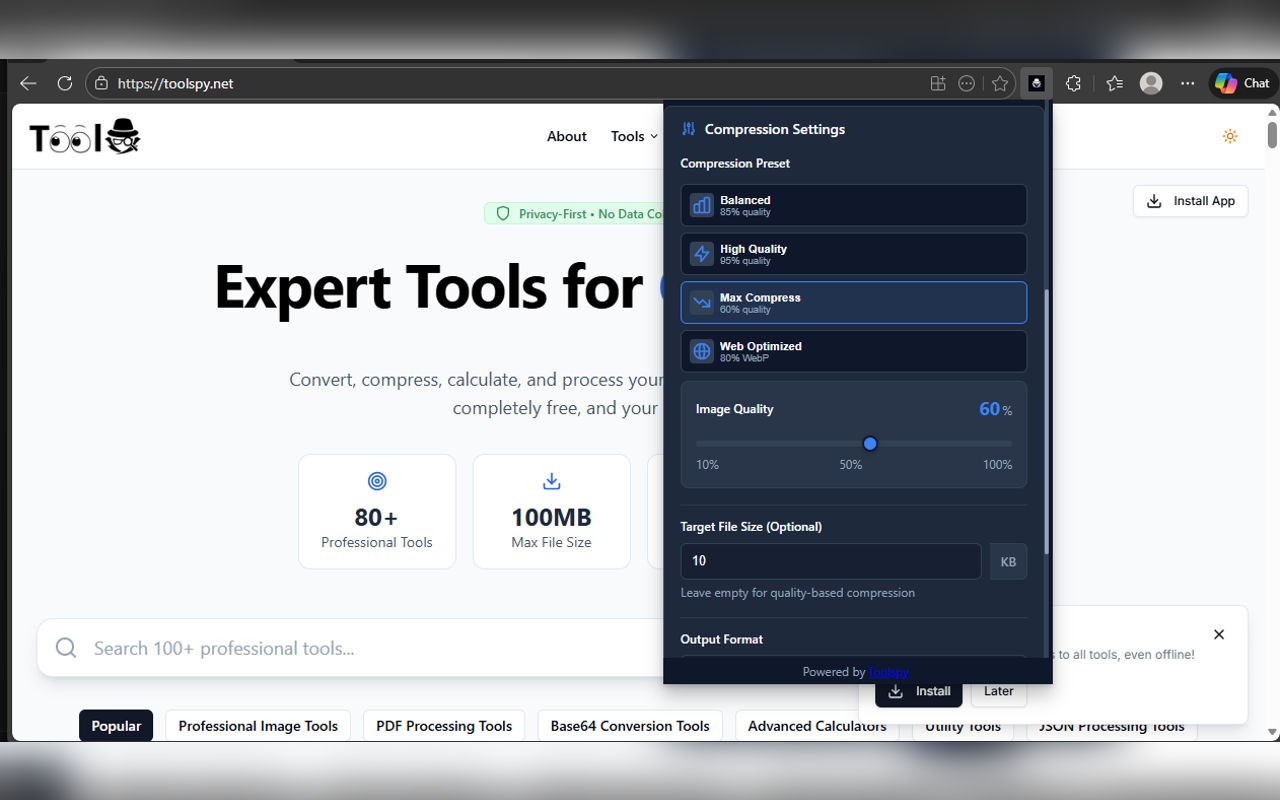
简介
Toolspy Image Compressor: Effortless In-Browser Image Optimization
Toolspy Image Compressor is an advanced browser extension designed to efficiently detect, compress, and optimize images directly within any webpage you visit. Harnessing cutting-edge web technologies combined with a powerful compression engine, Toolspy provides a comprehensive, user-friendly solution to accelerate image loading times, reduce bandwidth consumption, and maintain visual fidelity. Whether you are a web developer, content creator, designer, blogger, or an everyday internet user looking to enhance page responsiveness and save data, this extension integrates seamlessly into your browser’s toolbar, offering fast and configurable image compression capabilities right at your fingertips.
Upon activation, Toolspy Image Compressor intelligently scans the active webpage for all images, including those loaded dynamically or via lazy-loading techniques, ensuring no visual element is missed. The extension presents a curated list of discovered images within a sleek, dark-themed popup interface. Users can easily select multiple images for batch compression, adjusting key parameters such as compression level, output format, resizing dimensions, and metadata removal. All image processing is executed locally, securing your privacy and data integrity by preventing any images from leaving your device unless explicitly exported or shared by you.
One of Toolspy’s standout features is its blend of automatic detection with full manual control. Running a powerful content script in the background, the extension continuously monitors changes on the page, adapting swiftly when new images appear or content dynamically updates. This real-time responsiveness makes Toolspy exceptionally useful for image-heavy platforms like galleries, e-commerce sites, news pages, or portfolios. The extension’s local compression engine offers a spectrum of options — from lossless to lossy compression modalities — enabling users to strike the perfect balance between image quality and file size. Adjustable presets (high quality, balanced, maximum compression) simplify the process, while advanced settings allow fine-tuning of JPEG quality, progressive rendering, and EXIF metadata stripping to optimize both storage and privacy.
The intuitive popup interface is designed with minimal user effort in mind. After scanning, thumbnails of each image appear alongside controls for selecting, previewing, and customizing compression settings. Resizing can be done by specifying width or height while maintaining aspect ratios or enabling cropping for precise fitting. Metadata removal is easily toggled to enhance privacy and reduce image size further. Once satisfied with the chosen settings, users can compress selected images instantly and download them locally or copy them to the clipboard. This entire workflow is optimized for speed and convenience, enabling you to optimize images for faster web deployment, reduced page load times, or easier sharing on social networks and platforms.
Toolspy Image Compressor not only improves browsing performance by minimizing image sizes but also helps users reduce bandwidth consumption and streamline image management. Its privacy-first design ensures no browsing history or image data is tracked, collected, or sent to external servers, providing peace of mind while optimizing your web experience. Whether preparing assets for professional use or simply aiming for faster everyday browsing, Toolspy offers a robust, secure, and easy-to-use toolset integrated directly into your browser.
Key Features:
- Intelligent detection of all images on a webpage, including lazy-loaded and dynamically rendered images.
- Batch compression capability with selectable presets for balanced, high quality, or economical output.
- Customizable image output formats: retain original types or convert images to JPEG, PNG, or WebP.
- Flexible resizing options with aspect ratio maintenance and cropping controls.
- Metadata (EXIF) removal to protect privacy and save storage space.
- Advanced compression options including progressive JPEG encoding for better performance.
- Modern dark-mode popup with real-time image previews, batch selection, and individual image configuration.
- Fully local processing—no images are uploaded or processed on external servers unless exported by the user.
How It Works:
1. Install Toolspy Image Compressor from your browser’s extension store and pin it to your toolbar.
2. Open any webpage containing images you wish to optimize.
3. Click the Toolspy icon in the toolbar to launch the popup; it automatically scans and lists all images on the page.
4. Review the detected images and select one or multiple images for compression with preview thumbnails for reference.
5. Choose your desired compression settings by selecting a preset or manually adjusting quality, output format, resizing, and metadata options.
6. Optionally resize images or toggle EXIF metadata removal according to your requirements.
7. Compress the selected images locally and download or export them to your device or clipboard.
Privacy: - No personal data collected. All image processing occurs locally within your browser. Toolspy Image Compressor does not track your browsing history, collect images, or transmit user data to external servers. See our privacy policy for more details.
Toolspy Image Compressor 是做什么的
Toolspy Image Compressor 是一款面向 Edge 的实用工具类扩展,主要用来解决浏览器里某类具体的小问题。官方对它的介绍是:Detect and compress images from any webpage using Toolspy's powerful compression engine在微软 Edge 加载项商店上,它当前版本 1.0.0,评分 5(1 人评价),约 6 名用户。
适合什么人用
从功能定位看,Toolspy Image Compressor 更适合想补上浏览器原生缺失功能的用户。如果你平时只是偶尔遇到相关需求,用浏览器自带功能也能凑合;但如果这件事每天都发生,装一个专门处理它的扩展通常比手动操作省事得多。需要注意的是它作用于所有网站,装上后建议先观察一两天,确认不影响常用站点的正常使用。
怎么安装 Toolspy Image Compressor
- 打开微软 Edge 加载项商店上的官方页面;
- 点「添加到浏览器」并确认权限提示;
- 装好后在扩展列表里固定图标,方便随时开关。
本站只做索引与介绍,安装包来自官方商店。如果商店页面提示当前地区不可用,说明该扩展未在你所在区域上架。
常见问题
Toolspy Image Compressor 是免费的吗?
Toolspy Image Compressor 在微软 Edge 加载项商店免费提供下载。它是浏览器扩展,装上就能直接用,不需要注册账号。
Toolspy Image Compressor 安全吗?
它只申请了 0 项权限,范围比较克制,没有申请「读取所有网站数据」这种大权限。
Toolspy Image Compressor 支持哪些浏览器?
当前收录的版本来自微软 Edge 加载项商店,适用于 Edge。同一个扩展在其他商店可能有对应版本,但功能与版本号不一定相同。
怎么卸载 Toolspy Image Compressor?
在扩展管理页找到 Toolspy Image Compressor,点移除即可。它在本地保存的设置会一起清掉,不会残留数据。
权限清单 来自 manifest.json 原文
站点访问(可选) 1
<all_urls>
接口权限 3
activeTabscriptingstorage