
Title-Link Copy: AP-style Casing & Hyperlink EN
John Navas · EEdge MV3
AP-style title casing + selected text options for perfect link sharing
截图
简介
Title-Link Copy: AP-style Casing & Hyperlink
Privacy-focused extension that creates perfect citations. Easily copy page Titles, Links, or rich text Hyperlinks with advanced formatting options, including AP-style smart capitalization and selected text citation.
Streamline your research, writing, and sharing workflow. This extension provides advanced formatting tools right from your context menu or keyboard.
✅ Fully Compatible with Chrome and Microsoft Edge (Chromium).
---
🚀 KEY FEATURES
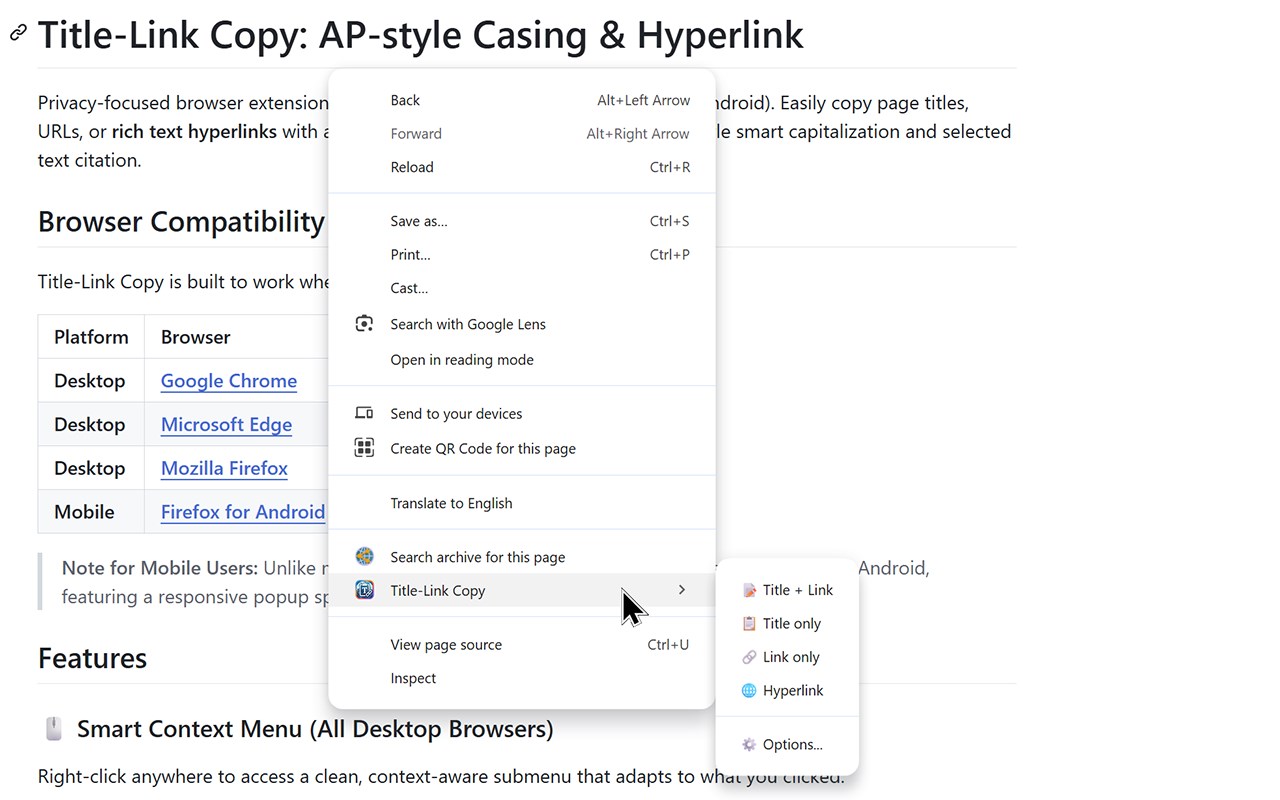
🖱️ Smart Context Menu
Right-click anywhere to access a clean, context-aware submenu that adapts to your needs:
• Title + Link: Copies both the Page Title (or Link Text) and the Link.
• Title Only: Grabs just the text.
• Link Only: Grabs just the Link.
• Hyperlink: Copies a clickable rich text link for emails and docs.
⌨️ Keyboard Shortcuts
Speed up your workflow with global shortcuts (fully customizable in your browser's extension settings). Commands are available for all four copy modes, including "Copy Hyperlink".
🧠 Advanced Formatting
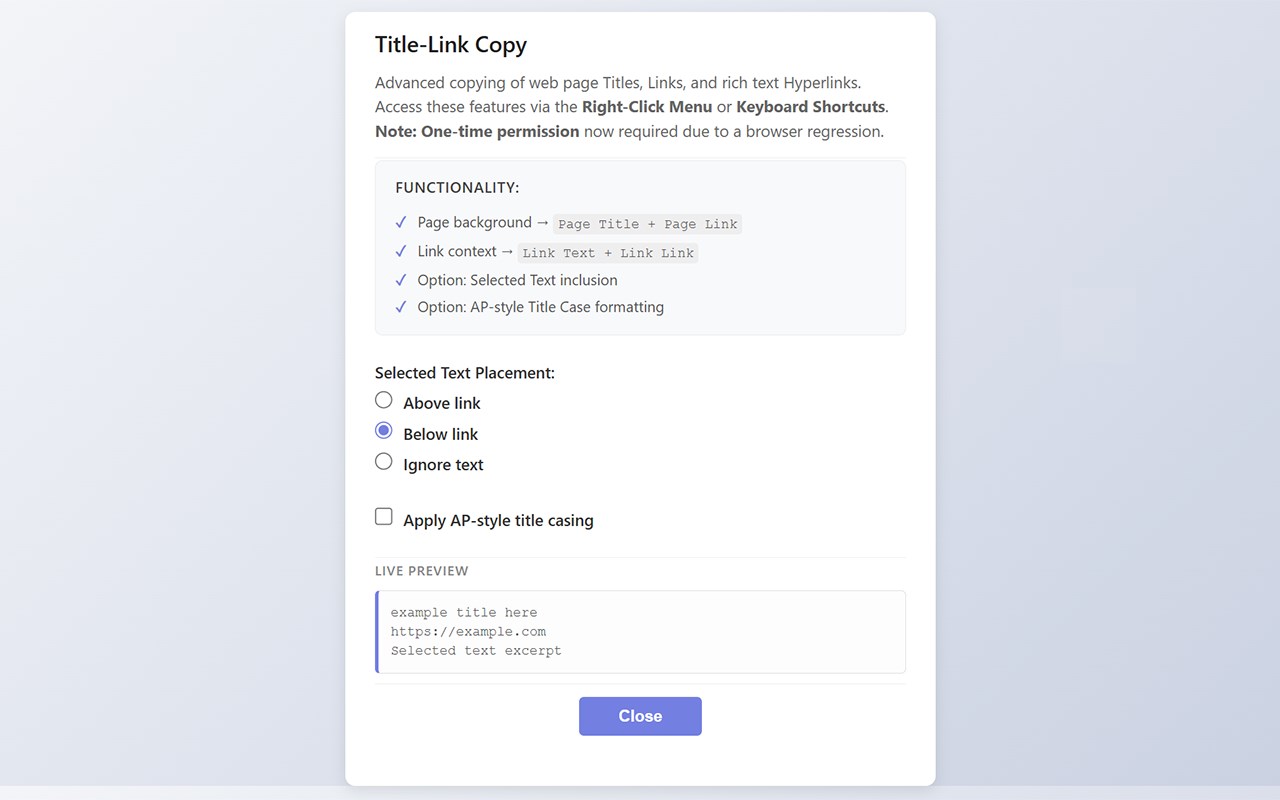
• AP-style Title Casing: A smart algorithm formats titles according to AP Stylebook guidelines. It intelligently handles minor words (a, an, the, of), preserves internal capitals (e.g., "iPhone", "YouTube"), and manages possessives correctly.
• Selected Text Support: Highlight text before you copy to automatically include it in your citation. You can choose to place the text Above the link, Below the link, or Ignore it.
---
📦 OUTPUT FORMATS
1. Standard Copy (Title + Link)
Formats clipboard content on separate lines for easy pasting into plain text documents or chats:
> The Page Title (AP Styled optional)
> Page Link (http…)
> "This is the specific text you selected on the page."
2. Hyperlink Copy (🌐)
Creates a dual-format clipboard entry suitable for any destination:
• Rich Text Editors (Word, Google Docs, Email): Pastes as a clickable, anchor link.
• Plain Text Editors (Notepad, Code): Automatically falls back to the standard "Title + Link" format.
---
🛡️ PRIVACY & PERMISSIONS
🔒 Privacy Focused
• Zero Data Collection: We do not track you, collect analytics, or transmit data.
• Minimal Permissions: We request the absolute minimum permissions required to function.
📋 Permissions Explained:
• "activeTab": Allows the extension to read the Title and Link of the current tab only when you interact with the extension.
• "contextMenus": Adds the "Title-Link Copy" items to your right-click menu.
• "scripting": Required to execute the copy command and read selected text on the page.
• "storage": Used to save your personal preferences locally on your device.
---
📅 VERSION HISTORY
• v1.2.0: Change in permission to avoid silent disabling.
• v1.1.3: Fixed issue where selected text was incorrectly included in "Link Only" copy mode.
• v1.1.2: Initial release.
Make your citations cleaner and faster today.
Title-Link Copy: AP-style Casing & Hyperlink 是做什么的
Title-Link Copy: AP-style Casing & Hyperlink 是一款面向 Edge 的效率工具类扩展,主要用来管住注意力、屏蔽干扰站点、记录时间。官方对它的介绍是:AP-style title casing + selected text options for perfect link sharing在微软 Edge 加载项商店上,它当前版本 1.2.0,评分 5(1 人评价),约 12 名用户。
适合什么人用
从功能定位看,Title-Link Copy: AP-style Casing & Hyperlink 更适合想专注工作学习、减少无效刷网页的用户。如果你平时只是偶尔遇到相关需求,用浏览器自带功能也能凑合;但如果这件事每天都发生,装一个专门处理它的扩展通常比手动操作省事得多。
怎么安装 Title-Link Copy: AP-style Casing & Hyperlink
- 打开微软 Edge 加载项商店上的官方页面;
- 点「添加到浏览器」并确认权限提示;
- 装好后在扩展列表里固定图标,方便随时开关。
本站只做索引与介绍,安装包来自官方商店。如果商店页面提示当前地区不可用,说明该扩展未在你所在区域上架。
常见问题
Title-Link Copy: AP-style Casing & Hyperlink 是免费的吗?
Title-Link Copy: AP-style Casing & Hyperlink 在微软 Edge 加载项商店免费提供下载。它是浏览器扩展,装上就能直接用,不需要注册账号。
Title-Link Copy: AP-style Casing & Hyperlink 安全吗?
它只申请了 0 项权限,范围比较克制,没有申请「读取所有网站数据」这种大权限。
Title-Link Copy: AP-style Casing & Hyperlink 支持哪些浏览器?
当前收录的版本来自微软 Edge 加载项商店,适用于 Edge。同一个扩展在其他商店可能有对应版本,但功能与版本号不一定相同。
怎么卸载 Title-Link Copy: AP-style Casing & Hyperlink?
在扩展管理页找到 Title-Link Copy: AP-style Casing & Hyperlink,点移除即可。它在本地保存的设置会一起清掉,不会残留数据。
权限清单 来自 manifest.json 原文
接口权限 3
contextMenusscriptingstorage
其他商店也有这款
同一款扩展在不同浏览器下的版本,权限与更新节奏可能不同
