
Text Watcher EN
Sevenleo · EEdge MV3
Monitor texts and automatically update pages with Text Watcher. Optimize your workflow and don't miss any important updates.
<all_urls>),意味着它可以读取你在任意站点的页面内容,包括已登录的页面。这是许多扩展正常工作的必要条件,但也值得你确认来源可信。
截图
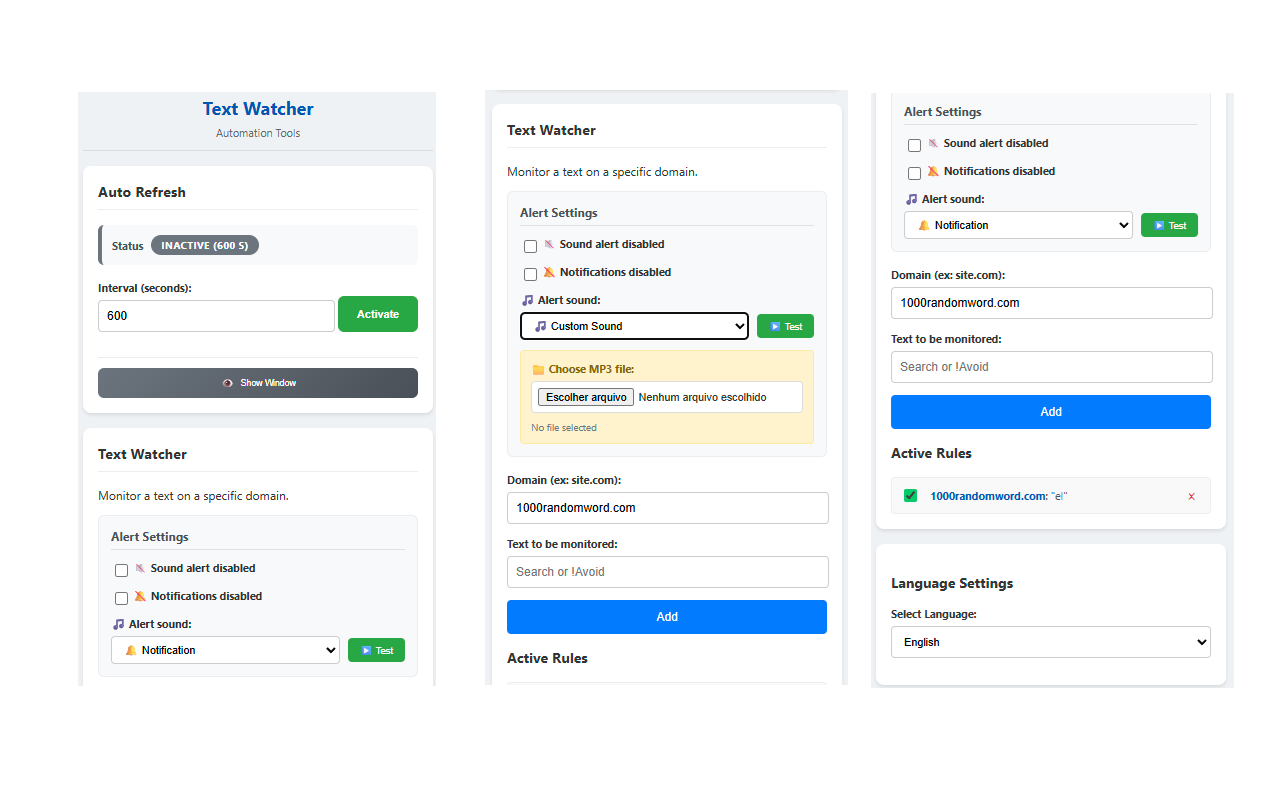
简介
🚀 TRANSFORM YOUR BROWSING EXPERIENCE WITH TEXT WATCHER - THE ULTIMATE WEB AUTOMATION EXTENSION!
Tired of missing important opportunities because you're not always monitoring your favorite sites? Frustrated by having to manually refresh pages hundreds of times a day? Text Watcher is here to revolutionize how you interact with the web!
🌟 WHY THOUSANDS OF USERS HAVE ALREADY CHOSEN TEXT WATCHER?
Text Watcher is much more than a simple extension - it's your intelligent personal assistant that works 24/7 to ensure you never miss an important update. With cutting-edge technology and intuitive interface, our extension offers two powerful features that will transform your online productivity.
🔄 INTELLIGENT AUTO REFRESH - NEVER MISS AN UPDATE AGAIN!
Imagine never having to press F5 or the refresh button again. Our Auto Refresh system is revolutionary:
✅ TOTAL CONTROL: Configure intervals from 1 second to any desired value
✅ COMPLETE VISUAL FEEDBACK: See exactly when the next update will happen
✅ MULTIPLE TABS: Configure each tab independently
✅ SMART INDICATORS: Tab title shows [R] and badge with real-time countdown
✅ PERFECT SYNCHRONIZATION: State always updated between popup and background
🔍 REVOLUTIONARY TEXT WATCHER - YOUR PERSONAL DIGITAL DETECTIVE!
This is the feature that makes our extension unique in the market. Monitor any text on any website with surgical precision:
🎯 INTELLIGENT DUAL MONITORING:
- PRESENCE: "In stock" → Instant alert when product returns
- ABSENCE: "!Out of stock" → Alert when product is NO LONGER out of stock
🌐 MULTI-DOMAIN: Configure specific rules for different sites
🔔 MULTIMODAL ALERTS: Visual notification + custom sound
⚡ REAL-TIME DETECTION: MutationObserver technology for instant changes
🎛️ GRANULAR CONTROL: Enable, disable or remove rules individually
🚀 OPTIMIZED PERFORMANCE: Debounce system prevents excessive checks
🌍 COMPLETE MULTI-LANGUAGE SUPPORT - SPEAK YOUR LANGUAGE!
We are the ONLY extension in the market with complete native support for multiple languages:
🇺🇸 ENGLISH - Complete and professional interface
🇧🇷 PORTUGUESE - 100% Brazilian translation
🇪🇸 SPANISH - Complete Spanish support
🔄 INSTANT SWITCHING: Interface updates in real-time
💾 SMART MEMORY: Your preferences are saved permanently
🤖 AUTOMATIC DETECTION: Automatically detects your browser language
🔊 ADVANCED AUDIO SYSTEM - NEVER MISS AN ALERT!
Our audio system is the most advanced in the market:
🎵 7 PROFESSIONAL SOUNDS INCLUDED:
- 🔔 Classic notification
- 📢 Simple beep
- 🚨 Attention siren
- 😃 Positive sound
- 🚓 Urgent siren
- ⚡ Success sound
- 🔫 Impact sound
🎧 CUSTOM MP3 SUPPORT: Upload your own sounds (up to 5MB)
🔊 VOLUME CONTROL: Adjust volume perfectly
▶️ INSTANT TESTING: Test any sound directly from popup
🎵 NO INTERACTION REQUIRED: Sounds play automatically when alerts trigger
💼 USE CASES THAT WILL TRANSFORM YOUR LIFE:
🛒 E-COMMERCE AND SHOPPING:
- Monitor when products return to stock
- Receive real-time price change alerts
- Detect flash sales and promotions
- Be the first to know about limited item restocks
- Track order and delivery status
📈 PROFESSIONAL MONITORING:
- Track critical service and system status
- Monitor dashboards and KPIs in real-time
- Instantly detect system errors and failures
- Receive critical update alerts
- Monitor competition and market changes
🎓 EDUCATION AND RESEARCH:
- Monitor grade and result publications
- Track news site updates
- Detect new content on academic blogs and forums
- Receive alerts about important deadlines
- Monitor scholarship and grant opportunities
🏠 PERSONAL USE:
- Monitor real estate availability for rent/purchase
- Track delivery and package status
- Detect social media updates
- Receive alerts about event tickets
- Monitor job opportunities
💰 TRADING AND INVESTMENTS:
- Monitor cryptocurrency and stock prices
- Receive market change alerts
- Track news that impacts investments
- Detect buy/sell opportunities
🎮 GAMING AND ENTERTAINMENT:
- Monitor game releases
- Receive alerts about drops and special events
- Track favorite streamer updates
- Detect gaming platform promotions
🔧 ADVANCED TECHNICAL FEATURES:
✅ MANIFEST V3
✅ MVC ARCHITECTURE: Organized and efficient code
✅ SERVICE WORKER: Superior performance
✅ OFFSCREEN AUDIO: Isolated and secure audio system
✅ MUTATIONOBSERVER: Real-time change detection
✅ SMART DEBOUNCE: Prevents excessive checks
✅ STORAGE SYNC: Settings synchronized across devices
✅ FALLBACK SYSTEM: Backup system for maximum reliability
🛡️ SECURITY AND PRIVACY:
🔒 MINIMAL PERMISSIONS: We only request what's necessary
🛡️ LOCAL DATA: Your settings stay on your computer
🔐 NO DATA COLLECTION: We don't collect personal information
✅ CLEAN CODE: Developed following best practices
🔍 TRANSPARENT: Auditable and trustworthy code
⚡ SUPER SIMPLE INSTALLATION AND USE:
1️⃣ INSTALL in 1 click
2️⃣ CONFIGURE your rules in seconds
3️⃣ RELAX and let the extension work for you
🎯 INTUITIVE INTERFACE:
- Modern and responsive design
- Clear visual feedback
- Hassle-free configuration
- Automatic synchronization
- Real-time updates
📊 IMPRESSIVE STATISTICS:
✅ 100% of features translated into 3 languages
✅ 7 professional sounds + custom MP3 support
✅ 1-second refresh interval (fastest in the market)
✅ Real-time text detection
✅ Unlimited rule support
✅ Compatible with all websites
✅ Zero impact on browser performance
🚀 CONSTANT UPDATES:
Our team works continuously to bring new features:
- New languages in development
- More audio options
- Integration with more platforms
- Performance improvements
- New use cases
Text Watcher 是做什么的
Text Watcher 是一款面向 Edge 的搜索增强类扩展,主要用来补充搜索结果、切换搜索引擎、过滤无效结果。官方对它的介绍是:Monitor texts and automatically update pages with Text Watcher. Optimize your workflow and don't miss any important updates.在微软 Edge 加载项商店上,它当前版本 3.2.5,约 50 名用户。
适合什么人用
从功能定位看,Text Watcher 更适合每天大量搜索、希望结果更干净准确的用户。如果你平时只是偶尔遇到相关需求,用浏览器自带功能也能凑合;但如果这件事每天都发生,装一个专门处理它的扩展通常比手动操作省事得多。需要注意的是它作用于所有网站,装上后建议先观察一两天,确认不影响常用站点的正常使用。
怎么安装 Text Watcher
- 打开微软 Edge 加载项商店上的官方页面;
- 点「添加到浏览器」并确认权限提示;
- 装好后在扩展列表里固定图标,方便随时开关。
本站只做索引与介绍,安装包来自官方商店。如果商店页面提示当前地区不可用,说明该扩展未在你所在区域上架。
常见问题
Text Watcher 是免费的吗?
Text Watcher 在微软 Edge 加载项商店免费提供下载。它是浏览器扩展,装上就能直接用,不需要注册账号。
Text Watcher 安全吗?
它只申请了 0 项权限,范围比较克制,没有申请「读取所有网站数据」这种大权限。
Text Watcher 支持哪些浏览器?
当前收录的版本来自微软 Edge 加载项商店,适用于 Edge。同一个扩展在其他商店可能有对应版本,但功能与版本号不一定相同。
怎么卸载 Text Watcher?
在扩展管理页找到 Text Watcher,点移除即可。它在本地保存的设置会一起清掉,不会残留数据。
权限清单 来自 manifest.json 原文
站点访问(可选) 1
<all_urls>
接口权限 6
activeTabalarmsnotificationsoffscreenstoragetabs