
Tab Management: Tab Manager|Productivity EN
Tab Management · EEdge MV3
Tab Management is a Google Extension For Productivity. To make Google Chrome – Faster, Efficient and Secured.
<all_urls>),意味着它可以读取你在任意站点的页面内容,包括已登录的页面。这是许多扩展正常工作的必要条件,但也值得你确认来源可信。
截图
简介
Tab Management is a Microsoft Add-on of Productivity system of tools.
Tab Management is designed to make Microsoft Edge Fast, Efficient and Secured.
Best Edge Extension for Productivity!
UNLEASH THE FULL POWER
OF YOUR WEB-BROWSER!
Features:
Is your browser slowing down your computer?
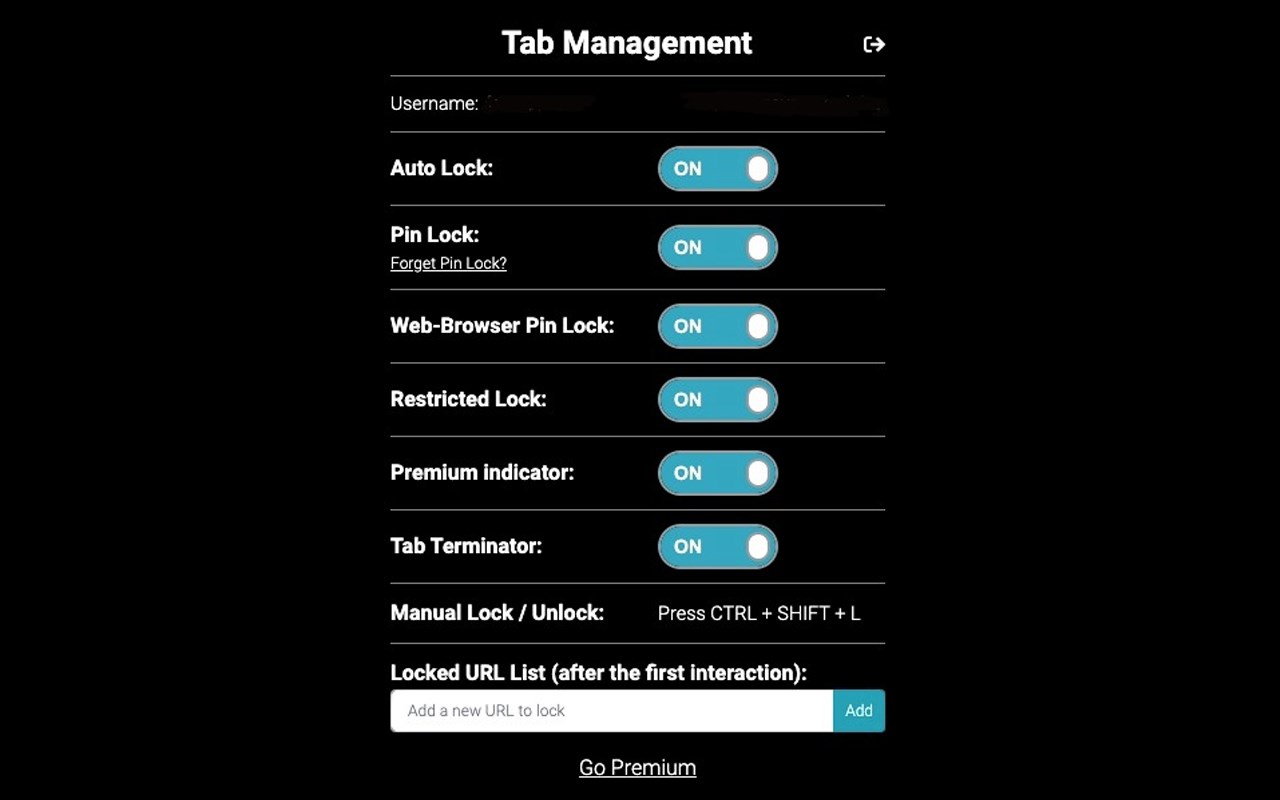
● Tab Terminator-
Will handle automatic closing of
Web Browser unused Tabs in order to keep the
Tab cluster mass under control.
Creating a web browsing experience that is faster, easier and more efficient.
Make Your Browser Faster Than Ever Before
Did you ever close your browser in a accident ? losing all your important data?
● Auto-Lock -
Automatically Locks Web Browser priority
Tabs, to prevent web browser
tabs accidental closure and cluster.
(by displaying pop-up - Leave site?
every time an unwanted closure of
important tab occurs).
● Manual Lock or Unlock -
Lets you manually Lock the
Web-Browser Tabs from accidentally closing .
Best Tab Locker For Chrome Extensions
Did you ever want to password protect specific websites tabs?
● Pin Lock-
Secure Your Web-Browser tabs with a simple
4 digit PIN to prevent unwanted usage
of browser tabs and secure them from data exposure.
Have you ever had someone use your web-browser without your consent?
● Web Browser Pin lock-
Secure your web-browser with 4 digit
Pin Lock to prevent sensitive data
exposure and unwanted usage of your web browser.
Best Tab Manager on Google Chrome store
Pin specific websites to always be protected from accidentally closing.
● Locked URL List-
Allows the user to add specific websites
to an organized list that will always stay
locked preventing unwanted closure of
those specific tabs in the list.
Tab Management is the Best Google Extension
Try It For Free Today!
Available on Google Chrome, Microsoft Edge Add-ons.
______________________________________________________________________________________________
FAQ
1. Can the Auto-lock feature be turned off?
Answer- The auto-lock feature can be turned off easily from the Tab Management menu by clicking toggle to “Turn OFF” and clicking on enable.
2. Can the Manual and Auto-Lock be used together?
Answer- Yes, simply Press the CTRL+SHIFT+L shortcut whenever you want to manually open or close a tab.
3. Does Tab Management commit to backup your data in case of loss?
Answer- No, Tab management will not restore the data in cases of software malfunction (example: shut down) or your hardware malfunction. However, it can help prevent closing important tabs, while using the browser.
4. Can Pinned Tabs be locked?
Answer- Yes, First go to the main menu and turn "ON" Restricted Mode toggle.
Second add all the URL address of your pinned tabs to the Locked URL List in the main menu,
(Make sure to copy paste the exact URL you want to lock).
5. I want it to Lock the Tabs that it wont allow to exit the tab to another website or closing the tab how can I do that?
Answer- You can turn on Restricted Mode in the main menu and click enable.
6. I want to set a password for a specific tab.
Answer- Turn on Pin Lock set up your pin afterwards right click on the website page you wish to lock click on the Tab Management Tab manager Tab locker - right click on Pin lock or unlock.
7. What does the Free version have?
Tab Management Free version lets you use manual lock, Locked URL List, Restricted Mode, Premium Indicator.( first time users get 14 days for free with full access to premium).
8. Does Tab Management support Chromebook?
Answer- Yes.(make sure to update to the latest version).
9. Does Tab Management share or use any of my information?
Answer- No.
10. Do we use a high amount of ram/resources?
Answer- No, tab management is a low-sized, well-optimized program, it will help you reduce the number of resources by highlighting your important tabs (and as a result, you can close the other which are might be less relevant).
11. Do we support Tab Management?
Answer- Yes, for adjustment of the program to your personal business needs or any other support please contact us at tabmanage.com/contact
12. What happens after the 14 days trial?
Answer- You will have an option to subscribe for our Premium service or you can chose to stay with the Free version that it will automatically switch for you that offers : Manual lock, Locked URL List, Restricted Mode, Beta Premium Indicator.
13. What other browsers do you support?
Answer- Currently we support : Google Chrome, Microsoft Edge And Firefox.
Also Chromebook.
14. Do you collect any information from me?
Answer- No we do not.
*Due to Chrome limitation’s, the auto-lock function can only preform after the first interaction (click) on-page, therefore the situation of a web page opened without any user interaction would result in a false indication of the lock symbol (the lock function will only be triggered after any interaction with the page or lock & unlock it with the manual CTRL+SHIFT+L: press, use lock/unlock toggle).
______________________________________________________________________________________________
Privacy Policy
Tab Management doesn't share information with any third party services and no data about the user is stored in any way or form without the users permission. All permissions required for Tab Management are only for running the features provided as they are stated.
Tab Management: Tab Manager|Productivity 是做什么的
Tab Management: Tab Manager|Productivity 是一款面向 Edge 的效率工具类扩展,主要用来管住注意力、屏蔽干扰站点、记录时间。官方对它的介绍是:Tab Management is a Google Extension For Productivity. To make Google Chrome – Faster, Efficient and Secured.在微软 Edge 加载项商店上,它当前版本 3.0,评分 3.1(9 人评价),约 371 名用户。
适合什么人用
从功能定位看,Tab Management: Tab Manager|Productivity 更适合想专注工作学习、减少无效刷网页的用户。如果你平时只是偶尔遇到相关需求,用浏览器自带功能也能凑合;但如果这件事每天都发生,装一个专门处理它的扩展通常比手动操作省事得多。需要注意的是它作用于所有网站,装上后建议先观察一两天,确认不影响常用站点的正常使用。
怎么安装 Tab Management: Tab Manager|Productivity
- 打开微软 Edge 加载项商店上的官方页面;
- 点「添加到浏览器」并确认权限提示;
- 装好后在扩展列表里固定图标,方便随时开关。
本站只做索引与介绍,安装包来自官方商店。如果商店页面提示当前地区不可用,说明该扩展未在你所在区域上架。
常见问题
Tab Management: Tab Manager|Productivity 是免费的吗?
Tab Management: Tab Manager|Productivity 在微软 Edge 加载项商店免费提供下载。它是浏览器扩展,装上就能直接用,不需要注册账号。
Tab Management: Tab Manager|Productivity 安全吗?
它只申请了 0 项权限,范围比较克制,没有申请「读取所有网站数据」这种大权限。
Tab Management: Tab Manager|Productivity 支持哪些浏览器?
当前收录的版本来自微软 Edge 加载项商店,适用于 Edge。同一个扩展在其他商店可能有对应版本,但功能与版本号不一定相同。
怎么卸载 Tab Management: Tab Manager|Productivity?
在扩展管理页找到 Tab Management: Tab Manager|Productivity,点移除即可。它在本地保存的设置会一起清掉,不会残留数据。
权限清单 来自 manifest.json 原文
站点访问(可选) 1
*://*/*
接口权限 5
contextMenusstoragetabGroupstabswindows