Tab Glide — Tab Scroll & Reorder EN
Tab Glide · EEdge MV3
A scrollable horizontal tab bar on websites, with fullscreen reveal, direction controls and adjustable height.
截图
简介
Give your tabs a little room.
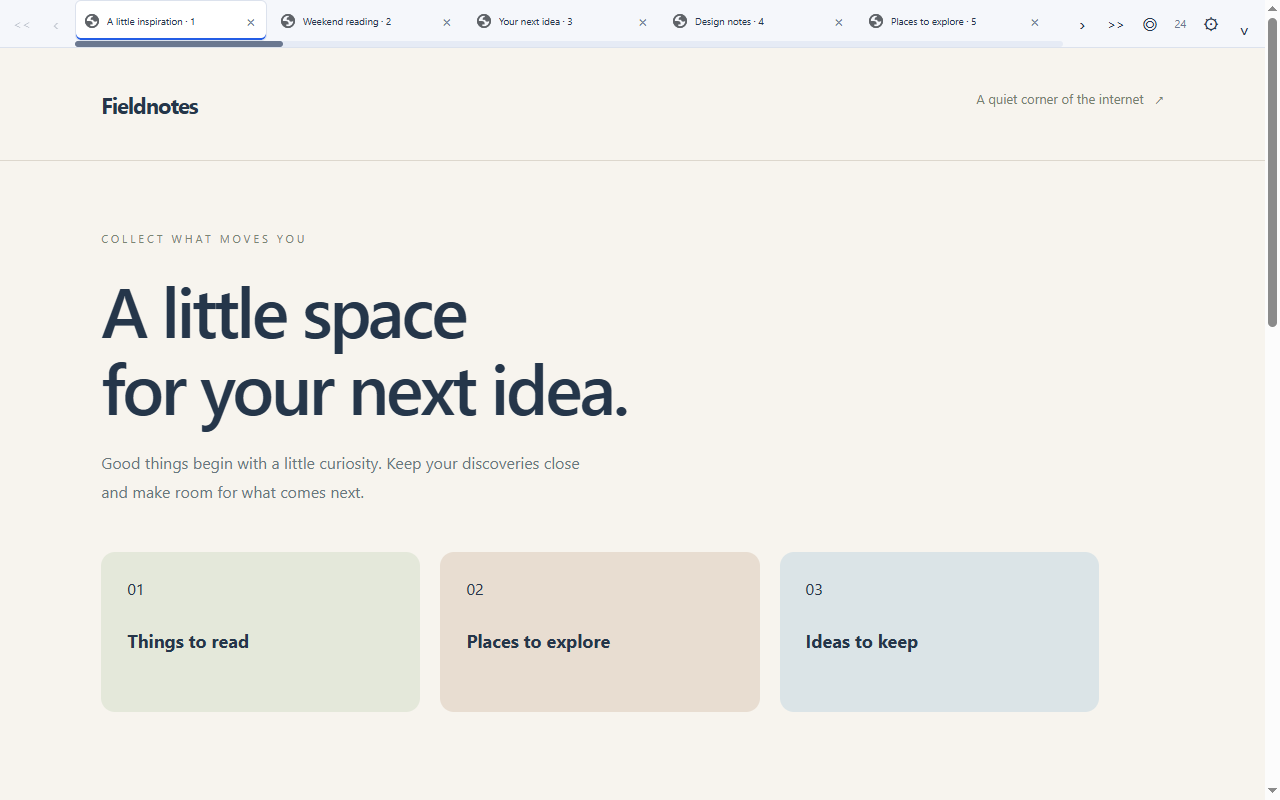
Tab Glide adds a readable, horizontal tab bar at the top of supported webpages. Roll your mouse wheel to move along the strip, or swipe horizontally on a trackpad. Scrolling moves the strip without changing your active tab.
Make it yours:
- Choose normal-window and browser-fullscreen visibility independently: always show, hide, or reveal at the webpage’s top edge.
- Turn scroll arrows on or off and choose a step of 1–20 tabs per click.
- Reverse scrolling to suit your mouse or trackpad preferences.
- Show or hide the scrollbar and adjust its thickness from 4 to 12 pixels, independently of optional click-and-drag scrolling.
- Add start/end buttons and a separate button to find the active tab.
- Keep the strip at your chosen position when revealing it, changing tabs or navigating. Scroll offsets stay in memory for this browser session.
- Reorder real browser tabs by dragging the icon, title or either one, or turn reordering off. Pinned tabs stay in their group.
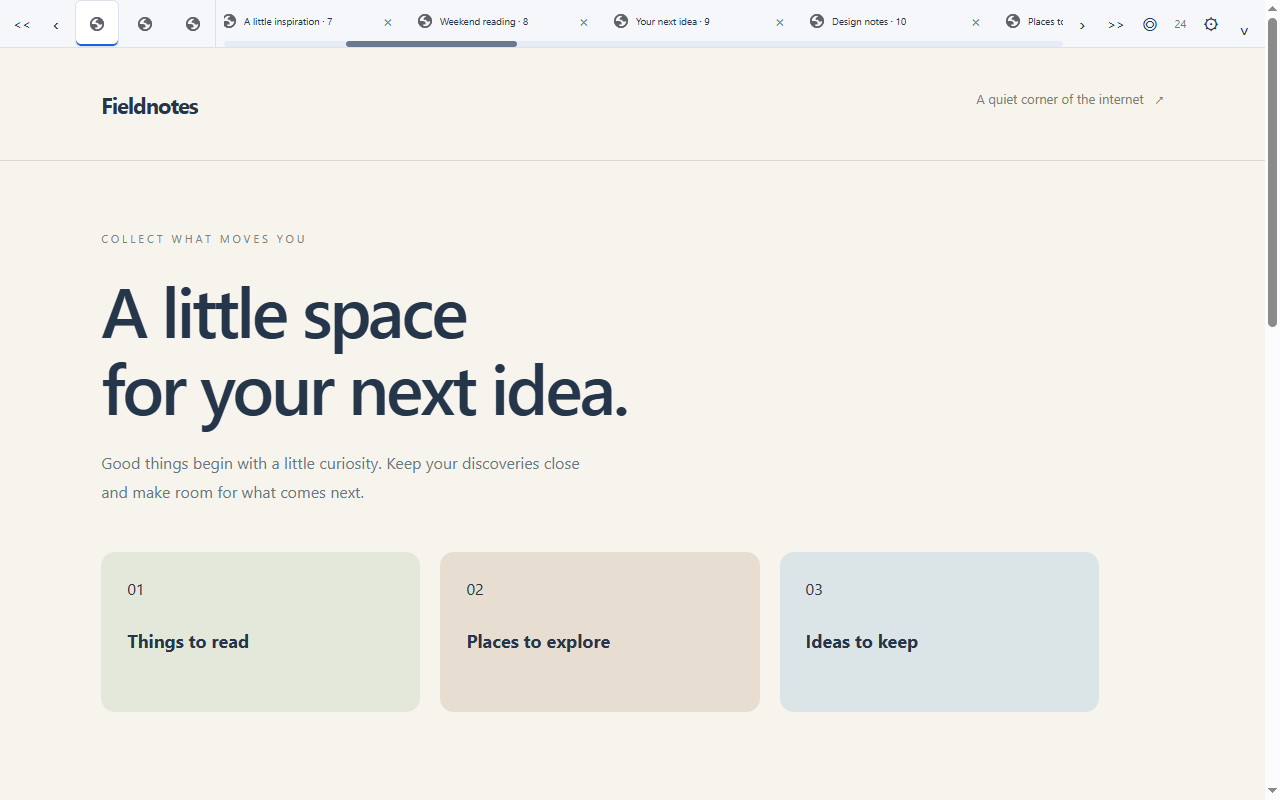
- Hide titles for compact, 44-pixel icon-only tabs. Hover to read the full title; middle-click or focus a tab and press Delete to close it.
- Optionally keep pinned tabs in a fixed area on the left while other tabs scroll. A crowded pinned area scrolls separately and leaves room for regular tabs.
- Show or hide pinned-tab titles independently, even when pinned tabs scroll with the rest.
- Adjust the bar height from 32 to 80 pixels and the tab width from 140 to 280 pixels.
- Choose a light, dark or system theme.
- Switch and close tabs, with an active indicator and a pinned marker when titles are shown.
- Try your preferences in a live preview with 30 sample tabs.
- Keep the current window’s tab order as tabs open, close or move.
- Hide or restore the bar using the switch in the extension popup or a configurable keyboard shortcut.
Website access is optional. Enable it from the extension’s popup, then control individual sites in Microsoft Edge’s extension settings. Settings are stored locally. There are no accounts, advertising, analytics or browsing-data uploads.
Please note: this is an additional bar on webpages. It does not replace, resize or restore scrolling in Microsoft Edge’s native tab strip. It overlays the top of the page and can be hidden when it covers site controls. It cannot appear on Microsoft Edge internal pages, extension stores, local files, other extensions or the built-in PDF viewer. It stays hidden during video/element fullscreen. Microsoft Edge’s own fullscreen toolbar may appear before the pointer reaches the webpage’s top edge.
All features are free. Optional support via PayPal opens an external page; no payment is required.
Tab Glide — Tab Scroll & Reorder 是做什么的
Tab Glide — Tab Scroll & Reorder 是一款面向 Edge 的效率工具类扩展,主要用来管住注意力、屏蔽干扰站点、记录时间。官方对它的介绍是:A scrollable horizontal tab bar on websites, with fullscreen reveal, direction controls and adjustable height.在微软 Edge 加载项商店上,它当前版本 1.0.7,约 2 名用户。
适合什么人用
从功能定位看,Tab Glide — Tab Scroll & Reorder 更适合想专注工作学习、减少无效刷网页的用户。如果你平时只是偶尔遇到相关需求,用浏览器自带功能也能凑合;但如果这件事每天都发生,装一个专门处理它的扩展通常比手动操作省事得多。
怎么安装 Tab Glide — Tab Scroll & Reorder
- 打开微软 Edge 加载项商店上的官方页面;
- 点「添加到浏览器」并确认权限提示;
- 装好后在扩展列表里固定图标,方便随时开关。
本站只做索引与介绍,安装包来自官方商店。如果商店页面提示当前地区不可用,说明该扩展未在你所在区域上架。
常见问题
Tab Glide — Tab Scroll & Reorder 是免费的吗?
Tab Glide — Tab Scroll & Reorder 在微软 Edge 加载项商店免费提供下载。它是浏览器扩展,装上就能直接用,不需要注册账号。
Tab Glide — Tab Scroll & Reorder 安全吗?
它只申请了 0 项权限,范围比较克制,没有申请「读取所有网站数据」这种大权限。
Tab Glide — Tab Scroll & Reorder 支持哪些浏览器?
当前收录的版本来自微软 Edge 加载项商店,适用于 Edge。同一个扩展在其他商店可能有对应版本,但功能与版本号不一定相同。
怎么卸载 Tab Glide — Tab Scroll & Reorder?
在扩展管理页找到 Tab Glide — Tab Scroll & Reorder,点移除即可。它在本地保存的设置会一起清掉,不会残留数据。
权限清单 来自 manifest.json 原文
接口权限 4
faviconscriptingstoragetabs