
Suno Downloader
Suno Downloader · EEdge MV3
2025 主题 Suno 下载器。适用于 Edge 的 Suno AI 下载器 Suno 音乐下载
<all_urls>),意味着它可以读取你在任意站点的页面内容,包括已登录的页面。这是许多扩展正常工作的必要条件,但也值得你确认来源可信。
截图
简介
要在主页上查看全球音乐列表,您必须先成为 Suno.com 会员。然后,您必须登录。
Suno Downloader MP3 下载器
您是一位喜欢从 Suno.com 发现和保存您喜爱的曲目的音乐爱好者吗?如果是这样,Suno Downloader Chrome 扩展程序将彻底改变您的音乐体验。这个功能强大但简单的工具允许您只需单击一下即可直接从 Suno.com 下载歌曲,让您比以往更轻松地离线欣赏您喜爱的音乐。
什么是 Suno Downloader?
Suno Downloader 是一款专门设计的 Chrome 扩展程序,可与 Suno.com 无缝集成,Suno.com 是发现和流式传输音乐的最流行平台之一。使用此扩展程序,您可以毫不费力地下载您喜欢的任何歌曲,确保您可以随时随地访问您喜爱的曲目 - 即使没有互联网连接。
Suno Downloader 的主要功能
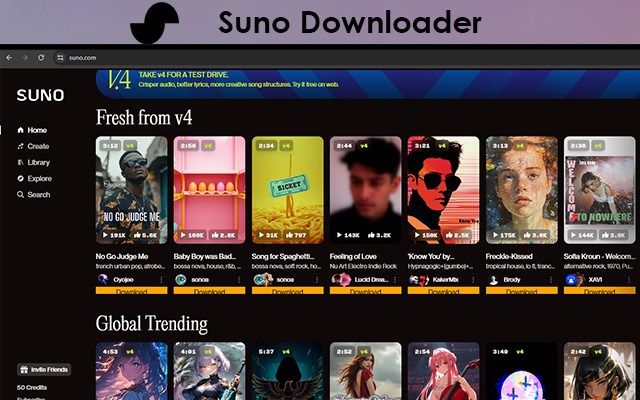
Suno.com 上的直接下载按钮:安装 Suno Downloader 扩展程序后,Suno.com 上每首歌曲下方都会出现一个方便的“下载”按钮。只需单击按钮,歌曲就会在几秒钟内保存到您的设备中。
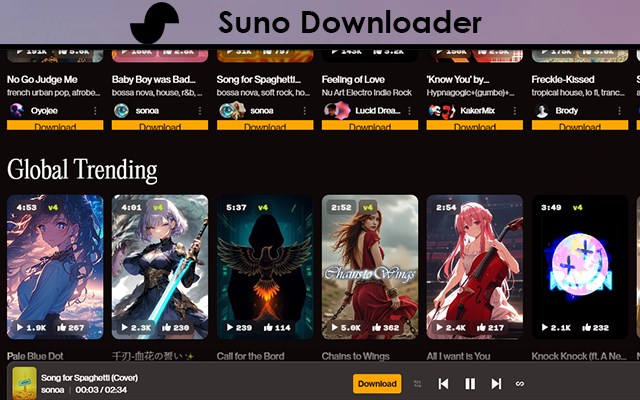
音乐播放器上的下载按钮:当任何歌曲开始在 Suno.com 上播放时,Suno Downloader 扩展程序会直接在音乐播放器上添加一个下载按钮。这意味着您甚至无需离开播放器界面即可下载曲目。
高品质音频:Suno Downloader 可确保您下载的所有歌曲都以高品质音频格式保存,因此您每次都可以享受清晰的声音。
快速易用:该扩展程序设计简单、速度快。只需单击一下,即可下载和保存您喜爱的歌曲。
免费且安全:Suno Downloader 完全免费使用,并且以您的安全为重。它没有恶意软件、广告和不必要的臃肿,可提供安全无忧的体验。
如何使用 Suno Downloader
安装扩展程序:前往 Chrome 网上应用店并搜索 Suno Downloader。单击“添加到 Chrome”以安装扩展程序。
访问 Suno.com:在浏览器中打开 Suno.com,开始探索您喜爱的歌曲。
轻松下载:
选项 1:在 Suno.com 页面上的任何歌曲下方找到“下载”按钮,然后单击它以保存曲目。
选项 2:当歌曲开始播放时,单击音乐播放器上的“下载”按钮立即下载曲目。
离线享受音乐:下载后,您的歌曲将保存到您的设备中,随时可以播放,即使没有互联网连接也可以。
为什么选择 Suno Downloader?
Suno Downloader 是任何喜欢 Suno.com 音乐的人的完美伴侣。它与平台的无缝集成,加上用户友好的设计,使其成为下载您喜爱曲目的终极工具。无论您是在策划公路旅行的播放列表还是保存歌曲以供离线收听,Suno Downloader 都能让这个过程变得快速、轻松和愉快。
结论
如果您是 Suno.com 的粉丝,并希望将您的音乐体验提升到一个新的水平,Suno Downloader Chrome 扩展程序是必备的。凭借其直观的下载按钮和高品质的音频下载,它是保存您喜爱的歌曲并离线欣赏它们的最简单方法。
立即安装 Suno Downloader,只需单击一下即可开始构建您的离线音乐库!
To see the Global music list on the home page, you must first become a Suno.com member. Then, you must log in.
Suno Downloader MP3 DOWNLOADER
Are you a music lover who enjoys discovering and saving your favorite tracks from Suno.com? If so, the Suno Downloader Chrome extension is here to revolutionize your music experience. This powerful yet simple tool allows you to download songs directly from Suno.com with just a click, making it easier than ever to enjoy your favorite tunes offline.
What is Suno Downloader?
Suno Downloader is a specially designed Chrome extension that seamlessly integrates with Suno.com, one of the most popular platforms for discovering and streaming music. With this extension, you can effortlessly download any song you love, ensuring you have access to your favorite tracks anytime, anywhere—even without an internet connection.
Key Features of Suno Downloader
Direct Download Button on Suno.com: Once the Suno Downloader extension is installed, a convenient "Download" button appears below every song on Suno.com. Simply click the button, and the song will be saved to your device in seconds.
Download Button on Music Player: When any song starts playing on Suno.com, the Suno Downloader extension adds a download button directly on the music player. This means you can download the track without even leaving the player interface.
High-Quality Audio: Suno Downloader ensures that all your downloaded songs are saved in high-quality audio formats, so you can enjoy crystal-clear sound every time.
Fast and Easy to Use: The extension is designed for simplicity and speed. With just one click, your favorite songs are ready to be downloaded and saved.
Free and Safe: Suno Downloader is completely free to use and is built with your safety in mind. It’s free from malware, ads, and unnecessary bloat, providing a secure and hassle-free experience.
How to Use Suno Downloader
Install the Extension: Head to the Chrome Web Store and search for Suno Downloader. Click “Add to Chrome” to install the extension.
Visit Suno.com: Open Suno.com in your browser and start exploring your favorite songs.
Download with Ease:
Option 1: Look for the Download button below any song on the Suno.com page and click it to save the track.
Option 2: When a song starts playing, click the Download button on the music player to download the track instantly.
Enjoy Your Music Offline: Once downloaded, your songs are saved to your device, ready to be played anytime, even without an internet connection.
Why Choose Suno Downloader?
Suno Downloader is the perfect companion for anyone who loves music on Suno.com. Its seamless integration with the platform, combined with its user-friendly design, makes it the ultimate tool for downloading your favorite tracks. Whether you’re curating a playlist for a road trip or saving songs for offline listening, Suno Downloader makes the process quick, easy, and enjoyable.
Conclusion
If you’re a fan of Suno.com and want to take your music experience to the next level, the Suno Downloader Chrome extension is a must-have. With its intuitive download buttons and high-quality audio downloads, it’s the easiest way to save your favorite songs and enjoy them offline.
Install Suno Downloader today and start building your offline music library with just one click!
Suno Downloader 是做什么的
Suno Downloader 是一款面向 Edge 的效率工具类扩展,主要用来管住注意力、屏蔽干扰站点、记录时间。官方对它的介绍是:2025 主题 Suno 下载器。适用于 Edge 的 Suno AI 下载器 Suno 音乐下载在微软 Edge 加载项商店上,它当前版本 4.0.1,约 343 名用户。
适合什么人用
从功能定位看,Suno Downloader 更适合想专注工作学习、减少无效刷网页的用户。如果你平时只是偶尔遇到相关需求,用浏览器自带功能也能凑合;但如果这件事每天都发生,装一个专门处理它的扩展通常比手动操作省事得多。需要注意的是它作用于所有网站,装上后建议先观察一两天,确认不影响常用站点的正常使用。
怎么安装 Suno Downloader
- 打开微软 Edge 加载项商店上的官方页面;
- 点「添加到浏览器」并确认权限提示;
- 装好后在扩展列表里固定图标,方便随时开关。
本站只做索引与介绍,安装包来自官方商店。如果商店页面提示当前地区不可用,说明该扩展未在你所在区域上架。
常见问题
Suno Downloader 是免费的吗?
Suno Downloader 在微软 Edge 加载项商店免费提供下载。它是浏览器扩展,装上就能直接用,不需要注册账号。
Suno Downloader 安全吗?
它只申请了 0 项权限,范围比较克制,没有申请「读取所有网站数据」这种大权限。
Suno Downloader 支持哪些浏览器?
当前收录的版本来自微软 Edge 加载项商店,适用于 Edge。同一个扩展在其他商店可能有对应版本,但功能与版本号不一定相同。
怎么卸载 Suno Downloader?
在扩展管理页找到 Suno Downloader,点移除即可。它在本地保存的设置会一起清掉,不会残留数据。
权限清单 来自 manifest.json 原文
站点访问(可选) 1
<all_urls>
接口权限 2
downloadsnotifications