
SpeedKeys · 方向键倍速(长按加速 / 快进退 / 跳过片头片尾)
零下OVO · EEdge MV3
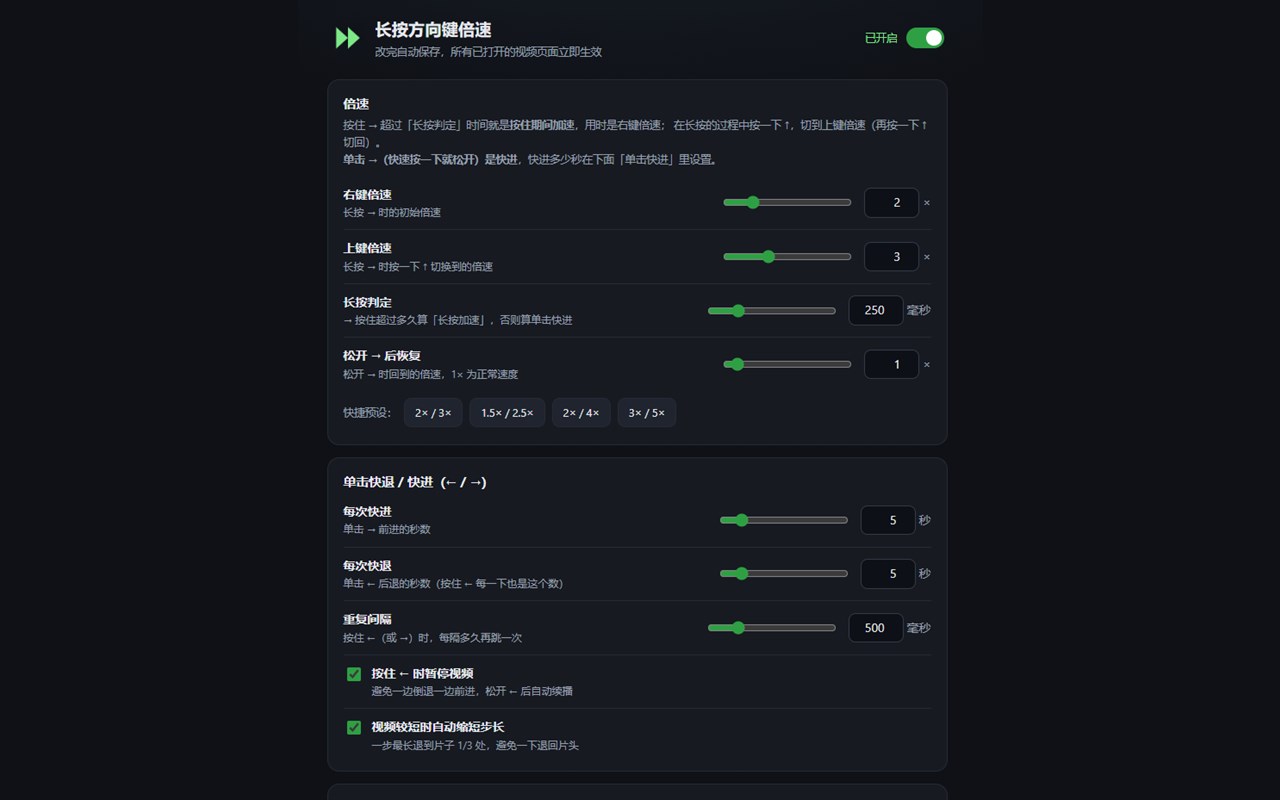
看视频时用方向键控制播放:长按 → 加速,按 ↑ 切换倍速,按 ↓ 锁定倍速,单击 → 快进、← 快退,并可按秒数自动跳过片头片尾。倍速、秒数、提示外观均可在设置页调整。
截图

简介
Control video playback with arrow keys — no need to drag the progress bar.
CORE FEATURES
· Hold → : speed up while holding, restore to normal speed on release
· Hold → + ↑ : switch to another speed preset (press ↑ again to switch back)
· Hold → + ↓ : lock the current speed, press ↓ again to unlock
· Tap → : skip forward a configurable number of seconds
· Tap ← : rewind; hold ← to keep rewinding every 0.5 seconds
· Auto-skip intro and outro by seconds:
intro can jump to a chosen position within the first 0-240 seconds;
outro can jump to "N seconds before the end" so the video finishes naturally
and the site can auto-play the next episode
VISUAL SETTINGS
· Speed values: hold speed, alternate speed, restore speed
· Seek step, hold threshold, repeat interval
· Toast style: text color, background color, icon color, opacity and saturation
· Built-in presets, changes take effect immediately
YOUTUBE SUPPORT
· By default only takes over speed presets, leaving YouTube's own seek shortcuts intact
· Playback speed stays in sync with YouTube's own "Playback speed" menu
PRIVACY
· No network requests, no analytics, no data collection
· All settings are stored locally in your browser
· Browser shortcuts such as Ctrl+↑/↓ (zoom) and Alt+← (back) are not affected
【平台支持】
· 桌面版 Edge / Chrome:完整支持
· 安卓:支持(需 Kiwi 等可装扩展的浏览器)
· iPhone / iPad:受 iOS 系统限制,无法安装浏览器扩展
更新公告:
修复了安卓端上滑不切换倍速的问题
SpeedKeys · 方向键倍速(长按加速 / 快进退 / 跳过片头片尾) 是做什么的
SpeedKeys · 方向键倍速(长按加速 / 快进退 / 跳过片头片尾) 是一款面向 Edge 的效率工具类扩展,主要用来管住注意力、屏蔽干扰站点、记录时间。官方对它的介绍是:看视频时用方向键控制播放:长按 → 加速,按 ↑ 切换倍速,按 ↓ 锁定倍速,单击 → 快进、← 快退,并可按秒数自动跳过片头片尾。倍速、秒数、提示外观均可在设置页调整。在微软 Edge 加载项商店上,它当前版本 1.6.1,约 97 名用户。
适合什么人用
从功能定位看,SpeedKeys · 方向键倍速(长按加速 / 快进退 / 跳过片头片尾) 更适合想专注工作学习、减少无效刷网页的用户。如果你平时只是偶尔遇到相关需求,用浏览器自带功能也能凑合;但如果这件事每天都发生,装一个专门处理它的扩展通常比手动操作省事得多。
怎么安装 SpeedKeys · 方向键倍速(长按加速 / 快进退 / 跳过片头片尾)
- 打开微软 Edge 加载项商店上的官方页面;
- 点「添加到浏览器」并确认权限提示;
- 装好后在扩展列表里固定图标,方便随时开关。
本站只做索引与介绍,安装包来自官方商店。如果商店页面提示当前地区不可用,说明该扩展未在你所在区域上架。
常见问题
SpeedKeys · 方向键倍速(长按加速 / 快进退 / 跳过片头片尾) 是免费的吗?
SpeedKeys · 方向键倍速(长按加速 / 快进退 / 跳过片头片尾) 在微软 Edge 加载项商店免费提供下载。它是浏览器扩展,装上就能直接用,不需要注册账号。
SpeedKeys · 方向键倍速(长按加速 / 快进退 / 跳过片头片尾) 安全吗?
它只申请了 0 项权限,范围比较克制,没有申请「读取所有网站数据」这种大权限。
SpeedKeys · 方向键倍速(长按加速 / 快进退 / 跳过片头片尾) 支持哪些浏览器?
当前收录的版本来自微软 Edge 加载项商店,适用于 Edge。同一个扩展在其他商店可能有对应版本,但功能与版本号不一定相同。
怎么卸载 SpeedKeys · 方向键倍速(长按加速 / 快进退 / 跳过片头片尾)?
在扩展管理页找到 SpeedKeys · 方向键倍速(长按加速 / 快进退 / 跳过片头片尾),点移除即可。它在本地保存的设置会一起清掉,不会残留数据。
权限清单 来自 manifest.json 原文
接口权限 1
storage