
SP X-Ray EN
SP X-Ray · EEdge MV3
Read-only SharePoint explorer in Chrome's side panel. Browse sites, lists, libraries, taxonomy. Run KQL searches - no setup needed.
截图
简介
Explore the full structure of any SharePoint Online or On-Premises site directly from Chrome's side panel - using your existing browser session. No Azure AD app registration. No OAuth flow. No setup.
────────────────────────────────────────
🌐 SITE EXPLORER
────────────────────────────────────────
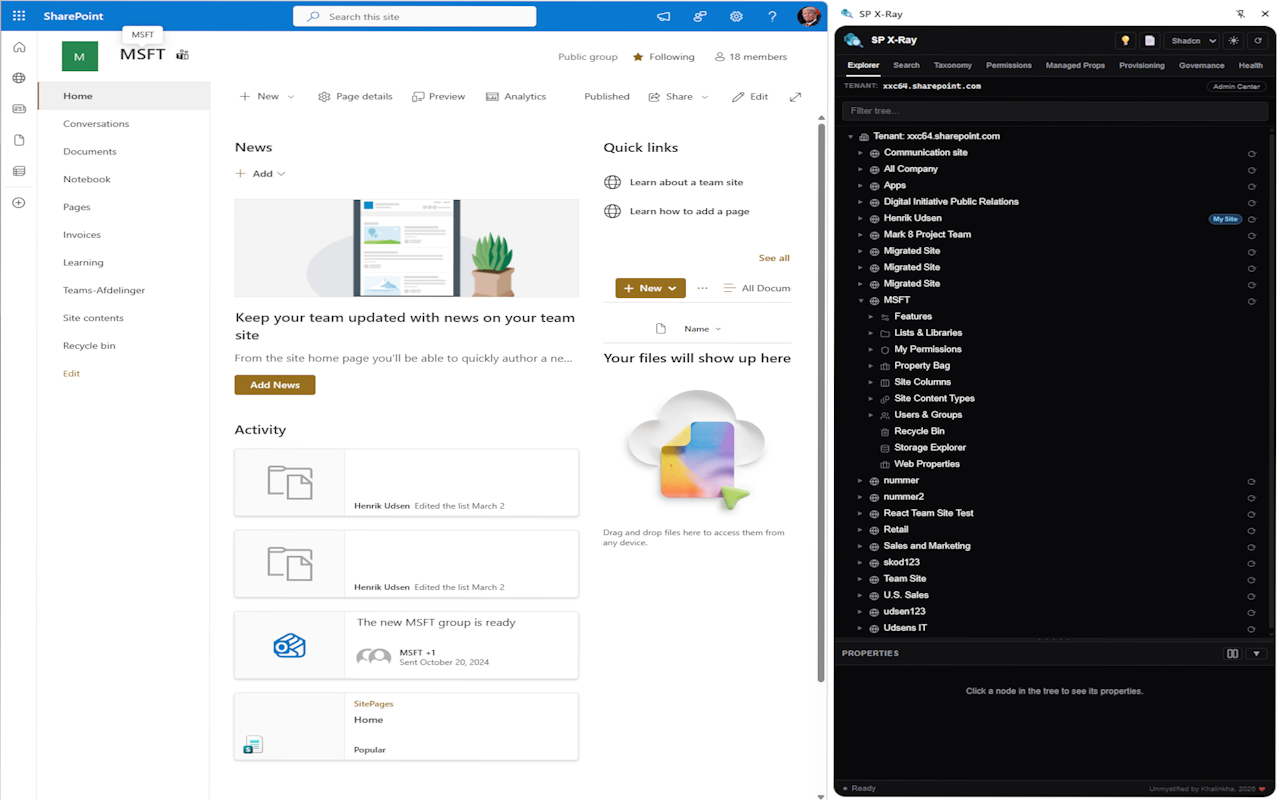
Browse the complete site hierarchy: site collections, sub-sites, lists and document libraries, fields and columns, content types, items and files (lazy-loaded with folder navigation), site columns, features, users and security groups.
────────────────────────────────────────
🔍 KQL SEARCH
────────────────────────────────────────
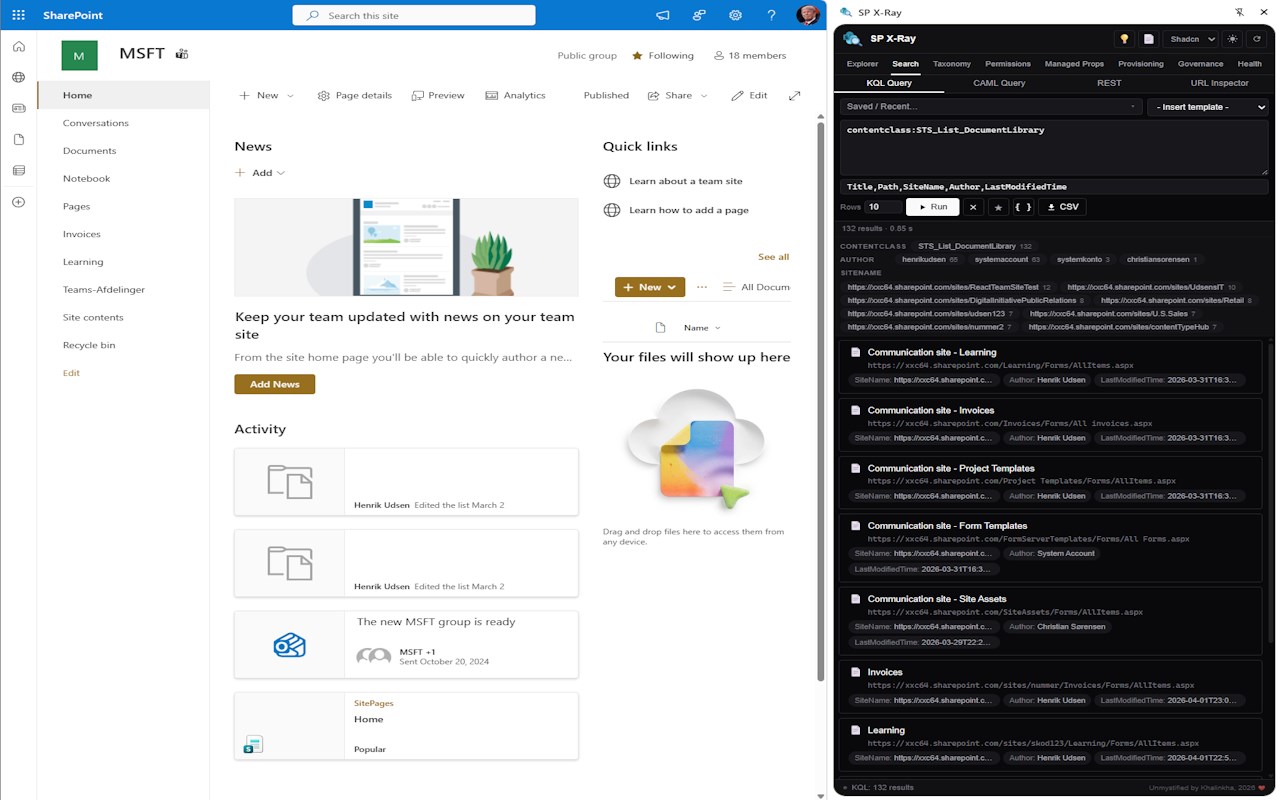
Run Keyword Query Language searches against the SharePoint search index. Results shown as cards with human-readable file sizes. Toggle raw JSON for debugging. Export all results to CSV across paginated result sets.
Refiner panel: clickable facet chips for ContentClass, FileType, Author and SiteName let you AND-filter results instantly.
────────────────────────────────────────
📋 CAML QUERY
────────────────────────────────────────
Build and run CAML queries against any list. Includes a list and scope selector, XML editor with syntax highlighting and live line numbers, 20 built-in presets, client-side XML validation, and a sticky-header results table.
Generate ready-to-use code in C# CSOM, C# SSOM, React/TypeScript (PnPjs v3) and PowerShell. Export to CSV · toggle raw JSON · copy query or REST URL.
────────────────────────────────────────
🛠 REST API TESTER
────────────────────────────────────────
Send GET and POST requests to any SharePoint REST endpoint. Choose Accept format (OData verbose, minimal metadata, JSON, XML), auto-inject X-RequestDigest for POST requests, and view syntax-highlighted responses. Session history keeps your last 20 requests.
────────────────────────────────────────
🔗 URL INSPECTOR
────────────────────────────────────────
Paste any SharePoint URL to instantly decode its components - site, library, folder, file, list GUID and item ID. Includes an "Open in tree" button to navigate the explorer directly to the decoded location.
────────────────────────────────────────
🏷 TAXONOMY BROWSER
────────────────────────────────────────
Browse the full term store hierarchy (Store - Groups - Sets - Terms) with lazy loading and a detail panel showing all term properties.
────────────────────────────────────────
⚙️ MANAGED PROPERTIES
────────────────────────────────────────
Search and inspect managed properties in the SharePoint search schema. Resizable detail panel. Falls back to site columns if the search administration endpoint is unavailable.
────────────────────────────────────────
📊 GOVERNANCE
────────────────────────────────────────
Four dashboards powered by Microsoft Graph - sign in once with your Microsoft 365 account:
• Inactive Sites - tenant-wide usage report showing last activity, page views and storage per site
• External Sharing - KQL-powered scan of externally shared documents with Graph sharing links and an anonymous-link chart across the tenant
• Site Hygiene - ownerless Microsoft 365 groups, guest users, and cold or orphaned Entra accounts
• Site Activity - hits, visits, storage quota, 30-day daily sparkline, and top users by file activity
────────────────────────────────────────
🔐 PERMISSIONS
────────────────────────────────────────
• Permission Report - enumerate all unique permissions across lists, libraries and sub-sites. Filter by name, export to CSV.
• User Access Scanner - enter any user's email or claims identity to see where they have access, at what level, and whether it is direct or via a group.
────────────────────────────────────────
🗑 RECYCLE BIN
────────────────────────────────────────
Browse deleted items on any site, filter by name, export to CSV, restore with conflict resolution, permanently delete individual items, or empty the entire bin - without leaving the side panel.
────────────────────────────────────────
💾 STORAGE EXPLORER
────────────────────────────────────────
See storage usage per list and library sorted by size. Site-level total, mini bar charts and CSV export.
────────────────────────────────────────
📦 PROVISIONING
────────────────────────────────────────
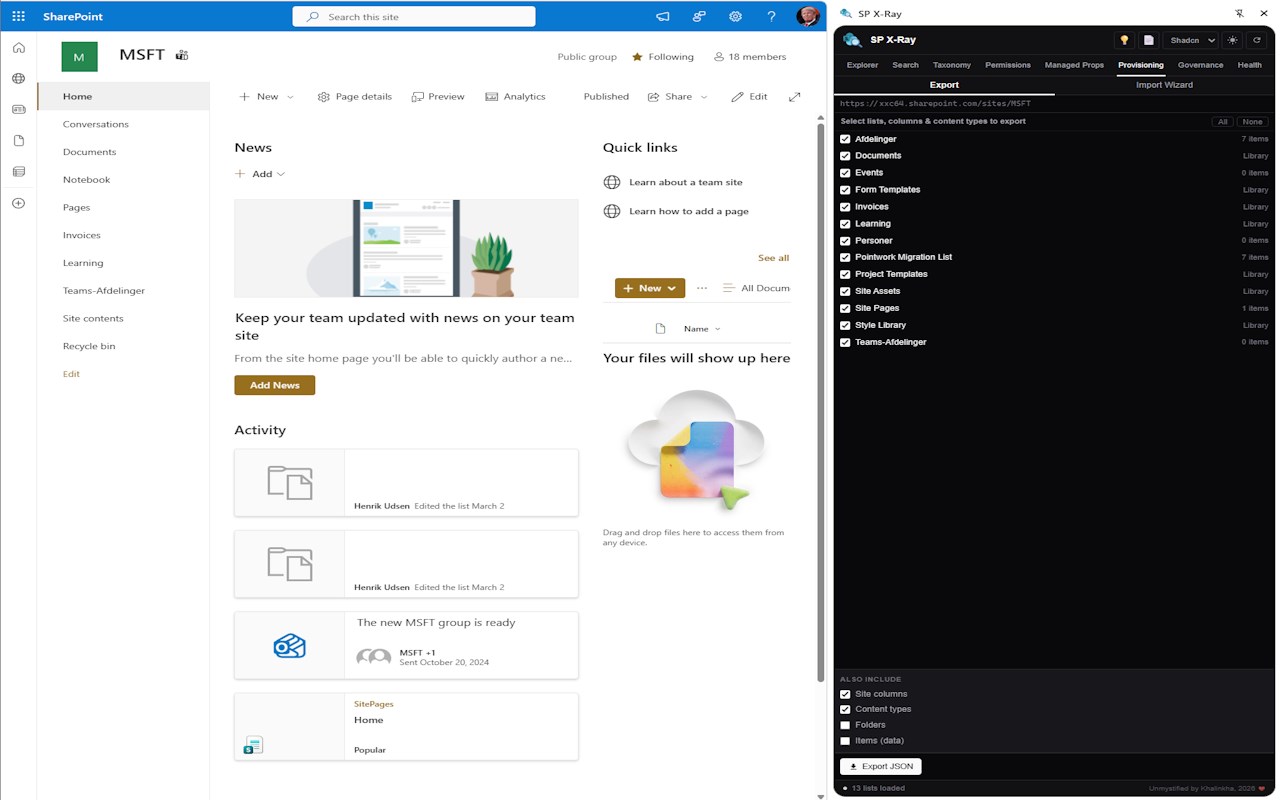
Export and import SharePoint site structure as portable JSON templates.
• Export - select lists, site columns, content types, folders and list items and download as a single JSON file
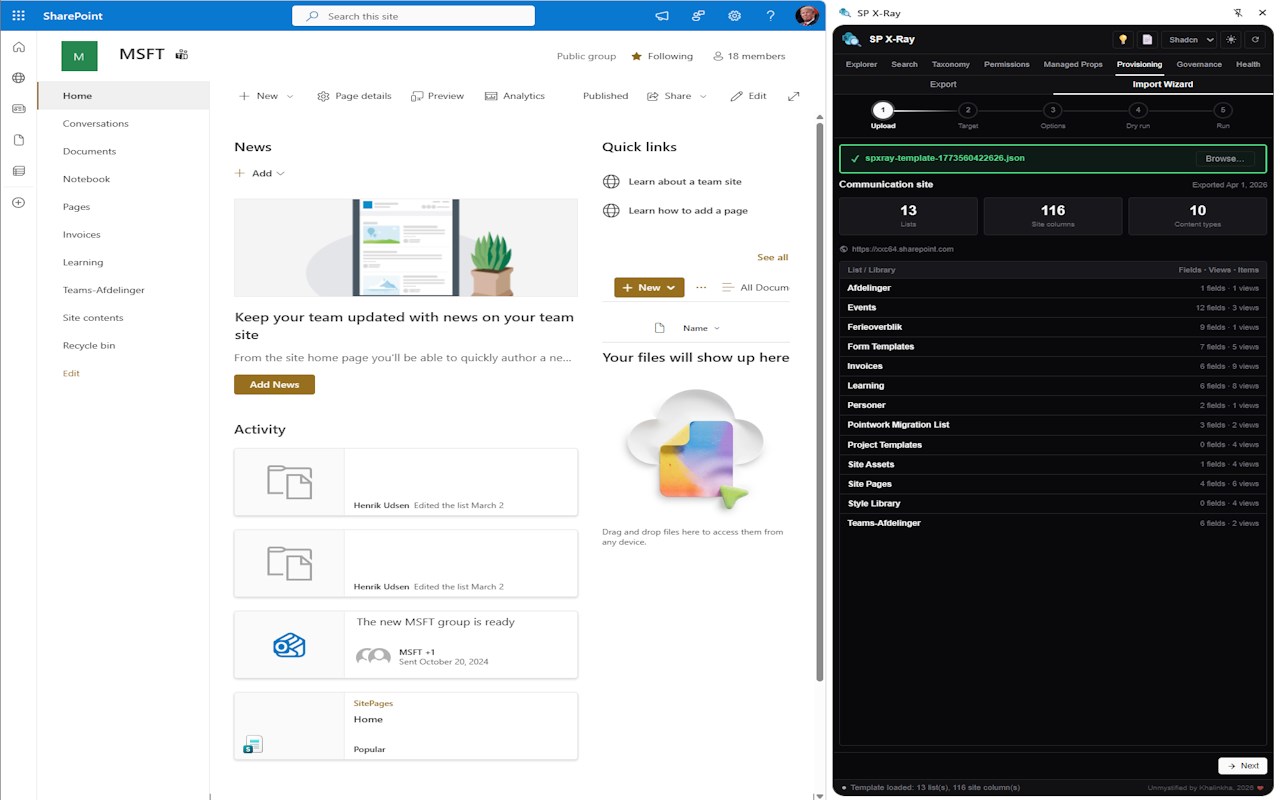
• Import Wizard - five-step guided wizard (Upload - Target - Options - Dry run - Apply). A rich preview card shows source title, export date, list count, field count and per-list details before you commit. Idempotent - re-running on an existing site safely skips duplicates.
────────────────────────────────────────
📁 COPY LIST
────────────────────────────────────────
Copy any list or library to another site collection or subsite - including fields, views and optionally list items. Triggered directly from the tree.
────────────────────────────────────────
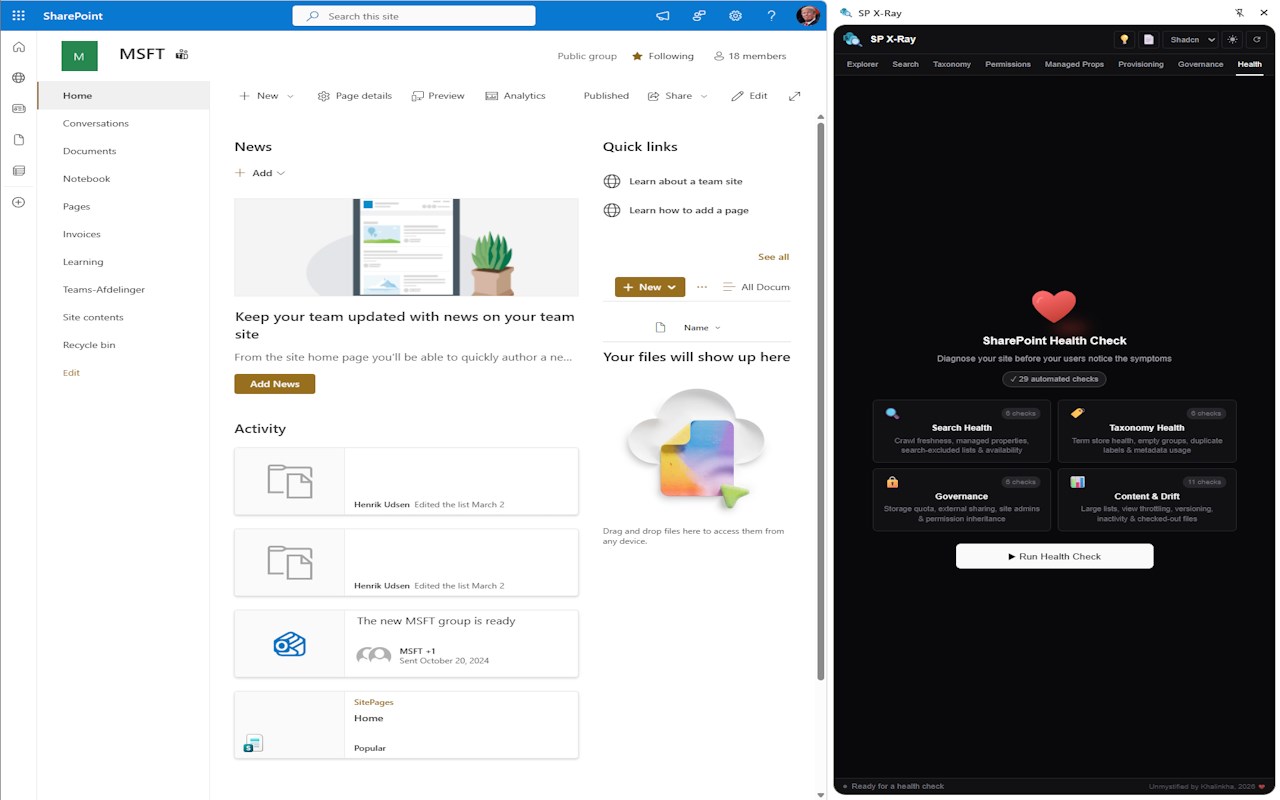
🏥 HEALTH CHECK
────────────────────────────────────────
29 automated checks across four categories:
• Search health - availability, crawl freshness, managed property coverage
• Taxonomy health - empty groups, sets without terms, duplicate labels
• Governance - storage quota, external sharing, admin count
• Content & drift - empty lists, versioning disabled, large lists approaching the 5,000-item threshold, missing indexes, unsafe views
Results shown with SVG status badges, color-coded rows, sticky category headers and callout-style remediation hints.
────────────────────────────────────────
✨ MORE
────────────────────────────────────────
• Property inspector - click any node to see all raw API properties
• File version history - version number, modified by, date, size and comments on any file
• Sharing tab - role assignments and items with active sharing links on list and library nodes
• Used in tab - see which lists and content types a field is used in
• Health indicator dots on list/library nodes - at-a-glance s…
SP X-Ray 是做什么的
SP X-Ray 是一款面向 Edge 的实用工具类扩展,主要用来解决浏览器里某类具体的小问题。官方对它的介绍是:Read-only SharePoint explorer in Chrome's side panel. Browse sites, lists, libraries, taxonomy. Run KQL searches - no setup needed.在微软 Edge 加载项商店上,它当前版本 2.5,约 24 名用户。
适合什么人用
从功能定位看,SP X-Ray 更适合想补上浏览器原生缺失功能的用户。如果你平时只是偶尔遇到相关需求,用浏览器自带功能也能凑合;但如果这件事每天都发生,装一个专门处理它的扩展通常比手动操作省事得多。
怎么安装 SP X-Ray
- 打开微软 Edge 加载项商店上的官方页面;
- 点「添加到浏览器」并确认权限提示;
- 装好后在扩展列表里固定图标,方便随时开关。
本站只做索引与介绍,安装包来自官方商店。如果商店页面提示当前地区不可用,说明该扩展未在你所在区域上架。
常见问题
SP X-Ray 是免费的吗?
SP X-Ray 在微软 Edge 加载项商店免费提供下载。它是浏览器扩展,装上就能直接用,不需要注册账号。
SP X-Ray 安全吗?
它只申请了 0 项权限,范围比较克制,没有申请「读取所有网站数据」这种大权限。
SP X-Ray 支持哪些浏览器?
当前收录的版本来自微软 Edge 加载项商店,适用于 Edge。同一个扩展在其他商店可能有对应版本,但功能与版本号不一定相同。
怎么卸载 SP X-Ray?
在扩展管理页找到 SP X-Ray,点移除即可。它在本地保存的设置会一起清掉,不会残留数据。
权限清单 来自 manifest.json 原文
接口权限 6
activeTabidentityscriptingsidePanelstoragetabs