
SideTalk for ChatGPT — Side Chat EN
Ha0c4 · EEdge MV3
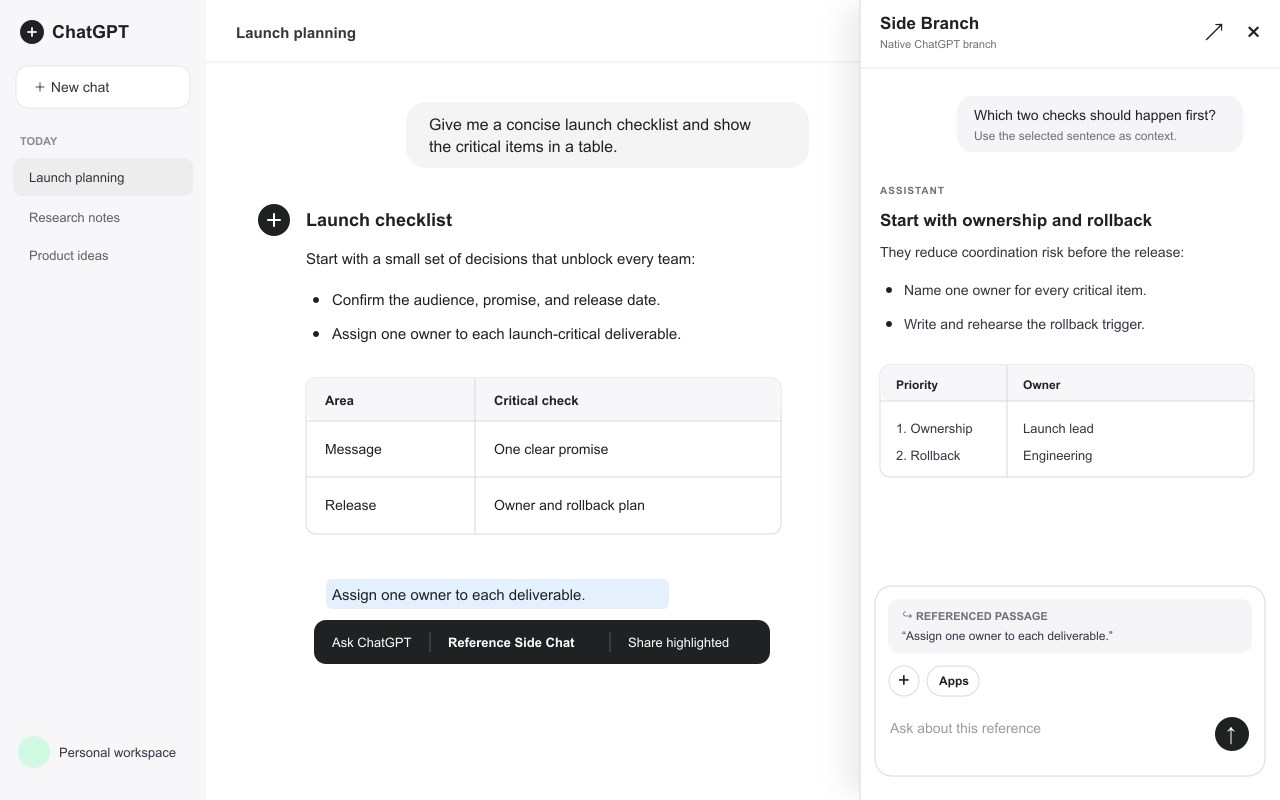
Add a side chat to the ChatGPT website. Ask follow-up questions beside your main conversation without changing its context.
截图
简介
Add a side chat to the ChatGPT website and ask follow-up questions without interrupting your main conversation.
SideTalk for ChatGPT — Side Chat is a Chrome and Microsoft Edge browser extension that opens a resizable chat sidebar inside chatgpt.com. Keep your original conversation visible while you clarify an answer, explore an alternative, or ask a separate question in a side conversation. Formerly called Side Branch for ChatGPT.
Each sidebar conversation uses a real native ChatGPT branch with the context available at its creation point. Your side questions and replies stay in that separate conversation. Later messages in the main chat are not automatically added to an existing branch, and side messages do not change the main chat's context.
What you can do:
• Chat side by side with your original ChatGPT conversation, including saved chats in Projects.
• Create multiple side conversations and switch between them.
• Select a passage in the main chat and choose “Reference Side Chat” to quote it in a follow-up.
• Dock the panel on the left or right, keep it floating, and resize it horizontally.
• Hide or show inherited conversation history while retaining the native branch's context.
• Use ChatGPT's own composer, models, file attachments, images, and available tools.
• Reopen saved side conversations after a page reload or browser restart.
• Close the panel without deleting the conversation; delete individual branches with confirmation, or use the three-second header close gesture to delete all side branches after a warning.
Use your existing ChatGPT account
Sign in to chatgpt.com with your own account. No API key, separate extension account, or developer-operated AI service is required. Model access, usage limits, files, tools, and native branch availability depend on your ChatGPT account. This extension works on the ChatGPT website; it does not provide a general-purpose assistant on unrelated websites.
Getting started
Open a saved ChatGPT conversation with an assistant reply, enable the extension after reading the first-use privacy notice, open “Side Chat,” and create a branch. Ask your follow-up in the panel while continuing to read the original conversation.
Privacy
The extension reads the ChatGPT page content needed to create and display your requested branch, including text you explicitly reference, and handles only files or images you explicitly attach or paste. Chats and attachments remain between your browser and your own authenticated ChatGPT session. The developer receives no conversations, files, analytics, or account credentials. Only branch-link metadata, privacy consent, and panel preferences are stored locally; transcripts and file contents are not saved by the extension. Explicit consent is required before first use.
This independent extension is not affiliated with or endorsed by OpenAI. ChatGPT is a trademark of OpenAI.
SideTalk for ChatGPT — Side Chat 是做什么的
SideTalk for ChatGPT — Side Chat 是一款面向 Edge 的效率工具类扩展,主要用来管住注意力、屏蔽干扰站点、记录时间。官方对它的介绍是:Add a side chat to the ChatGPT website. Ask follow-up questions beside your main conversation without changing its context.在微软 Edge 加载项商店上,它当前版本 0.6.0,评分 5(2 人评价),约 7 名用户。
适合什么人用
从功能定位看,SideTalk for ChatGPT — Side Chat 更适合想专注工作学习、减少无效刷网页的用户。如果你平时只是偶尔遇到相关需求,用浏览器自带功能也能凑合;但如果这件事每天都发生,装一个专门处理它的扩展通常比手动操作省事得多。
怎么安装 SideTalk for ChatGPT — Side Chat
- 打开微软 Edge 加载项商店上的官方页面;
- 点「添加到浏览器」并确认权限提示;
- 装好后在扩展列表里固定图标,方便随时开关。
本站只做索引与介绍,安装包来自官方商店。如果商店页面提示当前地区不可用,说明该扩展未在你所在区域上架。
常见问题
SideTalk for ChatGPT — Side Chat 是免费的吗?
SideTalk for ChatGPT — Side Chat 在微软 Edge 加载项商店免费提供下载。它是浏览器扩展,装上就能直接用,不需要注册账号。
SideTalk for ChatGPT — Side Chat 安全吗?
它只申请了 0 项权限,范围比较克制,没有申请「读取所有网站数据」这种大权限。
SideTalk for ChatGPT — Side Chat 支持哪些浏览器?
当前收录的版本来自微软 Edge 加载项商店,适用于 Edge。同一个扩展在其他商店可能有对应版本,但功能与版本号不一定相同。
怎么卸载 SideTalk for ChatGPT — Side Chat?
在扩展管理页找到 SideTalk for ChatGPT — Side Chat,点移除即可。它在本地保存的设置会一起清掉,不会残留数据。
权限清单 来自 manifest.json 原文
接口权限 3
scriptingstoragetabs