
Shein 到 WooCommerce 的 CSV 导出工具
addonBox · EEdge MV3
几分钟内用热门的 Shein 产品提升您的 WooCommerce 商店。
截图

简介
Shein to Woo - Effortlessly Import Shein Products to WooCommerce
Shein to Woo is a powerful browser extension designed to help you seamlessly export product listings from the Shein website into CSV format, ready for direct import into your WooCommerce store. With just a few clicks, you can transfer essential product information—including names, descriptions, prices, and images—from Shein to your WooCommerce store, significantly enhancing your product management efficiency.
Extension Features
- One-Click Export: Easily export product information from any category page on Shein.
- Automatic Data Retrieval: The extension captures all products displayed on the current page, with support for automatic pagination.
- CSV Format: The exported data is saved in CSV format, making it compatible for direct import into WooCommerce.
- Pause and Resume: You can pause and resume the export process at any time.
- Local Data Privacy: All data is stored exclusively on your local machine, ensuring privacy and security as it never passes through our servers.
How to Use
1. Open Shein: Navigate to any product listing page on the Shein website.
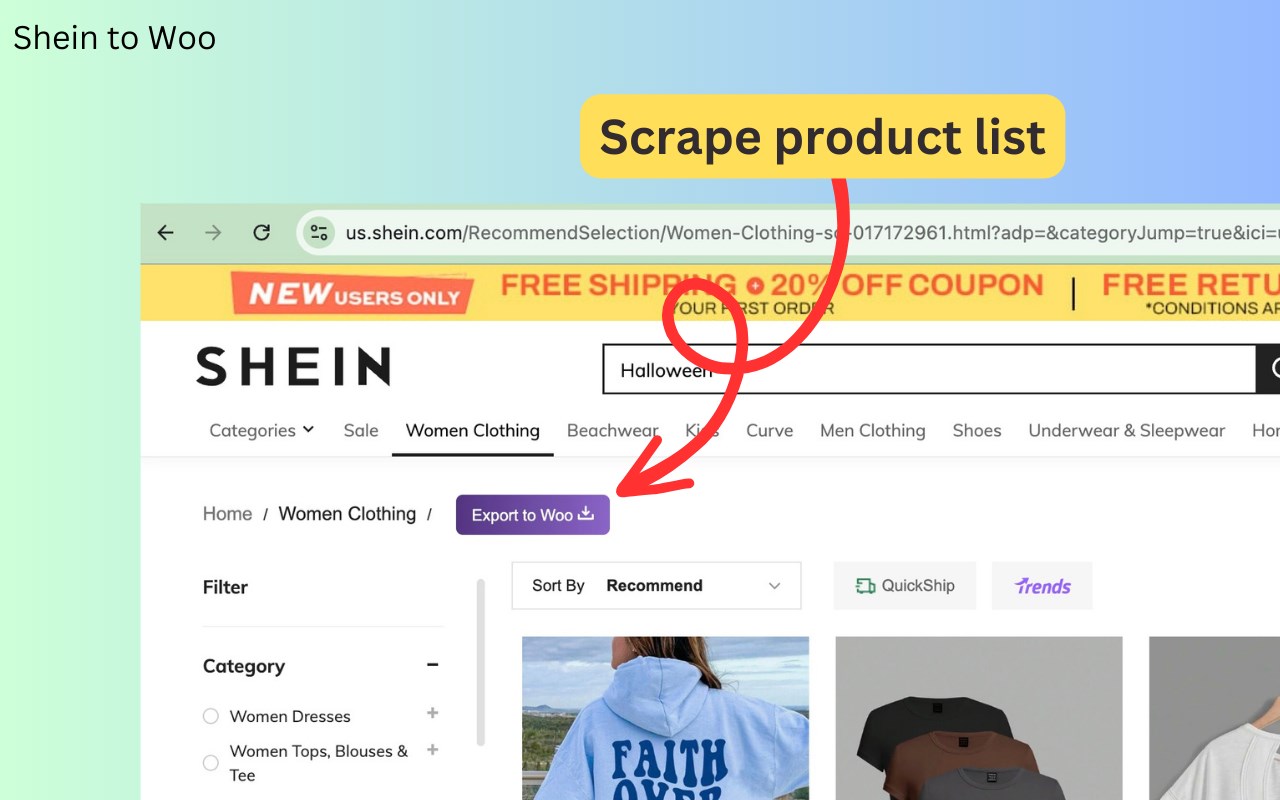
2. Click the Button: Click the "Export to Woo" button located in the browser toolbar to start capturing the product information from the current page. A pop-up window will display the progress of the data retrieval, allowing you to pause or resume as needed.
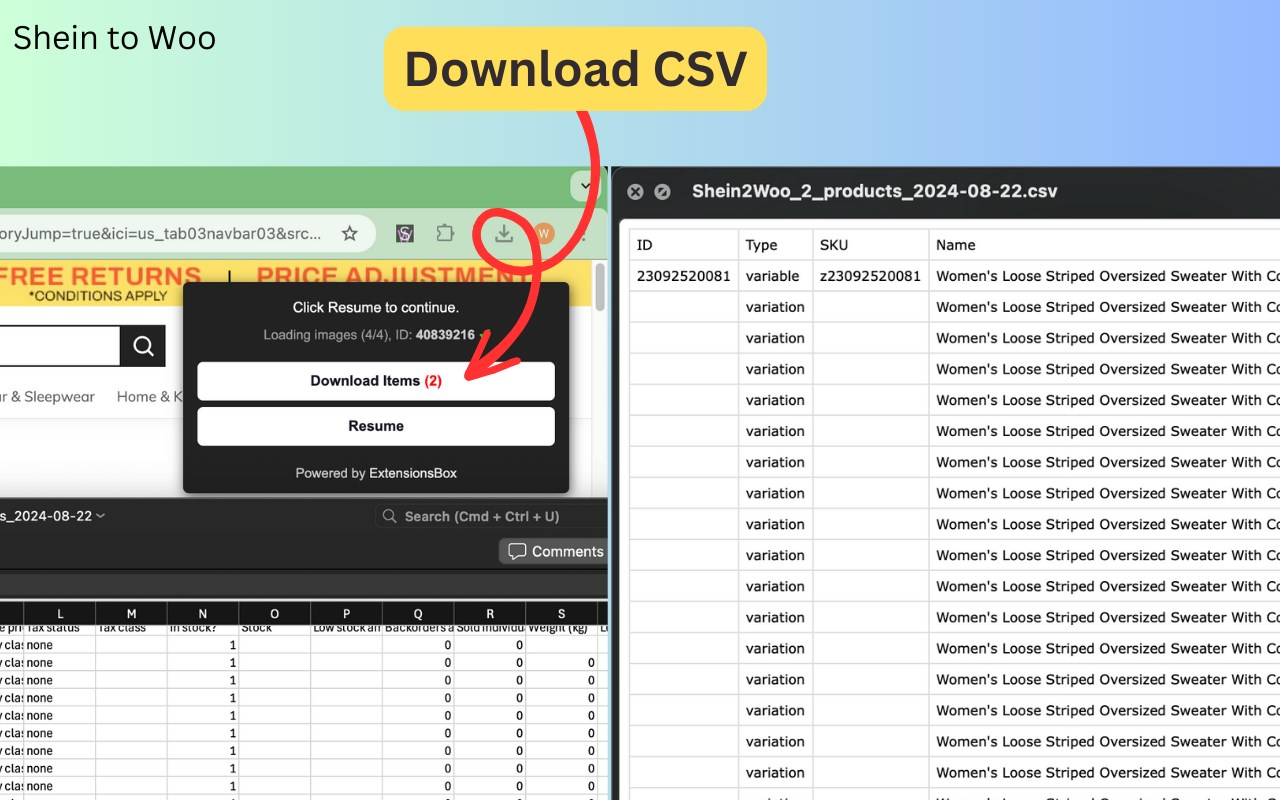
3. Download CSV: Once the export is complete or paused, click the "Download Items" button to save the data as a CSV file.
4. Import to WooCommerce: Log into your WooCommerce store’s admin panel, go to the product management section, and select the import feature. Upload the CSV file you just saved to successfully import the products into your store.
The Shein to Woo Extension provides WooCommerce store owners with a revolutionary way to import products, greatly improving workflow efficiency. With just a few simple steps, you can quickly bring popular Shein products into your store, helping you stay ahead of the competition and boost sales. We invite all WooCommerce store owners to download and use this Extension to breathe new life into your online shop!
Privacy Policy
Your data remains exclusively on your local machine, ensuring privacy and security, as it never passes through our servers.
In-App Purchases
Our Extension is a freemium product with a nominal subscription fee. With a paid subscription, you can export up to 3,000 items at a time and receive premium support. The exact cost is displayed in the extension's interface, ensuring transparency and ease of understanding.
Disclaimer
This extension is an independently developed product by ExtensionsBox and has no association with SHEIN LLC.
Shein 到 WooCommerce 的 CSV 导出工具 是做什么的
Shein 到 WooCommerce 的 CSV 导出工具 是一款面向 Edge 的购物比价类扩展,主要用来比价、查历史价格、自动套用优惠券、返现。官方对它的介绍是:几分钟内用热门的 Shein 产品提升您的 WooCommerce 商店。在微软 Edge 加载项商店上,它当前版本 1.0.7,评分 5(2 人评价),约 62 名用户。
适合什么人用
从功能定位看,Shein 到 WooCommerce 的 CSV 导出工具 更适合经常网购、想在下单前确认是否真便宜的用户。如果你平时只是偶尔遇到相关需求,用浏览器自带功能也能凑合;但如果这件事每天都发生,装一个专门处理它的扩展通常比手动操作省事得多。
怎么安装 Shein 到 WooCommerce 的 CSV 导出工具
- 打开微软 Edge 加载项商店上的官方页面;
- 点「添加到浏览器」并确认权限提示;
- 装好后在扩展列表里固定图标,方便随时开关。
本站只做索引与介绍,安装包来自官方商店。如果商店页面提示当前地区不可用,说明该扩展未在你所在区域上架。
常见问题
Shein 到 WooCommerce 的 CSV 导出工具 是免费的吗?
Shein 到 WooCommerce 的 CSV 导出工具 在微软 Edge 加载项商店免费提供下载。它是浏览器扩展,装上就能直接用,不需要注册账号。
Shein 到 WooCommerce 的 CSV 导出工具 安全吗?
它只申请了 0 项权限,范围比较克制,没有申请「读取所有网站数据」这种大权限。
Shein 到 WooCommerce 的 CSV 导出工具 支持哪些浏览器?
当前收录的版本来自微软 Edge 加载项商店,适用于 Edge。同一个扩展在其他商店可能有对应版本,但功能与版本号不一定相同。
怎么卸载 Shein 到 WooCommerce 的 CSV 导出工具?
在扩展管理页找到 Shein 到 WooCommerce 的 CSV 导出工具,点移除即可。它在本地保存的设置会一起清掉,不会残留数据。
权限清单 来自 manifest.json 原文
接口权限 2
identitystorage