
SEO META 1 COPY EN
macha · EEdge MV3
This is an extension that allows you to easily check SEO-related meta information and copy it with one click.
截图


简介
This is an extension that allows you to easily check SEO-related meta information and copy it with one click.
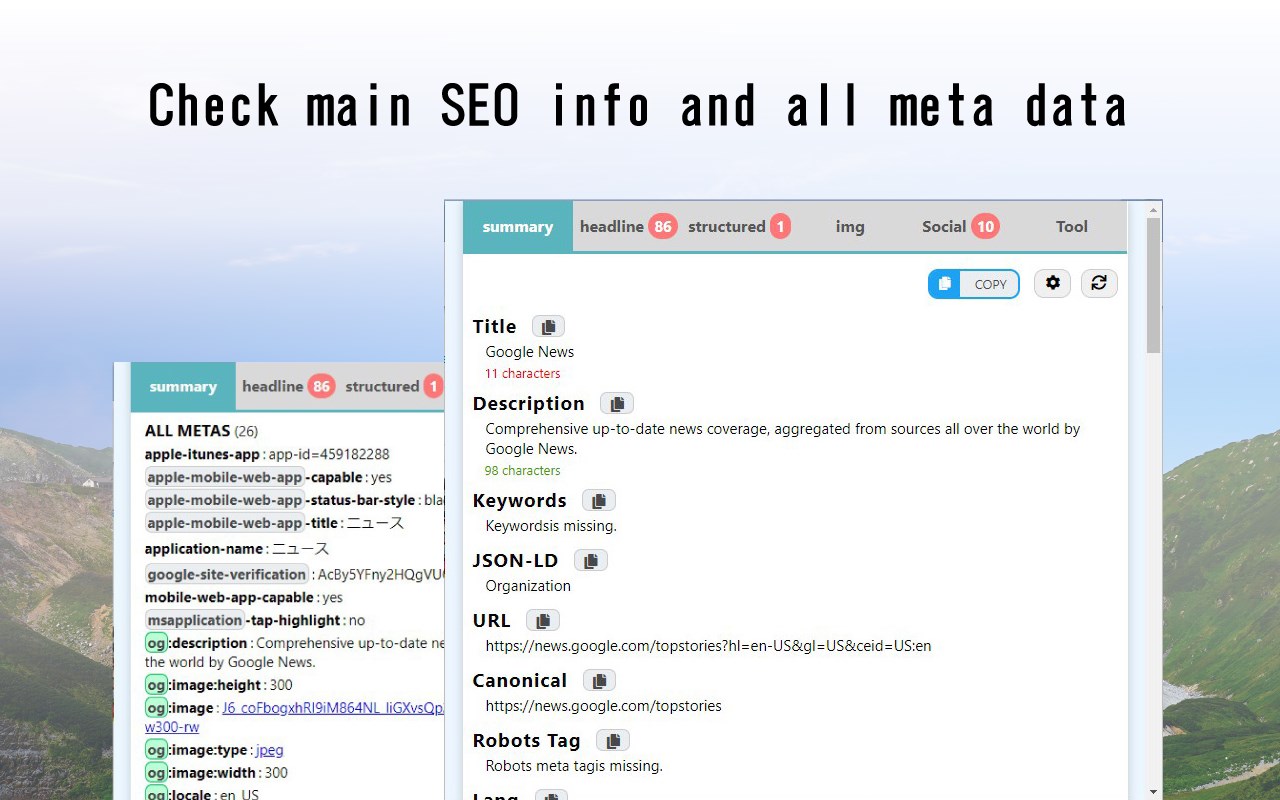
You can quickly check META information, headings, and structured markup (JSON-LD, Microdata, RDFa).
You can also easily copy information in Markdown or tab format.
Sidebar display is now supported. It can be changed from Options.
++++++ Usage ++++++
Simply install the extension in your browser and access the page you are interested in. When the icon is clicked, the metadata that is often checked by SEOs will be displayed.
++++++ Features ++++++
#### Summary Tabs ####
* Basic Information
** Displays information in Head tags such as Title, Description, etc.
** Total number of DOM elements
** Number of Style tags and bytes
** If the CMS is WordPress, show it. If the CMS is WordPress, show it. If the theme is known, show it too.
* Page Speed
** Obtained from Navigation Timing API.
* All StyleSheets
** List of css files set in stylesheet tag.
* ALL LINKS
** List of files set in the link tag.
* ALL SCRIPTS
** List of JS files set in script tag
* ALL METAS
** List of names and contents set in meta tags
* Number of links in Hx tags and a tags
* External links List of links by rel setting
#### headings tab ####
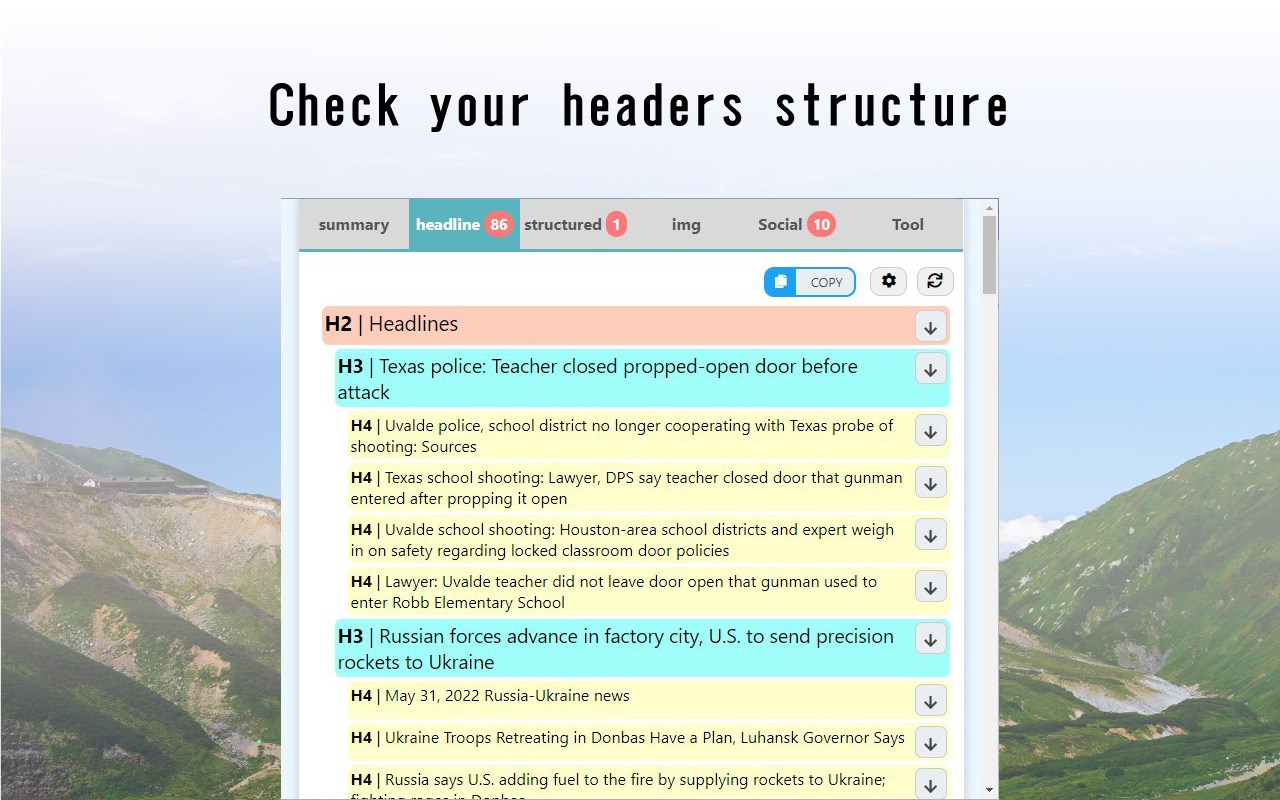
* H1 - H6 tags in the order of their appearance in the HTML.
* Each hierarchy has a different color and is indented for easy viewing.
* Use the arrow buttons on the right to scroll to where they appear.
* At the bottom is a list of the number of H1 - H6 uses and links.
#### JSON-LD tab ####
* This is a function to check the Google recommended structured data JSON-LD.
* You can also check the details of the settings.
* It does not check if the JSON-LD specification is correct.
* A link button to the Google Docs for each type of structured data has been provided. Please refer to the links for detailed specifications.
* We have also placed a link to Google's Rich Results Test at the bottom; please use Google's tool to check if the JSON-LD description is correct.
#### Microdata tab ####
* This is a function to check Microdata for structured data.
* You can also check the details.
* Red text notifies you if the no longer supported "data-vocabulary.org" is being used.
* Links to documentation, rich-results testing, and schema markup validation tools are also provided at the bottom.
#### RDFa tab ####
* This function verifies RDFa for structured data.
#### Image Tab ####
* The number of img tags at the top is summarized in a table by condition.
** Number of cases where ALT attribute is not set.
** Number of cases where loading="eager" is set
** Number of cases where loading="lazy" is set
** Number of images that are displayed by replacing the src attribute in JavasScript
*** Judged by whether data-src is set or not
** Number of noscript tags with img tags
** Number of img tags with no width and height set
** Number of webp, avif in next generation image format
** Number of img tags without width and height ** Number of webp and avif images in next generation image formats
** Number of images that took more than a certain number of milliseconds.
*** The number of images that took more than a specific number of milliseconds is counted using the Resource Timing API.
* You can check this in the list of images that match each condition.
** Thumbnail images.
*** If data-src exists, the image in data-src will be displayed.
** File name
** Value of ALT attribute
** Image type (determined by content-type, not extension)
** file size of the image
** size of the image
** time it took to display
** value of data-src, if present
** lazy processing
[ update history ]
### ver 16.5.1
* Add an entry to robots.txt
### ver 16.4.1
* Added a new check item to reflect Google's update to the Googlebot crawl limit to 2 MB.
### ver 16.2.1
* Switching between popup and sidebar display mode now takes effect immediately without restarting the extension.
### ver 6.6.0
* Add a list of internal links, page internal links
### ver 6.5.0
* Improved speedup by performing image checking asynchronously.
### ver 6.4.0
* Added the ability to open in the sidebar from a shortcut key.
### ver 6.3.0
* Some of the required properties of JSON-LD are now checked.
### ver 6.2.0
* Added a setting item to the context menu when clicking on the extension's icon.
### ver 6.1.0
* Changed design of options screen
* Fixed a bug in the initial display tab settings in the sidebar.
### ver 6.0.0
* Manifest V3 is supported.
### ver 5.1.0
* We have made it stand out when you press the headline move button.
### ver 5.0.3
* Sidebar support.
### ver 4.3.1
* Cases in which JSON-LD could not be read properly are now addressed.
### ver 4.3.0
* The default tab to be displayed first can now be set.
### ver 4.2.3
* Prepare for manifest V3 support
### ver 4.2.2
* Minor corrections
### ver 4.2.1
* Translation file update
### ver 4.2.0
* Google Search Console was added to Tools.
### ver 4.1.0
* TOOL tab added.
### ver 4.0.0
* JSON-LD/Microdata/RDFa are now combined in the Structured tab.
* Social tab has been added.
### ver 3.9.0
* The analysis results obtained once are now cached and reused.
* Option page added.
### ver 3.8.1
* Minor corrections
### ver 3.8.0
* Added the ability to check image rights information (EXIF, XMP, IPTC).
### ver 3.7.3
* bug fixed.
### ver 3.7.1
* Minor corrections
### ver 3.7.0
* Added field data for Core Web Vitals.
### ver 3.6.0
* Prepare for manifest V3 support
* Introduced a progress bar on the screen during analysis.
### ver 3.5.2
* Fixed some pages that could not be displayed due to errors.
* Changed the counting of slow images so that images for which "responseStart" cannot be obtained are not counted.
* Changed to sort the list of images that took more than 20 milliseconds in order of slowest to fastest.
### ver 3.5.1
* Fix the look.
### ver 3.5.0
* The time taken for each phase of the image resource can now be checked in a list.
…
SEO META 1 COPY 是做什么的
SEO META 1 COPY 是一款面向 Edge 的实用工具类扩展,主要用来解决浏览器里某类具体的小问题。官方对它的介绍是:This is an extension that allows you to easily check SEO-related meta information and copy it with one click.在微软 Edge 加载项商店上,它当前版本 16.5.1,评分 5(2 人评价),约 2,582 名用户。
适合什么人用
从功能定位看,SEO META 1 COPY 更适合想补上浏览器原生缺失功能的用户。如果你平时只是偶尔遇到相关需求,用浏览器自带功能也能凑合;但如果这件事每天都发生,装一个专门处理它的扩展通常比手动操作省事得多。
怎么安装 SEO META 1 COPY
- 打开微软 Edge 加载项商店上的官方页面;
- 点「添加到浏览器」并确认权限提示;
- 装好后在扩展列表里固定图标,方便随时开关。
本站只做索引与介绍,安装包来自官方商店。如果商店页面提示当前地区不可用,说明该扩展未在你所在区域上架。
常见问题
SEO META 1 COPY 是免费的吗?
SEO META 1 COPY 在微软 Edge 加载项商店免费提供下载。它是浏览器扩展,装上就能直接用,不需要注册账号。
SEO META 1 COPY 安全吗?
它只申请了 0 项权限,范围比较克制,没有申请「读取所有网站数据」这种大权限。
SEO META 1 COPY 支持哪些浏览器?
当前收录的版本来自微软 Edge 加载项商店,适用于 Edge。同一个扩展在其他商店可能有对应版本,但功能与版本号不一定相同。
怎么卸载 SEO META 1 COPY?
在扩展管理页找到 SEO META 1 COPY,点移除即可。它在本地保存的设置会一起清掉,不会残留数据。
权限清单 来自 manifest.json 原文
接口权限 4
activeTabcontextMenusscriptingstorage
其他商店也有这款
同一款扩展在不同浏览器下的版本,权限与更新节奏可能不同
