
SEO Inspector – Meta Tags, Schema & Rich Results Checker EN
EvlarSoft LLC · EEdge MV3
Check titles by pixel width, see headings and broken links, and test schema for Google rich results, on local and staging sites too.
截图
简介
SEO Inspector shows what search engines and social networks read on the page in front of you, and says exactly what to fix.
THE SEARCH RESULT, FIRST
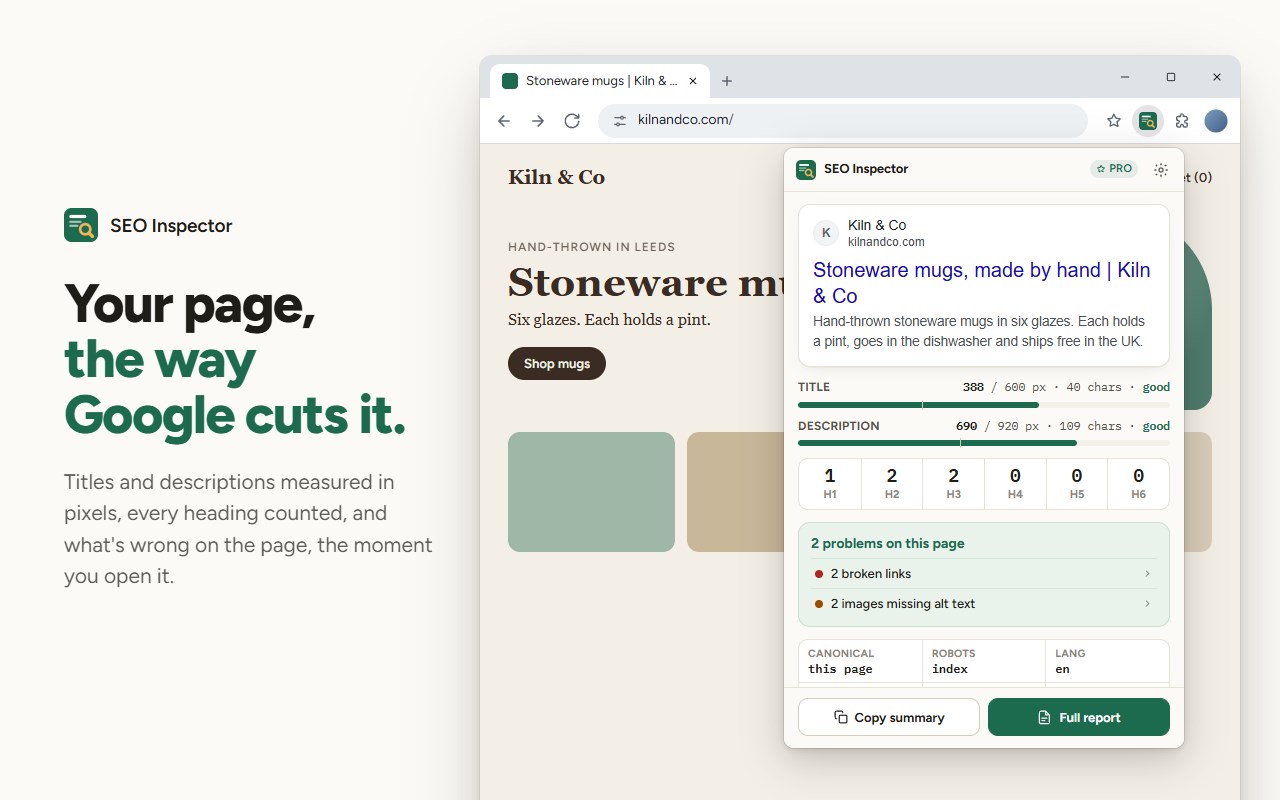
Open it on any page and the first thing you see is that page as a Google result. Titles and descriptions are measured in pixels, the way Google cuts them, not in characters: "WWWW" runs out of room long before "iiii". Each gets a bar and a readout such as 512 / 600 px · good, and the preview cuts the text where Google would.
HEADINGS AND PROBLEMS AT A GLANCE
A row of counts for H1 to H6, with a missing or doubled H1 flagged. Below it, what Pro found on this page, counted: images missing alt text, broken links on the same site, a missing or broken social image, structured data that won't earn its rich result.
RICH RESULTS, CHECKED WHERE GOOGLE CAN'T REACH
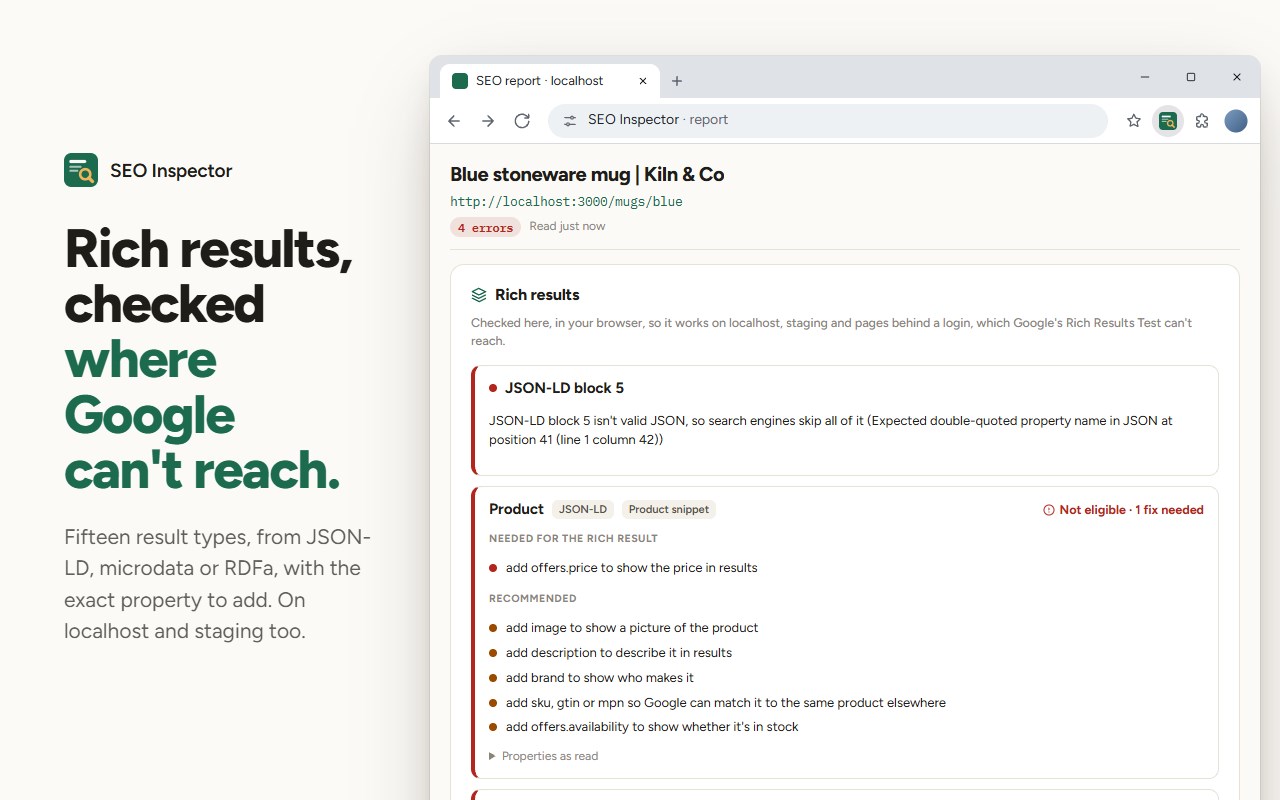
Pro reads JSON-LD, microdata and RDFa, @graph and nested items included, and checks them against what Google asks for: Product, Offer, Review, AggregateRating, Article, FAQPage, HowTo, Recipe, Event, LocalBusiness, Organization, BreadcrumbList, VideoObject, JobPosting and SoftwareApplication. It names the fix, such as "Product: add offers.price to show the price in results", and it works on localhost and staging, which Google's own test can't open.
SERVER HTML AGAINST THE LIVE PAGE
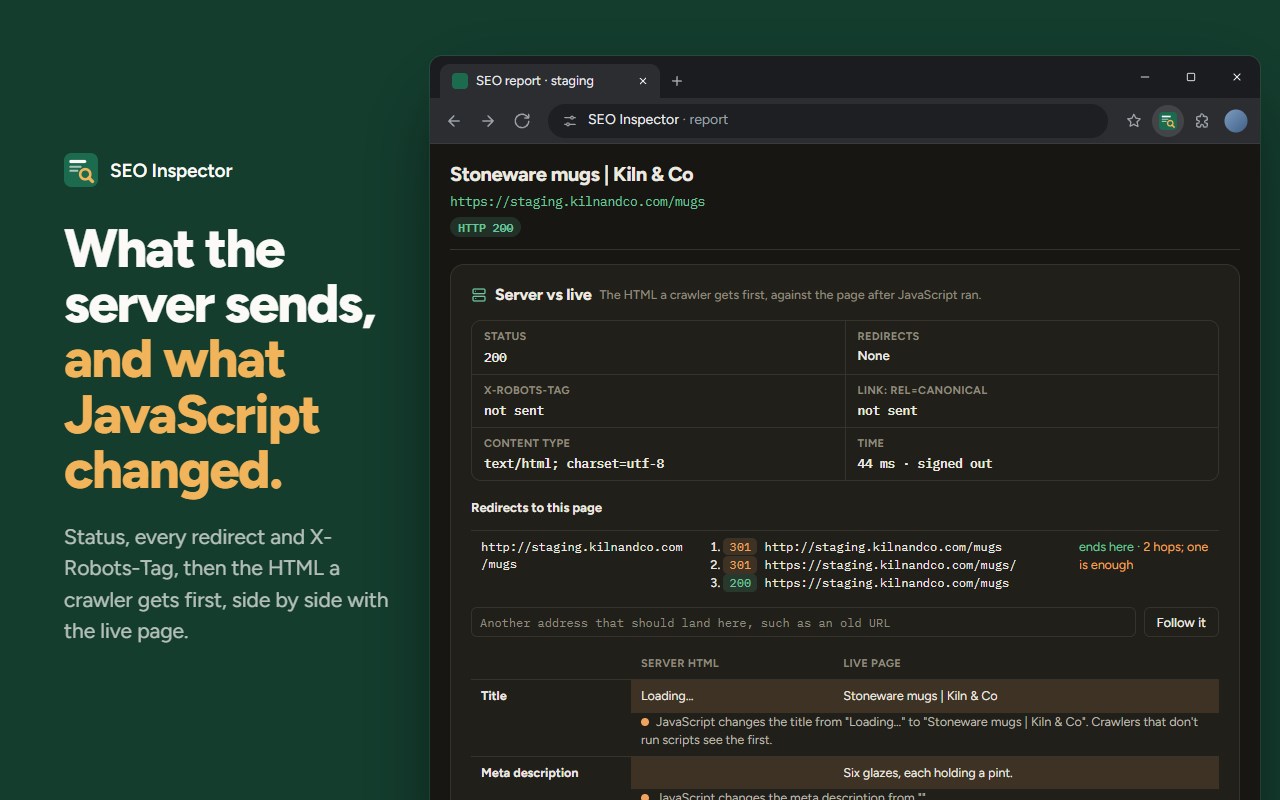
Pro fetches the page the way a crawler first sees it and compares it with the page after JavaScript has run: title, description, canonical, robots, headings, links and structured data. It shows the status code, every redirect in the chain, the X-Robots-Tag header and a canonical sent in the Link header.
SHARE PREVIEWS THAT TEST THE IMAGE
Cards for Facebook, X, LinkedIn, Slack, Discord and iMessage, drawn from the page's own tags. The social image is fetched and measured: whether it loads, its size, its shape and its weight, against each platform's limits.
EVERYTHING ELSE AN AUDIT NEEDS
The full heading outline, outlined on the page itself. Every image and its alt text. Internal, external and nofollow links, with broken links and redirects found at a polite pace. hreflang with a check that every language version links back. Canonical problems, robots.txt and sitemaps. An editable search preview for desktop and mobile, to try a rewrite before you ship it.
REPORTS AND SNAPSHOTS
Export the report as CSV for a spreadsheet or Markdown for a ticket. Save a snapshot, change the page, and compare: what moved, what was fixed, what broke. Or compare against another URL.
FREE AND PRO
Free shows the search preview with pixel-accurate title and description lengths, the heading counts, and how many problems Pro found on the page, with no time limit and no account. Pro is a one-time purchase and shows which ones they are, with everything above.
No account, no tracking. SEO Inspector reads a page only when you open it there, asks for access to a site only when you start a check that needs it, and sends nothing anywhere but the requests those checks make. The licence check with Gumroad is the only other request.
SEO Inspector – Meta Tags, Schema & Rich Results Checker 是做什么的
SEO Inspector – Meta Tags, Schema & Rich Results Checker 是一款面向 Edge 的实用工具类扩展,主要用来解决浏览器里某类具体的小问题。官方对它的介绍是:Check titles by pixel width, see headings and broken links, and test schema for Google rich results, on local and staging sites too.在微软 Edge 加载项商店上,它当前版本 1.0.0。
适合什么人用
从功能定位看,SEO Inspector – Meta Tags, Schema & Rich Results Checker 更适合想补上浏览器原生缺失功能的用户。如果你平时只是偶尔遇到相关需求,用浏览器自带功能也能凑合;但如果这件事每天都发生,装一个专门处理它的扩展通常比手动操作省事得多。
怎么安装 SEO Inspector – Meta Tags, Schema & Rich Results Checker
- 打开微软 Edge 加载项商店上的官方页面;
- 点「添加到浏览器」并确认权限提示;
- 装好后在扩展列表里固定图标,方便随时开关。
本站只做索引与介绍,安装包来自官方商店。如果商店页面提示当前地区不可用,说明该扩展未在你所在区域上架。
常见问题
SEO Inspector – Meta Tags, Schema & Rich Results Checker 是免费的吗?
SEO Inspector – Meta Tags, Schema & Rich Results Checker 在微软 Edge 加载项商店免费提供下载。它是浏览器扩展,装上就能直接用,不需要注册账号。
SEO Inspector – Meta Tags, Schema & Rich Results Checker 安全吗?
它只申请了 0 项权限,范围比较克制,没有申请「读取所有网站数据」这种大权限。
SEO Inspector – Meta Tags, Schema & Rich Results Checker 支持哪些浏览器?
当前收录的版本来自微软 Edge 加载项商店,适用于 Edge。同一个扩展在其他商店可能有对应版本,但功能与版本号不一定相同。
怎么卸载 SEO Inspector – Meta Tags, Schema & Rich Results Checker?
在扩展管理页找到 SEO Inspector – Meta Tags, Schema & Rich Results Checker,点移除即可。它在本地保存的设置会一起清掉,不会残留数据。
权限清单 来自 manifest.json 原文
接口权限 5
activeTabalarmsscriptingstoragewebRequest