
ScreenCapture Pro - Screenshot & Screen Recorder EN
Ave Netvs · EEdge MV3
Professional screenshot and screen recording tool with advanced editing. Capture, annotate, and record effortlessly.
<all_urls>),意味着它可以读取你在任意站点的页面内容,包括已登录的页面。这是许多扩展正常工作的必要条件,但也值得你确认来源可信。
截图


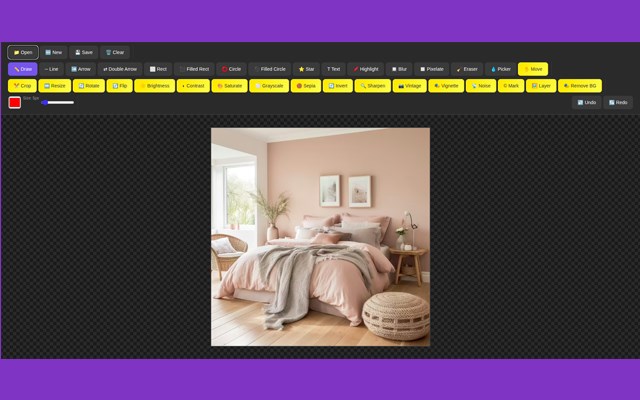
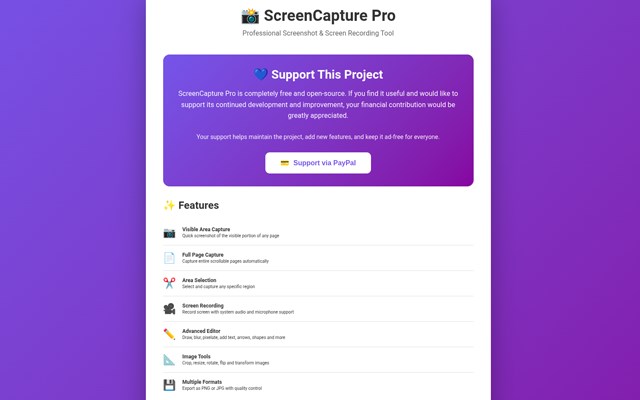
简介
🎯 ScreenCapture Pro - Professional Screenshot & Screen Recording Tool
The ultimate free and open-source solution for capturing, editing, and recording your screen. No limits, no subscriptions, completely free forever.
✨ KEY FEATURES
📸 ADVANCED SCREENSHOT TOOLS
- Visible Area Capture - Quick screenshot of current viewport
- Full Page Capture - Automatically captures entire scrollable pages
- Area Selection - Precisely select and capture any region
- Multiple Formats - Export as PNG or JPG with quality control
- Keyboard Shortcuts - Lightning-fast captures with hotkeys
🎥 PROFESSIONAL SCREEN RECORDING
- Unlimited Recordings - No time limits or watermarks
- Audio Support - Capture system audio and microphone simultaneously
- High Quality - Up to 1080p recording
- WebM Format - Efficient file sizes with excellent quality
- One-Click Recording - Start recording in seconds
✏️ POWERFUL IMAGE EDITOR
Built-in professional editor with comprehensive tools:
Drawing Tools:
- Freehand Draw, Lines, Arrows (single & double)
- Rectangles, Circles, Stars (filled & outline)
- Text with custom fonts and colors
- Highlight and Annotate
- Eyedropper Color Picker
Privacy Tools:
- Blur - Smooth gaussian blur effect
- Pixelate - Strong pixelation for sensitive info
- Eraser - Remove unwanted elements
Image Adjustments:
- Brightness, Contrast, Saturation controls
- Crop, Resize, Rotate, Flip
- Grayscale, Sepia, Vintage filters
- Sharpen, Vignette, Noise effects
- Invert colors
- Background removal
Advanced Features:
- Layer Support - Add multiple images
- Move & Position layers
- Watermark insertion
- Undo/Redo (50 steps)
- Keyboard shortcuts (Ctrl+Z, Ctrl+Y, Ctrl+S)
🎨 USER EXPERIENCE
- Clean, Modern Interface
- Dark Mode Editor
- Intuitive Controls
- Real-time Preview
- Responsive Design
- No Sign-up Required
🔒 PRIVACY & SECURITY
- 100% Local Processing - All captures processed on your device
- No Cloud Storage - Nothing sent to external servers
- No Data Collection - We don't track or store your data
- No Permissions Abuse - Only uses necessary permissions
- Open Source - Transparent code you can review
⚡ PERFORMANCE
- Lightning Fast - Optimized for speed
- Memory Efficient - Minimal resource usage
- Works Offline - No internet required after installation
- Cross-Browser Compatible - Works on Chrome, Edge, Brave, etc.
🆓 COMPLETELY FREE
All features are 100% free with no hidden costs, trials, or premium tiers. If you find this tool valuable, you can support the project via the optional PayPal contribution button.
📋 PERFECT FOR
- Developers & Designers - Documentation and bug reports
- Content Creators - Tutorials and presentations
- Students & Teachers - Educational materials
- Business Professionals - Reports and documentation
- Customer Support - Visual troubleshooting
- Social Media Managers - Content creation
- Anyone who needs quality screenshots!
🚀 GET STARTED
1. Install the extension
2. Click the extension icon
3. Choose your capture mode
4. Edit if needed
5. Save and share!
💡 PRO TIPS
- Use Ctrl+Shift+S for quick visible area capture
- Press ESC to cancel area selection
- Drag & drop images into the editor
- Paste images from clipboard (Ctrl+V)
- Use the Move tool to reposition layers
🔧 TECHNICAL DETAILS
- Supports high-DPI displays
- Respects device pixel ratio
- Handles long pages (up to 30,000px)
- Multiple audio sources in recordings
- Canvas-based editing for precision
We actively maintain and improve this extension based on user feedback!
🌟 WHY CHOOSE SCREENCAPTURE PRO?
Unlike other screenshot tools that lock features behind paywalls or add watermarks, ScreenCapture Pro gives you everything completely free. We believe quality tools should be accessible to everyone.
⭐ If you love ScreenCapture Pro, please leave a 5-star review and consider supporting the project. Your feedback helps us improve!
---
🔖 TAGS: screenshot, screen capture, screen recorder, full page, area capture, image editor, annotate, blur, pixelate, free, open source, no watermark, professional
📦 SIZE: ~60KB
🌍 LANGUAGES: English
🔄 UPDATES: Regular improvements and bug fixes
ScreenCapture Pro - Screenshot & Screen Recorder 是做什么的
ScreenCapture Pro - Screenshot & Screen Recorder 是一款面向 Edge 的实用工具类扩展,主要用来解决浏览器里某类具体的小问题。官方对它的介绍是:Professional screenshot and screen recording tool with advanced editing. Capture, annotate, and record effortlessly.在微软 Edge 加载项商店上,它当前版本 1.0.1,约 16 名用户。
适合什么人用
从功能定位看,ScreenCapture Pro - Screenshot & Screen Recorder 更适合想补上浏览器原生缺失功能的用户。如果你平时只是偶尔遇到相关需求,用浏览器自带功能也能凑合;但如果这件事每天都发生,装一个专门处理它的扩展通常比手动操作省事得多。需要注意的是它作用于所有网站,装上后建议先观察一两天,确认不影响常用站点的正常使用。
怎么安装 ScreenCapture Pro - Screenshot & Screen Recorder
- 打开微软 Edge 加载项商店上的官方页面;
- 点「添加到浏览器」并确认权限提示;
- 装好后在扩展列表里固定图标,方便随时开关。
本站只做索引与介绍,安装包来自官方商店。如果商店页面提示当前地区不可用,说明该扩展未在你所在区域上架。
常见问题
ScreenCapture Pro - Screenshot & Screen Recorder 是免费的吗?
ScreenCapture Pro - Screenshot & Screen Recorder 在微软 Edge 加载项商店免费提供下载。它是浏览器扩展,装上就能直接用,不需要注册账号。
ScreenCapture Pro - Screenshot & Screen Recorder 安全吗?
它只申请了 0 项权限,范围比较克制,没有申请「读取所有网站数据」这种大权限。
ScreenCapture Pro - Screenshot & Screen Recorder 支持哪些浏览器?
当前收录的版本来自微软 Edge 加载项商店,适用于 Edge。同一个扩展在其他商店可能有对应版本,但功能与版本号不一定相同。
怎么卸载 ScreenCapture Pro - Screenshot & Screen Recorder?
在扩展管理页找到 ScreenCapture Pro - Screenshot & Screen Recorder,点移除即可。它在本地保存的设置会一起清掉,不会残留数据。
权限清单 来自 manifest.json 原文
站点访问(可选) 1
<all_urls>
接口权限 6
activeTabdesktopCapturedownloadsscriptingstoragetabs