SCREEN TIME ALERT EN
Seng Thao www.thugon.com · EEdge MV3
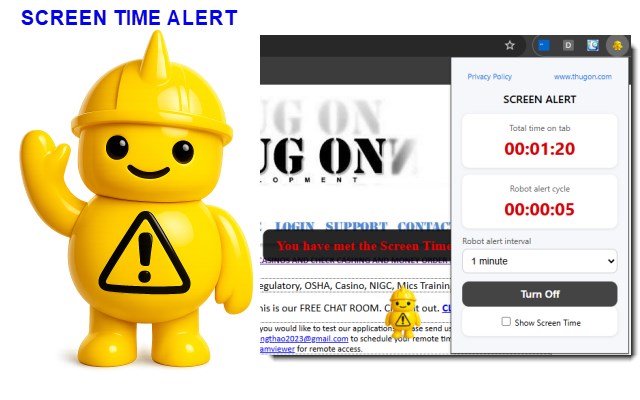
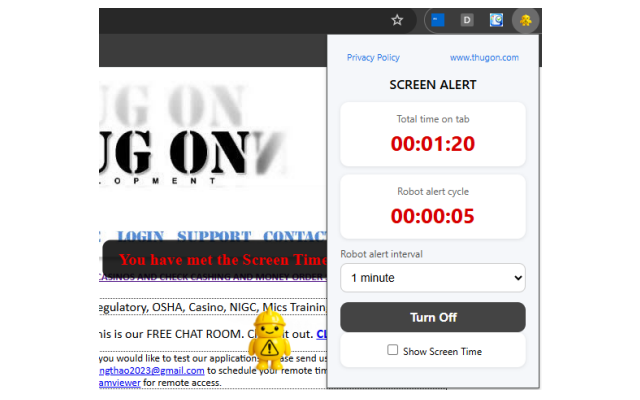
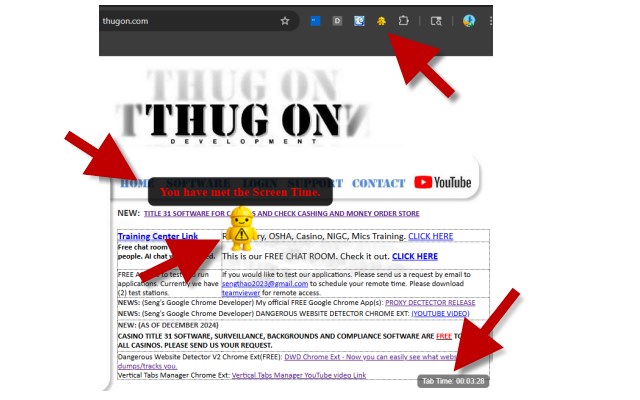
Screen Time Alert is a browser extension designed to help users monitor time spent on active browser tabs and optionally display visual on-screen alerts at user-defined intervals. When you set an alert from the menu, a robot will appear and warn you with a message based on the time interval that you had set. More smoke will appear as well. It is a fun app that is great for screen time monitoring.
<all_urls>),意味着它可以读取你在任意站点的页面内容,包括已登录的页面。这是许多扩展正常工作的必要条件,但也值得你确认来源可信。
截图
简介
Screen Time Alert is a browser extension designed to help users monitor time spent on active browser tabs and optionally display visual on-screen alerts at user-defined intervals. When you set an alert from the menu, a robot will appear and warn you with a message based on the time interval that you had set. More smoke will appear as well. It is a fun app that is great for screen time monitoring. FREE FOREVER. All rights reserved www.thugon.com and Seng Thao.
This extension operates entirely within the user’s browser environment.
Data Collection
Screen Time does not collect, transmit, sell, or share any personal or sensitive user data.
No personal information is collected
No browsing history is transmitted off the device
No analytics, tracking pixels, or third-party SDKs are used
No data is sent to external servers
Local Data Storage
The extension stores minimal configuration data locally using chromium built-in storage APIs.
This may include:
User-selected time intervals
Enabled or disabled state of alerts
Tab-specific session timing counters
All stored data remains on the user’s device and is never transmitted externally.
How the Extension Works
The extension monitors the currently active browser tab.
A local timer tracks how long the tab remains active.
When a user-defined interval is reached, a visual alert appears on the webpage.
All processing occurs locally using browser extension APIs.
No monitoring occurs when the browser is closed.
Permissions Explanation
activeTab
Used to identify the currently active tab so alerts can appear on that tab only.
scripting
Used to inject visual alert elements into webpages at the appropriate time.
storage
Used to store user preferences locally on the device.
host_permissions ()
Allows alerts to appear on any website the user visits.
No Remote Code Execution
Screen Time does not load, execute, or update code from remote servers. All functionality is packaged within the extension.
Third-Party Access
No third parties receive data or provide services related to this extension.
Children’s Privacy
This extension does not knowingly collect data from children and does not target minors.
User Control
Users may enable, disable, or remove the extension at any time. Removing the extension deletes all locally stored data.
Security
Because no data leaves the browser, there is no external data transmission or storage risk.
Disclaimer
This software is provided AS IS and WHERE IS, without warranties of any kind. Use of this extension is entirely at the user’s own risk.
Changes to This Policy
This Privacy Policy may be updated to reflect feature changes or Edge policy updates.
Contact
Website: https://www.thugon.com
Known Errors (This does not affect the app at all.)
If you see this error in the dev mode section: Unchecked runtime.lastError: No tab with id: 2022025007. Context Unknown Stack Trace :0 (anonymous function) . This occurs because the extension doesn't know what to do with those chrome:// tabs that doesn't have a url. The error is the browser's way of just expressing confusion. In the future, I will add codes to kill and/or ignore those tabs. Some like if (browser.runtime.lastError) { // tab was gone — expected in extension lifecycle }. You can simply, ignore the error. Nothing is saved, logged or etc. Many browser are just annoyed. No crash, error out or etc. - Seng Thao
SCREEN TIME ALERT 是做什么的
SCREEN TIME ALERT 是一款面向 Edge 的效率工具类扩展,主要用来管住注意力、屏蔽干扰站点、记录时间。官方对它的介绍是:Screen Time Alert is a browser extension designed to help users monitor time spent on active browser tabs and optionally display visual on-screen alerts at user-defined intervals. When you set an alert from the menu, a robot will appear and warn you with a message based on the time interval that you had set. More smoke will appear as well. It is a fun app that is great for screen time monitoring.在微软 Edge 加载项商店上,它当前版本 1.0,约 13 名用户。
适合什么人用
从功能定位看,SCREEN TIME ALERT 更适合想专注工作学习、减少无效刷网页的用户。如果你平时只是偶尔遇到相关需求,用浏览器自带功能也能凑合;但如果这件事每天都发生,装一个专门处理它的扩展通常比手动操作省事得多。需要注意的是它作用于所有网站,装上后建议先观察一两天,确认不影响常用站点的正常使用。
怎么安装 SCREEN TIME ALERT
- 打开微软 Edge 加载项商店上的官方页面;
- 点「添加到浏览器」并确认权限提示;
- 装好后在扩展列表里固定图标,方便随时开关。
本站只做索引与介绍,安装包来自官方商店。如果商店页面提示当前地区不可用,说明该扩展未在你所在区域上架。
常见问题
SCREEN TIME ALERT 是免费的吗?
SCREEN TIME ALERT 在微软 Edge 加载项商店免费提供下载。它是浏览器扩展,装上就能直接用,不需要注册账号。
SCREEN TIME ALERT 安全吗?
它只申请了 0 项权限,范围比较克制,没有申请「读取所有网站数据」这种大权限。
SCREEN TIME ALERT 支持哪些浏览器?
当前收录的版本来自微软 Edge 加载项商店,适用于 Edge。同一个扩展在其他商店可能有对应版本,但功能与版本号不一定相同。
怎么卸载 SCREEN TIME ALERT?
在扩展管理页找到 SCREEN TIME ALERT,点移除即可。它在本地保存的设置会一起清掉,不会残留数据。
权限清单 来自 manifest.json 原文
站点访问(可选) 1
<all_urls>
接口权限 3
activeTabscriptingstorage