Screen Keeper EN
Helpless Thor · EEdge MV3
Keep your screen awake with customizable mouse movements, scrolls, clicks, and keyboard presses. Prevent screen sleep on any device.
截图


简介
Screen Keeper is a lightweight, privacy-focused browser extension that prevents your screen from dimming, sleeping, or locking — even when you're not actively using your computer.
Whether you're monitoring a live dashboard, watching a long presentation, keeping a video call visible, running an unattended download, or simply reading a long article without constantly touching your mouse, Screen Keeper ensures your display stays on.
🛡️ HOW IT WORKS
Screen Keeper uses a multi-layered approach to keep your screen awake:
• Screen Wake Lock API — The modern, standards-based method that directly tells your browser to prevent the screen from sleeping. This is the most reliable and battery-friendly approach.
• Simulated User Activity — As a smart fallback, Screen Keeper can simulate mouse movements, page scrolling, mouse clicks, and keyboard presses at configurable intervals. These simulated actions prevent your operating system's idle detection from kicking in.
• Silent Video Playback — For maximum compatibility on some devices, a silent invisible video element runs in the background to prevent sleep.
⚡ QUICK PRESETS
Get started instantly with one-click presets:
• Minimal — Activates only the Wake Lock API with no simulated actions. The lightest option, perfect when Wake Lock alone is sufficient.
• Standard — Enables mouse movement and page scrolling simulation alongside Wake Lock. Ideal for most use cases.
• Aggressive — Activates all available action types (mouse, scroll, click, keyboard) at shorter intervals. Best for systems with strict idle policies.
🎯 FULLY CUSTOMIZABLE ACTIONS
Build your own activity profile by adding individual actions:
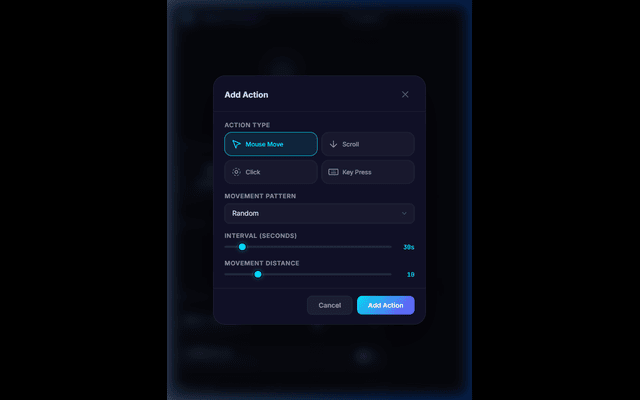
• Mouse Move — Choose from 5 movement patterns: random, circular, zigzag, linear, or figure-8. Set the movement distance and interval.
• Scroll — Simulate page scrolling in up/down or left/right directions with a configurable scroll amount.
• Click — Simulate mouse clicks at the center of the page or at random positions.
• Key Press — Simulate keyboard key presses using non-disruptive keys like F15, Shift, Ctrl, ScrollLock, or NumLock.
Each action can be individually enabled or disabled, and runs on its own configurable interval (5 to 300 seconds). You can add as many actions as you need.
⚙️ SETTINGS
• Interval Multiplier — Scale all action intervals from 0.5× (faster) to 5× (slower) with a single slider.
• Activity Sound — Enable an optional subtle click sound on each action execution for audio confirmation.
🔒 PRIVACY & PERMISSIONS
Screen Keeper is built with privacy as a priority:
• No data collection — Zero personal data is collected, transmitted, or shared. Everything runs entirely on your local machine.
• Minimal permissions — Only requests the bare minimum permissions needed to function: activeTab (to inject scripts when you click the icon), storage (to save your settings locally), alarms (to schedule actions), offscreen (for Wake Lock API), and scripting (to inject activity simulation).
• No remote code — All code is bundled locally. No external scripts are loaded or executed.
• No background network requests — Screen Keeper never communicates with any server.
🌐 CROSS-BROWSER COMPATIBILITY
Screen Keeper works on all Chromium-based browsers including Microsoft Edge, Google Chrome, Brave, Opera, and Arc. It is built using Manifest V3 for maximum security and performance.
💡 COMMON USE CASES
• Monitoring dashboards, analytics, or live data feeds
• Keeping video calls and presentations visible
• Reading long articles or documentation
• Running long downloads or file transfers
• Preventing corporate idle lockout policies
• Keeping remote desktop sessions alive
• Watching tutorials or training videos
Screen Keeper 是做什么的
Screen Keeper 是一款面向 Edge 的效率工具类扩展,主要用来管住注意力、屏蔽干扰站点、记录时间。官方对它的介绍是:Keep your screen awake with customizable mouse movements, scrolls, clicks, and keyboard presses. Prevent screen sleep on any device.在微软 Edge 加载项商店上,它当前版本 1.0.0,评分 5(1 人评价),约 52 名用户。
适合什么人用
从功能定位看,Screen Keeper 更适合想专注工作学习、减少无效刷网页的用户。如果你平时只是偶尔遇到相关需求,用浏览器自带功能也能凑合;但如果这件事每天都发生,装一个专门处理它的扩展通常比手动操作省事得多。
怎么安装 Screen Keeper
- 打开微软 Edge 加载项商店上的官方页面;
- 点「添加到浏览器」并确认权限提示;
- 装好后在扩展列表里固定图标,方便随时开关。
本站只做索引与介绍,安装包来自官方商店。如果商店页面提示当前地区不可用,说明该扩展未在你所在区域上架。
常见问题
Screen Keeper 是免费的吗?
Screen Keeper 在微软 Edge 加载项商店免费提供下载。它是浏览器扩展,装上就能直接用,不需要注册账号。
Screen Keeper 安全吗?
它只申请了 0 项权限,范围比较克制,没有申请「读取所有网站数据」这种大权限。
Screen Keeper 支持哪些浏览器?
当前收录的版本来自微软 Edge 加载项商店,适用于 Edge。同一个扩展在其他商店可能有对应版本,但功能与版本号不一定相同。
怎么卸载 Screen Keeper?
在扩展管理页找到 Screen Keeper,点移除即可。它在本地保存的设置会一起清掉,不会残留数据。
权限清单 来自 manifest.json 原文
接口权限 5
activeTabalarmsoffscreenscriptingstorage