
Science Research Assistant EN
Liam Thompson · EEdge MV3
Search for scientific information as quickly as possible while researching and writing scientific papers. Save notes for reference.
<all_urls>),意味着它可以读取你在任意站点的页面内容,包括已登录的页面。这是许多扩展正常工作的必要条件,但也值得你确认来源可信。
截图
简介
Science Research Assistant is a powerful browser extension designed to assist scientists, students, journalists, and anyone seeking reliable scientific research. Whether you're writing a thesis or gathering facts, this tool ensures you find and utilize research efficiently and effortlessly.
With a simple selection of any keyword or phrase on a webpage, you can instantly search relevant scientific journals. The extension also offers advanced meta-search options and other valuable tools to enhance your research process.
You can easily save text from webpages or PDFs for future reference, and seamlessly export your saved records to PDF for better organization.
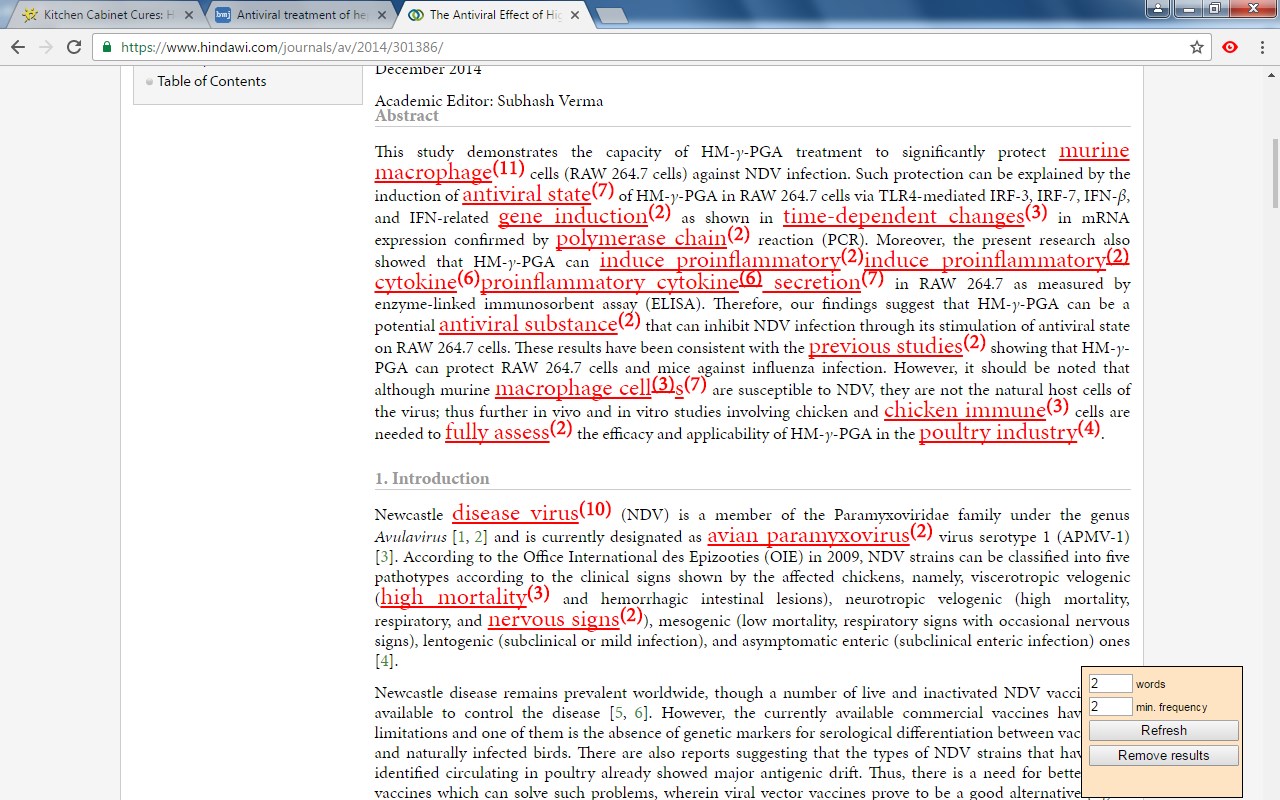
The built-in algorithm analyzes text from any webpage, identifying the most frequently used keywords and key information, all while highlighting important details. You can even customize the algorithm with your own rules, enabling you to swiftly pinpoint the most crucial insights from lengthy papers or web content.
If you're still in the early stages of exploring a research topic or formulating a hypothesis, the Science Research Assistant helps you navigate the overwhelming volume of available information. With its News and Trends feature, you can quickly gauge the popularity and future relevance of a topic, while receiving related suggestions to inspire fresh ideas.
This extension is your essential tool for fast, accurate, and insightful research, helping you stay ahead in your field.
Science Research Assistant will help you to:
· Search and analyze the complex structure of web information
· Search scientific journal articles
· Search books
· Search patents
· Search records history
· Save notes to record's history
· Backup your notes
· Compile reports and export to PDF
· Use helpful meta-search patterns to dig deeper into the web
· Track news and trends
Usage:
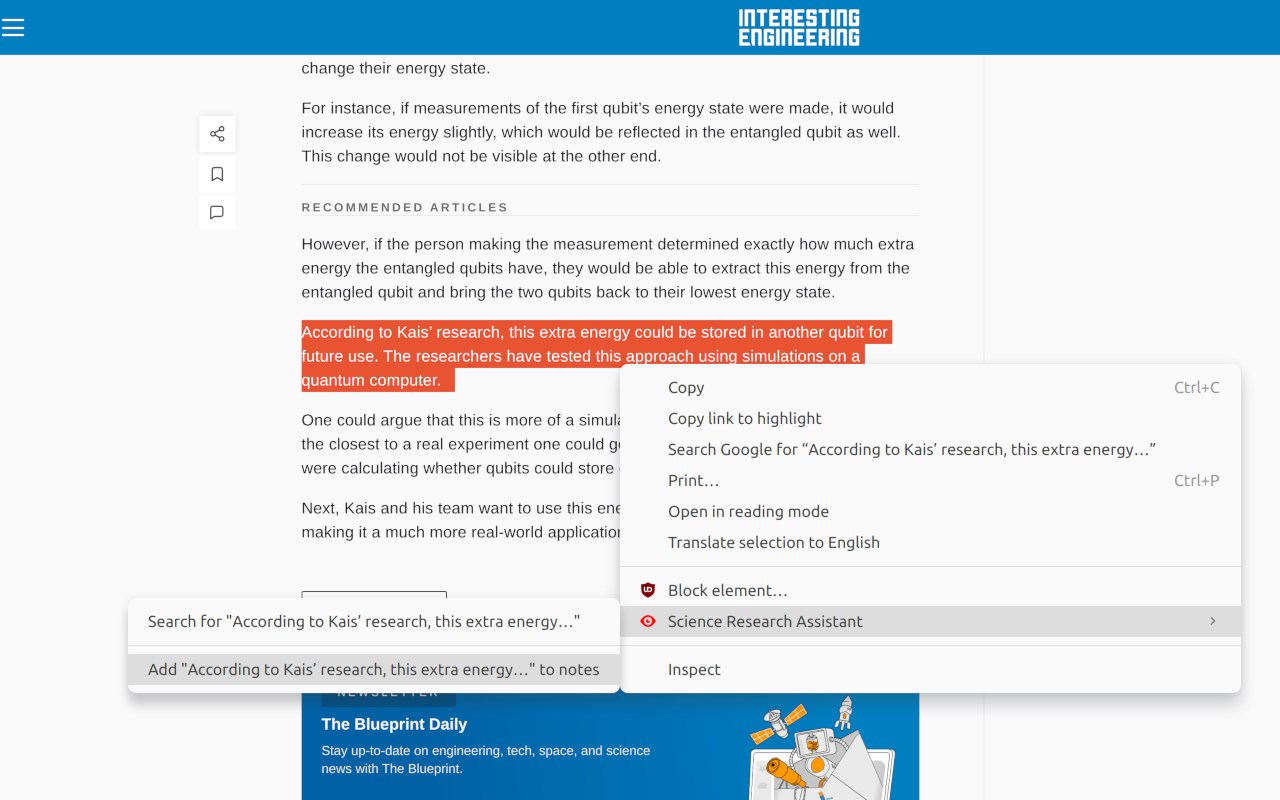
- Save selection text to notes – select text on a web page, click the right mouse button, and choose “Add .. to notes” from your context menu.
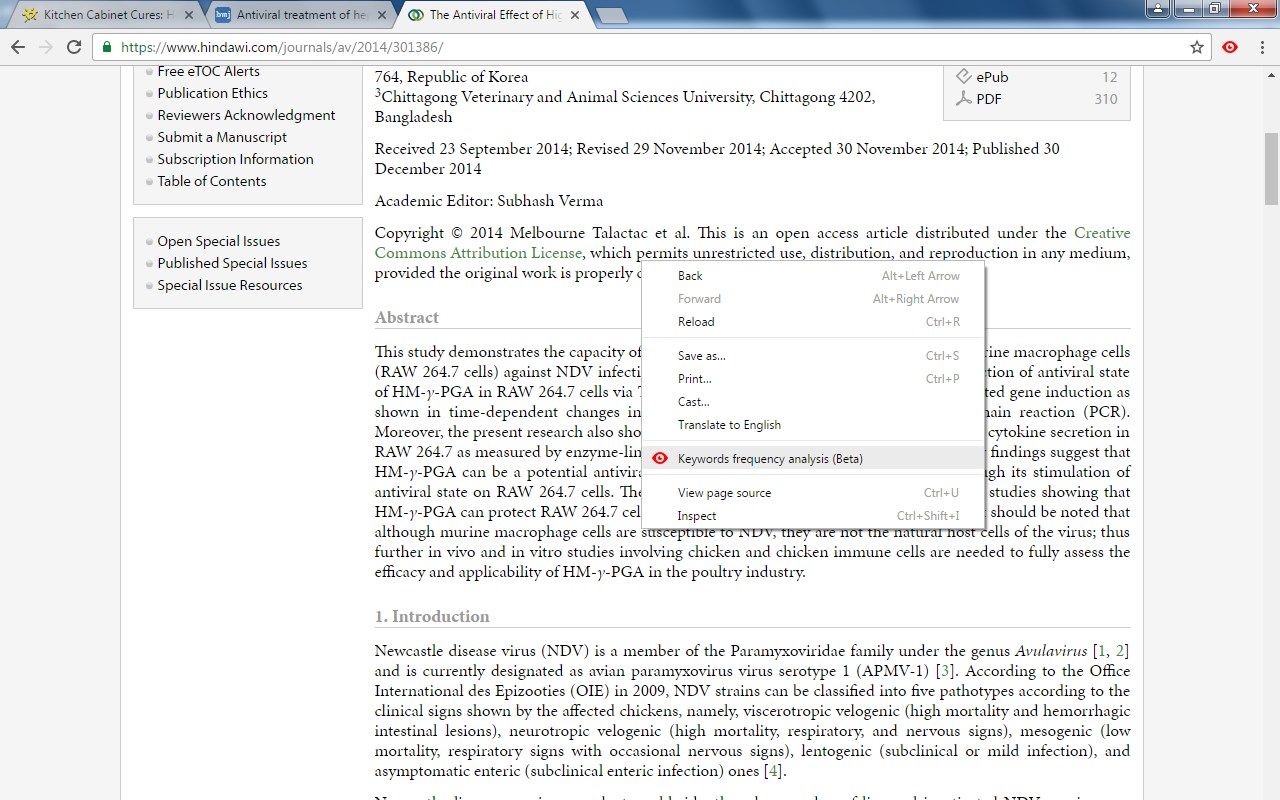
- Keyword analysis – click the right mouse button and then choose “Keyword frequency analysis (beta)” from the context menu.
- Keyword distribution – click on the highlighted keyword to see all its appearances in the text.
- Keywords analysis settings overlay – choose the number of words in a keyword phrase (one to five) and the minimum required frequency within the text (from two to 10) you would like to get analysis for. Click the refresh button or remove the results button to remove the analysis.
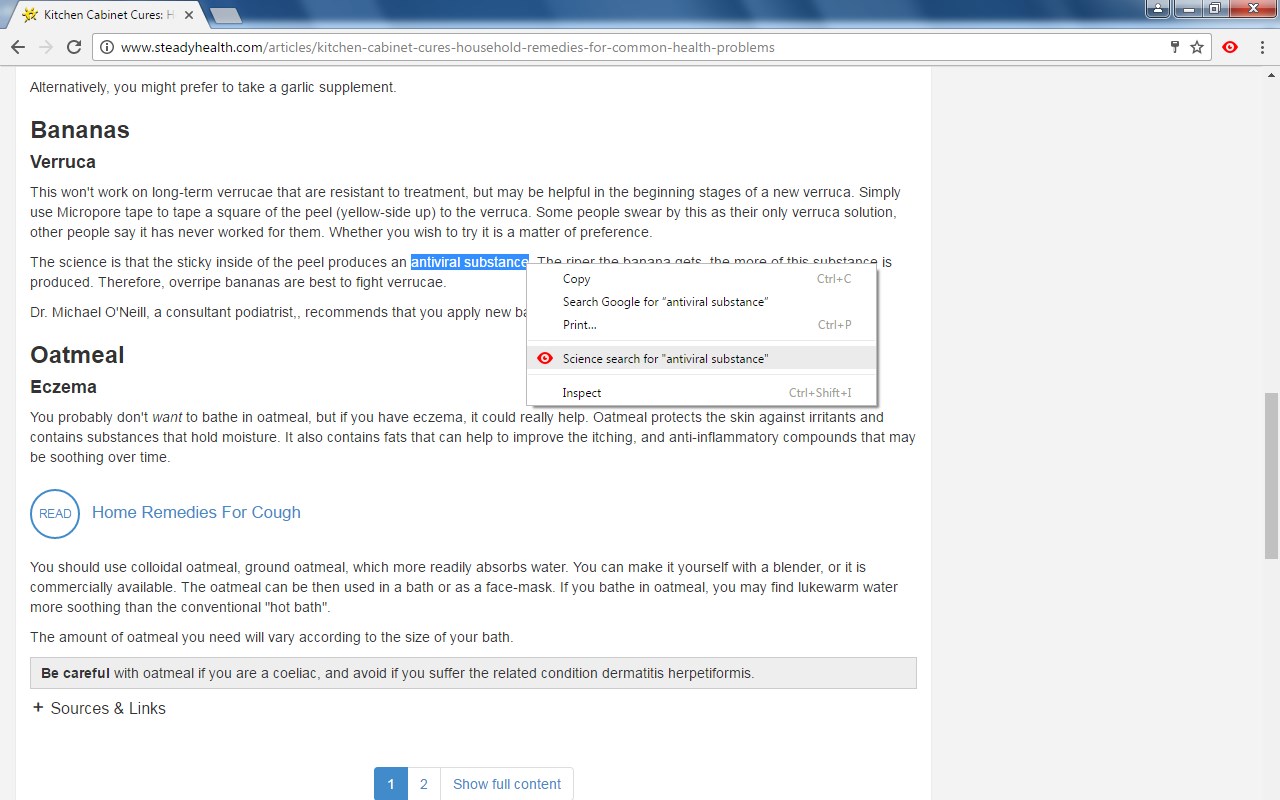
- Selection search – select any word in text on a web page, click the right mouse button, and choose “Science search for ..” from your context menu. This activates a search of various journals and web tools (see Settings).
- Settings/Manual search – click on the extension icon in the top right corner of your web browser.
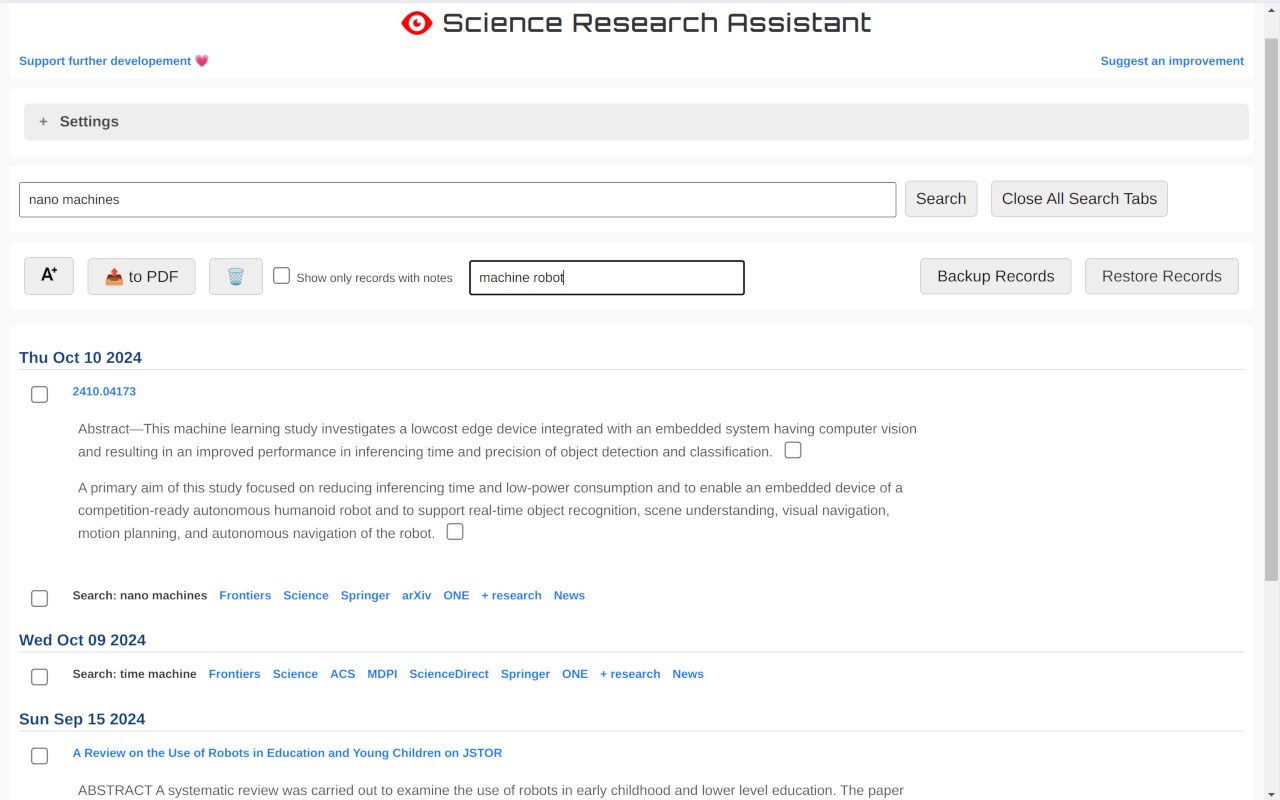
- Filter saved records by keyword
- Click "A+" button to resize the text
- Click "📤 to PDF" button to export selected records and notes to PDF.
- Click 🗑️to remove selected records and notes.
We always welcome suggestions on what science sources and useful tools to include in future releases of the Science Research Assistant, so do not hesitate to contact us by using the provided form in the settings section.
Thanks for all feedback!
Science Research Assistant 是做什么的
Science Research Assistant 是一款面向 Edge 的搜索增强类扩展,主要用来补充搜索结果、切换搜索引擎、过滤无效结果。官方对它的介绍是:Search for scientific information as quickly as possible while researching and writing scientific papers. Save notes for reference.在微软 Edge 加载项商店上,它当前版本 3.1.3,评分 5(20 人评价),约 80 名用户。
适合什么人用
从功能定位看,Science Research Assistant 更适合每天大量搜索、希望结果更干净准确的用户。如果你平时只是偶尔遇到相关需求,用浏览器自带功能也能凑合;但如果这件事每天都发生,装一个专门处理它的扩展通常比手动操作省事得多。需要注意的是它作用于所有网站,装上后建议先观察一两天,确认不影响常用站点的正常使用。
怎么安装 Science Research Assistant
- 打开微软 Edge 加载项商店上的官方页面;
- 点「添加到浏览器」并确认权限提示;
- 装好后在扩展列表里固定图标,方便随时开关。
本站只做索引与介绍,安装包来自官方商店。如果商店页面提示当前地区不可用,说明该扩展未在你所在区域上架。
常见问题
Science Research Assistant 是免费的吗?
Science Research Assistant 在微软 Edge 加载项商店免费提供下载。它是浏览器扩展,装上就能直接用,不需要注册账号。
Science Research Assistant 安全吗?
它只申请了 0 项权限,范围比较克制,没有申请「读取所有网站数据」这种大权限。
Science Research Assistant 支持哪些浏览器?
当前收录的版本来自微软 Edge 加载项商店,适用于 Edge。同一个扩展在其他商店可能有对应版本,但功能与版本号不一定相同。
怎么卸载 Science Research Assistant?
在扩展管理页找到 Science Research Assistant,点移除即可。它在本地保存的设置会一起清掉,不会残留数据。
权限清单 来自 manifest.json 原文
站点访问(可选) 2
http://*/*https://*/*
接口权限 4
activeTabcontextMenusscriptingstorage
其他商店也有这款
同一款扩展在不同浏览器下的版本,权限与更新节奏可能不同