
Save to LinkVault EN
boxove · EEdge MV3
Save, find, and manage LinkVault links from your browser.
截图
简介
Save to LinkVault keeps link saving fast, structured, and under your control by connecting your browser directly to your configured LinkVault service. Built for people who want more than a simple bookmark tool, it helps you capture pages as short links, organize them with meaningful tags, search previously saved entries, and reuse them without interrupting your browsing flow. The extension works through a compact popup and a dedicated settings page, making it easy to save the current page, review the detected title and URL, adjust tags, and send everything to your LinkVault instance in just a few clicks.
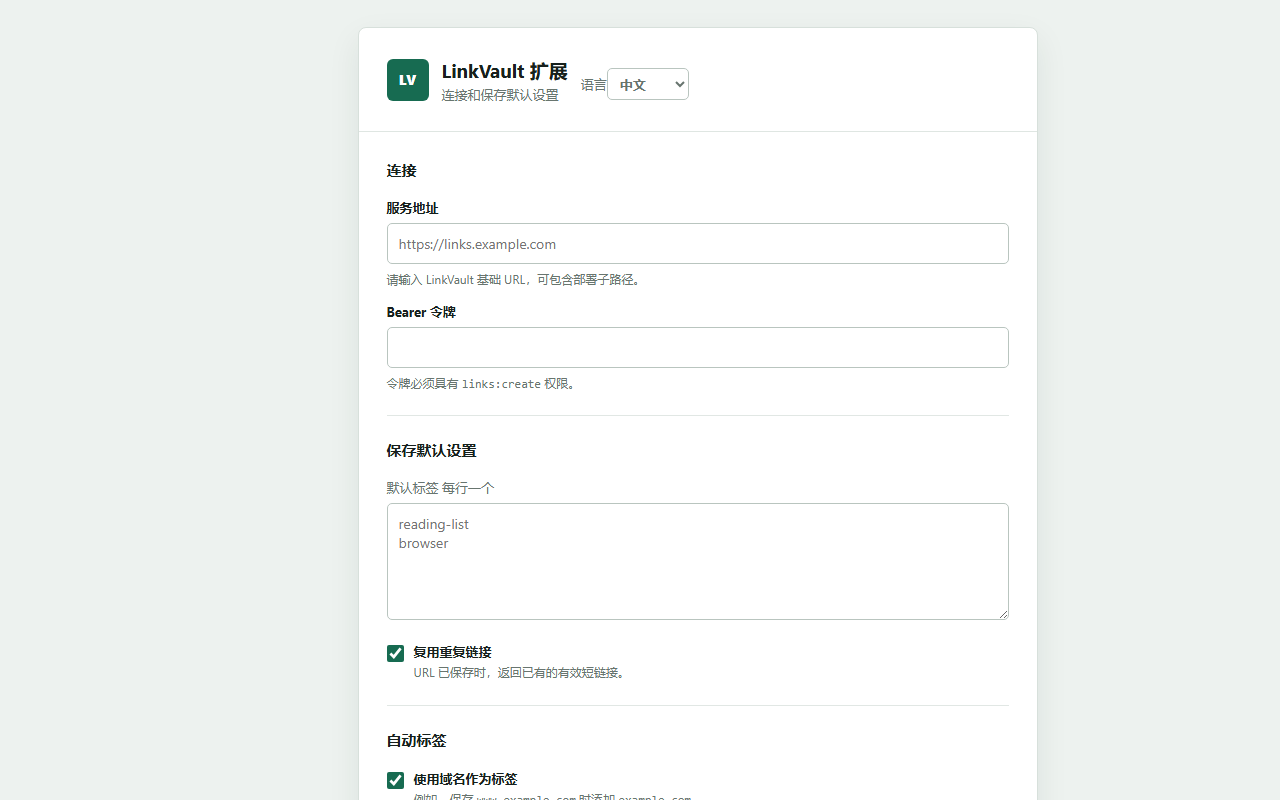
The package-based functionality shows a workflow focused on reliability and organization. You can configure your LinkVault service URL and bearer token, then save links from regular HTTP or HTTPS pages directly from the browser. Tagging is a major part of the experience. The extension can suggest tags from your own defaults, from the current page domain, and from common URL parameters such as source, medium, campaign, and ref. It also supports custom JSON-based tagging rules, letting you automatically apply tags when specific host names, titles, full URLs, or parameters match conditions you define. This makes it useful for reading lists, research collections, campaign tracking, code references, and repeatable work processes where consistent categorization matters.
Save to LinkVault also goes beyond basic saving by including advanced options when needed. You can choose how duplicate URLs are handled, either by reusing an existing active short link or creating a new one. Advanced fields can include a custom short code, start and expiration dates, click limits, one-time link behavior, visitor confirmation for one-time links, a favorite flag, and campaign-related metadata such as campaign, source, medium, and content. After saving, the extension can show the returned short URL, provide one-click copying, and display available health details such as status, expiration, click usage, and target health information.
The extension also acts as a lightweight finder for your existing LinkVault library. Its built-in search panel can look up saved links by title, tag, short code, or URL and display up to ten results from the LinkVault API. Results can include the title or slug, short URL, status, and associated tags, helping you quickly retrieve links you have already stored instead of saving duplicates or searching through external dashboards.
Reliability is another core part of the design. When LinkVault is temporarily unavailable or retryable server issues occur, save requests can be placed into a local offline queue instead of being lost. The queue is stored in browser local storage, supports up to 100 entries, and can be synced manually from the popup or retried automatically every five minutes through a scheduled process. The popup also shows the current queue count so you can see whether any saves are waiting to be synchronized. In addition to the popup, the extension supports a keyboard shortcut for saving the current page and context menu actions for saving the current page, a clicked link, or a URL extracted from selected text. The interface supports both English and Chinese, and the project also provides an open-source repository at https://github.com/pseuo/LinkVault.
Key Features:
- Direct integration with a configurable LinkVault service using your service URL and bearer token.
- Quick capture of the current page with automatic title and URL prefilling in the popup.
- Smart tag suggestions based on default tags, page domain, and common URL parameters.
- Custom JSON tagging rules for automatically applying tags based on host, title, URL, or parameter matches.
- Flexible duplicate handling that can reuse an existing active short link or create a new one.
- Advanced save options including custom short code, scheduling, click limits, one-time settings, favorites, and campaign metadata.
- Built-in search for saved links by title, tag, short code, or URL, with visible status and tags.
- Offline queue support with local storage, manual sync, and automatic retry every five minutes.
- Additional save actions through keyboard shortcuts and context menu entries.
- Bilingual interface support for English and Chinese.
How It Works:
1. Open the settings page and enter your LinkVault service URL and bearer token.
2. Optionally configure default tags, duplicate behavior, domain tagging, parameter tagging, and custom JSON tagging rules.
3. Visit any regular HTTP or HTTPS page and open the popup to load the current page title and URL.
4. Review or edit the title, URL, and tags, and expand advanced options if you want to set custom short code, expiration, click limits, one-time behavior, favorites, or campaign fields.
5. Save the link directly from the popup, or use the keyboard shortcut or context menu for faster capture.
6. If the service cannot be reached, the extension can queue the save locally and show the number of pending items.
7. Use the search panel to find previously saved links, review results, and copy or open the short URL when needed.
Privacy: - This extension stores configuration and queued save items in browser local storage and sends link data, including URLs, titles, tags, and optional metadata, to the configured LinkVault service in order to create and search links. A bearer token is required for authenticated requests.
Save to LinkVault 是做什么的
Save to LinkVault 是一款面向 Edge 的效率工具类扩展,主要用来管住注意力、屏蔽干扰站点、记录时间。官方对它的介绍是:Save, find, and manage LinkVault links from your browser.在微软 Edge 加载项商店上,它当前版本 2.0.0。
适合什么人用
从功能定位看,Save to LinkVault 更适合想专注工作学习、减少无效刷网页的用户。如果你平时只是偶尔遇到相关需求,用浏览器自带功能也能凑合;但如果这件事每天都发生,装一个专门处理它的扩展通常比手动操作省事得多。
怎么安装 Save to LinkVault
- 打开微软 Edge 加载项商店上的官方页面;
- 点「添加到浏览器」并确认权限提示;
- 装好后在扩展列表里固定图标,方便随时开关。
本站只做索引与介绍,安装包来自官方商店。如果商店页面提示当前地区不可用,说明该扩展未在你所在区域上架。
常见问题
Save to LinkVault 是免费的吗?
Save to LinkVault 在微软 Edge 加载项商店免费提供下载。它是浏览器扩展,装上就能直接用,不需要注册账号。
Save to LinkVault 安全吗?
它只申请了 0 项权限,范围比较克制,没有申请「读取所有网站数据」这种大权限。
Save to LinkVault 支持哪些浏览器?
当前收录的版本来自微软 Edge 加载项商店,适用于 Edge。同一个扩展在其他商店可能有对应版本,但功能与版本号不一定相同。
怎么卸载 Save to LinkVault?
在扩展管理页找到 Save to LinkVault,点移除即可。它在本地保存的设置会一起清掉,不会残留数据。
权限清单 来自 manifest.json 原文
接口权限 4
activeTabalarmscontextMenusstorage