
Rule AdBlocker EN
Leonardo Compson · EEdge MV3
Removes all ads and banners with simple regular expression rules.
截图
简介
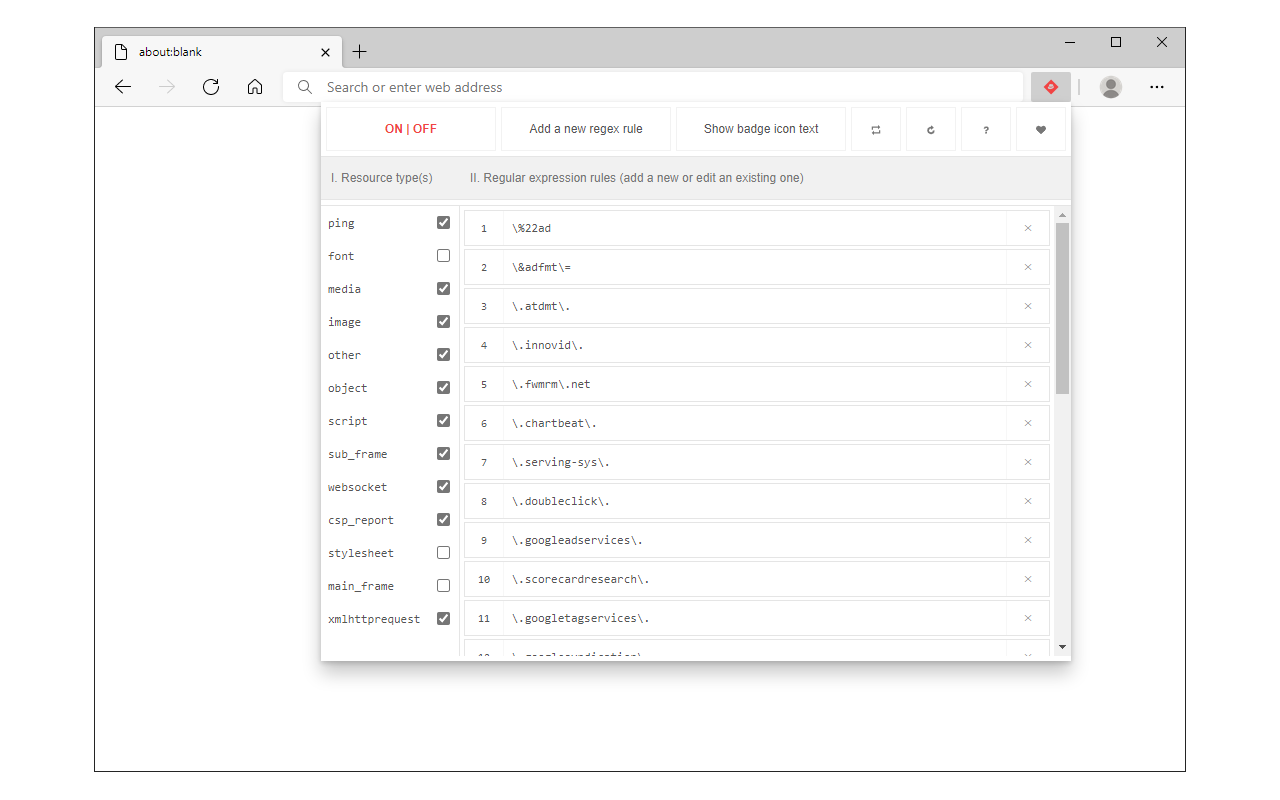
Rule AdBlocker is a lite extension that let you easily block ads, and all unwanted contents with regular expression matching.
Simply write a desired blocking rule and then reload the page to see blocked ads in the browser console. By default, there are 28 rules available in toolbar popup. You can add, edit or remove these rules at any time. Moreover, you can easily specify which resource type needs to be blocked by regular expression rules.
There are 13 resource types that are constantly monitored with this addon. By default, 10 types are marked in toolbar popup. There is also an ON|OFF switch in the popup (top left corner) to enable you activate or deactivate this addon.
Note 1: when you first install the addon, it is turn OFF. Please open toolbar popup UI, make desired changes and then turn the addon ON.
Note 2: please write blocking rules in regular expression format. If you are not familiar with regular expressions, please visit https://en.wikipedia.org/wiki/Regular_expression page to get more info about regular expressions.
Rule AdBlocker 是做什么的
Rule AdBlocker 是一款面向 Edge 的效率工具类扩展,主要用来管住注意力、屏蔽干扰站点、记录时间。官方对它的介绍是:Removes all ads and banners with simple regular expression rules.在微软 Edge 加载项商店上,它当前版本 0.1.7,评分 5(2 人评价),约 505 名用户。
适合什么人用
从功能定位看,Rule AdBlocker 更适合想专注工作学习、减少无效刷网页的用户。如果你平时只是偶尔遇到相关需求,用浏览器自带功能也能凑合;但如果这件事每天都发生,装一个专门处理它的扩展通常比手动操作省事得多。
怎么安装 Rule AdBlocker
- 打开微软 Edge 加载项商店上的官方页面;
- 点「添加到浏览器」并确认权限提示;
- 装好后在扩展列表里固定图标,方便随时开关。
本站只做索引与介绍,安装包来自官方商店。如果商店页面提示当前地区不可用,说明该扩展未在你所在区域上架。
常见问题
Rule AdBlocker 是免费的吗?
Rule AdBlocker 在微软 Edge 加载项商店免费提供下载。它是浏览器扩展,装上就能直接用,不需要注册账号。
Rule AdBlocker 安全吗?
它只申请了 0 项权限,范围比较克制,没有申请「读取所有网站数据」这种大权限。
Rule AdBlocker 支持哪些浏览器?
当前收录的版本来自微软 Edge 加载项商店,适用于 Edge。同一个扩展在其他商店可能有对应版本,但功能与版本号不一定相同。
怎么卸载 Rule AdBlocker?
在扩展管理页找到 Rule AdBlocker,点移除即可。它在本地保存的设置会一起清掉,不会残留数据。
权限清单 来自 manifest.json 原文
接口权限 3
declarativeNetRequestnotificationsstorage