
Reader View
Readwell Reader View · EEdge MV3
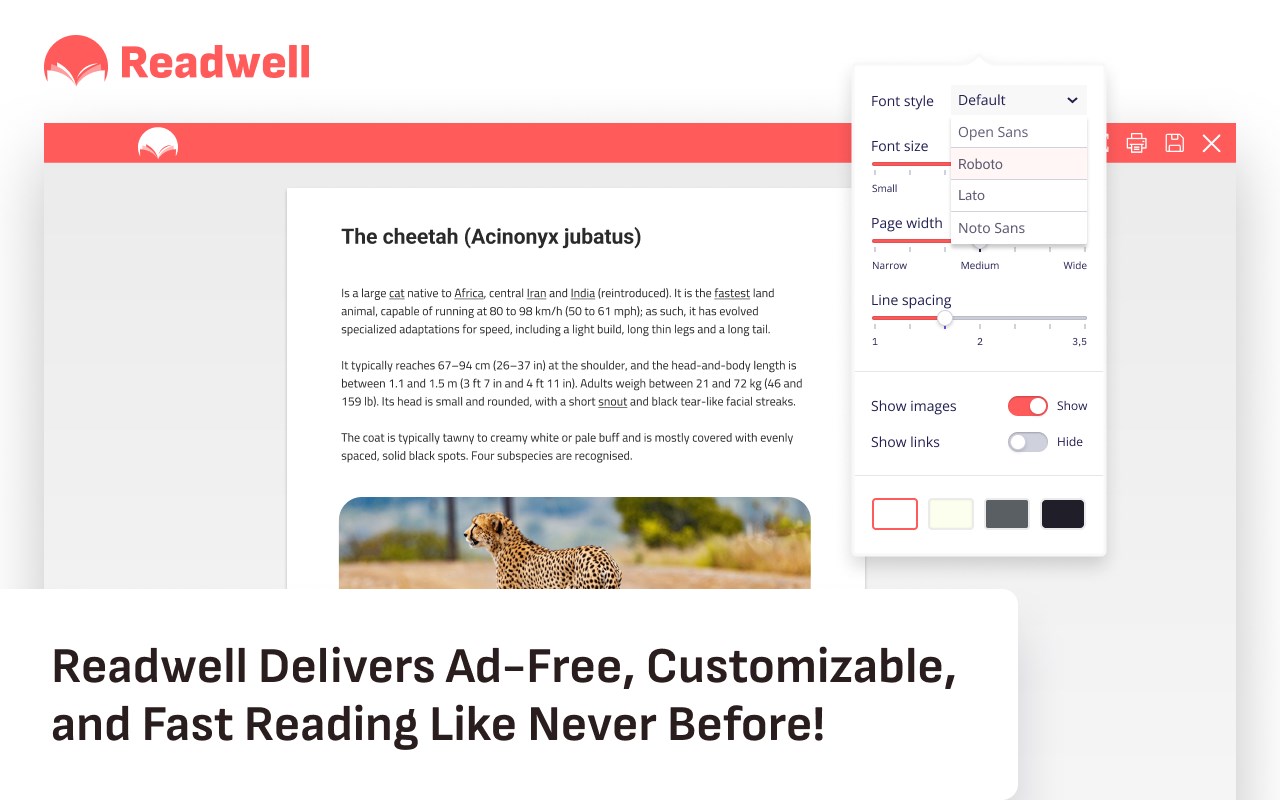
Readwell Reader View Delivers Ad-Free, Customizable, and Fast Reading Like Never Before!
<all_urls>),意味着它可以读取你在任意站点的页面内容,包括已登录的页面。这是许多扩展正常工作的必要条件,但也值得你确认来源可信。
截图
简介
Readwell is not just another browser extension; it's your gateway to a more enjoyable and immersive online reading experience. It's designed to help you get the most out of your online content, whether you're reading news articles, blog posts, research papers, or simply enjoying a good story.
At its core, Readwell is all about simplicity and empowerment. It offers a set of powerful tools that put you in control of how you consume digital content. Whether you're an avid reader, a student, a professional, or simply someone who loves to explore the vast digital realm, Readwell has something for you.
Features That Set Readwell Apart
Let's delve into the heart of Readwell, where a world of possibilities awaits:
Ad-Free Reading: Bid farewell to annoying ads and distractions, ensuring a seamless reading experience. Say hello to clean, clutter-free content.
Customizable Fonts: Tailor your reading style with adjustable fonts for ultimate comfort. Readwell lets you choose how you want your text to appear.
Dark Mode: Reduce eye strain during late-night reading sessions with a soothing dark theme. Enjoy content in a way that suits your surroundings.
Accessibility: Readwell is for everyone. Enjoy effortless reading with text-to-speech and high-contrast options that cater to diverse needs.
Print-Friendly: Want to keep a copy of an article for later? No problem. Save or print articles effortlessly for offline access, creating your personal library.
Fast Loading: Pages load swiftly with Readwell, eliminating the waiting time and ensuring an uninterrupted reading journey.
Focus: Immersing yourself in content is a breeze with Readwell. Say goodbye to distractions and dive deeper into your reading.
One-Click Activation: Start enjoying Readwell with a single click. It's designed for simplicity and convenience, making it accessible to all.
Experience the future of online reading with Readwell. It's your key to unrivaled clarity, customization, and speed. Try it now, and unlock a whole new world of online reading pleasure. Your digital content will never be the same again
阅读优优不仅仅是另一个浏览器扩展,
它是你通向更愉快、更沉浸式的线上阅读体验的大门。
它的设计目的是帮助你从你的线上内容中获得最大的收益,
无论你是在阅读新闻文章、博客帖子、研究论文,还是在享受一个好故事。
在其核心,阅读优优全是关于简单和赋权。
它提供了一套强大的工具,
让你掌控你如何消费数字内容。
无论你是狂热的读者、学生、专业人士,
还是只是喜欢探索广阔的数字领域的人,
阅读优优都有适合你的东西。
阅读优优的独特功能
让我们深入阅读优优的内心,等待着你的是一片可能性的世界:
无广告阅读:告别烦人的广告和干扰,保证无缝阅读体验。
向干净、整洁的内容说你好。
可定制字体:通过可调整字体定制你的阅读风格,获得最舒适的体验。
阅读优优让你选择你想要的文字显示方式。
暗黑模式:在深夜阅读时减少眼睛疲劳,使用舒适的暗色主题。
以适应你周围环境的方式享受内容。
可访问性:阅读优优适合所有人。
通过文本转语音和高对比度选项,享受轻松阅读,满足多样化的需求。
易打印:想要保存一篇文章以便稍后阅读?
没问题。轻松保存或打印文章以便离线阅读,创建你的个人图书馆。
快速加载:使用阅读优优,页面加载迅速,消除等待时间,确保阅读之旅不间断。
专注:使用阅读优优,沉浸在内容中就像微风一样容易。告别干扰,深入你的阅读。
一键激活:只需单击一下就可以开始享受阅读优优。
它的设计目的是简单和方便,使其对所有人都易于访问。
体验阅读优优带来的在线阅读的未来。
它是你通向无与伦比的清晰度、定制化和速度的钥匙。
现在就试试看,解锁全新的在线阅读乐趣的世界。
你的数字内容将永远不会再是原来的样子。
Reader View 是做什么的
Reader View 是一款面向 Edge 的效率工具类扩展,主要用来管住注意力、屏蔽干扰站点、记录时间。官方对它的介绍是:Readwell Reader View Delivers Ad-Free, Customizable, and Fast Reading Like Never Before!在微软 Edge 加载项商店上,它当前版本 1.1.0,评分 5(3833 人评价),约 15,078 名用户。
适合什么人用
从功能定位看,Reader View 更适合想专注工作学习、减少无效刷网页的用户。如果你平时只是偶尔遇到相关需求,用浏览器自带功能也能凑合;但如果这件事每天都发生,装一个专门处理它的扩展通常比手动操作省事得多。需要注意的是它作用于所有网站,装上后建议先观察一两天,确认不影响常用站点的正常使用。
怎么安装 Reader View
- 打开微软 Edge 加载项商店上的官方页面;
- 点「添加到浏览器」并确认权限提示;
- 装好后在扩展列表里固定图标,方便随时开关。
本站只做索引与介绍,安装包来自官方商店。如果商店页面提示当前地区不可用,说明该扩展未在你所在区域上架。
常见问题
Reader View 是免费的吗?
Reader View 在微软 Edge 加载项商店免费提供下载。它是浏览器扩展,装上就能直接用,不需要注册账号。
Reader View 安全吗?
它只申请了 0 项权限,范围比较克制,没有申请「读取所有网站数据」这种大权限。
Reader View 支持哪些浏览器?
当前收录的版本来自微软 Edge 加载项商店,适用于 Edge。同一个扩展在其他商店可能有对应版本,但功能与版本号不一定相同。
怎么卸载 Reader View?
在扩展管理页找到 Reader View,点移除即可。它在本地保存的设置会一起清掉,不会残留数据。
权限清单 来自 manifest.json 原文
站点访问(可选) 1
<all_urls>
接口权限 7
alarmscontextMenusdeclarativeNetRequestfaviconnotificationsscriptingstorage